

Sober Scan




A CLI tool that detects alcohol intoxication and drowsiness from facial images.
#Alcohol Intoxication #Facial Recognition #CLI

|
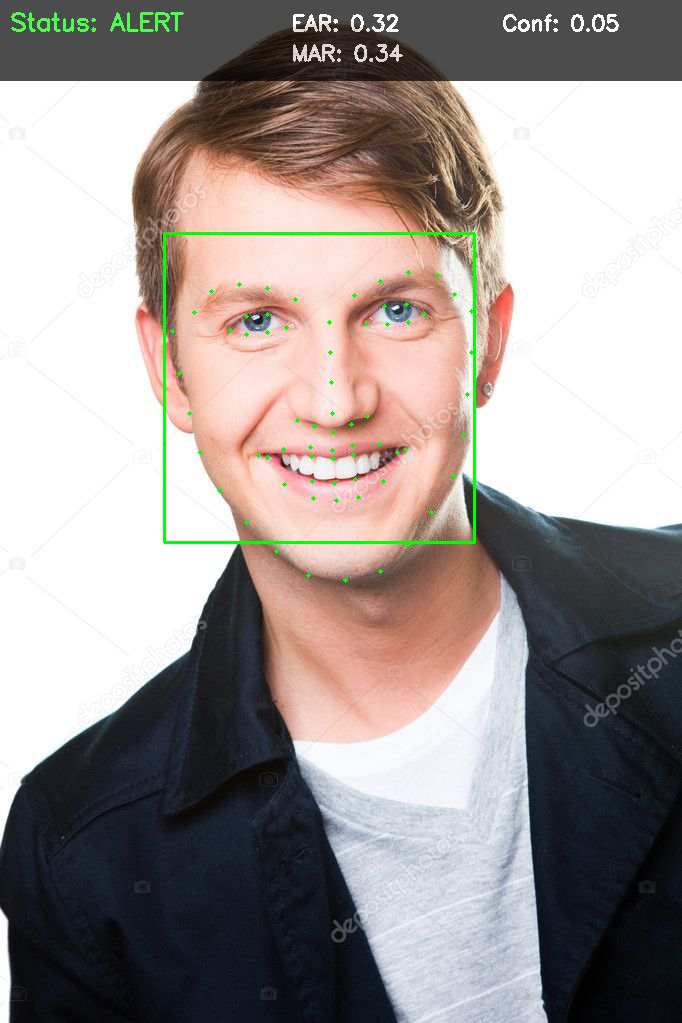 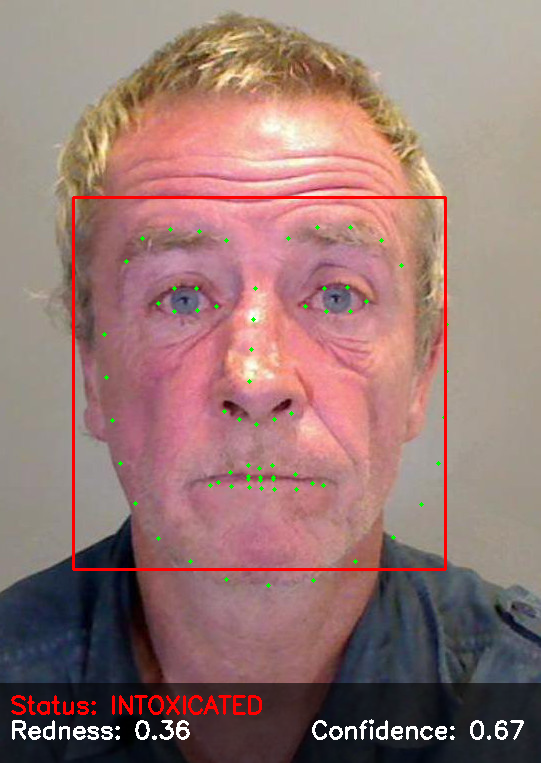
|
🚀 Getting Started
It is recommended to use uv to create a virtual environment and pip install the following package.
pip install sober-scan
To run the application, simply type:
sober-scan
# or
sober-scan --help
✨ New Features
🔄 Incremental Learning & Model Management
Sober-Scan now supports incremental learning, allowing you to update models with new data without full retraining:
- Incremental Learning: Update SVM, Naive Bayes, KNN, and RF models with new data
- CNN Fine-Tuning: Continue training CNN models from existing weights
- Data Augmentation: Automatic augmentation for improved CNN accuracy
- Model Versioning: Automatic backups and version control for all models
- Dataset Management: Register, merge, split, and organize datasets
Quick Examples:
# Fine-tune CNN with new data (recommended for adding data)
sober-scan train /path/to/new_data \
  --model cnn \
  --model-path models/intoxication_cnn.pt \
  --continue-training \
  --backup \
  --save-model

# Incremental learning with Naive Bayes
sober-scan train /path/to/new_data \
  --model nb \
  --incremental \
  --save-model

# Manage model versions
sober-scan manage version list intoxication_cnn
sober-scan manage version restore intoxication_cnn --version <timestamp>

# Manage datasets
sober-scan manage dataset register my_data /path/to/data
sober-scan manage dataset merge dataset1,dataset2 combined
📖 See QUICK_REFERENCE.md for complete command reference and examples.
👨💻 Development Setup
-
Clone the repository and navigate to project folder:
git clone https://github.com/Sang-Buster/Sober-Scan
cd Sober-Scan
-
Install uv first:
# macOS/Linux
curl -LsSf https://astral.sh/uv/install.sh | sh
# Windows
powershell -c "irm https://astral.sh/uv/install.ps1 | iex"
-
Create a virtual environment at
Sober-Scan/.venv/:uv venv --python 3.10
-
Activate the virtual environment:
# macOS/Linux
source .venv/bin/activate
# Windows
.venv\Scripts\activate
-
Install the required packages:
uv pip install -e .
-
Install ruff and pre-commit:
uv pip install ruff pre-commit
ruffis a super fast Python linter and formatter.pre-commithelps maintain code quality by running automated checks before commits are made.
-
Install git hooks:
pre-commit install --hook-type commit-msg --hook-type pre-commit --hook-type pre-push
These hooks perform different checks at various stages:
commit-msg: Ensures commit messages follow the conventional formatpre-commit: Runs Ruff linting and formatting checks before each commitpre-push: Performs final validation before pushing to remote
-
Code Linting:
ruff check
ruff check --fix
ruff check --select I
ruff check --select I --fix
ruff format
-
Run the application:
uv run src/sober_scan/cli.py
📝 File Structure
📂Sober-Scan
 ┣ 📂src                         // Source Code
 ┃ ┗ 📦sober_scan                  // Python package
 ┃ ┃ ┣ 📂commands                      // Command line interface
 ┃ ┃ ┃ ┣ 📄detect.py
 ┃ ┃ ┃ ┣ 📄model.py
 ┃ ┃ ┃ ┗ 📄train.py
 ┃ ┃ ┣ 📂models                        // Model files
 ┃ ┃ ┃ ┣ 📄cnn.py
 ┃ ┃ ┃ ┣ 📄knn.py
 ┃ ┃ ┃ ┣ 📄nb.py
 ┃ ┃ ┃ ┣ 📄rf.py
 ┃ ┃ ┃ ┗ 📄svm.py
 ┃ ┃ ┣ 📂tests                         // Test files
 ┃ ┃ ┃ ┗ 📄test_cli.py
 ┃ ┃ ┣ 📄cli.py                        // CLI interface
 ┃ ┃ ┣ 📄config.py                     // Configuration
 ┃ ┃ ┣ 📄feature_extraction.py         // Feature extraction
 ┃ ┃ ┗ 📄utils.py                      // Utility functions
 ┣ 📄.gitignore                  // Git ignore patterns (env, cache, database)
 ┣ 📄.pre-commit-config.yaml     // Pre-commit hooks (ruff, commit message)
 ┣ 📄.pre-commit_msg_template.py // Commit message format validator
 ┣ 📄.python-version             // Python version
 ┣ 📄LICENSE                     // MIT License
 ┣ 📄README.md                   // Project documentation
 ┣ 📄pyproject.toml              // Project configuration
 ┗ 📄uv.lock                     // Lock file
1 maintainer

Metadata
1 maintainer
Release files for sober-scan 0.0.5
For a detailed explanation of source distributions (sdists) and built distributions (wheels), please see the package formats documentation.
Source distribution (sdist)
| File | Size | Uploaded | |
|---|---|---|---|
| sober_scan-0.0.5.tar.gz | 3.8 MB | Details |
Built distribution (wheel)
| File | Interpreter | ABI | Platform | Reset |
|---|---|---|---|---|
| sober_scan-0.0.5-py3-none-any.whl | Python 3 | none | any | Details |
Total release size: 3.9 MB
Release files / sober_scan-0.0.5.tar.gz
| Download URL | sober_scan-0.0.5.tar.gz |
|---|---|
| Size | 3.8 MB |
| Tags | Source |
|
SHA-256 checksum How to use checksums |
f5bcb1fa994a4be35e5955c4b605cd079f153a1bdb87eac3bd40408aa4782f65
|
|
BLAKE2b-256 checksum How to use checksums |
c9a27a03200c38479fa3dba6cbb51b2f46b69a84f0e9e8d9d4df15f99b8fbea1
|
| Upload date | |
|
Uploaded using Trusted Publishing? What is trusted publishing? |
No |
| Uploaded via |
uv/0.8.15
|
Release files / sober_scan-0.0.5-py3-none-any.whl
| Download URL | sober_scan-0.0.5-py3-none-any.whl |
|---|---|
| Size | 56.9 kB |
| Tags | Python 3 |
|
SHA-256 checksum How to use checksums |
50f3a0c52cf922fb4889b05ef86d2c39ecfbf317dfb9733276dfec395abef227
|
|
BLAKE2b-256 checksum How to use checksums |
5de76dbc143667f1dc8eb4b4f63d56eb8490feae5fbc794054a25ca937ddcb4b
|
| Upload date | |
|
Uploaded using Trusted Publishing? What is trusted publishing? |
No |
| Uploaded via |
uv/0.8.15
|














