
SoCo (Sonos Controller) is a simple library to control Sonos speakers.


Project description
SoCo (Sonos Controller) is a Python project that allows you to programmatically control Sonos speakers. It was originally created at Music Hack Day Sydney by Rahim Sonawalla and is now developed by a team of people at its GitHub repository
For more background on the project, please see Rahim’s blog post.
Visit the SoCo documentation for a more detailed overview of all the functionailty.


WARNING
Sonos has changed the way music service account information is available. This means that currently a group of music service will give authentication issues and cannot be used at all. Known members of this group are: Google Play Music, Apple Music, Amazon Music, Spotify and Napster.
Issue #557 is a meta issue for this problem and you can use that to track progress on solving the issues, but please refrain from posting “me too” comments in there. Also, there is no need to open any more separate issue about this.
If you have another music service that should be on the list, comment in #557
Installation
SoCo requires Python 2.7, or 3.4 or newer.
Use pip:
pip install soco
SoCo depends on the Requests HTTP library. If you use pip to install Soco, Requests will be installed automatically for you. If not, you can use:
pip install requests
Basic Usage
You can interact with a Sonos Zone Player through a SoCo object. If you know the IP address of a Zone Player, you can create a SoCo object directly:
>>> from soco import SoCo
>>> my_zone = SoCo('192.168.1.101')
>>> my_zone.player_name
Kitchen
>>> my_zone.status_light = True
>>> my_zone.volume = 6
But perhaps the easiest way is to use the module-level discover function. This will find all the Zone Players on your network, and return a python set containing them:
>>> import soco
>>> for zone in soco.discover():
...        print zone.player_name
Living Room
Kitchen
If you prefer a list to a set:
>>> zone_list = list(soco.discover())
>>> zone_list
[SoCo("192.168.1.101"), SoCo("192.168.1.102")]
>>> zone_list[0].mute = True
Of course, you can also play music!
#!/usr/bin/env python
from soco import SoCo

if __name__ == '__main__':
    sonos = SoCo('192.168.1.102') # Pass in the IP of your Sonos speaker
    # You could use the discover function instead, if you don't know the IP

    # Pass in a URI to a media file to have it streamed through the Sonos
    # speaker
    sonos.play_uri(
        'http://ia801402.us.archive.org/20/items/TenD2005-07-16.flac16/TenD2005-07-16t10Wonderboy.mp3')

    track = sonos.get_current_track_info()

    print track['title']

    sonos.pause()

    # Play a stopped or paused track
    sonos.play()
Support
If you need support for SoCo, feel free to post your question either on our Google Group or on the #soco IRC channel on freenode.
Example Applications
To show off what can be made with SoCo, a simple web application is included in the examples folder.
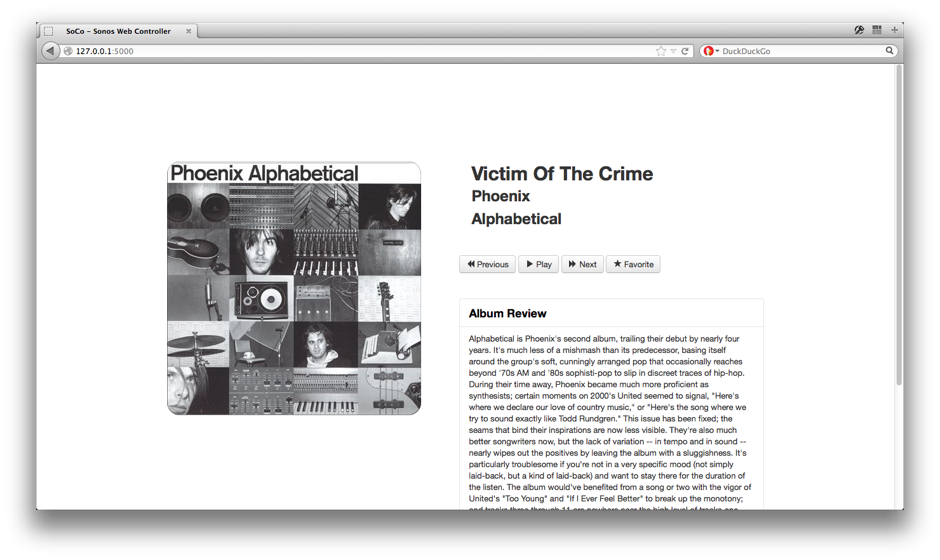
Screenshot of web app
Features
SoCo supports the following controls amongst others:
Play, Pause, Stop
Next track, Previous track
Volume get and set
Mute (or unmute)
Get current transport information (if speaker is playing, paused or stopped)
Get information about the currently playing track
Track title
Artist
Album
Album Art (if available)
Track length
Duration played (for example, 30 seconds into a 3 minute song)
Playlist position (for example, item 5 in the playlist)
Track URI
Receive events when the player state changes
Search for and play music items:
Local music library
Webradio via TuneIn and music services (still unstable)
Saved Sonos favorites, favorite radio stations and shows
Switch the speaker’s source to line-in or TV input (if the Zone Player supports it)
Manage the Sonos queue:
Get the items in the queue
Add items to the queue
Clear the queue
Play a specific song from the queue
Join or unjoin speakers from a group
Put all Sonos speakers in a network into “party mode”.
Get or set alarms
Get or set sleep timers
Get or set the speaker’s bass and treble EQ
Toggle the speaker’s loudness compensation, night mode and dialog mode
Toggle the white status light on the unit
Get the speaker’s information
Zone Name
Zone Icon
UID (usually something like RINCON_XXXXXXXXXXXXXXXXX)
Serial Number
Software version
Hardware version
MAC Address
Set the speaker’s Zone Name
Start a music library update and determine if one is in progress
SoCo also supports lower level access from Python to all Sonos services (e.g. ContentDirectory or RenderingControl).
Google Group
There is a Soco group over at Google Groups. Feel free to drop by for support, ideas or casual conversation related to SoCo.
License
SoCo is released under the MIT license.
Release history Release notifications | RSS feed


Download files
Download the file for your platform. If you're not sure which to choose, learn more about installing packages.
Source Distribution
Built Distribution
Filter files by name, interpreter, ABI, and platform.
If you're not sure about the file name format, learn more about wheel file names.
Copy a direct link to the current filters
File details
Details for the file soco-0.16.tar.gz.
File metadata
- Download URL: soco-0.16.tar.gz
- Upload date:
- Size: 665.0 kB
- Tags: Source
- Uploaded using Trusted Publishing? No
- Uploaded via: twine/1.11.0 pkginfo/1.4.2 requests/2.19.1 setuptools/40.0.0 requests-toolbelt/0.8.0 tqdm/4.24.0 CPython/2.7.14
File hashes
| Algorithm | Hash digest | |
|---|---|---|
| SHA256 |
7bed4475e3f134283af1f520a9b2e6ce2a8e69bdc1b58ee68528b3d093972424
|
|
| MD5 |
459c5800f7416cab0e4389b2d574eab5
|
|
| BLAKE2b-256 |
604becbf9a4fb4c0042fb77e782476d961dfd9c761fa617b9d8883a0a16785ea
|
File details
Details for the file soco-0.16-py2.py3-none-any.whl.
File metadata
- Download URL: soco-0.16-py2.py3-none-any.whl
- Upload date:
- Size: 115.9 kB
- Tags: Python 2, Python 3
- Uploaded using Trusted Publishing? No
- Uploaded via: twine/1.11.0 pkginfo/1.4.2 requests/2.19.1 setuptools/40.0.0 requests-toolbelt/0.8.0 tqdm/4.24.0 CPython/2.7.14
File hashes
| Algorithm | Hash digest | |
|---|---|---|
| SHA256 |
90cc720e6ee5172354d60c2f6e6fc62fc60afefad2078b33f4538e5fc625c818
|
|
| MD5 |
13ae92cc464f2540cb1e0c3785b0d365
|
|
| BLAKE2b-256 |
36bb6d246c3945a30c3ca06f6d7b43544e2f1d50c56f0685d8966de42b53725e
|






