
Multi-agent AI orchestration platform with Constitutional AI governance, Socratic guidance, and RAG knowledge management

Project description
Socrates AI - Collaborative Development Platform
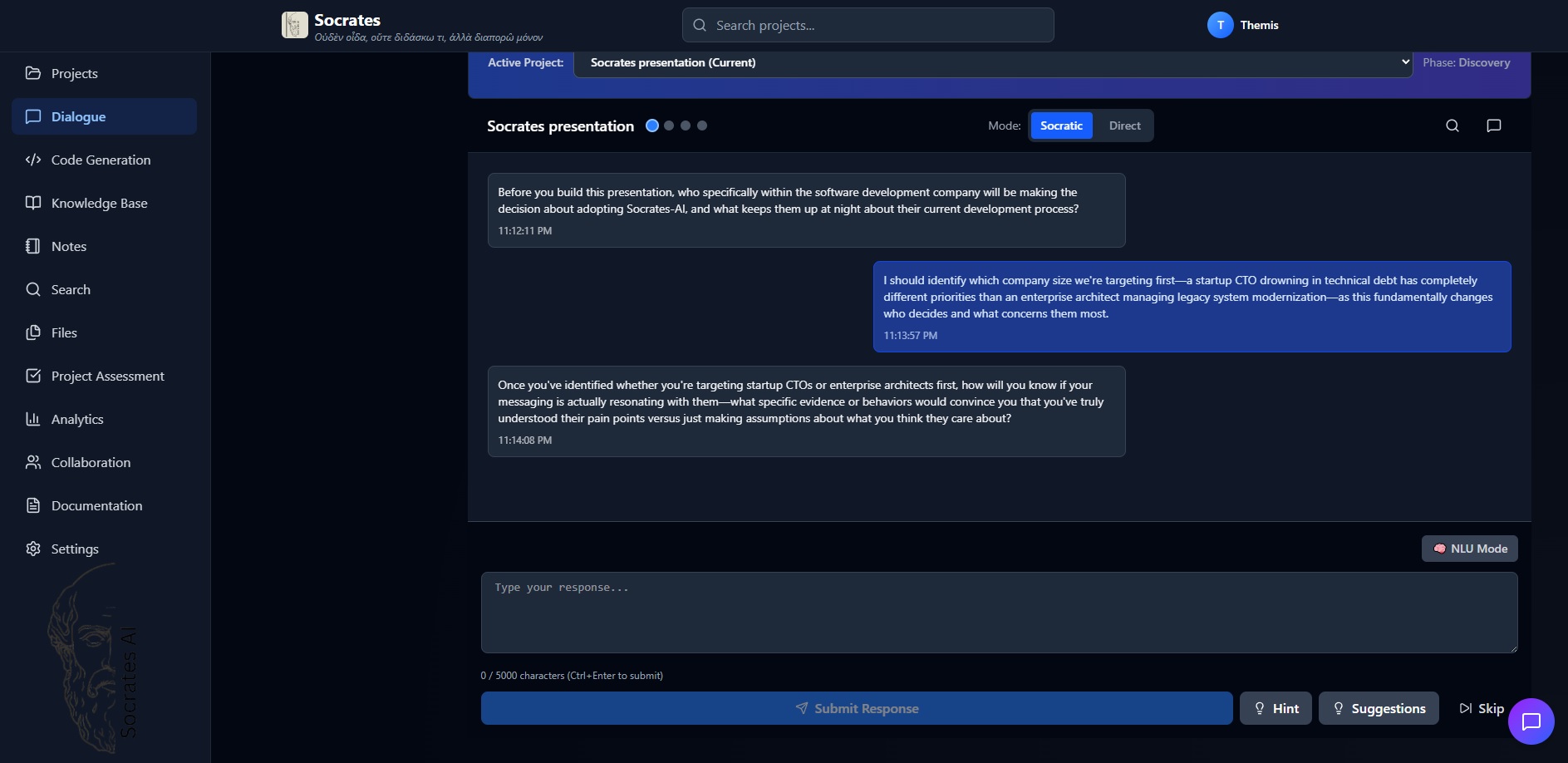
A complete project management and vibe coding RAG system. Comprehensive AI-powered platform for collaborative software project development, with real-time collaboration, multi-agent orchestration, and production-grade infrastructure.
Status: Beta (v0.2.0) License: MIT Architecture: FastAPI Backend + React Frontend + PostgreSQL + Redis + ChromaDB Latest: All code quality checks passing, PyPI published, integrations ready Package: socrates-ai on PyPI
Key Features
🎓 Socratic Learning: AI-guided Socratic questioning to help teams think through complex design and development problems
🤖 Multi-Agent System: Specialized agents for project management, code generation, conflict resolution, knowledge management, and more
📚 Knowledge Management: RAG (Retrieval-Augmented Generation) with vector embeddings for intelligent knowledge retrieval and synthesis
🔄 Real-Time Collaboration: WebSocket-powered real-time presence, cursor tracking, and document synchronization
🔐 Enterprise Security: JWT authentication with MFA, OWASP-compliant security headers, role-based access control, encryption
⚡ High-Performance: Rate limiting, Redis caching, connection pooling, async database queries, optimized query execution
📊 Production Monitoring: Prometheus metrics, Grafana dashboards, health checks, detailed logging, performance tracking
☸️ Kubernetes-Ready: Complete Kubernetes manifests, Helm charts, Docker multi-platform builds, CI/CD automation
🎯 Latest Release (v0.2.0 Beta)
✨ Package & Integrations
- ✅ Published to PyPI as unified
socrates-aipackage - ✅ Integrated with LangChain, LangGraph, and OpenClaw
- ✅ CLI and REST API as internal modules with entry points
- ✅ Docker build optimized with layer caching
🔧 Code Quality & Performance
- ✅ All ruff linting checks passing (0 errors)
- ✅ All docstrings formatted per PEP 257
- ✅ Tests passing, Code quality workflow validated
- ✅ Docker build optimized (first build ~10 min, subsequent ~30 sec)
📚 Documentation
Quick links to get you started:
- Quick Start Guide ⚡ - Get running in 5-10 minutes
- Installation Guide - Detailed setup for all platforms
- Architecture Guide - Understand the system design
- API Reference - Complete API documentation
- Troubleshooting - Common issues and solutions
- Deployment Guide - Deploy to production
- GitHub Integration - Advanced GitHub features
Quick Start
PyPI Installation (Recommended)
# Install from PyPI
pip install socrates-ai

# With LangChain integration
pip install socrates-ai[langchain]

# With LangGraph integration
pip install socrates-ai[langgraph]

# With OpenClaw integration
pip install socrates-ai[openclaw]

# All integrations
pip install socrates-ai[all]

# Start API server
socrates-api

# Or use CLI
socrates --help
Docker Compose (Local Development)
git clone https://github.com/Nireus79/Socrates.git
cd Socrates

# Create environment (for local development with SQLite)
cp deployment/configurations/.env.example .env

# Or for production with PostgreSQL:
# cp deployment/configurations/.env.production.example .env

# Start services
docker-compose -f deployment/docker/docker-compose.yml up -d

# Access Frontend at http://localhost:3000 (via Nginx)
# Access API at http://localhost:8000
# API Documentation at http://localhost:8000/docs
Kubernetes (Production)
# Using Helm
helm install socrates ./helm \
  --namespace production \
  --set api.image.tag=latest \
  --set postgresql.auth.password=$(openssl rand -base64 32)

# Or using kubectl with manifests
kubectl apply -f kubernetes/namespace.yaml
kubectl apply -f kubernetes/*.yaml
API Endpoints
Authentication
POST /auth/register- User registrationPOST /auth/login- User login with JWTPOST /auth/logout- Logout and invalidate sessionPOST /auth/refresh- Refresh access tokenPOST /auth/mfa/setup- Setup MFA (TOTP)
Projects
POST /projects- Create projectGET /projects- List user's projectsGET /projects/{id}- Get project detailsPUT /projects/{id}- Update projectDELETE /projects/{id}- Delete projectPOST /projects/{id}/advance-phase- Move to next phasePOST /projects/{id}/team-members- Add team member
Chat & Knowledge
POST /projects/{id}/chat/sessions- Create chat sessionPOST /projects/{id}/chat/sessions/{sid}/message- Send messageGET /projects/{id}/knowledge- List knowledge entriesPOST /projects/{id}/knowledge- Add knowledge entryGET /projects/{id}/knowledge/search- Search knowledge
Analytics & Reports
GET /projects/{id}/analytics- Project analyticsGET /projects/{id}/analytics/detail- Detailed metricsGET /projects/{id}/chat/sessions/{sid}/export- Export chat
See API_REFERENCE.md for complete endpoint documentation.
Architecture
┌─────────────────────────────────────────────────────────────┐
│                    Socrates Platform                         │
├─────────────────────────────────────────────────────────────┤
│                                                               │
│  Frontend (React)          API Server (FastAPI)              │
│  ┌──────────────┐          ┌──────────────────┐              │
│  │ React UI     │◄─────────┤ REST Endpoints   │              │
│  │ WebSocket    │          │ Rate Limiting    │              │
│  │ Real-time    │          │ Security Headers │              │
│  └──────────────┘          │ JWT Auth + MFA   │              │
│                            │ CORS Hardened    │              │
│                            └──────────────────┘              │
│                                      │                       │
│                ┌─────────────────────┼──────────────────┐   │
│                │                     │                  │   │
│        ┌───────▼──────┐     ┌────────▼────────┐  ┌─────▼──┐ │
│        │  PostgreSQL  │     │  Redis Cache    │  │ChromaDB│ │
│        │  - Projects  │     │  - Sessions     │  │ - RAG  │ │
│        │  - Users     │     │  - Rate Limits  │  │Vectors │ │
│        │  - Knowledge │     │  - Embeddings   │  └────────┘ │
│        └──────────────┘     └─────────────────┘             │
│                                                               │
│        ┌──────────────────────────────────────┐             │
│        │        Multi-Agent Orchestrator      │             │
│        ├──────────────────────────────────────┤             │
│        │ - ProjectManager                     │             │
│        │ - CodeGenerator                      │             │
│        │ - SocraticCounselor                  │             │
│        │ - ContextAnalyzer                    │             │
│        │ - ConflictDetector                   │             │
│        │ - KnowledgeManager                   │             │
│        └──────────────────────────────────────┘             │
│                          │                                   │
│                  ┌───────▼────────┐                         │
│                  │  Claude AI API  │                         │
│                  └────────────────┘                         │
│                                                               │
├─────────────────────────────────────────────────────────────┤
│              Kubernetes Orchestration Layer                 │
│  ┌──────────────┐  ┌──────────────┐  ┌──────────────┐      │
│  │ Pod Scaling  │  │ Load Balancing│  │ Health Checks│      │
│  │ Auto-Healing │  │ Service Mesh  │  │ Self-Healing│      │
│  └──────────────┘  └──────────────┘  └──────────────┘      │
│                                                               │
├─────────────────────────────────────────────────────────────┤
│              Monitoring & Observability                     │
│  ┌──────────────┐  ┌──────────────┐  ┌──────────────┐      │
│  │ Prometheus   │  │ Grafana       │  │ AlertManager │      │
│  │ Metrics      │  │ Dashboards    │  │ Notifications│      │
│  └──────────────┘  └──────────────┘  └──────────────┘      │
└─────────────────────────────────────────────────────────────┘
Documentation
- 📖 QUICK_START_GUIDE.md - Get started quickly
- 🏗️ ARCHITECTURE.md - System architecture deep-dive
- 📚 API_REFERENCE.md - Complete API documentation
- 🚀 DEPLOYMENT.md - Production deployment & Docker guide
- ⚙️ CONFIGURATION.md - Environment configuration
- 👨💻 DEVELOPER_GUIDE.md - Development setup & patterns
- 🔄 CI_CD.md - GitHub Actions workflows & testing
- 🐛 TROUBLESHOOTING.md - Problem solving guide
- 📋 INSTALLATION.md - Setup and installation instructions
Production Features
✅ Security
- JWT authentication with TOTP MFA
- OWASP Top 10 protection
- Rate limiting (5/min free, 100/min pro)
- Input validation & sanitization
- Encrypted database fields
✅ Performance
- Connection pooling (20 connections)
- Redis caching with in-memory fallback
- Query optimization & indexing
- Async database operations
- Request compression
✅ Reliability
- Database transactions & rollback
- Automated backups with S3 support
- Health monitoring & self-healing
- Graceful degradation
- Error tracking & logging
✅ Operations
- Kubernetes manifests & Helm charts
- Docker multi-platform builds
- CI/CD GitHub Actions workflows
- Prometheus metrics & Grafana dashboards
- Structured logging
Deployment
Docker Compose (Recommended for Local Development)
Includes PostgreSQL, Redis, ChromaDB, and Nginx:
cd deployment/docker
docker-compose up -d

# Wait for services to be ready (30-60 seconds)
# Frontend: http://localhost:3000 (via Nginx proxy)
# API: http://localhost:8000
# PostgreSQL: localhost:5432 (user: socrates / pass: socrates_dev_password)
See DEPLOYMENT.md for production Kubernetes setup.
Development
Prerequisites
Before setting up locally, ensure you have:
-
Python: 3.11+ (recommended) or 3.8+ (minimum)
- Check:
python --versionorpython3 --version - Download from: https://www.python.org/downloads/
- Check:
-
Node.js & npm: 14+ (LTS version recommended)
- Check:
node --versionandnpm --version - Download from: https://nodejs.org/
- Check:
-
Anthropic API Key (required for AI features)
- Get from: https://console.anthropic.com/api/keys
- Keep it safe - you'll add it to .env
-
System Requirements:
- RAM: 4GB minimum (8GB recommended)
- Disk: 2GB for dependencies and data
- Internet: Required for Claude API access
Setup Development Environment (Local - SQLite)
# Clone and setup
git clone https://github.com/Nireus79/Socrates.git
cd Socrates

# Create environment (uses SQLite by default)
cp deployment/configurations/.env.example .env

# Edit .env and add your Anthropic API key (required!)
# Open .env and set: ANTHROPIC_API_KEY=sk-ant-your-actual-key-here
nano .env  # or use your preferred editor

# Create virtual environment (Python)
python -m venv .venv

# Activate virtual environment
# On Linux/macOS:
source .venv/bin/activate

# On Windows (Command Prompt):
.venv\Scripts\activate

# On Windows (PowerShell):
.venv\Scripts\Activate.ps1

# Install dependencies
pip install -r requirements.txt

# Install frontend dependencies
cd socrates-frontend
npm install
cd ..

# Run development servers
# On Linux/macOS:
bash scripts/start-dev.sh

# On Windows:
scripts\start-dev.bat

# Success! You should see:
# Frontend: http://localhost:5173 (Vite dev server)
# Backend: http://localhost:8000
# API Docs: http://localhost:8000/docs
What's Next After Startup?
- Open Frontend: Visit http://localhost:5173 in your browser
- Create Account: Click "Sign Up" and create your first user account
- Add API Key:
- Go to Settings > LLM > Anthropic
- Paste your API key and save
- Create a Project: Click "New Project" and fill in project details
- Explore Features: Try Socratic Questioning, Code Generation, etc.
Troubleshooting Local Setup
Port already in use?
# Find process using port
lsof -i :8000  # Linux/macOS
netstat -ano | findstr :8000  # Windows

# Or modify .env to use different port
# SOCRATES_API_PORT=9000
Module not found errors?
# Ensure virtual environment is activated
source .venv/bin/activate  # Linux/macOS
.venv\Scripts\activate     # Windows

# Reinstall dependencies
pip install -r requirements.txt
API key errors?
# Verify API key is set in .env
cat .env | grep ANTHROPIC_API_KEY  # Linux/macOS
type .env | findstr ANTHROPIC_API_KEY  # Windows

# Also verify in UI: Settings > LLM > Anthropic
Run Tests
# All tests with coverage
pytest tests/ --cov=socratic_system

# Specific test category
pytest tests/unit/ -v
pytest tests/integration/ -v
pytest tests/e2e/ -v

# With coverage report
pytest --cov=socratic_system --cov-report=html
Code Quality
# Format code
black socratic_system/ socrates-api/src/ socrates-cli/src/

# Import sorting
isort socratic_system/ socrates-api/src/ socrates-cli/src/

# Lint with ruff
ruff check socratic_system/ socrates-api/src/ socrates-cli/src/

# Type checking with mypy
mypy socratic_system/ --ignore-missing-imports

# Security scanning with bandit
bandit -r socratic_system/ socrates-api/src/ socrates-cli/src/
☕ Support Socrates Development
Socrates is free and open-source. If you find it useful, consider supporting development through GitHub Sponsors:
🎁 GitHub Sponsors - Premium Tiers
Become a sponsor to unlock premium features and support active development. Your sponsorship is automatically applied to your Socrates account!
| Tier | Price | Features | Link |
|---|---|---|---|
| Supporter | $5/month | 10 projects, 5 team members, 100GB storage | Sponsor Now |
| Contributor | $15/month | Unlimited projects, unlimited members, unlimited storage | Sponsor Now |
| Custom | $25+/month | All Enterprise + priority support | Sponsor Now |
How It Works:
- Sponsor on GitHub Sponsors
- Your Socrates account is automatically upgraded (usually within seconds)
- Start using premium features immediately
- View payment history and tier details in Socrates Settings
👉 Full Sponsorship Guide - Learn how to manage your sponsorship and access premium features in Socrates.
Other Ways to Support
- Star the repository ⭐
- Fork and contribute code improvements
- Share feedback and feature requests
- Report bugs to help us improve
- Write documentation for new features
- Spread the word about Socrates
Contributing
- Fork the repository
- Create a feature branch:
git checkout -b feature/my-feature - Commit changes:
git commit -am 'Add feature' - Push to branch:
git push origin feature/my-feature - Submit pull request
Support
- Bugs & Issues: GitHub Issues
- Documentation: Docs Directory
- Sponsorship: Sponsorship Guide
- GitHub Sponsors: Become a Sponsor
- Email: support@socrates-ai.dev
License
MIT License - see LICENSE file for details
Acknowledgments
Built with:
- Claude AI by Anthropic
- FastAPI for REST API
- PostgreSQL for data persistence
- ChromaDB for vector storage
- Redis for caching
- Kubernetes for orchestration
Made with ❤️ for teams who believe in collaborative development
Project details
Release history Release notifications | RSS feed


Download files
Download the file for your platform. If you're not sure which to choose, learn more about installing packages.
Source Distribution
Built Distribution
Filter files by name, interpreter, ABI, and platform.
If you're not sure about the file name format, learn more about wheel file names.
Copy a direct link to the current filters
File details
Details for the file socrates_ai-0.1.2.tar.gz.
File metadata
- Download URL: socrates_ai-0.1.2.tar.gz
- Upload date:
- Size: 480.7 kB
- Tags: Source
- Uploaded using Trusted Publishing? No
- Uploaded via: twine/6.2.0 CPython/3.12.3
File hashes
| Algorithm | Hash digest | |
|---|---|---|
| SHA256 |
5475d87cf29e9811cf0585754ebaba4ef0ce3203ab954c65d6f57525c027c548
|
|
| MD5 |
065155f057b55f1fd87ab310e5e76b98
|
|
| BLAKE2b-256 |
c20509a81b4b24359c4069165d14fa666dbd19de9fa6b2c85bcfcc84cd7fafd8
|
File details
Details for the file socrates_ai-0.1.2-py3-none-any.whl.
File metadata
- Download URL: socrates_ai-0.1.2-py3-none-any.whl
- Upload date:
- Size: 493.5 kB
- Tags: Python 3
- Uploaded using Trusted Publishing? No
- Uploaded via: twine/6.2.0 CPython/3.12.3
File hashes
| Algorithm | Hash digest | |
|---|---|---|
| SHA256 |
9cf81d236264357d7fea865865b0335ef5044a9ad1b04138100a2339964d4bde
|
|
| MD5 |
d3ee1bf70abd7b42f7933d9f1863055f
|
|
| BLAKE2b-256 |
2060e83ae3a20c97c4a7a6474df9cf016de12a20fe62e43325567a1cb8dea4ff
|






