
🧠 Socratic Debug (socratic)
Stop copying stack traces. Start mastering your bugs.
An autonomous pedagogical debugger and AI mentor built for students learning to code and developers who want to truly understand their errors instead of copy-pasting AI patches.








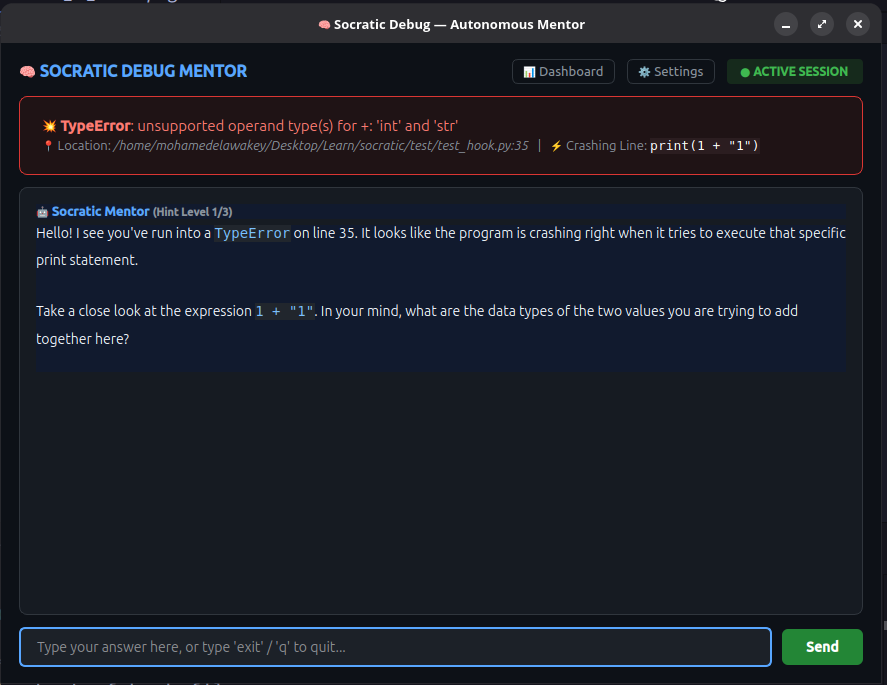
⚡ Interactive Socratic Mentorship Session
📊 AI Learning Curve Dashboard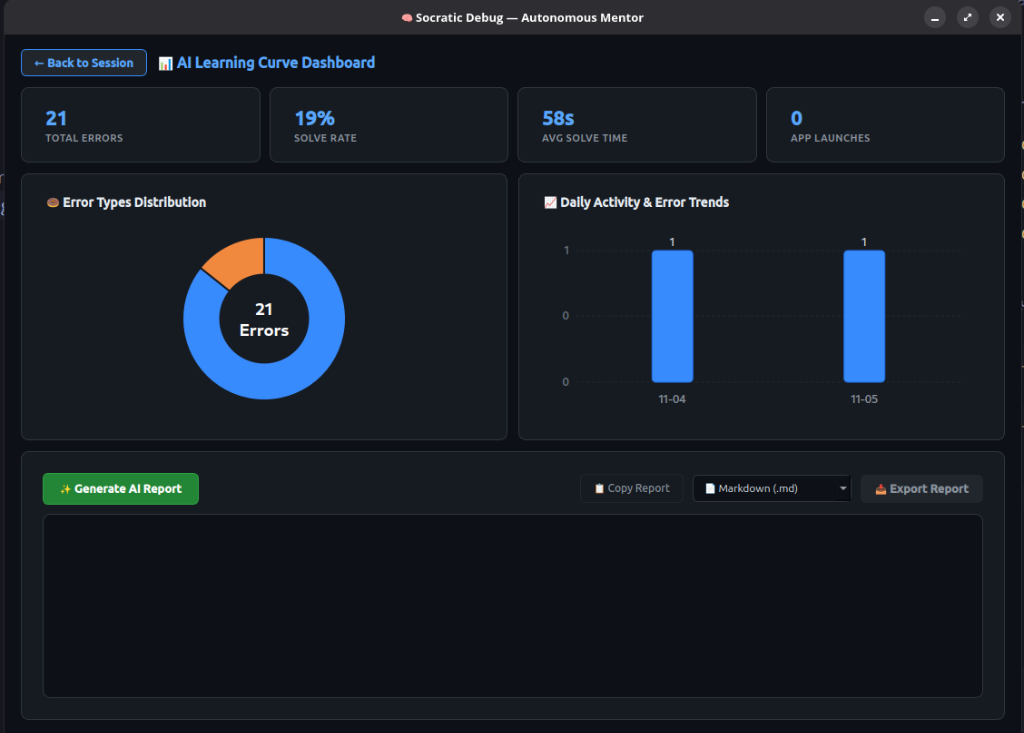
Interactive Error Distribution, Daily Activity Trends & AI Diagnostic Reports |
⚙️ In-App Settings & Masked Secrets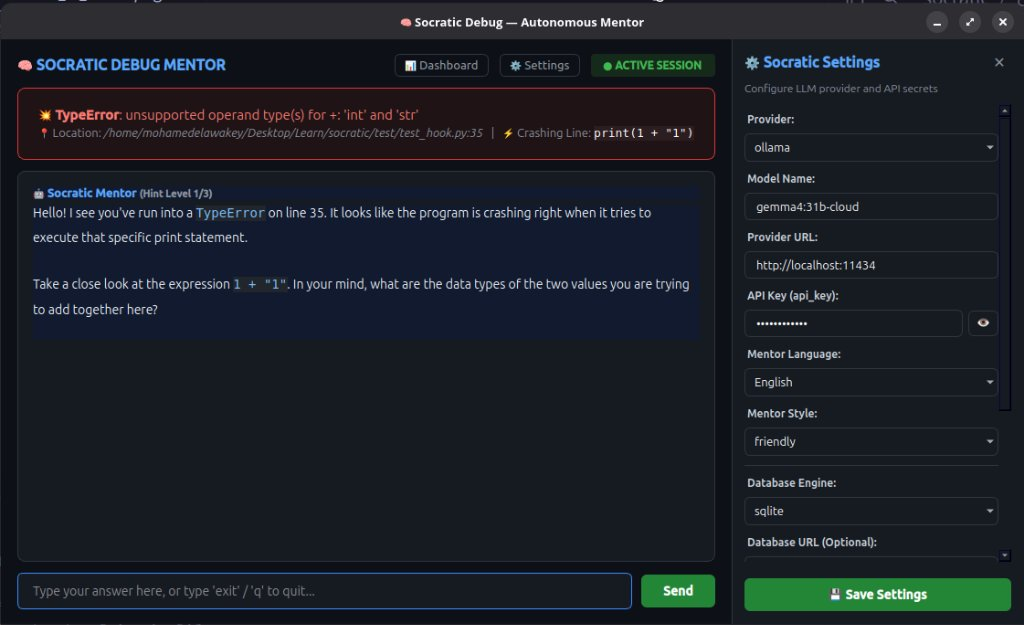
Slide-in drawer with toggleable secret masking ( |
💡 Why Socratic?
When a runtime crash happens, both beginners learning to program and seasoned developers often hit a wall:
- For Students & Beginners: A 50-line red terminal traceback feels overwhelming and cryptic. In the age of AI, copying the error into an LLM and pasting the generated code creates an illusion of progress—the student passes the assignment but never builds problem-solving intuition or mental models.
- For Developers & Engineers: Blindly pasting fixes without dissecting the failure mechanism leads to fragile code, cascading bugs, and recurring design flaws.
Socratic Debug changes the paradigm.
Instead of dumping walls of red text or spoon-feeding copy-paste solutions, socratic intercepts uncaught runtime crashes and launches a dedicated desktop mentorship window. Powered by LangGraph, it acts like a personal coding instructor sitting right next to you:
- It guides you through a progressive, calibrated Socratic dialogue.
- It asks probing questions that help you spot the exact misconception on your own.
- It verifies your understanding before finally unlocking defensive programming best practices.
✨ Features
- 🖥️ Standalone Desktop Window: Launches an isolated, dark-themed GUI terminal window right at the center of your screen. No terminal clutter.
- 📊 Interactive AI Learning Curve Dashboard: Built-in analytics dashboard featuring interactive error distribution donut charts, daily activity bar charts, and personalized AI-generated diagnostic progress reports with live streaming.
- 📥 Multi-Format Report Exporting: Export your AI learning curve reports directly into Markdown (
.md), PDF (.pdf), or Microsoft Word (.docx) with zero external binary dependencies. - 💾 Telemetry & Zero-Config Local Database: Automatically records structured telemetry (error types, time-to-solve, hint levels, repetition) into a zero-setup local SQLite database (
~/.socratic/socratic.db), with auto-detection and migration support for PostgreSQL and SQL Server. - ⚙️ In-App Settings Drawer & Secret Masking: Configure models, providers, database engines, and API keys directly from the GUI with a slide-in settings panel, toggleable secret masking (
👁️), and instant hot-reloading. - ⚡ Real-Time Auto-Reload & Live Watcher: Background file monitor (
FileMonitor) listens for fixes as you edit your code. It handles editor auto-save with a smart typing debounce, validates syntax, and auto-detects solutions live—no manual re-runs needed! - 🌍 Pure Native BiDi & Arabic Support: Flawlessly displays English and Arabic with full Right-to-Left (RTL) text shaping and formatting.
- 🎯 Calibrated Socratic Mentorship: 3-tier adaptive hints (Observation ➔ Mechanism ➔ Idiomatic Prevention).
- 🧠 Smart Evaluator: Distinguishes between partial observations (e.g., stating a variable's value) and true comprehension before unlocking the defensive code solution.
- 🔌 Universal LLM Support: Plug into local models via Ollama (Gemma, Llama, Qwen) or cloud providers via OpenRouter / Google Gemini.
- 🏗️ Clean Decoupled Architecture: Core agent nodes and exception hooks communicate via an abstract
EventBus, allowing Socratic to plug cleanly into Desktop GUI, CLI, or future IDE plugins (VS Code, JetBrains). - 📊 Built-in Observability: Native tracing with LangSmith to monitor latency, tokens, and node execution graphs.
- 🌐 Cross-Platform: Runs seamlessly on Linux, macOS, and Windows.
🚀 Quick Start
Installation
The cleanest, recommended way to install socratic globally across your system without virtual environment conflicts:
# Recommended (isolated global CLI)
pipx install socratic-debug

# Or via standard pip
pip install socratic-debug
Alternatively, use the one-line install script:
# Linux & macOS
curl -sSL https://raw.githubusercontent.com/mohamedelawakey/socratic/main/install.sh | bash

# Windows (PowerShell)
irm https://raw.githubusercontent.com/mohamedelawakey/socratic/main/install.ps1 | iex
🛠️ Usage
You can use socratic in two distinct ways:
Method 1: Zero-Code-Change CLI Runner (Recommended)
You don't need to add any code or imports to your script! Simply prefix your execution:
socratic run my_script.py
- If your script runs successfully, it outputs normally.
- If an unhandled exception occurs, the Socratic Mentor Window springs to life immediately!
- Edit your file in your editor (VS Code, PyCharm, etc.)—Socratic will detect your fix live and celebrate your solution!
Method 2: In-Process Runtime Hook
If you are building an application or library and want Socratic guidance baked directly into development runs:
import socratic
socratic.install()

# Your regular application code
number_1 = 10
number_2 = 0
print(number_1 / number_2)  # <-- ZeroDivisionError triggers Socratic window!
⚙️ Configuration (.socratic.yaml)
You can configure settings via the in-app ⚙️ Settings drawer or directly in .socratic.yaml:
# LLM Provider: "ollama" or "openrouter"
provider: "ollama"
provider_name: "gemma4:31b-cloud"
provider_link: "http://localhost:11434"

# API Key (for cloud providers like OpenRouter)
api_key: "your_api_key_here"

# Mentor Personality & Language ("Arabic" or "English")
socratic_language: "English"
socratic_style: "friendly"

# Observability with LangSmith (Optional)
LANGSMITH_TRACING: "true"
LANGSMITH_API_KEY: "lsv2_pt_..."
LANGSMITH_PROJECT: "socratic-debug"
🤝 Contributing
We welcome contributions from developers worldwide! Please review our CONTRIBUTING.md guidelines:
- For feature requests or major changes, please open a GitHub Discussion or Issue first.
- For bug fixes, direct Pull Requests are warmly welcome.
- Browse our open issues labeled
good first issueto start contributing.
Please note that this project adheres to the Contributor Covenant Code of Conduct.
📄 License
Distributed under the MIT License. See LICENSE for full details.
1 maintainer

Metadata
1 maintainer
Release files for socratic-debug 0.0.9
For a detailed explanation of source distributions (sdists) and built distributions (wheels), please see the package formats documentation.
Source distribution (sdist)
| File | Size | Uploaded | Provenance | Actions |
|---|---|---|---|---|
| socratic_debug-0.0.9.tar.gz | 45.1 kB | Without provenance | Details for socratic_debug-0.0.9.tar.gz |
Built distribution (wheel)
| File | Interpreter | ABI | Platform | Actions Reset |
|---|---|---|---|---|
| socratic_debug-0.0.9-py3-none-any.whl | Python 3 | none | any | Details for socratic_debug-0.0.9-py3-none-any.whl |
Total release size: 106.2 kB
Release files / socratic_debug-0.0.9.tar.gz
| Download URL | socratic_debug-0.0.9.tar.gz |
|---|---|
| Size | 45.1 kB |
| Tags | Source |
|
SHA-256 checksum How to use checksums |
002aa12d4450642d637af26ddc15b9433baaabb1acd73080de7c154aa6d3bd9b
|
|
BLAKE2b-256 checksum How to use checksums |
a54b937eea2c0c7f962f381840340a32b85a471528e7e704d7f2432f56ad4e38
|
| Upload date | |
|
Uploaded using Trusted Publishing? What is trusted publishing? |
No |
| Uploaded via |
twine/7.0.0 CPython/3.11.17
|
Release files / socratic_debug-0.0.9-py3-none-any.whl
| Download URL | socratic_debug-0.0.9-py3-none-any.whl |
|---|---|
| Size | 61.1 kB |
| Tags | Python 3 |
|
SHA-256 checksum How to use checksums |
ebf2e147e01954cdadff3afab9c769cf9553512abda7f54517bad7dc4d727f72
|
|
BLAKE2b-256 checksum How to use checksums |
5c738967af3860a7686f4e86cb8e395289c87766ce5f40350e3cfee0b2b1fa00
|
| Upload date | |
|
Uploaded using Trusted Publishing? What is trusted publishing? |
No |
| Uploaded via |
twine/7.0.0 CPython/3.11.17
|
Security for socratic-debug 0.0.9
Provenance
Provenance describes where a file came from. On PyPI, provenance is shared via attestations, which provide a verifiable record of the build or publishing details. View details, limitations and caveats.
No provenance found
None of the files in this release were uploaded with provenance metadata.
A note on package security
PyPI is a repository for distributing packages, not a service for auditing them. While third-party security researchers and our staff do their best to detect and remove malicious packages, PyPI cannot guarantee the quality, security or suitability of any given package.
To learn more about protecting yourself from malicious actors, visit our package security documentation.














