
Domain Invariant Representation through Adversarial Calibration (DIRAC), a graph neural network to integrate spatial multi-omic data into a unified domain

Project description
DIRAC (Domain Invariant Respresentation through Adversatial Calibration)







Spatially resolved integration of multi-omics with DIRAC highlights cell-specific remodeling
DIRAC is a Python package, written in PyTorch and based on Scanpy.
DIRAC is a graph neural network to integrate spatial multi-omic data into a unified domain-invariant embedding space and to automate cell-type annotation by transferring labels from reference spatial or single-cell multi-omic data.
DIRAC primarily includes two integration paradigms: vertical integration and horizontal integration, which differ in their selection of anchors. In vertical integration, multiple data modalities from the same cells are jointly analyzed, using cell correspondences in single-cell data or spot correspondences in spatial data as anchors for alignment. In horizontal integration, the same data modality from distinct groups of cells is aligned using genomic features as anchors. The best way to familiarize yourself with DIRAC is to check out our tutorial and our documentation.
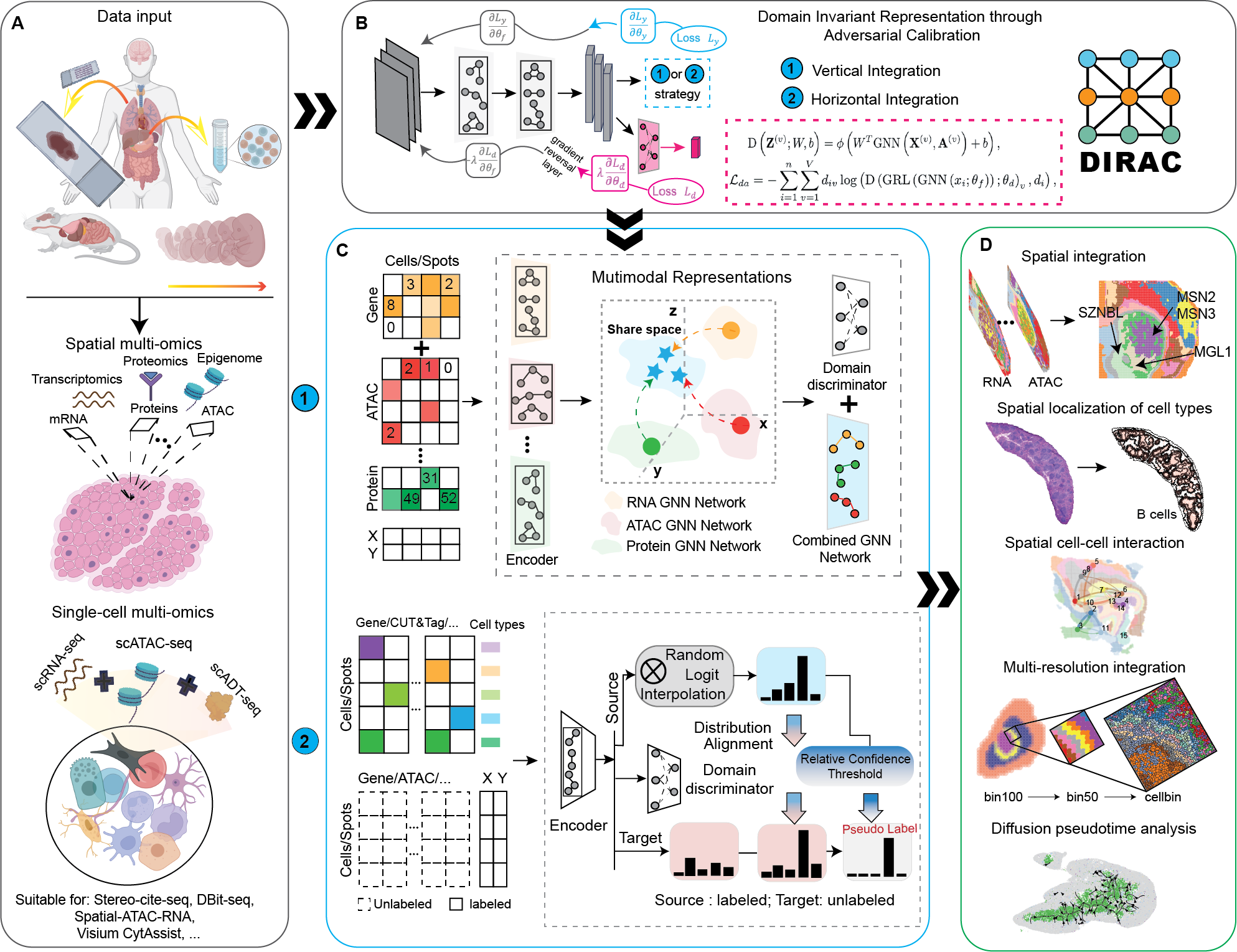
For more details, please check out our publication.
Directory structure
.
├── sodirac                  # Main Python package
├── data                    # Data files
├── evaluation              # Method evaluation pipelines
├── experiments             # Experiments and case studies
├── tests                   # Unit tests for the Python package
├── docs                    # Documentation files
├── custom                  # Customized third-party packages
├── packrat                 # Reproducible R environment via packrat
├── env.yaml                # Reproducible Python environment via conda
├── pyproject.toml          # Python package metadata
├── LICENSE
└── README.md
How to install DIRAC
To install DIRAC, make sure you have PyTorch and Scanpy installed. If you need more details on the dependences, look at the environment.yml file.
- set up conda environment for DIRAC
conda env create -f environment.yml
- install sodirac from shell:
    conda activate dirac-env
    pip install sodirac
- To start using DIRAC, import DIRAC in your jupyter notebooks or/and scripts
import sodirac as sd
Installing within a conda environment is recommended.
Usage
Please checkout the documentations and tutorials at dirac.readthedocs.io.
Release history Release notifications | RSS feed


Download files
Download the file for your platform. If you're not sure which to choose, learn more about installing packages.
Source Distribution
Built Distribution
Filter files by name, interpreter, ABI, and platform.
If you're not sure about the file name format, learn more about wheel file names.
Copy a direct link to the current filters
File details
Details for the file sodirac-0.1.3.tar.gz.
File metadata
- Download URL: sodirac-0.1.3.tar.gz
- Upload date:
- Size: 39.7 kB
- Tags: Source
- Uploaded using Trusted Publishing? No
- Uploaded via: twine/5.1.1 CPython/3.12.7
File hashes
| Algorithm | Hash digest | |
|---|---|---|
| SHA256 |
f1f258862c733c0b0825180db3f5ebf0024baa5ff9179d89bdad7665fc552fb6
|
|
| MD5 |
39c8f8c6b8fcf45ae6b4038ed8ee837f
|
|
| BLAKE2b-256 |
f698df57d03bea897b3e1b3ac2c33e2ac59077db392720ca89922f303c33f6f0
|
File details
Details for the file sodirac-0.1.3-py3-none-any.whl.
File metadata
- Download URL: sodirac-0.1.3-py3-none-any.whl
- Upload date:
- Size: 40.6 kB
- Tags: Python 3
- Uploaded using Trusted Publishing? No
- Uploaded via: twine/5.1.1 CPython/3.12.7
File hashes
| Algorithm | Hash digest | |
|---|---|---|
| SHA256 |
d9102906b8bb9b9151a074bbcdf0fa833763253294dd3c4118c59e9441648b8e
|
|
| MD5 |
320c2dfe8a0191179101e65d828be052
|
|
| BLAKE2b-256 |
5886bd8e2fafbb374e6b366847f8ab91ca1d1c4d9f7bb07d6bd93ddce1f9d049
|






