
Instant tools. Instant builds. One command.
Verified details
These details have been verified by PyPIProject links
GitHub Statistics
Maintainers

Project description
Soldr / Rust

A tool to download rust tool sets and aggressive cache your build. 2× faster cross-PR builds via content-addressed caching that swatinem's per-key cache cannot share. GH and local builds. Just add soldr before all your build commands.
Third-party comparison (soldr vs Swatinem/rust-cache vs ...): published from zackees/setup-soldr — see its comparison-cluster workflow and the rendered page once the migration in soldr#674 completes. The legacy https://zackees.github.io/soldr/ page is being repurposed for soldr-internal per-scenario regression history (no third-party comparison surface lives on this repo anymore).


Performance
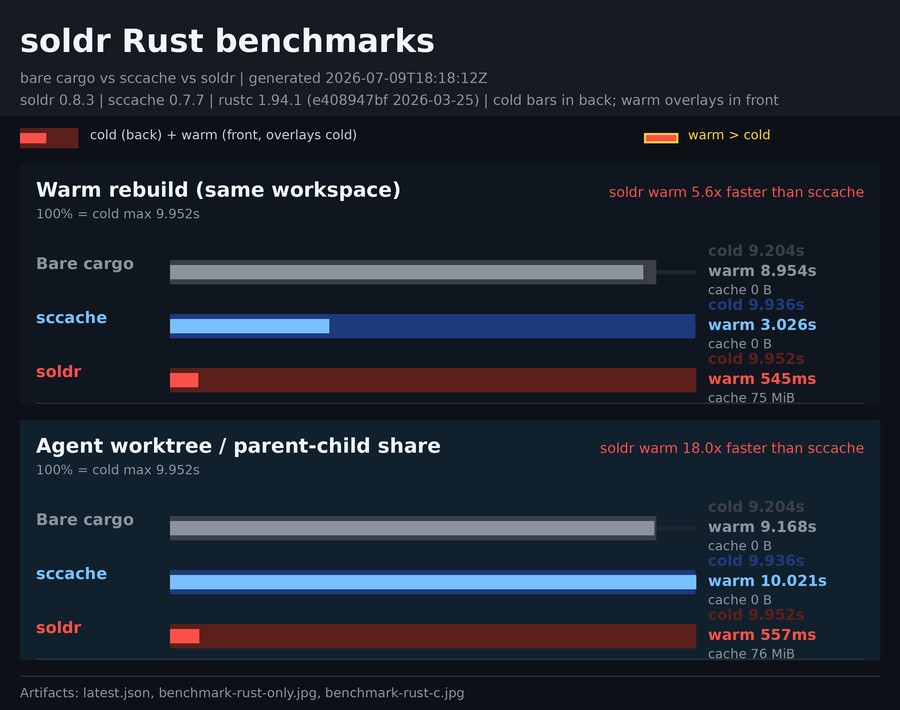
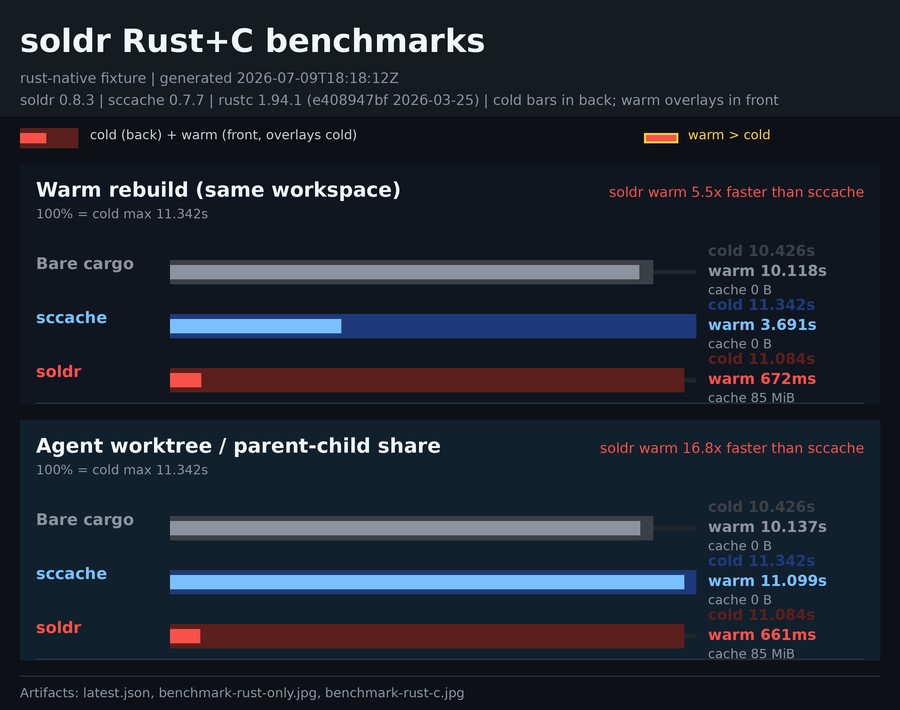
Cold builds are a wash; clean-target reconstruction from a warm compiler cache and cross-worktree sharing are where soldr's wrapper architecture pays off. The README chart's clean-target row intentionally deletes target/; it does not claim Cargo's intact-target freshness fast path. Full historical trend + interactive view: zackees.github.io/soldr. For the swatinem/rust-cache comparison (GHA target-dir caching, a different layer) see PERF.md.
Instant tools. Instant builds. One command.
soldr = crgx + zccache in a single tool.
Where correct builds meet instant builds.
The point of soldr is not to invent some brand-new primitive. The point is to combine the pieces that already work into one tool that people can actually rely on every day.
zccache is already excellent. crgx already proved the value of instant Rust tooling. soldr turns those into one front door:
- get the right Rust tool for the job
- get the right Windows ABI without thinking about it
- get transparent compilation caching without separate setup
That is the same reason uv is compelling. uv did not win because it invented packaging, virtual environments, or Python installation. It won because it made the whole workflow feel like one tool instead of a pile of separate ones.
soldr aims for the same outcome in the Rust toolchain world.
Current release line:
0.5.xis the secure front-door, tool-fetch, and built-in zccache-backed cache release line1.0.0-rcremains reserved for broader release hardening and bootstrap validation- the supported external integration boundary remains the
soldrexecutable, not the internal Rust crates; see docs/API_BOUNDARY.md - practical integration examples for local builds and GitHub Actions live in INTEGRATION.md
Install from npm
npm install -g @zackees/soldr
soldr --version
The npm package is a small launcher that downloads the matching soldr GitHub
Release binary for your OS and architecture during install, verifies it against
the published SHA256SUMS file, and exposes the soldr command.
Published npm archives and PyPI wheels support both Intel (x86_64) and Apple
Silicon (arm64) macOS. Intel artifacts are cross-built through soldr's
blessed Apple SDK path and smoke-tested on an Intel macOS runner before release.
GitHub Actions setup
The current GitHub Actions entry point is the public setup-soldr action:
- uses: zackees/setup-soldr@v0
  with:
    cache: true

- run: soldr cargo build --locked --release
- run: soldr cargo test --locked
That action:
- installs
soldr - bootstraps
rustupinto the cached runner-local root when the runner does not already have it - preinstalls the exact Rust toolchain from
rust-toolchain.tomlby default viarustup - restores a cacheable runner-local root for Soldr, Cargo, and rustup state
- restores and saves the Soldr-owned zccache compilation artifact cache under
SOLDR_CACHE_DIRby default; setbuild-cache: falseto disable it - restores and saves a zccache-owned Rust artifact plan cache by default for no-op CI fast paths; set
target-cache: falseto disable it ortarget-cache-mode: fullto opt into explicit whole-target caching - puts
soldronPATHfor later steps
For existing workflows where rewriting every cargo ... command is high-friction, opt into Cargo PATH shims:
- uses: zackees/setup-soldr@v0
  with:
    tool-shims: cargo

- run: cargo build --locked --release
- run: cargo test --locked
The shim mode is off by default. When enabled, the action resolves the real Cargo binary before prepending its shim directory, then exports that real path for Soldr so cargo ... can safely trampoline into soldr cargo ... without recursive PATH lookup.
If your project pins Rust in rust-toolchain.toml, let the action read that file or pass the exact value with toolchain:. Do not preinstall a different generic toolchain such as stable and assume soldr will reconcile it later. The action exports RUSTUP_TOOLCHAIN after installation so later cargo, rustc, and soldr cargo ... steps stay on the toolchain it just installed instead of asking rustup to resolve a pinned file lazily.
On GitHub-hosted runners, this means you usually do not need a separate toolchain setup action for the normal path. The action still uses rustup under the hood today, but it bootstraps rustup itself when the runner does not already have it.
On runners without rustup, the action downloads and installs it into the cached runner-local root before provisioning the requested toolchain.
The public action lives in zackees/setup-soldr and is generated from this repository's root action source. This repository dogfoods zackees/setup-soldr@v0 in setup-soldr-action.yml. For fuller examples and fallback patterns, see INTEGRATION.md.
Native vs cross targets
soldr cargo --target ... runs the build through soldr/zccache, but it does not fetch a target's Rust standard library. If the active toolchain does not already have that target installed, the canonical failure is error[E0463]: can't find crate for core/std (or compiler_builtins) at the first compile step.
Native host targets work by default because rustup installs the host triple as part of the toolchain. Cross targets must be declared explicitly. Building aarch64-pc-windows-msvc from a Windows x86 runner, for example, requires provisioning aarch64-pc-windows-msvc before any soldr cargo --target aarch64-pc-windows-msvc invocation.
Two equivalent ways to declare a cross target: declaratively via rust-toolchain.toml's [toolchain].targets (preferred — setup-soldr honors it during toolchain install), or imperatively via soldr rustup target add / soldr toolchain prepare (see #331 and PR #333).
# rust-toolchain.toml — declarative (preferred)
[toolchain]
channel = "1.94.1"
targets = ["aarch64-pc-windows-msvc"]
# CLI — imperative
soldr rustup target add aarch64-pc-windows-msvc
soldr cargo build --target aarch64-pc-windows-msvc
# Orchestrated
soldr toolchain prepare
soldr cargo build --target aarch64-pc-windows-msvc
The canonical multi-platform GitHub Actions tutorial lives in zackees/setup-soldr#90.
For Windows x64 → Windows GNU builds via managed MinGW-w64 GCC, and Linux →
Windows MSVC cross-compilation via the blessed soldr build surface (with
soldr cargo xwin retained as an explicit legacy fallback),
see docs/CROSS_COMPILE.md.
CI cache lineage
GitHub Actions caches are not shared across arbitrary sibling feature branches. A workflow run can restore caches from its own branch, the default branch, and for pull requests the PR base branch. It cannot directly restore caches created on another feature branch.
That means Soldr treats main as the canonical warm-cache source:
- CI runs on pushes to
mainand feature branches. - A feature-branch push can save a branch-local cache entry in its own branch scope.
- Later pushes and PRs for that same branch restore that branch-local cache first.
- If the feature branch has no exact cache yet, GitHub falls back to the
maincache lineage through the same stable keys. - The heavy cache-producing CI runs on branch pushes, not
pull_request, so each feature branch gets one useful cache lineage instead of a duplicate PR merge-ref lineage.
In practice this gives the exact parent/child model we want: main acts as the shared parent cache, feature branches read from that parent on miss, and each feature branch may also save its own preferred child cache when the workflow runs on push. Pull requests then reflect the branch-push CI state instead of creating a second heavy cache path. This repository is the first reference implementation of that pattern. For the full wiring and rollout notes, see docs/CI_CACHE.md.
Why soldr exists
On Windows, the real problem is not "how do I cache builds?" or "how do I download a tool binary?" in isolation.
The real problem is that the execution path is messy:
- the wrong
cargocan win onPATH - the wrong Windows target can get selected
- GNU can leak in where MSVC should have been used
- users end up debugging their toolchain instead of shipping code
soldr exists to make that path boring.
When you run soldr, the tool should do the obvious thing:
- pick MSVC on Windows by default
- fetch the tool you asked for
- cache it locally
- fetch and manage zccache so Rust builds get transparent caching without manual wrapper setup
If soldr solves that one problem well, it becomes a super tool: the command you reach for first, because it makes the rest of the stack behave.
-
Tool acquisition (the crgx half): Need
maturin,cargo-dylint, or any crate binary? soldr fetches a pre-built binary from GitHub Releases in seconds. Nocargo installfrom source. Cached locally for instant reuse. On0.5.x, this is still an upstream trust decision rather than a repo-side trust guarantee; see docs/TRUST_BOUNDARIES.md. -
Compilation caching (the zccache half):
soldr cargo ...now fetches and manages a pinnedzccacherelease for Rust builds. soldr owns the zccache daemon/session wiring and keeps managed zccache artifacts under Soldr's cache root.
# Build through soldr's front door:
soldr cargo build --release
soldr cargo test
soldr --no-cache cargo test
soldr purge
SOLDR_RUSTC_WRAPPER=sccache soldr cargo build
SOLDR_RUSTC_WRAPPER=none soldr cargo build

# Shorthand: drop the `cargo` prefix for cargo's built-in verbs and for
# any cargo subcommand soldr already prebuilds. `soldr cargo <verb>` is
# preserved as the explicit escape hatch (always works), and the
# collision verbs `clean`, `config`, and `version` keep their
# soldr-native meaning. See docs/API.md "Cargo Verb Shorthand" for the
# full list.
soldr build --release          # == soldr cargo build --release
soldr test --workspace         # == soldr cargo test --workspace
soldr clippy -- -D warnings    # == soldr cargo clippy -- -D warnings
soldr nextest run              # == soldr cargo nextest run

# Fetch and run any Rust tool instantly:
soldr maturin build --release
soldr cargo-dylint check
soldr rustfmt src/main.rs
Use soldr as your PEP 517 build backend (instead of maturin)
For Rust+Python packages, point pyproject.toml at soldr instead of
maturin and pip install . / uv pip install . route the whole build
through soldr:
[build-system]
requires = ["soldr"]
build-backend = "soldr"

# Your existing [tool.maturin] section stays exactly as it is —
# soldr drives a pinned maturin under the hood, so all maturin
# configuration keeps working unchanged.
[tool.maturin]
manifest-path = "crates/my-crate/Cargo.toml"
module-name = "my_pkg._native"
python-source = "src"
That is the entire change — no maturin entry in requires, no other
files touched. What you get over build-backend = "maturin":
- Pinned maturin, fetched on demand — soldr downloads a pinned maturin binary (or provisions the PyPI wheel in an isolated uv-managed env if the binary fetch misses). Reproducible across machines; nothing to add to your dependencies.
- Toolchain pinning — the build uses the rustup toolchain your
rust-toolchain.tomldeclares (MSVC on Windows), even when a stray GNU cargo or mingw shadows it onPATH. - Managed cmake + ninja — cmake-based
*-syscrates (libz-ng-sys,zstd-sys, ...) configure with pinned tools from the soldr toolchain archive instead of whatevercmake/makeyourPATHhappens to serve. - Compilation caching — rustc invocations run under soldr's
RUSTC_WRAPPER, so repeat builds hit the cache.
Local PEP 517 builds use an explicit fast dev profile by default:
opt-level = 0, 256 codegen units, line-table debug information, no LTO, and
incremental compilation. Explicit Maturin/Cargo settings and
SOLDR_PEP517_PROFILE remain authoritative per setting; release pipelines
should select their release profile explicitly.
Successful wheel and editable builds print a one-line cache and timing summary
to stderr. Set SOLDR_PEP517_STATS=off to silence it; SOLDR_PEP517_STATS=full
(and detected verbose pip/uv frontends) also prints the complete session
statistics payload.
Soldr also caches the last successful wheel for each project/build mode under
~/.soldr/pep517/wheels/. Before packaging it scans source and staged-artifact
metadata (relative path, size, and modification time); an unchanged tree
hardlinks the cached wheel into pip's requested output directory and skips
wheel rebuilding/compression. Set SOLDR_PEP517_WHEEL_CACHE=off to opt out.
Projects whose packaging backend is not maturin can use soldr as a managed
wrapper by selecting a delegate in pyproject.toml:
[build-system]
requires = ["soldr", "setuptools>=64"]
build-backend = "soldr"

[tool.soldr.pep517]
delegate-backend = "setuptools.build_meta"
The delegate receives the normal PEP 517/660 hooks and return values while
soldr supplies its target, profile, linker, and cache environment. This is
intended for projects with custom staging such as native CLI scripts plus a
PyO3 extension. Maturin remains the default when no delegate is configured.
The same explicit profile settings work for delegates as for maturin; for
example, pip install . --config-settings profile=release selects the
release profile, while an ordinary install uses the fast local dev profile.
The backend also asks soldr to try its fastest supported linker locally. If
that linker fails with a linker-availability error, soldr retries once with
the platform linker and remembers the successful fallback in its cache. An
equivalent later build uses the fallback immediately and prints a warning.
Set SOLDR_PEP517_LINKER=none to disable this policy. An explicit
SOLDR_LINKER=fast is treated as a deliberate choice: it reports the failure
without silently downgrading to the system linker.
Note: soldr's own wheel is built with plain build-backend = "maturin",
not with itself — using soldr as its own build backend created a
bootstrap cycle where a broken installed soldr made the fix in this
repo uninstallable (pip install . pulled the published soldr wheel
and shelled out to the system soldr binary).
How it works
soldr is a chameleon binary: one executable that picks its role from argv[1] on every invocation. Three roles:
flowchart TD
    A["soldr <argv[1]> ..."] --> B{"classify argv[1]"}
    B -->|"path to rustc"| C["<b>Cache mode</b><br/>invoked as RUSTC_WRAPPER by cargo.<br/>hash inputs, query cache,<br/>forward to real rustc on miss."]
    B -->|"built-in verb<br/>cargo · rustup · status · cache · ..."| D["<b>Dispatch mode</b><br/>run internal handler,<br/>or exec a toolchain binary<br/>resolved via rustup."]
    B -->|"anything else<br/>maturin · cargo-nextest · cbindgen · ..."| E["<b>Tool-fetch mode</b><br/>resolve via known_tools,<br/>download from GitHub Releases,<br/>exec the fetched binary."]
When you run soldr cargo build, the two other modes both come into play. soldr acts as the dispatch-mode front door, then cargo re-invokes soldr once per crate as the RUSTC_WRAPPER — that second soldr is the cache-mode instance that talks to the managed zccache daemon:
sequenceDiagram
    autonumber
    participant U as User
    participant S1 as soldr (front door)
    participant C as cargo
    participant S2 as soldr (RUSTC_WRAPPER)
    participant Z as zccache daemon
    participant R as real rustc

    U->>S1: soldr cargo build --release
    S1->>S1: dispatch mode: cargo verb
    S1->>Z: start managed zccache if needed
    S1->>C: exec cargo (RUSTC_WRAPPER=soldr)
    loop per crate
        C->>S2: soldr [path-to-rustc] [args]
        S2->>Z: query cache (hash of inputs)
        alt cache hit
            Z-->>S2: cached artifact
            S2-->>C: emit artifact, exit 0
        else cache miss
            Z->>R: forward to rustc
            R-->>Z: fresh artifact
            Z->>Z: store keyed by input hash
            Z-->>S2: artifact
            S2-->>C: emit artifact, exit 0
        end
    end
    C-->>S1: build complete
    S1-->>U: exit
Tool fetches are much simpler — no cargo, no rustc, no wrapper handshake:
soldr maturin build --release
  +-- maturin cached?  --> run instantly
  +-- not cached?      --> download pre-built binary (2s) --> run
Linker speed (the other half of fast CI)
soldr caches rustc invocations. It does not cache the linker step. If your build links many binaries (multiple tests/*.rs files, several [[bin]] targets, examples, benches), the dominant cost is often ld, and zccache will not help with that.
On Linux, switch to the mold linker for ~5-10x faster linking. Add to your repo's .cargo/config.toml:
[target.x86_64-unknown-linux-gnu]
linker = "clang"
rustflags = ["-C", "link-arg=-fuse-ld=mold"]

[target.x86_64-unknown-linux-musl]
linker = "clang"
rustflags = ["-C", "link-arg=-fuse-ld=mold"]
Then in CI, install mold before any cargo step:
- name: Install mold linker
  run: |
    sudo apt-get update
    sudo apt-get install -y --no-install-recommends mold
macOS uses ld64, which is already fast and rarely worth swapping. Windows uses MSVC's linker, which mold does not target.
If you also have many separate test binaries, consider consolidating them under one tests/<name>.rs entry point with sub-modules. Fewer linker invocations is itself a multiplicative win on top of mold.
Design goals
- One obvious command: Fetch tools, pick the right Windows target, and run through managed zccache through the same entry point.
- Front-door builds:
soldr cargo ...is the primary build UX. - Invisible caching:
soldr cargo ...uses a soldr-managed zccache by default, withsoldr --no-cache cargo ...as the opt-out. - Real cache controls:
soldr status,soldr cache, andsoldr cleanreport and manage the soldr-managed zccache state, whilesoldr purgeremoves all Soldr-managed cache artifacts for bug clearing and benchmarking. - One cache boundary: soldr keeps its own tools, zccache session state, and managed zccache artifacts under
~/.soldr/by default. UseSOLDR_CACHE_DIRto move that root. - Disposable-worktree friendly on Windows: for build orchestration, soldr can relocate itself under
~/.soldr/runtime/soldr-self/soRUSTC_WRAPPERdoes not keep using a worktree-localsoldr.exe; stale runtime copies are cleaned up periodically. - Pre-built first: Download a pre-built binary before compiling from source. Fall back gracefully.
- Cargo-compatible: soldr preserves normal cargo arguments instead of forcing a separate workflow.
- Cross-platform: Linux, macOS, Windows (x86_64 + aarch64).
- MSVC by default on Windows: Always targets
x86_64-pc-windows-msvc(oraarch64-pc-windows-msvc) unless the active project explicitly selects another target in.cargo/config.toml,.cargo/config, orrust-toolchain.toml. MSVC links againstvcruntime140.dllwhich ships with every modern Windows install. The GNU target requires shippinglibgcc_s_seh-1.dllandlibwinpthread-1.dllwith every binary, which is extra baggage for most projects; when a project explicitly needsx86_64-pc-windows-gnu,soldr prepare --target x86_64-pc-windows-gnuprovisions managed MinGW-w64 GCC on Windows x64. This matches the Rust ecosystem default: rustup, cargo-binstall, and nearly all published release binaries target MSVC. crgx gets this wrong by baking the target at compile time, causing it to look for GNU binaries when compiled under MSYS2.
Architecture
Monocrate. A single Rust crate soldr-cli under crates/soldr-cli/, with four module trees inside it. The earlier four-crate workspace (soldr-core / soldr-fetch / soldr-cache / soldr-cli) was collapsed in 2026-05; the regression guard crates/soldr-cli/tests/monocrate_guard.rs fails the build if anyone reintroduces a second crate.
soldr/
|-- crates/
|   `-- soldr-cli/
|       |-- src/
|       |   |-- core/            # Shared types, config, cache paths (formerly soldr-core)
|       |   |-- fetch/           # Binary resolution + download (formerly soldr-fetch)
|       |   |-- cache_lib/       # RUSTC_WRAPPER + daemon IPC (formerly soldr-cache)
|       |   `-- main.rs + cli/   # Mode detection, dispatch, cargo front door
|       `-- tests/
|-- src/soldr/                    # Python package (maturin bin bindings)
`-- tests/
| Module | Role |
|---|---|
src/core/ |
Shared types, config (~/.soldr/config.toml), target-triple resolution (MSVC default on Windows), cache paths, error types. No I/O beyond config files. |
src/fetch/ |
Binary resolution. known_tools registry, trust (SHA-256 pins + SOLDR_TRUST_MODE enforcement), rustup auto-bootstrap, resolution chain (local cache → repo lookup → GitHub Releases → extract). |
src/cache_lib/ |
RUSTC_WRAPPER mode: hash inputs (blake3), check ~/.soldr/cache/, daemon IPC (Unix socket / Windows named pipe), LRU eviction, soldr save / soldr load archive transport, auto-GC. |
src/main.rs + cli/ |
Mode detection (chameleon dispatch), clap for built-ins, exec for tool fetch, cargo front door (soldr cargo ...). |
A thin src/lib.rs re-exports pub mod core; pub mod fetch; pub mod cache_lib; so the library integration tests can keep use soldr_cli::core::*-style imports. This is not a supported public Rust library API.
Prior art
Built on lessons from:
- zccache - 2.4x faster warm builds than sccache (benchmark)
- crgx - the npx of Rust, instant tool execution
- cargo-binstall - pre-built binary resolution
- sccache - the original Rust compilation cache
Security And Verification
- SECURITY.md describes the current hardening posture and release policy.
- docs/API_BOUNDARY.md defines the supported machine-facing integration boundary.
- docs/PYPI_TRUSTED_PUBLISHING.md describes the optional Trusted Publishing path for hardened PyPI wheels.
.github/workflows/release-auto.ymlis the only release workflow: when a reviewed version bump lands onmain, it derives the version fromCargo.toml, reruns the release gate, and performs final publication through thereleaseenvironment where the release credentials live.- RELEASE.md documents the intended maximum-security release setup and owner workflow.
- docs/RELEASE_VERIFICATION.md explains how to verify published release artifacts.
- docs/TRUST_BOUNDARIES.md inventories the external systems and artifacts
soldrcurrently trusts, including the current0.5.xlimits of runtime fetched-binary trust.
License
BSD-3-Clause.
Project details
Verified details
These details have been verified by PyPIProject links
GitHub Statistics
Maintainers
Release history Release notifications | RSS feed


Download files
Download the file for your platform. If you're not sure which to choose, learn more about installing packages.
Source Distributions
Built Distributions
Filter files by name, interpreter, ABI, and platform.
If you're not sure about the file name format, learn more about wheel file names.
Copy a direct link to the current filters
File details
Details for the file soldr-0.8.20-py3-none-win_arm64.whl.
File metadata
- Download URL: soldr-0.8.20-py3-none-win_arm64.whl
- Upload date:
- Size: 11.1 MB
- Tags: Python 3, Windows ARM64
- Uploaded using Trusted Publishing? Yes
- Uploaded via: twine/6.1.0 CPython/3.13.13
File hashes
| Algorithm | Hash digest | |
|---|---|---|
| SHA256 |
6e77ed3debc6167333996154e4bc5283852cae56cc99bd3f84051d15300ca913
|
|
| MD5 |
046d9f13b19e7c562db15b78e7f20588
|
|
| BLAKE2b-256 |
da6c0d7ecb9c897282d1bb0890272e9f572a3a8fc31eb0057e7fb8a81cf16c2c
|
Provenance
The following attestation bundles were made for soldr-0.8.20-py3-none-win_arm64.whl:
Publisher:
release-auto.yml on zackees/soldr
-
Statement:
-
Statement type:
https://in-toto.io/Statement/v1 -
Predicate type:
https://docs.pypi.org/attestations/publish/v1 -
Subject name:
soldr-0.8.20-py3-none-win_arm64.whl -
Subject digest:
6e77ed3debc6167333996154e4bc5283852cae56cc99bd3f84051d15300ca913 - Sigstore transparency entry: 2219747210
- Sigstore integration time:
-
Permalink:
zackees/soldr@0a652ee96f7ad76148adefc958dc96d286714a43 -
Branch / Tag:
refs/heads/main - Owner: https://github.com/zackees
-
Access:
public
-
Token Issuer:
https://token.actions.githubusercontent.com -
Runner Environment:
github-hosted -
Publication workflow:
release-auto.yml@0a652ee96f7ad76148adefc958dc96d286714a43 -
Trigger Event:
push
-
Statement type:
File details
Details for the file soldr-0.8.20-py3-none-win_amd64.whl.
File metadata
- Download URL: soldr-0.8.20-py3-none-win_amd64.whl
- Upload date:
- Size: 12.0 MB
- Tags: Python 3, Windows x86-64
- Uploaded using Trusted Publishing? Yes
- Uploaded via: twine/6.1.0 CPython/3.13.13
File hashes
| Algorithm | Hash digest | |
|---|---|---|
| SHA256 |
be8894525c9ceec8a2246c134eaff3387346def53f91a260ed1c57d875fba7ee
|
|
| MD5 |
380e5df1509531c87602f77ae41d4b02
|
|
| BLAKE2b-256 |
03af0a0b17c54625cf816d24fddadc920f2f783168bd4dccf818570d0252800f
|
Provenance
The following attestation bundles were made for soldr-0.8.20-py3-none-win_amd64.whl:
Publisher:
release-auto.yml on zackees/soldr
-
Statement:
-
Statement type:
https://in-toto.io/Statement/v1 -
Predicate type:
https://docs.pypi.org/attestations/publish/v1 -
Subject name:
soldr-0.8.20-py3-none-win_amd64.whl -
Subject digest:
be8894525c9ceec8a2246c134eaff3387346def53f91a260ed1c57d875fba7ee - Sigstore transparency entry: 2219746799
- Sigstore integration time:
-
Permalink:
zackees/soldr@0a652ee96f7ad76148adefc958dc96d286714a43 -
Branch / Tag:
refs/heads/main - Owner: https://github.com/zackees
-
Access:
public
-
Token Issuer:
https://token.actions.githubusercontent.com -
Runner Environment:
github-hosted -
Publication workflow:
release-auto.yml@0a652ee96f7ad76148adefc958dc96d286714a43 -
Trigger Event:
push
-
Statement type:
File details
Details for the file soldr-0.8.20-py3-none-musllinux_1_2_x86_64.whl.
File metadata
- Download URL: soldr-0.8.20-py3-none-musllinux_1_2_x86_64.whl
- Upload date:
- Size: 12.0 MB
- Tags: Python 3, musllinux: musl 1.2+ x86-64
- Uploaded using Trusted Publishing? Yes
- Uploaded via: twine/6.1.0 CPython/3.13.13
File hashes
| Algorithm | Hash digest | |
|---|---|---|
| SHA256 |
cb05eac85b97191999318808367aa4c77c30ca2a9976f39a365659087ed387d3
|
|
| MD5 |
658eafc0f95cb287ccf654294f758b04
|
|
| BLAKE2b-256 |
3c38aea1edcbf323d1e33afab5654dbff85e0c8d034fd439d3b425d52fd7614b
|
Provenance
The following attestation bundles were made for soldr-0.8.20-py3-none-musllinux_1_2_x86_64.whl:
Publisher:
release-auto.yml on zackees/soldr
-
Statement:
-
Statement type:
https://in-toto.io/Statement/v1 -
Predicate type:
https://docs.pypi.org/attestations/publish/v1 -
Subject name:
soldr-0.8.20-py3-none-musllinux_1_2_x86_64.whl -
Subject digest:
cb05eac85b97191999318808367aa4c77c30ca2a9976f39a365659087ed387d3 - Sigstore transparency entry: 2219747168
- Sigstore integration time:
-
Permalink:
zackees/soldr@0a652ee96f7ad76148adefc958dc96d286714a43 -
Branch / Tag:
refs/heads/main - Owner: https://github.com/zackees
-
Access:
public
-
Token Issuer:
https://token.actions.githubusercontent.com -
Runner Environment:
github-hosted -
Publication workflow:
release-auto.yml@0a652ee96f7ad76148adefc958dc96d286714a43 -
Trigger Event:
push
-
Statement type:
File details
Details for the file soldr-0.8.20-py3-none-musllinux_1_2_aarch64.whl.
File metadata
- Download URL: soldr-0.8.20-py3-none-musllinux_1_2_aarch64.whl
- Upload date:
- Size: 11.2 MB
- Tags: Python 3, musllinux: musl 1.2+ ARM64
- Uploaded using Trusted Publishing? Yes
- Uploaded via: twine/6.1.0 CPython/3.13.13
File hashes
| Algorithm | Hash digest | |
|---|---|---|
| SHA256 |
4e1c964a5e1603eff84732753452a7c9f9b5a415abcd603381aeb6039a26b34a
|
|
| MD5 |
d354d83efbef4c9c9b3b9193bf886eb4
|
|
| BLAKE2b-256 |
96be0896be62d0fe79c102a42d9d3be590a0f6bcad779d806cad7ed0d41eb465
|
Provenance
The following attestation bundles were made for soldr-0.8.20-py3-none-musllinux_1_2_aarch64.whl:
Publisher:
release-auto.yml on zackees/soldr
-
Statement:
-
Statement type:
https://in-toto.io/Statement/v1 -
Predicate type:
https://docs.pypi.org/attestations/publish/v1 -
Subject name:
soldr-0.8.20-py3-none-musllinux_1_2_aarch64.whl -
Subject digest:
4e1c964a5e1603eff84732753452a7c9f9b5a415abcd603381aeb6039a26b34a - Sigstore transparency entry: 2219746699
- Sigstore integration time:
-
Permalink:
zackees/soldr@0a652ee96f7ad76148adefc958dc96d286714a43 -
Branch / Tag:
refs/heads/main - Owner: https://github.com/zackees
-
Access:
public
-
Token Issuer:
https://token.actions.githubusercontent.com -
Runner Environment:
github-hosted -
Publication workflow:
release-auto.yml@0a652ee96f7ad76148adefc958dc96d286714a43 -
Trigger Event:
push
-
Statement type:
File details
Details for the file soldr-0.8.20-py3-none-manylinux_2_17_x86_64.manylinux2014_x86_64.whl.
File metadata
- Download URL: soldr-0.8.20-py3-none-manylinux_2_17_x86_64.manylinux2014_x86_64.whl
- Upload date:
- Size: 11.6 MB
- Tags: Python 3, manylinux: glibc 2.17+ x86-64
- Uploaded using Trusted Publishing? Yes
- Uploaded via: twine/6.1.0 CPython/3.13.13
File hashes
| Algorithm | Hash digest | |
|---|---|---|
| SHA256 |
ef993626bfa9cf1d164297edd0871fa3f0270cdbf9f90865fdd0f8b19d911abc
|
|
| MD5 |
7345a78a09c3b6807927cad45b7caf45
|
|
| BLAKE2b-256 |
5583f51d9a6f3dd92ab4e6e15697576c4bc22cda831b1a0ff91bb3a8be5ea42b
|
Provenance
The following attestation bundles were made for soldr-0.8.20-py3-none-manylinux_2_17_x86_64.manylinux2014_x86_64.whl:
Publisher:
release-auto.yml on zackees/soldr
-
Statement:
-
Statement type:
https://in-toto.io/Statement/v1 -
Predicate type:
https://docs.pypi.org/attestations/publish/v1 -
Subject name:
soldr-0.8.20-py3-none-manylinux_2_17_x86_64.manylinux2014_x86_64.whl -
Subject digest:
ef993626bfa9cf1d164297edd0871fa3f0270cdbf9f90865fdd0f8b19d911abc - Sigstore transparency entry: 2219746998
- Sigstore integration time:
-
Permalink:
zackees/soldr@0a652ee96f7ad76148adefc958dc96d286714a43 -
Branch / Tag:
refs/heads/main - Owner: https://github.com/zackees
-
Access:
public
-
Token Issuer:
https://token.actions.githubusercontent.com -
Runner Environment:
github-hosted -
Publication workflow:
release-auto.yml@0a652ee96f7ad76148adefc958dc96d286714a43 -
Trigger Event:
push
-
Statement type:
File details
Details for the file soldr-0.8.20-py3-none-manylinux_2_17_aarch64.manylinux2014_aarch64.whl.
File metadata
- Download URL: soldr-0.8.20-py3-none-manylinux_2_17_aarch64.manylinux2014_aarch64.whl
- Upload date:
- Size: 10.9 MB
- Tags: Python 3, manylinux: glibc 2.17+ ARM64
- Uploaded using Trusted Publishing? Yes
- Uploaded via: twine/6.1.0 CPython/3.13.13
File hashes
| Algorithm | Hash digest | |
|---|---|---|
| SHA256 |
e9c8d10444330116d2615546f5c46f3c6da675d222e11389b1682b818b2caa2f
|
|
| MD5 |
3155db6fc8b7b1989cce214d1a31f0ef
|
|
| BLAKE2b-256 |
ef6d8401f594115e18fa7e4988fc67e9599c26dfa0a247a96eb9f13a48ed51d5
|
Provenance
The following attestation bundles were made for soldr-0.8.20-py3-none-manylinux_2_17_aarch64.manylinux2014_aarch64.whl:
Publisher:
release-auto.yml on zackees/soldr
-
Statement:
-
Statement type:
https://in-toto.io/Statement/v1 -
Predicate type:
https://docs.pypi.org/attestations/publish/v1 -
Subject name:
soldr-0.8.20-py3-none-manylinux_2_17_aarch64.manylinux2014_aarch64.whl -
Subject digest:
e9c8d10444330116d2615546f5c46f3c6da675d222e11389b1682b818b2caa2f - Sigstore transparency entry: 2219747087
- Sigstore integration time:
-
Permalink:
zackees/soldr@0a652ee96f7ad76148adefc958dc96d286714a43 -
Branch / Tag:
refs/heads/main - Owner: https://github.com/zackees
-
Access:
public
-
Token Issuer:
https://token.actions.githubusercontent.com -
Runner Environment:
github-hosted -
Publication workflow:
release-auto.yml@0a652ee96f7ad76148adefc958dc96d286714a43 -
Trigger Event:
push
-
Statement type:
File details
Details for the file soldr-0.8.20-py3-none-macosx_11_0_arm64.whl.
File metadata
- Download URL: soldr-0.8.20-py3-none-macosx_11_0_arm64.whl
- Upload date:
- Size: 10.8 MB
- Tags: Python 3, macOS 11.0+ ARM64
- Uploaded using Trusted Publishing? Yes
- Uploaded via: twine/6.1.0 CPython/3.13.13
File hashes
| Algorithm | Hash digest | |
|---|---|---|
| SHA256 |
654e6c66df24754c274ef7f4e90b3185028eb3fbddfe83f4de0f656bde67ea8d
|
|
| MD5 |
af0ec5c43982f387dbdeb8e355976261
|
|
| BLAKE2b-256 |
fda1c5790ace786e48f4206cb16e95804fd89cddcc73a2bcf23d008991fa63c8
|
Provenance
The following attestation bundles were made for soldr-0.8.20-py3-none-macosx_11_0_arm64.whl:
Publisher:
release-auto.yml on zackees/soldr
-
Statement:
-
Statement type:
https://in-toto.io/Statement/v1 -
Predicate type:
https://docs.pypi.org/attestations/publish/v1 -
Subject name:
soldr-0.8.20-py3-none-macosx_11_0_arm64.whl -
Subject digest:
654e6c66df24754c274ef7f4e90b3185028eb3fbddfe83f4de0f656bde67ea8d - Sigstore transparency entry: 2219746606
- Sigstore integration time:
-
Permalink:
zackees/soldr@0a652ee96f7ad76148adefc958dc96d286714a43 -
Branch / Tag:
refs/heads/main - Owner: https://github.com/zackees
-
Access:
public
-
Token Issuer:
https://token.actions.githubusercontent.com -
Runner Environment:
github-hosted -
Publication workflow:
release-auto.yml@0a652ee96f7ad76148adefc958dc96d286714a43 -
Trigger Event:
push
-
Statement type:
File details
Details for the file soldr-0.8.20-py3-none-macosx_10_12_x86_64.whl.
File metadata
- Download URL: soldr-0.8.20-py3-none-macosx_10_12_x86_64.whl
- Upload date:
- Size: 11.5 MB
- Tags: Python 3, macOS 10.12+ x86-64
- Uploaded using Trusted Publishing? Yes
- Uploaded via: twine/6.1.0 CPython/3.13.13
File hashes
| Algorithm | Hash digest | |
|---|---|---|
| SHA256 |
40c8e5f9c1b2c52898dcc6f405cdb271dc3b1c0cd868faed785569fd3f6bea3b
|
|
| MD5 |
ef58ab35c2478df2a1fa4f11f9d79a7e
|
|
| BLAKE2b-256 |
c49dd3009edd0e72c249e7ed2a98a8ca0c16d2a065208654f16992eae0ca8223
|
Provenance
The following attestation bundles were made for soldr-0.8.20-py3-none-macosx_10_12_x86_64.whl:
Publisher:
release-auto.yml on zackees/soldr
-
Statement:
-
Statement type:
https://in-toto.io/Statement/v1 -
Predicate type:
https://docs.pypi.org/attestations/publish/v1 -
Subject name:
soldr-0.8.20-py3-none-macosx_10_12_x86_64.whl -
Subject digest:
40c8e5f9c1b2c52898dcc6f405cdb271dc3b1c0cd868faed785569fd3f6bea3b - Sigstore transparency entry: 2219746916
- Sigstore integration time:
-
Permalink:
zackees/soldr@0a652ee96f7ad76148adefc958dc96d286714a43 -
Branch / Tag:
refs/heads/main - Owner: https://github.com/zackees
-
Access:
public
-
Token Issuer:
https://token.actions.githubusercontent.com -
Runner Environment:
github-hosted -
Publication workflow:
release-auto.yml@0a652ee96f7ad76148adefc958dc96d286714a43 -
Trigger Event:
push
-
Statement type:






