
SolidWorks MCP
Let an AI agent (Claude, or any other MCP client) model real parametric parts and assemblies in your own SolidWorks — and check its own work. Every modelling call returns the measured volume, mass and bounding box, so the agent can compare the result with the spec and correct itself instead of guessing that it "looks about right".
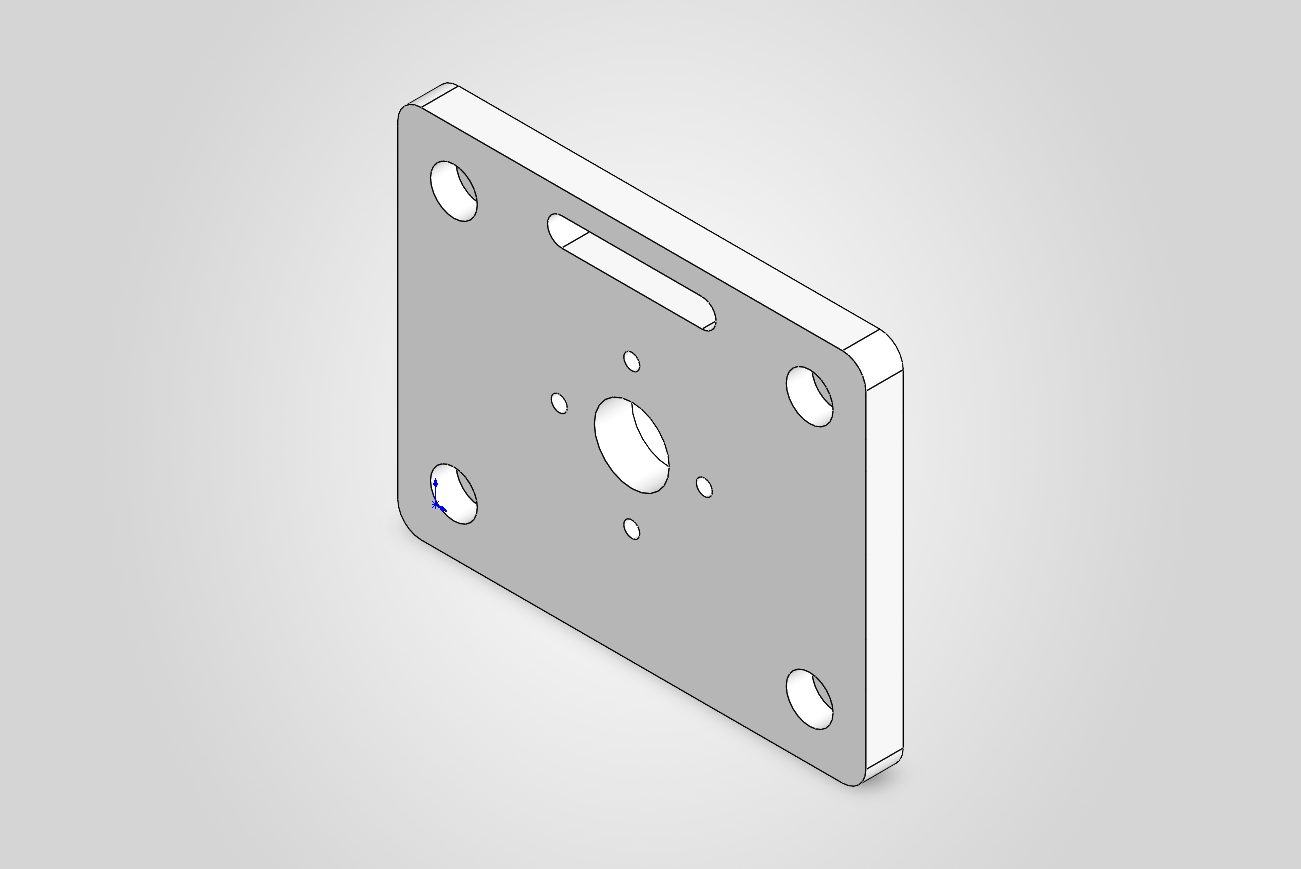
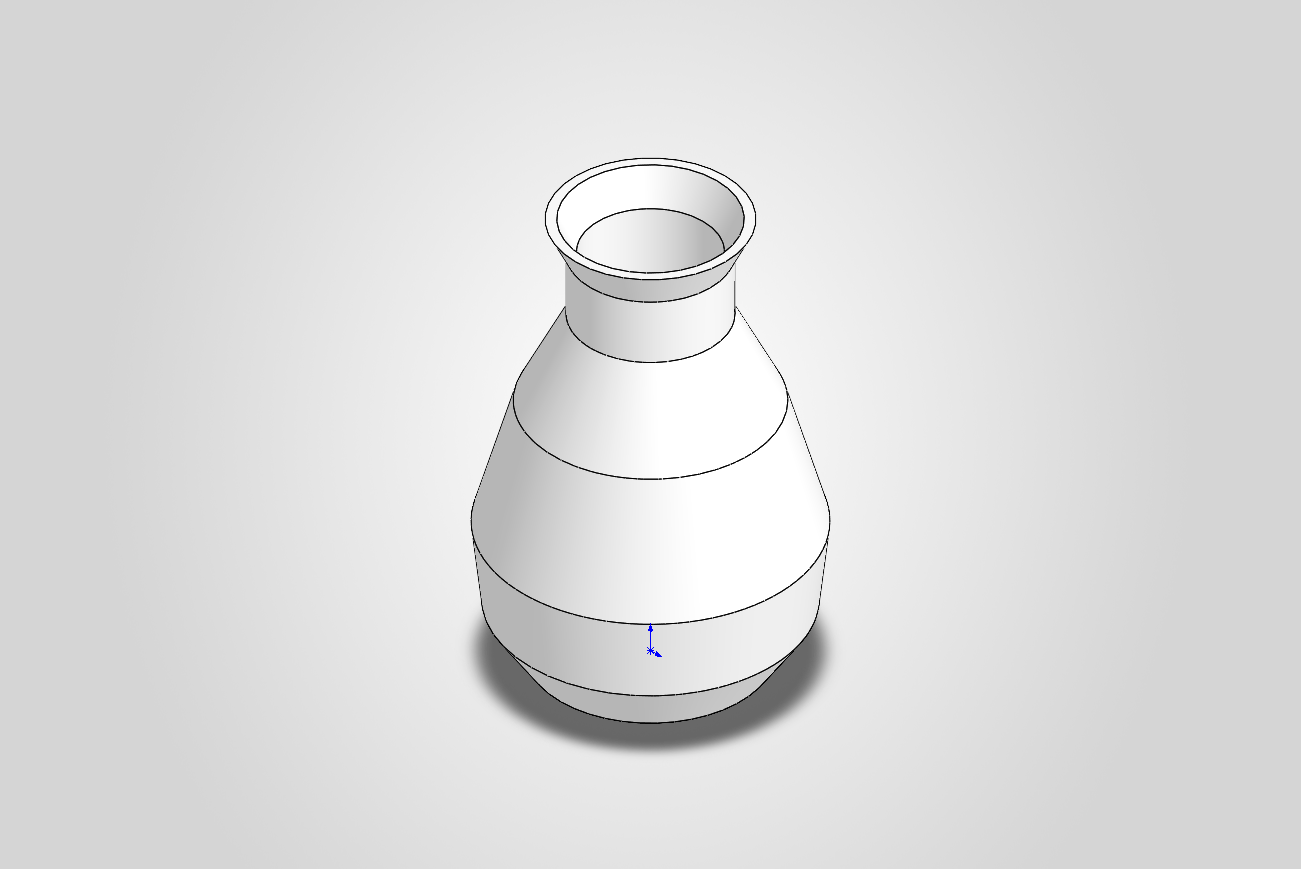
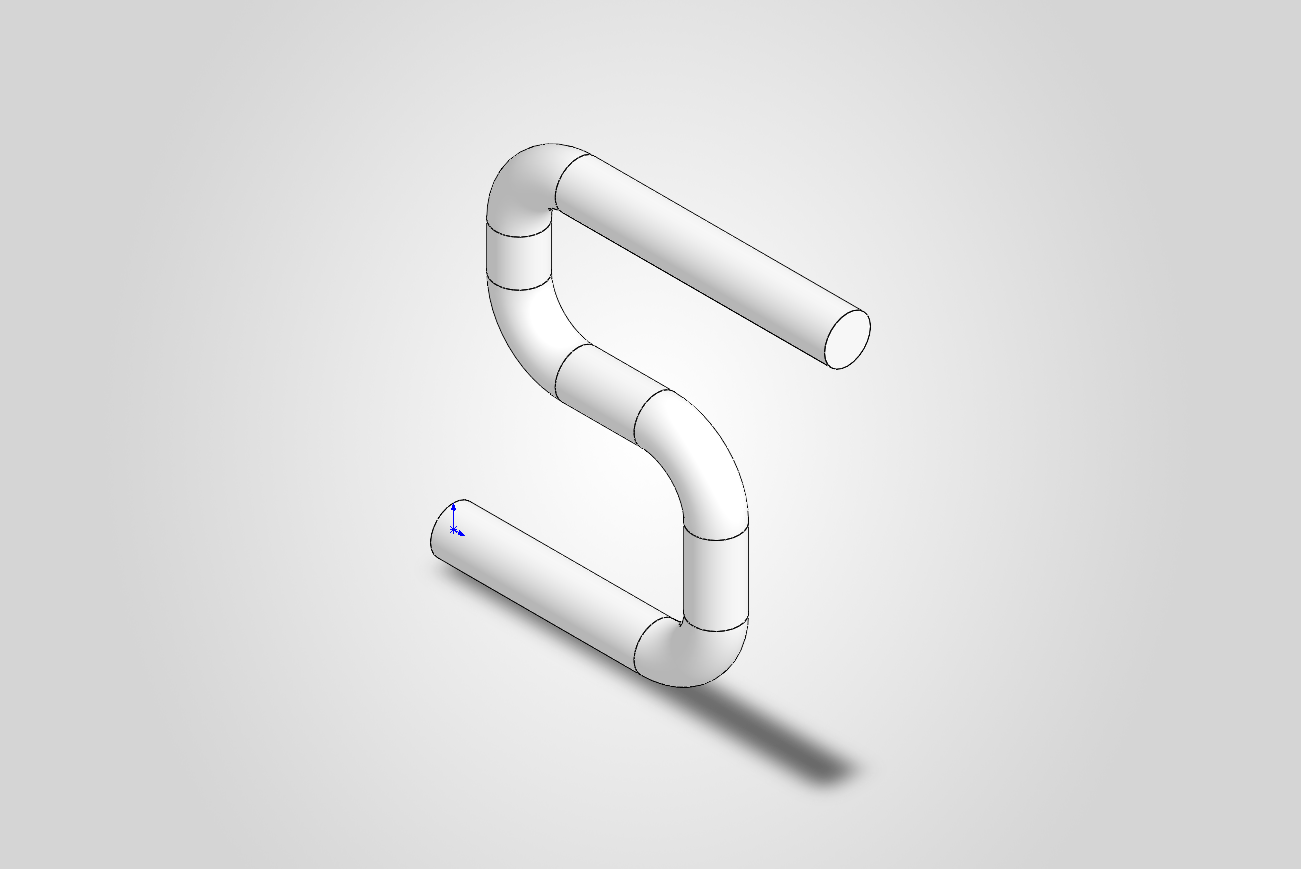
Built by the tools themselves: a mounting bracket (every step checked against a hand calculation), a revolved + shelled vase, a swept pipe.
Why this server
- It verifies, not just generates. Features report measured geometry; dimensions and mates are measured back after the rebuild.
- Real CAD, not just primitives. Extrude, revolve, sweep, loft and splines; holes, counterbores, slots and pockets on any face; fillets, chamfers, shells, patterns, equations and materials. Assemblies with mates and interference checks. STEP/STL/3MF export and screenshots. 45 tools in total.
- It fails loud. A call that cannot do what was asked returns
{ok: false, error}with the cause, never silently wrong geometry. - A fixed, typed tool surface. There is no "run arbitrary code" tool; the agent can only do what the tools allow.
- Tested against real SolidWorks. 175 tests; each feature's integration test compares the result with a hand calculation.
- Local. It talks to your running SolidWorks over COM; the server itself makes no network calls.
Quickstart
-
Install uv.
-
Start SolidWorks and leave it open (the server attaches to the running instance — it does not launch one).
-
Register the server with your MCP client.
Claude Code:
claude mcp add solidworks -- uvx --from git+https://github.com/hjbaard/SolidWorks-MCP solidworks-mcp
Claude Desktop (
claude_desktop_config.json) or any other client:{ "mcpServers": { "solidworks": { "command": "uvx", "args": ["--from", "git+https://github.com/hjbaard/SolidWorks-MCP", "solidworks-mcp"] } } }
-
Ask for a part, for example:
Design a 100 × 80 × 8 mm mounting plate with a Ø16 mm centre bore, four counterbored M5 holes 12 mm from the corners and R5 corners. Check the volume against your own calculation, then export a fine STL.
Requirements and compatibility
- Windows, with SolidWorks installed, licensed and running.
- Python 3.11+ (uv fetches one if needed).
- Tested on SOLIDWORKS 2026 (3DEXPERIENCE R2026x). The API calls it uses exist since SOLIDWORKS 2020 SP2, so 2020–2025 should work, but that is untested. Tried another version? Please open an issue with the result, whether it worked or not.
Status: early (v0.2). It works end-to-end, but tool names and conventions may still change. See CHANGELOG.md.
Troubleshooting
- "Geen draaiende SolidWorks gevonden" / connection fails — SolidWorks must be
running before you start the server or run a script; it attaches to the active
instance via
GetActiveObjectand does not launch one. - First call is slow or
EnsureModuleerrors — the first COM call generates the makepy typelib wrappers under your tempgen_pyfolder. Let it finish; if it gets into a bad state, delete thegen_pycache and retry. Early binding is mandatory on this build (see Architecture). - A feature returns
{ok: false, error: ...}— that is by design: every tool fails loud with a readable (Dutch) message rather than silently producing wrong geometry. Read the message; it names the likely cause. - Only tested against SOLIDWORKS 2026 (3DEXPERIENCE R2026x). On other builds the
verified enum values or method signatures may differ — re-run
scripts/introspect_api.pyto inspect your installed typelib.
Development
Clone the repository, then install it editable into a venv:
python -m venv .venv
.\.venv\Scripts\python.exe -m pip install -e .[dev]
To run the MCP server from this checkout instead of via uvx, point your client at the venv's Python:
{
  "mcpServers": {
    "solidworks": {
      "command": "C:\\path\\to\\SolidWorks-MCP\\.venv\\Scripts\\python.exe",
      "args": ["-m", "solidworks_mcp.server"]
    }
  }
}
Run the verification scripts
With SolidWorks open:
.\.venv\Scripts\python.exe scripts\probe_connection.py     # M0
.\.venv\Scripts\python.exe scripts\m1_block.py             # M1
.\.venv\Scripts\python.exe scripts\m2_parametric.py        # M2
.\.venv\Scripts\python.exe scripts\test_mcp_server.py      # M3 (full MCP loop over stdio)
.\.venv\Scripts\python.exe scripts\m5_demo_bracket.py      # M5 (3D-print bracket, every step verified)
scripts/introspect_api.py regenerates/inspects the installed typelib and prints
verified enum values — run it if SolidWorks is upgraded and signatures change.
Tests
.\.venv\Scripts\python.exe -m pytest                 # all tests
.\.venv\Scripts\python.exe -m pytest -m "not solidworks"   # fast unit layer, no SolidWorks
Two layers: pure unit tests (units, selector/direction parsing, polygon
cleaning, the component-placement maths, and that every MCP tool forwards its
arguments to the right session method) run anywhere; integration tests
(solidworks marker) drive a running SolidWorks and verify each feature's
volume — or each component's placement — against a hand calc. They auto-skip if
SolidWorks isn't reachable.
Tools
The server speaks MCP over stdio.
Part tools
| Tool | Purpose |
|---|---|
get_status |
Is SolidWorks reachable? revision + active/current part |
new_part |
Create a new empty part (becomes current) |
add_box(width_mm, height_mm, depth_mm, name) |
Sketch rectangle + extrude; returns mass properties |
add_cylinder(diameter_mm, height_mm, name) |
Cylinder by revolving a profile 360° about an axis (Y axis) |
add_disc(diameter_mm, thickness_mm, name) |
Disc/puck/flange: circle extruded along +Z (holes/patterns compose) |
add_cone(bottom_diameter_mm, top_diameter_mm, height_mm, name) |
Cone/frustum by revolve (top Ø = 0 → full cone) |
add_revolved_profile(profile_mm, angle_deg, name) |
Revolve any closed (radius, height) profile about the axis (shafts, vases, rings) |
add_swept_pipe(path_mm, diameter_mm, bend_radius_mm, name) |
Sweep a round profile along a 2D path with rounded bends (pipes, tubes, rods) |
add_swept_profile(profile_mm, path_mm, bend_radius_mm, name) |
Sweep any closed cross-section along a 2D path (rails, gaskets, trim, channels) |
add_lofted_solid(profiles_mm, heights_mm, name) |
Loft/blend 2+ polygon profiles on stacked parallel planes (transitions, adapters) |
add_extruded_profile(points_mm, depth_mm, name) |
Extrude any closed polygon [[x,y],…] (brackets, sections) |
add_extruded_spline(points_mm, depth_mm, name) |
Extrude a smooth closed spline through points (free-form/organic outlines) |
add_hole(diameter_mm, x_mm, y_mm, name) |
Cut a circular through-hole at (x, y) through the depth axis |
add_counterbore_hole(clearance_diameter_mm, cbore_diameter_mm, cbore_depth_mm, x_mm, y_mm, name) |
Counterbored screw hole (flush cap-head / heat-set insert) on +Z |
add_hole_on_face(diameter_mm, face, x_mm, y_mm, z_mm, name) |
Through-hole on ANY planar face at a 3D point (side holes, etc.) |
cut_profile(points_mm, depth_mm, name) |
Cut a polygon pocket/slot from the +Z face (blind or through) |
cut_profile_on_face(points_mm, face, depth_mm, name) |
Cut a polygon pocket on ANY face (3D points on the face) |
cut_slot(length_mm, width_mm, x_mm, y_mm, angle_deg, depth_mm, name) |
Cut a straight slotted hole (obround) on the +Z face at any angle |
add_fillet(radius_mm, edges, name) |
Round edges (edges: all, axis x/y/z, or indices "2,5") |
add_chamfer(distance_mm, edges, name) |
Chamfer edges at 45° (edges: all, axis, or indices) |
add_shell(thickness_mm, open_face) |
Hollow to a wall thickness; open a face (+z/…) or none |
add_linear_pattern(count, spacing_mm, direction, feature_name) |
Repeat a feature N times along +x/-x/… |
add_circular_pattern(count, center_x_mm, center_y_mm, feature_name) |
Repeat a feature N times around an axis (bolt circle) |
set_dimension(dimension_name, value_mm) |
Change a named driving dim (e.g. D1@BlockExtrude), rebuild, remeasure |
set_equation(equation) |
Add a global equation linking dims (e.g. "D1@BlockExtrude" = 25) |
set_material(name, database) |
Assign a material (e.g. 6061 Alloy) so mass/density are real |
rebuild(top_only) |
Force rebuild, report errors |
get_mass_properties |
Volume, mass, density, surface area, centre of mass, bounding box |
get_bounding_box |
Tight part bounding box (min/max/size, mm) |
list_faces / list_edges |
Inspect faces (normal/area/centre) and edges (type/axis/length) by index |
export(path, file_format, quality, deviation_mm, angle_deg) |
STEP/STL/IGES/Parasolid/3MF (silent; verifies file). STL/3MF tessellation: quality coarse/fine, or explicit deviation_mm+angle_deg |
screenshot(path) |
Isometric, zoom-to-fit PNG/BMP/JPG |
save_part(path) / open_part(path) |
Save to / open a native .sldprt |
close_part(save) |
Close the current part or assembly |
Assembly tools
| Tool | Purpose |
|---|---|
new_assembly |
Create a new empty assembly (becomes the current document) |
open_assembly(path) / save_assembly(path) |
Open / save a native .sldasm |
insert_component(path, x_mm, y_mm, z_mm, fixed) |
Insert a part with its origin at (x, y, z); the first component is fixed by default |
list_components |
Name, path, fixed, position, rotation and bounding box of every component |
set_component_transform(name, x_mm, y_mm, z_mm, rx_deg, ry_deg, rz_deg) |
Move/rotate a component; the transform is read back and verified |
add_mate(comp_a, face_a, comp_b, face_b, mate_type, distance_mm, flip) |
Mate two planar faces: coincident, distance, parallel, perpendicular — measured back from the geometry afterwards |
check_interference |
Component pairs whose solids overlap, with the volume in mm³ (touching faces don't count) |
get_assembly_bounding_box |
Bounding box of the whole assembly (min/max/size, mm) |
export and screenshot work on assemblies too.
Faces are selected by direction in the component's own frame (+x, -z, …),
so a selector keeps meaning the same face however the component is turned. Add
:inner (e.g. +y:inner) for the cavity side of a hollow part — the inside of a
room wall instead of its outer skin.
All linear dimensions are millimetres; the server converts to/from the SolidWorks-internal metre/radian units at the boundary.
Architecture
src/solidworks_mcp/
  binding.py     early-binding plumbing (wrap raw dispatches in generated classes)
  com_worker.py  one dedicated STA thread; all COM calls serialised through it
  session.py     SolidWorks operations (must run on the COM thread)
  server.py      FastMCP tools that delegate to session via the worker
  constants.py   enum values read from the installed typelib (verified)
  units.py       mm<->m, deg<->rad
  errors.py      SolidWorksError -> agent-facing {ok:false,error}
Two non-obvious design decisions, both load-bearing:
-
Early binding is mandatory. On this build
GetActiveObjectreturns a dispatch whoseGetTypeInfo()fails, soEnsureDispatch/CastTocannot infer types and pure late binding breaks (IModelDoc2.FirstFeature→DISP_E_MEMBERNOTFOUND). We generate makepy wrappers from the installed typelib and wrap each raw dispatch in the right interface class; calls then go by dispid viaInvokeTypes, bypassing name resolution. Seebinding.py. -
A dedicated COM thread. COM is STA and thread-affine. The MCP server runs on asyncio, so all COM work is pinned to one worker thread (
com_worker.py) that handlers post to and await — actively enforcing the "one COM session, single-threaded" rule that does not hold automatically in an async server.
Status and roadmap
Proven end-to-end against SOLIDWORKS 2026 (3DEXPERIENCE R2026x):
| Milestone | What it proves | State |
|---|---|---|
| M0 | COM connection to a running SolidWorks | ✅ |
| M1 | new part → sketch rectangle → extrude → mass properties (volume matches hand calc) | ✅ |
| M2 | change a named dimension → rebuild → volume changes predictably | ✅ |
| M3 | full agent loop via the MCP server: build → measure → correct → export STEP/STL + screenshot | ✅ |
| M4 | revolve, sweep, loft, profiles, holes/pockets/counterbores, slots, fillet/chamfer, shell, patterns, equations, materials, save/open | 🚧 ongoing |
| M5 | end-to-end 3D-print part: build a functional mounting bracket through the full loop → verify every dimension → export a fine STL (scripts/m5_demo_bracket.py) | ✅ |
| M6 | assemblies: insert and position components, mate them, check interference — every placement and mate measured back (tests/test_assembly.py) | ✅ |
See Docs/PROGRESS.md for the detailed log and roadmap. Feedback and contributions are welcome.
Known limitations
- Geometry so far: boxes, cylinders/cones (revolve), arbitrary
extruded profiles, holes, polygon pockets/slots (
cut_profile), fillets, chamfers, shells, linear + circular patterns (bolt circles); plus equations, materials, geometry inspection, and save/open of.sldprt, holes + pockets on any planar face (model→sketch transform), round flanges (disc + bore + bolt circle), and slotted holes (cut_slot, obround at any angle — the first arc-based sketch), general revolves (add_revolved_profile: any(r,z)profile → shafts, vases, rings), swept pipes/tubes (add_swept_pipe: a round profile along a rounded 2D path), and lofts (add_lofted_solid: blend stacked polygon profiles → transitions/adapters), free-form extrusions (add_extruded_spline: a smooth closed spline → organic/aesthetic outlines), and non-circular sweeps (add_swept_profile: any cross-section along a path → rails, gaskets, trim). Mirror is shelved — both routes fail on this build; an AI mirrors by placing features symmetrically. - Selection: plane walk, face-by-normal/direction (
_planar_face_by_normal,+z/…, with:innerfor the cavity side of a hollow part), and edge selection by axis or explicit index (_select_edges).list_faces/list_edgeslet an agent inspect geometry before selecting. - Assemblies (M6): components, transforms, mates and interference detection. Component patterns, in-context features, configurations, drawings and Simulation (FEA) are out of scope.
1 maintainer

Release files for solidworks-mcp 0.2.1
For a detailed explanation of source distributions (sdists) and built distributions (wheels), please see the package formats documentation.
Source distribution (sdist)
| File | Size | Uploaded | |
|---|---|---|---|
| solidworks_mcp-0.2.1.tar.gz | 68.8 kB | Details |
Built distribution (wheel)
| File | Interpreter | ABI | Platform | Reset |
|---|---|---|---|---|
| solidworks_mcp-0.2.1-py3-none-any.whl | Python 3 | none | any | Details |
Total release size: 123.2 kB
Release files / solidworks_mcp-0.2.1.tar.gz
| Download URL | solidworks_mcp-0.2.1.tar.gz |
|---|---|
| Size | 68.8 kB |
| Tags | Source |
|
SHA-256 checksum How to use checksums |
03284f035aff6066afcff7e1e71f99563a4f13fbd9cfa63fe014a69b9d70a875
|
|
BLAKE2b-256 checksum How to use checksums |
a07fe23e2d988cbecfbbe6f1d9e4b3224195a6c91d1cb2164010404d0735e427
|
| Upload date | |
|
Uploaded using Trusted Publishing? What is trusted publishing? |
Yes |
| Uploaded via |
twine/7.0.0 CPython/3.13.14
|
Provenance
Provenance describes where a file came from. On PyPI, provenance is shared via attestations, which provide a verifiable record of the build or publishing details. View details, limitations and caveats.


PyPI Publish Attestation
PyPI verified that this artifact, at this checksum, originated from the publisher listed below.
Signed by GitHub Actions, verified by PyPI on Sep 25, 2026.
Transparency logRelease files / solidworks_mcp-0.2.1-py3-none-any.whl
| Download URL | solidworks_mcp-0.2.1-py3-none-any.whl |
|---|---|
| Size | 54.4 kB |
| Tags | Python 3 |
|
SHA-256 checksum How to use checksums |
b5948feab047b343c19d6b48aafddcabf9640c01f02a329692371b220195725f
|
|
BLAKE2b-256 checksum How to use checksums |
1546fc1e74b18fd7152403d830ec53cd7b171f81d996f044cd10749fad15e143
|
| Upload date | |
|
Uploaded using Trusted Publishing? What is trusted publishing? |
Yes |
| Uploaded via |
twine/7.0.0 CPython/3.13.14
|
Provenance
Provenance describes where a file came from. On PyPI, provenance is shared via attestations, which provide a verifiable record of the build or publishing details. View details, limitations and caveats.
PyPI Publish Attestation
PyPI verified that this artifact, at this checksum, originated from the publisher listed below.
Signed by GitHub Actions, verified by PyPI on Sep 25, 2026.
Transparency log













