
Soliterm
Solitaire for your terminal. Twelve games, played by GNOME AisleRiot's rules with the keyboard or the mouse, and if you have AisleRiot, one set of statistics shared between the two.




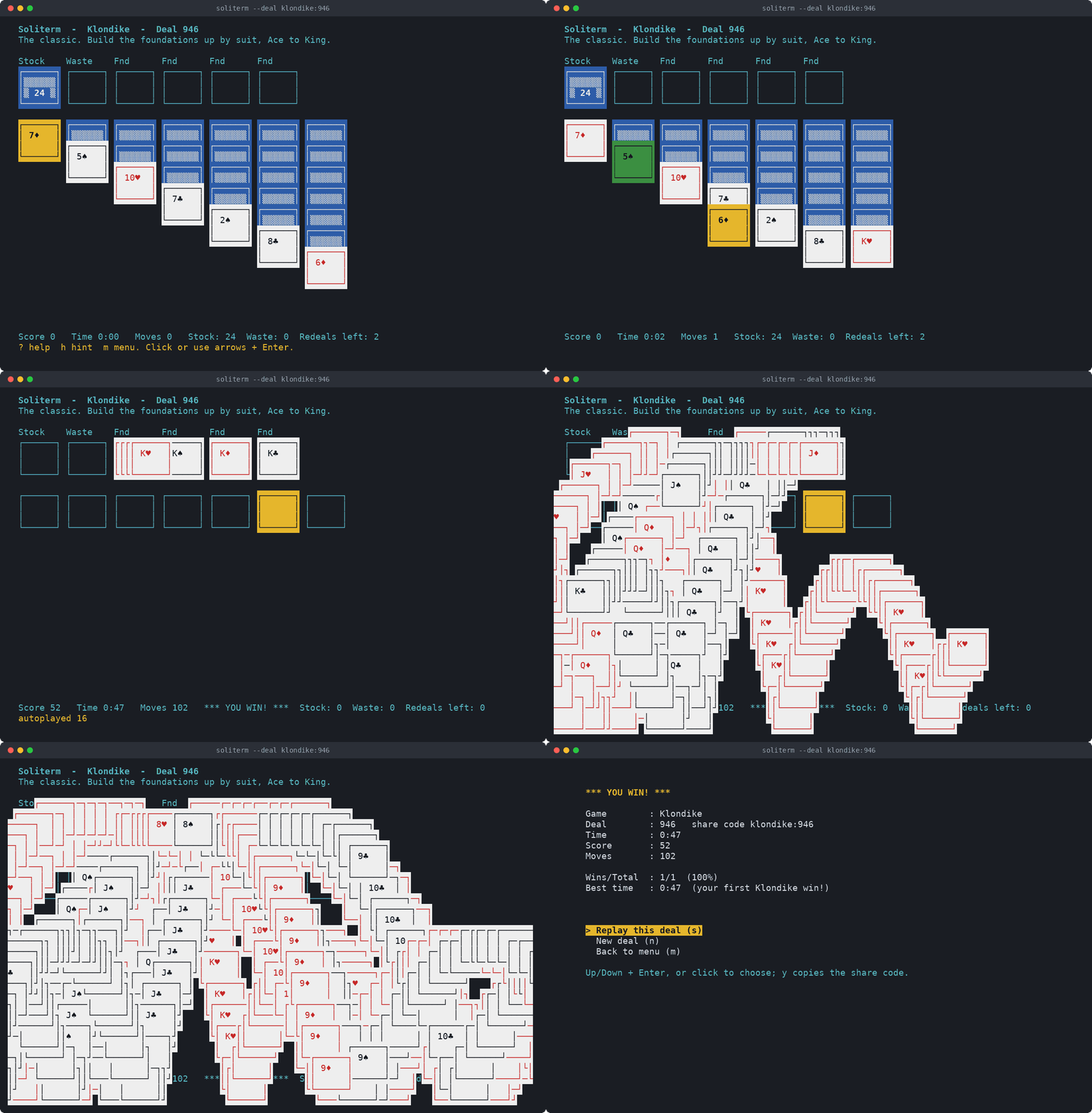
Try it now
With pipx, this downloads it into a temporary environment and plays it straight away:
pipx run soliterm
To keep it:
pipx install soliterm      # or: pip install soliterm
soliterm
Or take the single file from the latest release and run it with Python:
curl -LO https://github.com/bwenstar/soliterm/releases/latest/download/soliterm.pyz
python3 soliterm.pyz
Or play from a checkout:
git clone https://github.com/bwenstar/soliterm.git
cd soliterm
PYTHONPATH=src python3 -m soliterm
It needs Python 3.9 or newer, and nothing else on Linux and macOS. On
Windows, curses comes from the windows-curses package, which pip and pipx
install along with Soliterm. To play the .pyz there, run
py -m pip install windows-curses first, or it plays in text mode.
What's in it
- Twelve games: Klondike, Spider, FreeCell, Golf, Triple Peaks, Yukon and six more, each with AisleRiot's rules and scoring.
- Keyboard or mouse. The arrow keys and Enter, or click and drag. Hints, undo and redo all the way back to the deal, and one key to send every card up once the game is as good as won.
- Your statistics, shared with AisleRiot. When GNOME AisleRiot is installed the two keep one record, so a game won in either shows up in both. Soliterm adds win streaks on top.
- Deals you can share. Every deal has a number, and a share code
such as
klondike:d3:48213(Klondike drawing three, deal 48213) lets a friend play the same cards. Every game has a daily deal, the same for everyone that day, with nothing going online. - Leave whenever you like. Quit in the middle of a game and it's waiting on the menu next time, clock and all.
- Four themes, a four-colour deck and a compact view.
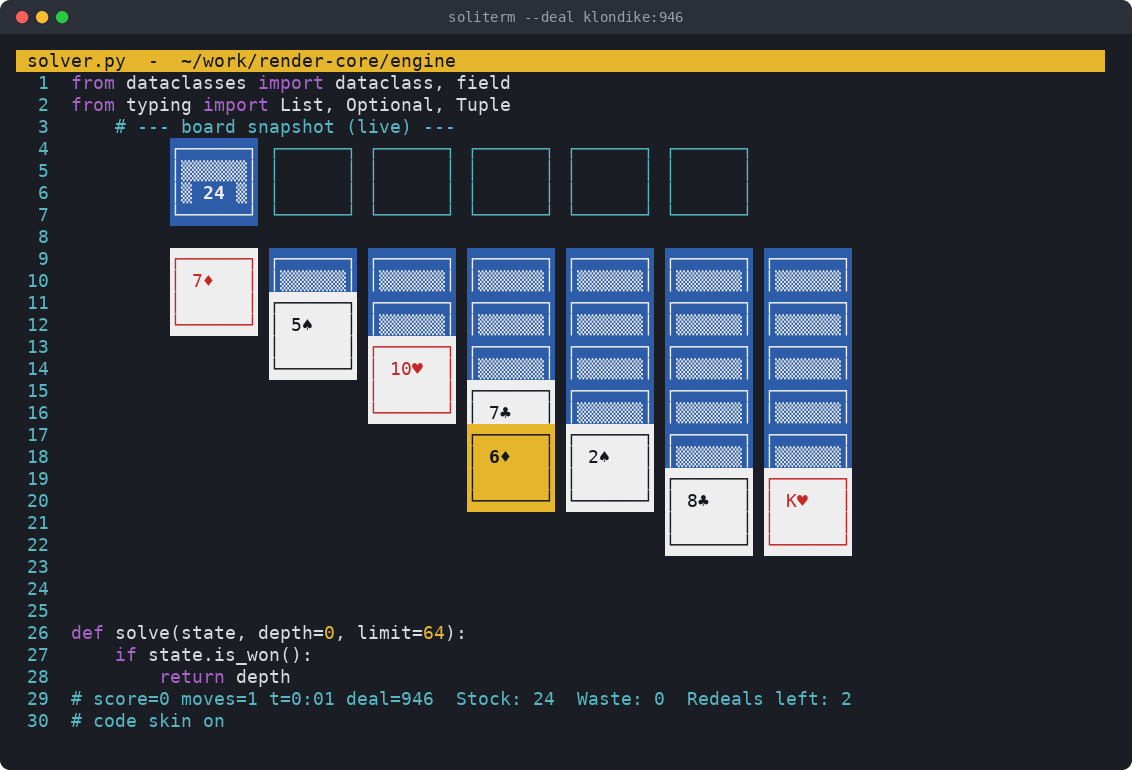
- A code skin and a boss key, for playing where you perhaps shouldn't.
- A text mode for pipes, scripts and terminals curses can't drive.
- Nothing to install but Python, and windows-curses on Windows, which
pip adds for you. The game uses the standard library alone and fits in
one
.pyzfile.
Screenshots
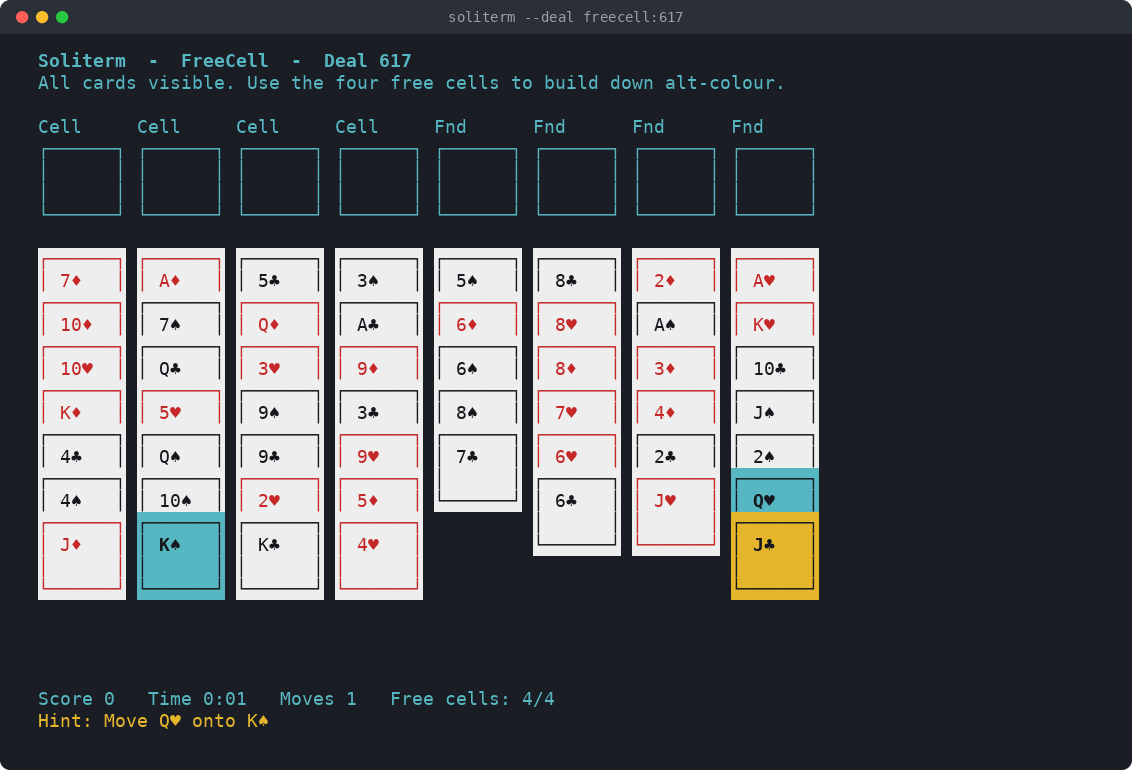
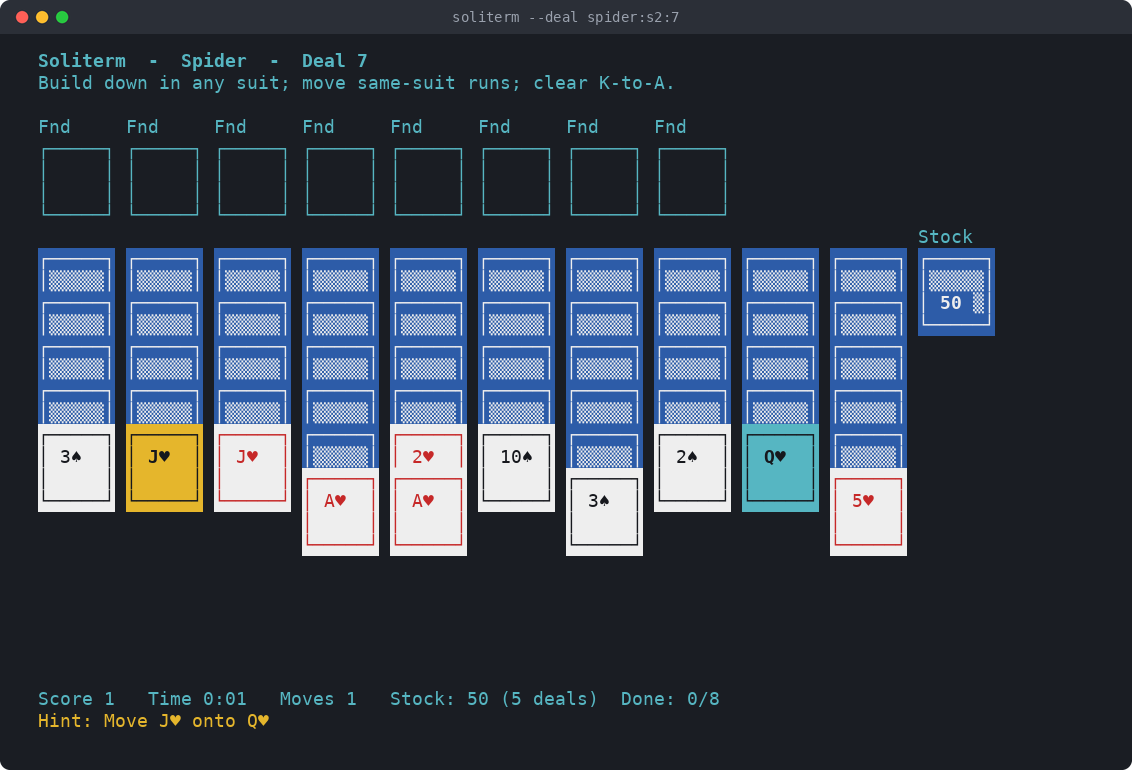
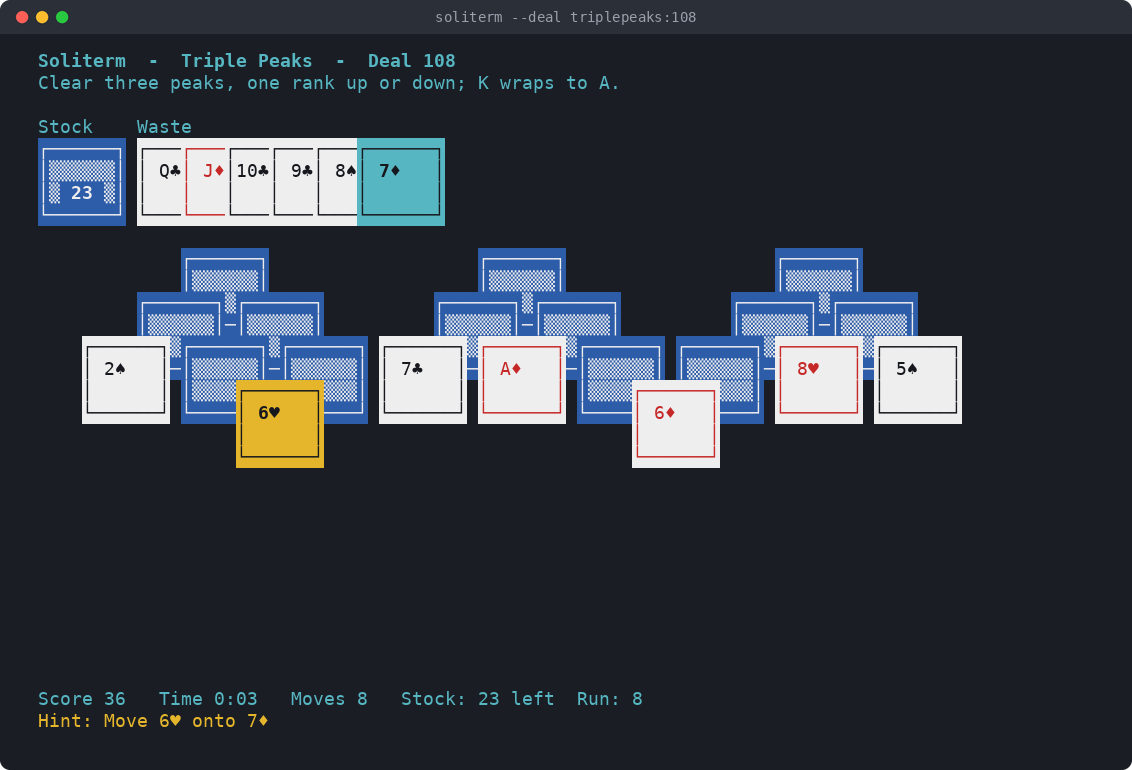
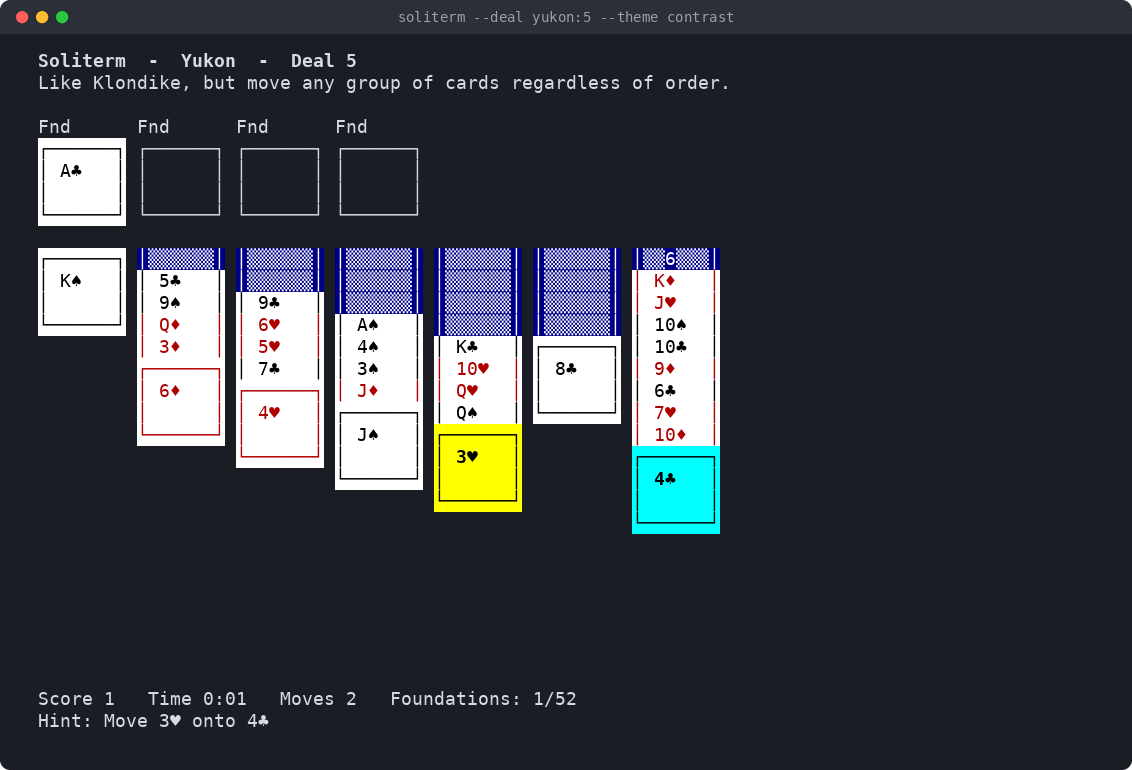
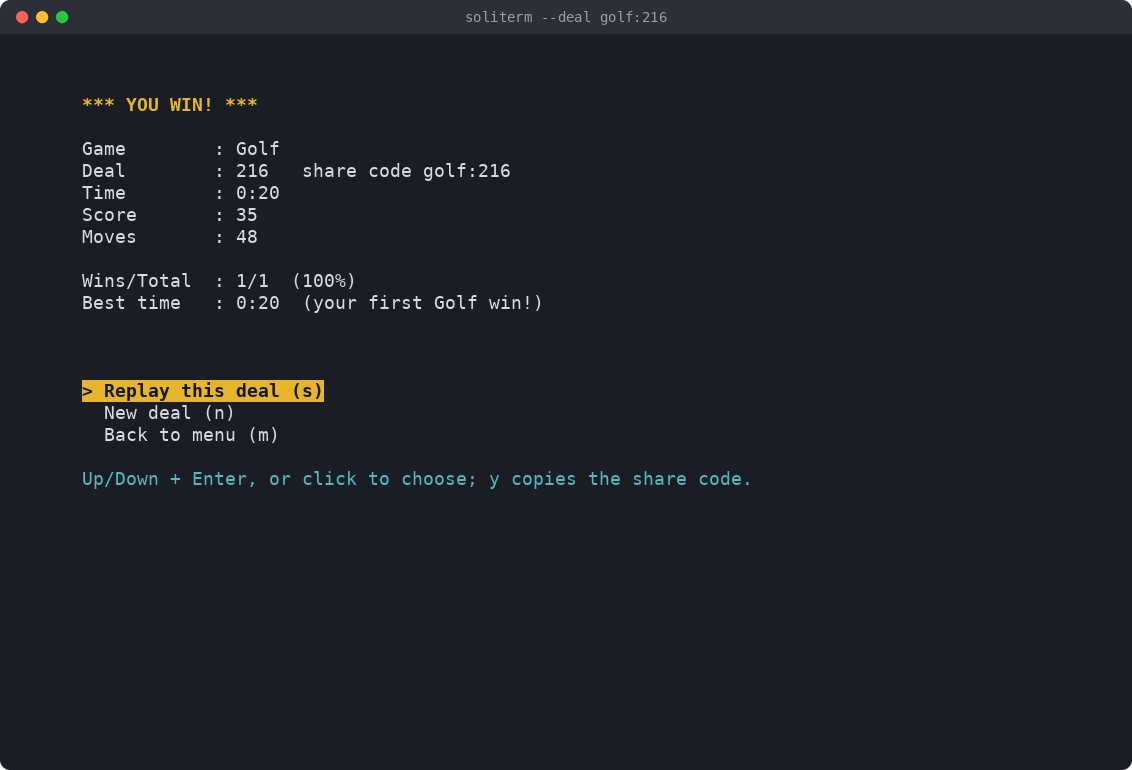
These and the recording at the top are all of a terminal 100 columns by 32 rows.
| FreeCell, with a hint | Spider in two suits |
|---|---|
 |
 |
| The code skin | Triple Peaks, eight cards into a run |
 |
 |
| Yukon in the contrast theme | A win |
 |
 |
The games
Each game has a page with its rules, its scoring and a few tips.
| Game | Key | What it's like |
|---|---|---|
| Klondike | klondike |
The classic one-deck game: seven columns and a stock, drawing one card or three. |
| Spider | spider |
Two decks, ten columns: build full King to Ace runs in one, two or four suits. |
| Spiderette | spiderette |
Spider on one deck and seven columns, dealt like Klondike, in four suits. |
| FreeCell | freecell |
Every card face up, four free cells, and nearly every deal can be won. |
| Eight Off | eightoff |
FreeCell's cousin with eight cells and columns built in suit; nearly all skill. |
| Golf | golf |
Clear seven face-up columns onto the waste, one rank up or down, no wrapping. |
| Triple Peaks | triplepeaks |
Clear three overlapping peaks onto the waste, a rank up or down, in scoring runs. |
| Yukon | yukon |
Klondike with no stock, where any face-up group can move, in order or not. |
| Scorpion | scorpion |
Seven columns built down in suit, any face-up group moves, and no foundations. |
| Bakers Dozen | bakersdozen |
One deck, thirteen open columns, no stock; build down by rank in any suit. |
| Forty Thieves | fortythieves |
Two decks, ten columns built down in suit, one pass through the stock. |
| Canfield | canfield |
Reserve of 13, deal three with unlimited redeals, foundations from a random base rank. |
soliterm on its own opens a menu of them, and soliterm --game spider
goes straight to one.
Playing
These are the keys you need for a first game:
| Keys | What they do |
|---|---|
| Arrow keys | move the cursor between the piles |
Enter or Space |
pick up the cards at the cursor, then press again on another pile to put them down |
d |
deal from the stock |
h |
show a hint |
u, r |
undo and redo |
a |
send up every card that's safe to, or finish the game once every card can go up |
n |
deal a new game |
? |
show every key |
q |
quit, keeping the game for next time |
With the mouse, click a card to pick it up along with the cards on it,
then click where it goes, or drag it there. A double-click sends a card to
its foundation. In Golf and Triple Peaks, a click or Enter on a card
that goes on the waste plays it there.
There's a lot more, from the options and the statistics to the themes and the boss key, and docs/keybindings.md has every key on every screen.
Deals and share codes
Every deal has a number, shown at the top of the board, and the same
number deals the same cards on any computer and any Python.
soliterm --deal 48213 plays deal 48213 of the game you played last, or
of Klondike the first time (add --game for another), and n then deals
48214, so you can work through them in order. Numbers run from 0 to
2147483647, and a deal picked at random is one of the first million, to
keep its number short.
A share code names a deal exactly: the game, any options you've changed,
and the number. klondike:d3:48213 is Klondike drawing three, deal 48213.
The end of every game shows its code, and anyone can play the same cards
with soliterm --deal klondike:d3:48213, or by pressing g in a game, or
picking Play a deal on the menu, and typing it in. Options left at their
standard setting aren't written, so most codes are only the game and the
number. The ones that can appear are:
| Game | In a share code |
|---|---|
| Klondike | d1 or d3, the cards to draw; rs, rn or ru, standard, no or unlimited redeals |
| Spider | s1, s2 or s4, the number of suits |
| Triple Peaks | ss or sm, standard or multiplier scoring |
FreeCell deals use Microsoft FreeCell's numbers, so deal 617 here is deal 617 there, and 11982 is the one deal among the first 32,000 that can't be won.
--draw 3 and --suits 2 change Klondike's draw or Spider's suits for a
single run without saving them.
The daily deal
soliterm --daily deals today's hand of the game you played last, or of
Klondike the first time (add --game for another), and Daily deal on the
menu lists every game's. It's the same cards for everyone that day, with
the standard options. Today is your computer's date, and nothing goes
online. When it ends you get a line to paste to friends, which gives no
cards away:
Soliterm daily 2026-09-24, Klondike: won in 3:12, 87 moves
A daily is deal YYYYMMDD, so soliterm --deal klondike:20260924 plays that
day's cards again whenever you like.
Saved games
Leave a game with q, m or Ctrl-C, or close the terminal on it, and
it's kept for next time with its clock, its score and the moves to undo,
and the way out says so: soliterm: saved your Klondike game; run soliterm to pick it up. Each game has room for one saved game, so a Klondike and a
Spider can both be waiting, but not two Klondikes. The game's row on the
menu then reads Resume your game: 0:42, 31 moves, and picking it, or
starting it with --game, carries on where you left off. A daily you
leave is kept the same way, and that day's daily carries on with it.
A few things give a game up instead, and it counts as a loss: n for a new
deal, g for another deal, and changing the game's options with o. So
does leaving the "No moves left" screen, whether for a new deal or the
menu, with q or Ctrl-C, or by closing the terminal. Undo and Replay this
deal on that screen don't count anything.
On Windows, closing the console window or pressing Ctrl-Break ends
Soliterm at once, in text mode too. The game in play isn't kept or
counted, and if you'd picked it up from a save, that save is gone as well.
Leave with q, m or Ctrl-C to keep it.
A deal you ask for by number or share code, or with --draw or --suits,
is always the deal you asked for, even when that game has a saved game
waiting. The saved one stays where it is for later. There's only room for
one, though, so the new deal says it won't be kept, and it counts as lost
when you leave it. With nothing waiting, it's kept like any other.
A kept game isn't in the statistics, here or in AisleRiot, until it's finished or given up. Then it counts once, with all the time you spent on it.
Text mode keeps games too, but only when you're typing at a terminal,
where Ctrl-D (Ctrl-Z and then Enter on Windows) keeps the game as q does.
From a script or a pipe, leaving a game you've started counts it as lost.
Statistics and AisleRiot
Soliterm keeps the statistics AisleRiot does for each game: the games won
and played, the percentage won, and the best and worst winning times.
When GNOME AisleRiot is installed, it reads and writes AisleRiot's own
record in ~/.config/gnome-games/aisleriot, so a game finished here shows
up in AisleRiot's Statistics window and a game won there shows up here.
It only ever changes the entries for its twelve games and leaves the rest
of that file as it was. Until AisleRiot has been run once to make that
file's folder, results wait in Soliterm's own statistics and go in after.
AisleRiot reads that file once, when it starts, and can write its own copy
back over it when it quits. A game finished here while AisleRiot is open
is then lost from AisleRiot's statistics, and from the same numbers here,
so keep AisleRiot closed while you play here.
AisleRiot keeps no time for a win that took more than 100 minutes, so
while the two share, Soliterm doesn't either.
Two columns go beyond AisleRiot's: Streak, the wins in a row you're on, and Longest, the most you've had. They come from the games played here, so a game played in AisleRiot doesn't count towards them.
s in a game shows the statistics, and soliterm --stats prints them
with the last ten games you played. soliterm --reset-stats clears them,
AisleRiot's record of the twelve games included, along with the history of
games played here. It asks you to type yes first (or takes --yes when
there's no terminal to ask at), keeps a copy of what it clears in
aisleriot.soliterm-bak next to AisleRiot's file and in stats.json.bak
and history.jsonl.bak next to Soliterm's, and leaves saved games alone.
To keep AisleRiot's statistics out of it:
- for good, set
"sync_aisleriot": falsein~/.config/soliterm/config.json; - for one run, pass
--no-sync, or setSOLITERM_NO_AISLERIOT=1.
Either way AisleRiot's file is neither read nor written. The games you play are counted in Soliterm's own statistics, and go into AisleRiot's with the next game that's shared.
Themes
t moves on to the next theme and the game remembers it, and
--theme NAME picks one for a single run.
| Theme | What it looks like |
|---|---|
classic |
the look Soliterm has always had, in your terminal's own colours |
dark |
softer colours for a dark background, on 256-colour terminals |
light |
the same for a light background |
contrast |
text in your terminal's own colours, and the strongest card colours |
On a terminal without 256 colours, dark and light look like classic.
classic and contrast suit themselves to a light background when the
terminal says it has one, as the terminal notes below explain.
4 swaps the red and black deck for a four-colour one, as bridge players
use: green clubs and orange diamonds, or blue diamonds on a terminal
without 256 colours. It works with every theme, and the game remembers it
too.
Text mode
--text plays the same games as plain lines of text. It prints the board,
reads a command, and prints the board again:
$ soliterm --text --deal golf:216 --ascii
Soliterm - Golf - Deal 216 (text mode). Type h for help.

=== Golf ===
stk#0 wst#1
[###] [   ]
 (17)

   #2    #3    #4    #5    #6    #7    #8
[ 7C] [ JC] [ 2C] [ 4D] [ KD] [ QS] [ JS]
[ 8S] [10C] [ AH] [10D] [ AD] [ QH] [ JD]
[ 6D] [ 7H] [ KH] [ 6H] [ 5D] [ AS] [ 4C]
[ 4S] [ QC] [ KS] [ 5C] [ 9H] [ 3S] [ 2S]
[ 5H] [ JH] [ 9D] [ 7D] [ 9S] [10H] [ 5S]

score=0 moves=0 | Stock: 17 left
A slot is named by the number in its tag. Here d deals a card onto the
waste in slot 1, and after a second d puts 6S there, 2 1 moves the 5H
from slot 2 onto it. hint suggests a move and h lists the rest. It's
also what you get when the input or the output isn't a terminal, so
printf 'hint\nq\n' | soliterm --deal golf:216 works, and when curses
can't run, with a line on stderr saying why.
docs/text-mode.md
has the whole of it.
Options
| Option | What it does |
|---|---|
--game GAME |
start a game instead of the menu; --list shows the names |
--deal N, --deal CODE |
play deal N, or the deal a share code names |
--daily |
play today's daily deal |
--draw 1, --draw 3 |
Klondike: draw one card or three, for this run only |
--suits 1, --suits 2, --suits 4 |
Spider: play with one, two or four suits, for this run only |
--text |
play in text mode even at a terminal |
--ascii |
show the suits as S, H, D and C and draw the cards in plain ASCII |
--color |
colour in text mode even when the output isn't a terminal, and colour on in the full-screen game |
--no-color |
no colour, in either mode, for this run |
--theme NAME |
classic, dark, light or contrast, for this run only |
--no-animation |
finish and win without animating the cards |
--list |
list the games and exit |
--stats |
print the statistics and exit |
--reset-stats |
erase the statistics of every game, asking first, and exit |
--yes |
with --reset-stats, don't ask |
--no-sync |
leave AisleRiot's statistics alone this time |
--debug-info |
print what a bug report needs and exit |
--version |
print the version and exit |
-h, --help |
print a summary of the options and exit |
In config.json, "animation": false turns the animation off for good,
and "symbols": false does the same for --ascii. NO_COLOR turns
colour off as --no-color does, and v switches it in the game.
The man page covers all of this along with the environment variables and
the exit statuses. From a checkout, read it with man -l man/soliterm.6.
Where your files live
| File | What's in it |
|---|---|
~/.config/soliterm/config.json |
your settings: each game's options, the colours and theme, the game last played |
~/.local/share/soliterm/stats.json |
the statistics of every game |
~/.local/share/soliterm/history.jsonl |
a line for every game played here, which the streaks come from |
~/.local/share/soliterm/saves/ |
the games kept for next time, one file for each game |
~/.config/gnome-games/aisleriot |
AisleRiot's own statistics, shared when AisleRiot is installed |
XDG_CONFIG_HOME takes the place of ~/.config and XDG_DATA_HOME of
~/.local/share, as usual. On Windows, ~ is your user profile folder.
soliterm --debug-info prints where the files are on your machine.
Pointing both variables at an empty folder gives you a fresh start that leaves your own files alone, which is handy for trying things out:
tmp=$(mktemp -d)
XDG_CONFIG_HOME=$tmp XDG_DATA_HOME=$tmp soliterm --no-sync
Upgrading from aisle-cli
Soliterm used to be called aisle-cli, and on its first run it copies aisle-cli's settings and statistics across, leaving the old files where they were. The man page's FILES section has the details.
Terminal notes
- Size. Every game and every screen fits in 80 by 24. Most boards fit
in less, down to 40 by 16 for Klondike, but the big ones need more:
Bakers Dozen needs 68 columns and Triple Peaks 22 rows. In a window
that's too small, Soliterm says what size it needs instead of drawing a
cut-off board, and carries on once you make the window bigger. The
compact view,
x, works there too and takes fewer rows. - TERM. The full-screen game goes by
TERM, as curses does. When it isn't set, isdumb, or names a terminal this system has no entry for, Soliterm plays in text mode and says why.xterm-256colorsuits most terminals. - Colours. The
darkandlightthemes need a terminal with 256 colours. With 8 or 16, or direct colour such asxterm-direct, they look likeclassic. - Light backgrounds. Some terminals, such as rxvt and Konsole, say
what their colours are in
COLORFGBG, and when it ends in;7or;15Soliterm takes the background to be light. If yours doesn't set it, or says the wrong thing, pickdarkorlight, which look the same everywhere, or setCOLORFGBG=0;15for a light background. - Suits and card edges. The cards are drawn with box-drawing
characters and suit symbols, which need a UTF-8 locale and a font that
has them. When the full-screen game can't encode them (under
LC_ALL=C, say), it draws letters and plain ASCII by itself, and text mode does the same when its output can't take them. If they come out as boxes or question marks anyway, use--ascii. - tmux and screen. Inside them,
TERMis theirs.tmux-256color,screen-256colorandscreen.xterm-256colorall have 256 colours, but plainscreenhas 8.set -g default-terminal tmux-256colorin~/.tmux.conf, orterm screen-256colorin~/.screenrc, fixes that. IfEscis slow to act in tmux, that's itsescape-time, which is half a second in many versions;set -sg escape-time 25brings it down. - Windows. The game needs the windows-curses package there, which pip
and pipx install along with it. Without it, Soliterm plays in text mode
and tells you how to add it.
TERMdoesn't matter on Windows. Closing the console window or pressing Ctrl-Break loses the game in play, as Saved games above explains.
Contributing
Bug reports, fixes and new games are all welcome.
CONTRIBUTING.md
has the setup, the checks CI runs and the house rules.
docs/adding-a-game.md
walks through adding a game, and
docs/architecture.md
shows how the pieces fit together. The tests run with python -m pytest,
never touch your real files, and take under a minute. For a security
problem, see
SECURITY.md.
Licence
Soliterm is MIT licensed; see LICENSE.
It plays by AisleRiot's rules and shares AisleRiot's statistics file, but Soliterm is not affiliated with or endorsed by GNOME or the AisleRiot authors.
1 maintainer

Metadata
1 maintainer
Release files for soliterm 1.0.1
For a detailed explanation of source distributions (sdists) and built distributions (wheels), please see the package formats documentation.
Source distribution (sdist)
| File | Size | Uploaded | |
|---|---|---|---|
| soliterm-1.0.1.tar.gz | 293.0 kB | Details |
Built distribution (wheel)
| File | Interpreter | ABI | Platform | Reset |
|---|---|---|---|---|
| soliterm-1.0.1-py3-none-any.whl | Python 3 | none | any | Details |
Total release size: 433.9 kB
Release files / soliterm-1.0.1.tar.gz
| Download URL | soliterm-1.0.1.tar.gz |
|---|---|
| Size | 293.0 kB |
| Tags | Source |
|
SHA-256 checksum How to use checksums |
3ac983356f71943d6af7aa779d00aa775cfc2f7cbfb46c7e8adc862b421d30c0
|
|
BLAKE2b-256 checksum How to use checksums |
9536a1f6b59564f6f249a663c8ccfc2baca834c9c7a48e83d1306563e8ae7d2c
|
| Upload date | |
|
Uploaded using Trusted Publishing? What is trusted publishing? |
Yes |
| Uploaded via |
twine/7.0.0 CPython/3.13.14
|
Provenance
Provenance describes where a file came from. On PyPI, provenance is shared via attestations, which provide a verifiable record of the build or publishing details. View details, limitations and caveats.


PyPI Publish Attestation
PyPI verified that this artifact, at this checksum, originated from the publisher listed below.
Signed by GitHub Actions, verified by PyPI on Sep 29, 2026.
Transparency logRelease files / soliterm-1.0.1-py3-none-any.whl
| Download URL | soliterm-1.0.1-py3-none-any.whl |
|---|---|
| Size | 140.8 kB |
| Tags | Python 3 |
|
SHA-256 checksum How to use checksums |
e580f07ef03988357fbdbf7d55accfa52651597170a80b54943c27e0e7295fd0
|
|
BLAKE2b-256 checksum How to use checksums |
1b80844737fcfa25df54e27b04edc7b94af95544485a3144e13ca303a939e4bf
|
| Upload date | |
|
Uploaded using Trusted Publishing? What is trusted publishing? |
Yes |
| Uploaded via |
twine/7.0.0 CPython/3.13.14
|
Provenance
Provenance describes where a file came from. On PyPI, provenance is shared via attestations, which provide a verifiable record of the build or publishing details. View details, limitations and caveats.
PyPI Publish Attestation
PyPI verified that this artifact, at this checksum, originated from the publisher listed below.
Signed by GitHub Actions, verified by PyPI on Sep 29, 2026.
Transparency log













