
This release is a pre-release and may not be stable for production use.

SoloSheet
"Sum to the Highest" — a spreadsheet built on the open .sheet format.
Local, private, and lean. Part of the SoloGrove family.
What it does
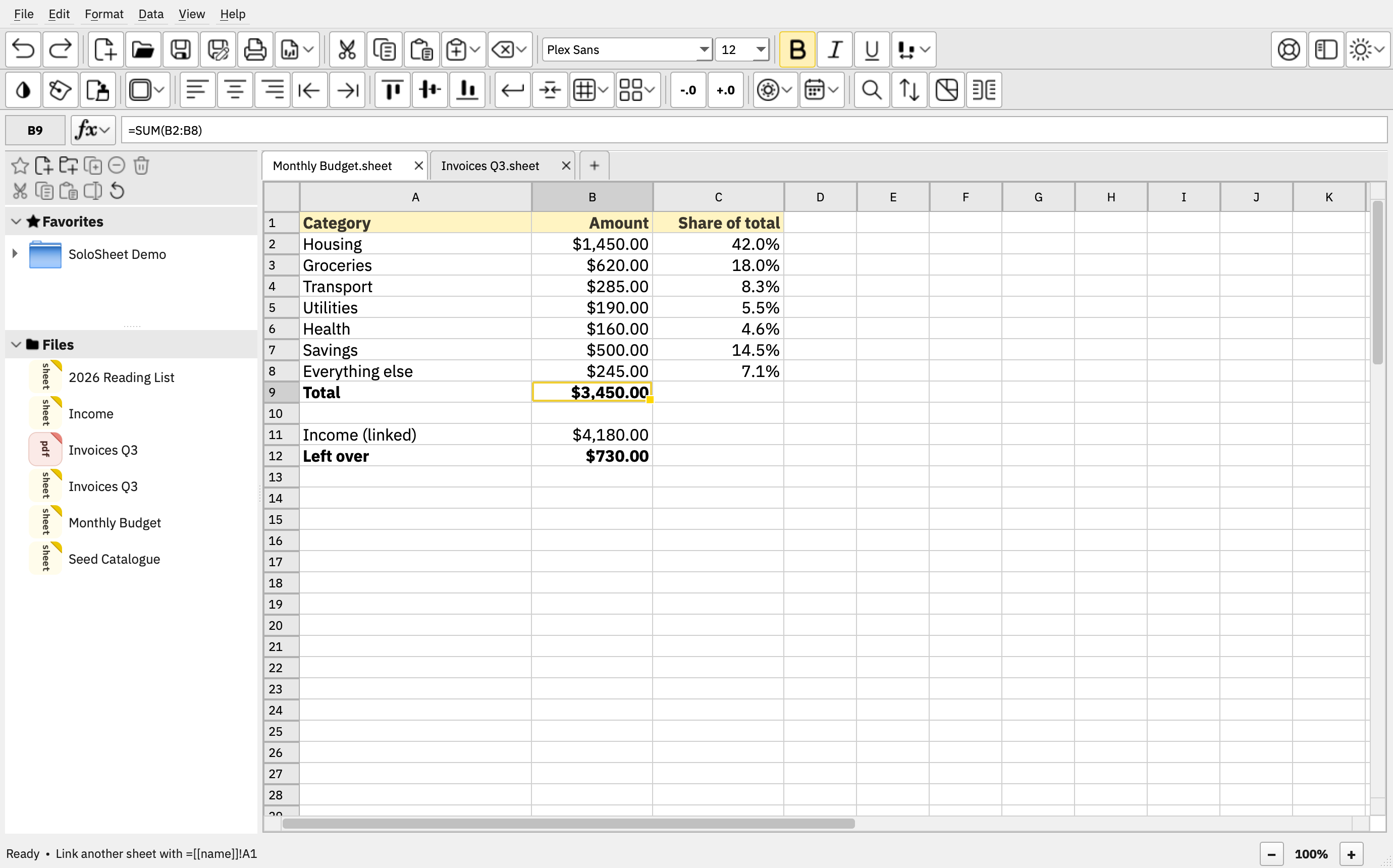
- Wiki-linked sheets — every
.sheetfile is a single spreadsheet, linkable to others the way wikis link pages, right inside formulas:=[[sales]]!B4,=SUM([[sales]]!A1:A20),=[[q1]]!A1 + [[q2]]!A1. - An open format — clean, structured JSON that any person, program, or AI
can parse. No XML, no lock-in. Open a
.sheetin a text editor and read your own data. Spec: solosheet.org/format. - Local & private — 100% offline, zero telemetry, no accounts. There is no code in it that opens a socket. Your files are just files.
- Lean by design — as Markdown is to Word, SoloSheet is to Excel: fewer features, so it stays simple, fast, portable, and future-proof. CSV import and export move data in and out.
- One experience — built on solocore: the same look and behavior on Linux, BSD, macOS, and Windows, multilingual by design with full right-to-left support.
Install
Full per-platform instructions live at solosheet.org/install. The short version:
Linux (pipx from your distro, e.g. apt install pipx libxcb-cursor0):
pipx install solosheet
pipx ensurepath
solosheet-desktop install
Windows (no Python needed — uv brings its own):
winget install astral-sh.uv
uv tool install solosheet
solosheet-desktop install
FreeBSD (Qt from ports; the one extra flag is what lets pipx see it):
pkg install py312-pipx py312-pyside6
pipx install --system-site-packages solosheet
solosheet-desktop install
macOS: see solosheet.org — macOS installs a
signed-by-checksum .dmg rather than the PyPI package.
solosheet-desktop install registers the launcher, the .sheet file
association, and the document icon — per-user, no root, no admin.
Requirements
Python 3.10+. Qt arrives automatically as a PySide6 wheel (6.8+) — nothing to install separately. On Linux the wheels need glibc ≥ 2.34 (x86_64: Debian 12+, Ubuntu 22.04+, Fedora 35+, RHEL 9+, Arch, Tumbleweed) or glibc ≥ 2.39 (ARM64: Ubuntu 24.04+, Debian 13+, Raspberry Pi OS trixie); floors current as of PySide6 6.11. Musl distributions are not supported. Windows 10 (1809)+ on x64 or native ARM64.
Updating
SoloSheet never checks for updates — that is a promise, not a gap. Subscribe
to the release feed,
then pipx upgrade solosheet (or uv tool upgrade solosheet) when you
choose to.
GPL-3.0-or-later. The sdist beside every wheel carries the complete source.
1 maintainer

Metadata
1 maintainer
Release files for solosheet 1.0.0rc5
For a detailed explanation of source distributions (sdists) and built distributions (wheels), please see the package formats documentation.
Source distribution (sdist)
| File | Size | Uploaded | |
|---|---|---|---|
| solosheet-1.0.0rc5.tar.gz | 1.2 MB | Details |
Built distribution (wheel)
| File | Interpreter | ABI | Platform | Reset |
|---|---|---|---|---|
| solosheet-1.0.0rc5-py3-none-any.whl | Python 3 | none | any | Details |
Total release size: 2.2 MB
Release files / solosheet-1.0.0rc5.tar.gz
| Download URL | solosheet-1.0.0rc5.tar.gz |
|---|---|
| Size | 1.2 MB |
| Tags | Source |
|
SHA-256 checksum How to use checksums |
a9931b8759b448e3797abdc542408fee679ba6a7917e7ffdd168e89da770b815
|
|
BLAKE2b-256 checksum How to use checksums |
44c9ade0f99146032e03d12d01720e5267748a4c63f2dfd739792daae705a003
|
| Upload date | |
|
Uploaded using Trusted Publishing? What is trusted publishing? |
No |
| Uploaded via |
uv/0.11.25 {"installer":{"name":"uv","version":"0.11.25","subcommand":["publish"]},"python":null,"implementation":{"name":null,"version":null},"distro":{"name":"macOS","version":null,"id":null,"libc":null},"system":{"name":null,"release":null},"cpu":null,"openssl_version":null,"setuptools_version":null,"rustc_version":null,"ci":null}
|
Release files / solosheet-1.0.0rc5-py3-none-any.whl
| Download URL | solosheet-1.0.0rc5-py3-none-any.whl |
|---|---|
| Size | 960.0 kB |
| Tags | Python 3 |
|
SHA-256 checksum How to use checksums |
57eccedef4e88c1b418ae092bee189eadd8d675ab54ea13e200e679bd3fc1f1a
|
|
BLAKE2b-256 checksum How to use checksums |
6358d1b90d5b976cbaac5e3f9c2d5b075622d2507e1d5cd561e8014751a8ab50
|
| Upload date | |
|
Uploaded using Trusted Publishing? What is trusted publishing? |
No |
| Uploaded via |
uv/0.11.25 {"installer":{"name":"uv","version":"0.11.25","subcommand":["publish"]},"python":null,"implementation":{"name":null,"version":null},"distro":{"name":"macOS","version":null,"id":null,"libc":null},"system":{"name":null,"release":null},"cpu":null,"openssl_version":null,"setuptools_version":null,"rustc_version":null,"ci":null}
|














