
SOLWEIG-GPU: GPU-Accelerated Thermal Comfort Modeling Framework









SOLWEIG-GPU is a Python package and command-line interface for running the standalone SOLWEIG (Solar and LongWave Environmental Irradiance Geometry) model on CPU or GPU (if available). It enables high-resolution urban microclimate modeling by computing key variables such as Sky View Factor (SVF), Mean Radiant Temperature (Tmrt), and the Universal Thermal Climate Index (UTCI).
What is new in Version 2
- Modular code to calculate wall and aspect, sky-view factor, and TMRT/UTCI
- Ability to compute wet bulb globe temperature (WBGT)
- Bug fixes
- Implements GLIDE-SOL (Zonato et al., 2026) features:
- Download and process the required input datasets
- Wind direction based wind-extension coefficient calculation (requires ERA5 data)
- Compute diagnostic urban heat island intensity (UHII) when ERA5 forcing data is used
Cite this work as
-
Kamath, H. G., Sudharsan, N., Singh, M., Wallenberg, N., Lindberg, F., & Niyogi, D. (2026). SOLWEIG-GPU: GPU-Accelerated Thermal Comfort Modeling Framework for Urban Digital Twins. Journal of Open Source Software, 11(118), 9535. https://doi.org/10.21105/joss.09535
-
Zonato, A., Kamath, H.G., Sudharsan, N., Monaco, L., Kittner, J., Wolf, L., Demuzere, M.A., Middel, A., Bechtel, B. and Milelli, M., 2026. GLIDE-SOL: A GPU-accelerated Global Lightweight Infrastructure for Diagnostic Environmental Modeling with SOLWEIG. EGUsphere, 2026, pp.1-30. https://doi.org/10.5194/egusphere-2026-776
SOLWEIG was originally developed by Dr. Fredrik Lindberg's group. Journal reference: Lindberg, F., Holmer, B. & Thorsson, S. SOLWEIG 1.0 – Modelling spatial variations of 3D radiant fluxes and mean radiant temperature in complex urban settings. Int J Biometeorol 52, 697–713 (2008). https://doi.org/10.1007/s00484-008-0162-7
SOLWEIG GPU code is an extension of the original SOLWEIG Python model that is part of the Urban Multi-scale Environmental Predictor (UMEP). GitHub code: https://github.com/UMEP-dev/UMEP
UMEP journal reference: Lindberg, F., Grimmond, C.S.B., Gabey, A., Huang, B., Kent, C.W., Sun, T., Theeuwes, N.E., Järvi, L., Ward, H.C., Capel-Timms, I. and Chang, Y., 2018. Urban Multi-scale Environmental Predictor (UMEP): An integrated tool for city-based climate services. Environmental Modelling & Software, 99, pp.70-87. https://doi.org/10.1016/j.envsoft.2017.09.020
For detailed documentation, see Solweig-GPU Documentation
Features
- CPU and GPU support (automatically uses GPU if available)
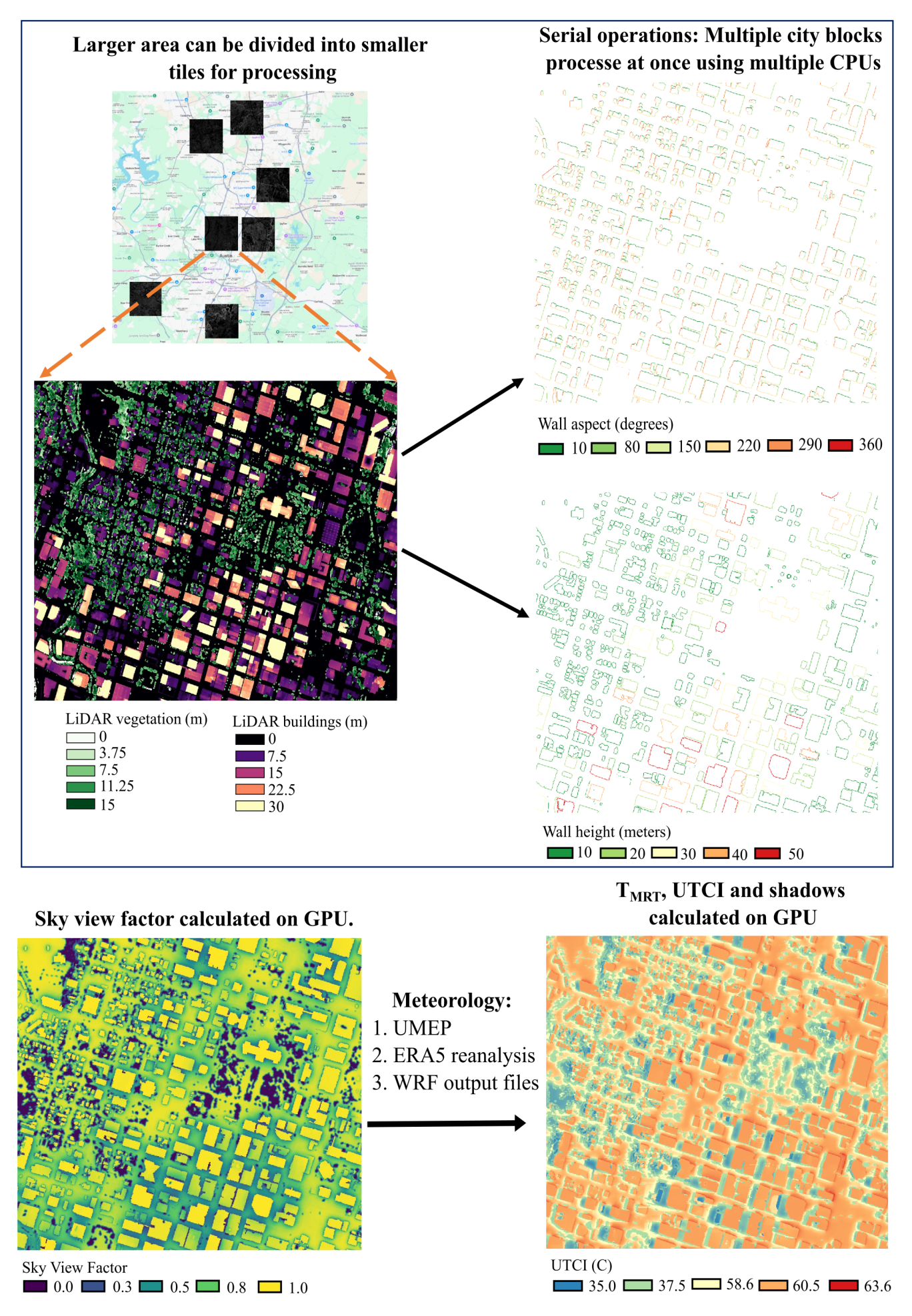
- Divides larger areas into tiles based on the selected tile size
- CPU-based computations of wall height and aspect are parallelized across multiple CPUs
- GPU-based computation of SVF, shortwave/longwave radiation, shadows, Tmrt, and UTCI
- Compatible with meteorological data from UMEP, ERA5, and WRF (
wrfout) - Pipeline can be run in stages (
preprocess,run_walls_aspect,run_utci_tiles) for subset-of-tiles or reuse; see documentation (Developer Guide and API Reference)
Flowchart of the SOLWEIG-GPU modeling framework
Required Input Data
Building DSM: Includes both buildings and terrain elevation (e.g.,Building_DSM.tif)DEM: Digital Elevation Model excluding buildings (e.g.,DEM.tif)Tree DSM: Vegetation height data only (e.g.,Trees.tif)
Currently tested only for hourly data
- Meteorological forcing:
- Custom
.txtfile (from UMEP) - ERA5 (both instantaneous and accumulated)
- WRF output NetCDF (
wrfout)
- Custom
ERA5 Variables Required
- 2-meter air temperature
- 2-meter dew point temperature
- Surface pressure
- 10-meter U and V wind components
- Downwelling shortwave radiation (accumulated)
- Forecasted surface roughness (if wind extinction coefficients are to be calculated)
Output Details
- Output directory:
output_folder/(under the directory you pass asbase_path) - Structure: One folder per tile (e.g.,
0_0/,1000_0/) - SVF: Single-band raster
- Other outputs: Multi-band raster (e.g., 24 bands for hourly results)
If you need outputs in a different folder, set base_path to that directory and pass complete paths for the rasters: building_dsm_filename, dem_filename, trees_filename, and landcover_filename (optional).
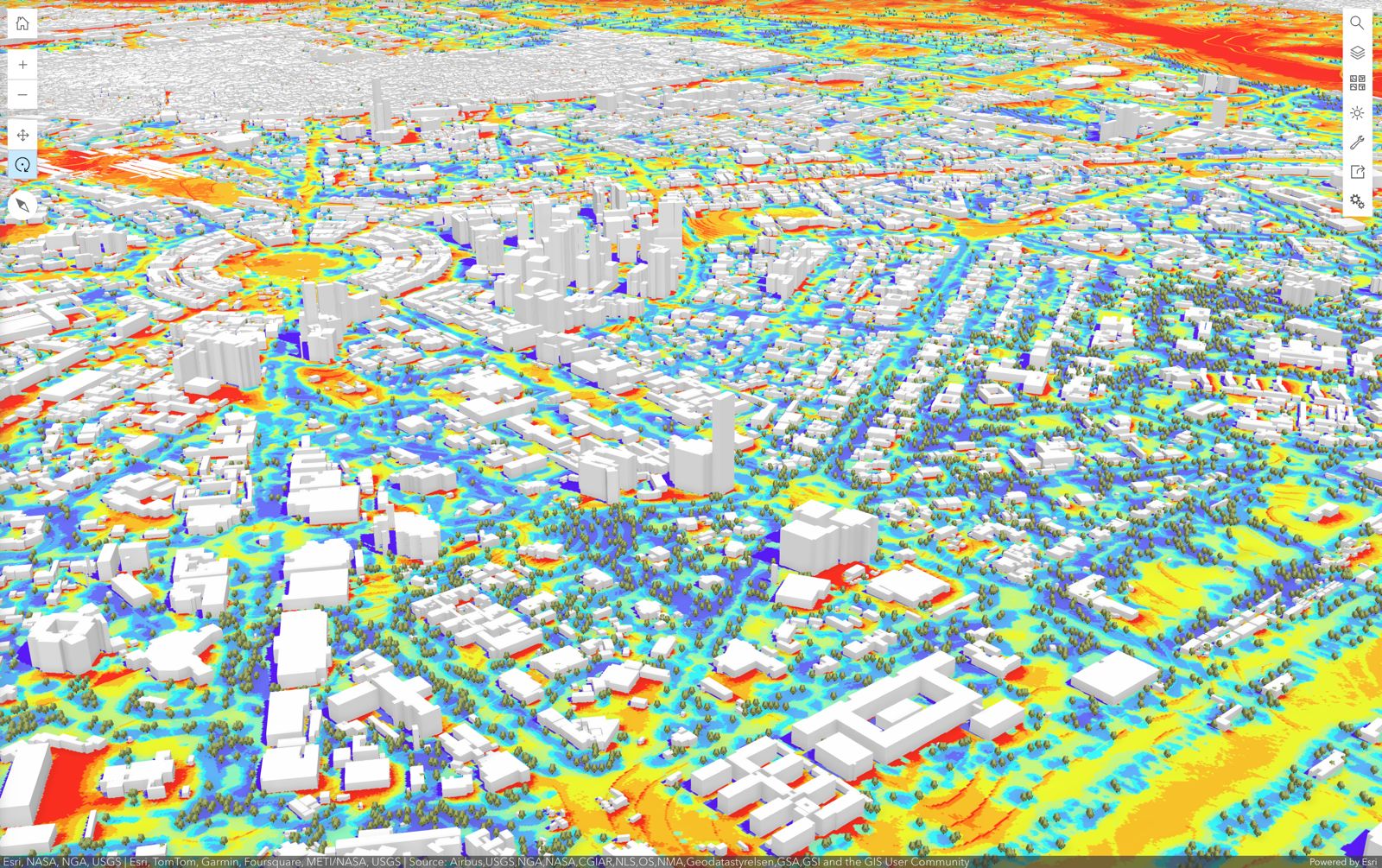
UTCI for New Delhi, India, generated using SOLWEIG-GPU and visualized with ArcGIS Online.
Installation
We recommend using conda environment (please see documentation)
conda create -n solweig python=3.10
conda activate solweig
conda install -c conda-forge gdal cudnn pytorch timezonefinder matplotlib #cudnn is required only if you are using nvidia GPU
pip install solweig-gpu
#if you have older versions installed
pip install --upgrade solweig-gpu
Testing
Run the test suite with:
pytest -q
With coverage:
pytest --cov=solweig_gpu --cov-report=term-missing
CI runs tests on Linux and macOS across Python 3.10–3.12.
Sample Data
Please refer to the sample dataset to familiarize yourself with the expected inputs. Sample data can be found at:
Python Usage
Notes on sample data and forcing options
-
The
Input_rasterfolder in the sample contains the raster files required by SOLWEIG-GPU:Building_DSM.tifDEM.tifTrees.tifLandcover.tif(optional)
-
SOLWEIG-GPU can be meteorologically forced in three ways:
- Using your own meteorological
.txtfile - ERA5 reanalysis
- Weather Research and Forecasting (WRF) output files. Make sure filenames follow one of:
wrfout_d0x_yyyy-mm-dd_hh_mm_ss(preferred; works across operating systems)wrfout_d0x_yyyy-mm-dd_hh:mm:sswrfout_d0x_yyyy-mm-dd_hh
- Using your own meteorological
-
The
Forcing_datafolder in the sample data contains example data for all forcing methods.
Examples
Data download (optional)
Download the required data for SOLWEIG-GPU from near-globally available urban datasets. Google Earth Engine must be authenticated before this process.
import os
from solweig_gpu import build_inputs

os.environ["EE_PROJECT"] = "your-gee-project-id"  # Your own GEE/GCP project ID

base_path = build_inputs(
    lat=latitude,
    lon=longitude,
    city="City name",
    km_buffer=2,        # Kilometers from the central lat-lon to set the download extent
    km_reduced_lat=1,
    km_reduced_lon=1,
    base_folder="/path/to/save/inputs",
    resolution=2,       # Spatial resolution of the generated rasters in meters
)

print("SOLWEIG input folder:", base_path)
Compute direction-based wind coefficients (optional)
This requires ERA5 data with the variable Forecasted surface roughness.
from solweig_gpu import build_wind_ext_coeff

build_wind_ext_coeff(
    "/path/to/solweig/input",                            # Base path where input rasters are present
    "/path/to/era5/data_stream-oper_stepType-instant.nc"  # ERA5 instantaneous file
)
Example 1: Modular way of running the model with ERA5
Step 1: Preprocess and create inputs in the required format
- The model simulation date is
2020-08-13. - The start and end dates provided to the model are
2020-08-13 06:00:00 UTCand2020-08-14 05:00:00 UTC, respectively. UTC to local time conversion is handled internally. For Austin, TX, this corresponds to2020-08-13 01:00:00to2020-08-13 23:00:00local time. - The
tile_sizedepends on the RAM available on the GPU. A smaller value is safer for lower-memory GPUs, while larger tiles can improve throughput on high-memory GPUs. - The
overlapcontrols the additional pixels used for shadow transfer between neighboring tiles. For example, withtile_size=1000andoverlap=100, the processed tile size becomes1100 × 1100pixels.
from solweig_gpu import preprocess

preprocess(
    base_path="/path/to/solweig/input",
    selected_date_str="2020-08-13",
    building_dsm_filename="Building_DSM.tif",
    dem_filename="DEM.tif",
    trees_filename="Trees.tif",
    landcover_filename="Landuse.tif",        # Use None if land cover is not used
    windcoeff_folder="/path/to/solweig/input", # Use None if wind coefficients are not used
    tile_size=400,
    overlap=0,
    use_own_met=False,
    start_time="2020-08-13 06:00:00",
    end_time="2020-08-14 05:00:00",
    data_source_type="ERA5",
    data_folder="/path/to/era5",
    own_met_file=None,
    preprocess_dir="/path/to/solweig/input",
    use_uhi=True,  # Use only with ERA5. Calculates diagnostic urban heat island intensity.
)
Step 2: Calculate wall height and aspect
from solweig_gpu import run_walls_aspect

run_walls_aspect("/path/to/solweig/input")
Step 3: Calculate the sky-view factor
from solweig_gpu import calculate_svf

calculate_svf(
    base_path="/path/to/solweig/input",
    patch_option=2,
    overwrite=False,
)
Step 4: Run the SOLWEIG-GPU model
from solweig_gpu import run_utci_tiles

run_utci_tiles(
    base_path="/path/to/solweig/input",
    preprocess_dir="/path/to/solweig/input",
    selected_date_str="2020-08-13",
    save_tmrt=True,
    save_svf=False,
    save_kup=False,
    save_kdown=False,
    save_lup=False,
    save_ldown=False,
    save_shadow=False,
    save_wbgt=False,
)
Example 2: Run the model end-to-end with ERA5
from solweig_gpu import thermal_comfort

thermal_comfort(
    base_path="/path/to/solweig/input",
    selected_date_str="2020-08-13",
    building_dsm_filename="Building_DSM.tif",
    dem_filename="DEM.tif",
    trees_filename="Trees.tif",
    landcover_filename="Landuse.tif",  # Use None if land cover is not used
    ERA_5_z0_find=True,  # If True, expects data_stream-oper_stepType-instant.nc in data_folder
    tile_size=400,
    overlap=0,
    use_own_met=False,
    start_time="2020-08-13 06:00:00",
    end_time="2020-08-14 05:00:00",
    data_source_type="ERA5",
    data_folder="/path/to/era5",
    use_uhi=True,
    save_wbgt=True,
)
Example 3: Run the model end-to-end with WRF
This can also be run in the modular way by following Example 1 and replacing data_source_type with wrfout.
from solweig_gpu import thermal_comfort

thermal_comfort(
    base_path="/path/to/solweig/input",
    selected_date_str="2020-08-13",
    building_dsm_filename="Building_DSM.tif",
    dem_filename="DEM.tif",
    trees_filename="Trees.tif",
    landcover_filename=None,
    ERA_5_z0_find=False,  # Set True only if data_folder contains ERA5 data_stream-oper_stepType-instant.nc
    tile_size=3600,
    overlap=20,
    use_own_met=False,
    start_time="2020-08-13 06:00:00",
    end_time="2020-08-14 05:00:00",
    data_source_type="wrfout",
    data_folder="/path/to/wrfout/files",
    own_met_file=None,
    use_uhi=False,  # Always keep False when using WRF forcing
    save_tmrt=True,
    save_svf=False,
    save_kup=False,
    save_kdown=False,
    save_lup=False,
    save_ldown=False,
    save_shadow=False,
    save_wbgt=False,
)
- The model simulation date is
2020-08-13. - The start and end dates provided to the model are
2020-08-13 06:00:00 UTCand2020-08-14 05:00:00 UTC, respectively. These are the start and end times of the WRF output in UTC. In local time, this corresponds to2020-08-13 01:00:00to2020-08-13 23:00:00for Austin, TX. UTC to local time conversion is handled internally. - The
tile_sizedepends on the RAM available on the GPU. The value can be reduced for lower-memory GPUs. - The
overlapcontrols the additional pixels used for shadow transfer between neighboring tiles. For example, withtile_size=3600andoverlap=20, the processed tile size becomes3620 × 3620pixels. - If
ERA_5_z0_find=True, SOLWEIG-GPU calculates wind-extension coefficients and expects the ERA5 filedata_stream-oper_stepType-instant.ncto be available indata_folder. Ifdata_folderpoints to WRF output files, keepdata_stream-oper_stepType-instant.ncin that folder.
Example 4: Own File
from solweig_gpu import thermal_comfort

thermal_comfort(
    base_path="/path/to/solweig/input",
    selected_date_str="2020-08-13",
    building_dsm_filename="Building_DSM.tif",
    dem_filename="DEM.tif",
    trees_filename="Trees.tif",
    landcover_filename=None,
    ERA_5_z0_find=False,  # Set True only if data_folder contains ERA5 data_stream-oper_stepType-instant.nc
    tile_size=3600,
    overlap=20,
    use_own_met=True,
    start_time=None,
    end_time=None,
    data_source_type=None,
    data_folder=None,
    own_met_file="/path/to/met.txt",
    use_uhi=False,  # Not recommended with user-provided meteorological files
    save_tmrt=True,
    save_svf=False,
    save_kup=False,
    save_kdown=False,
    save_lup=False,
    save_ldown=False,
    save_shadow=False,
    save_wbgt=False,
)
- Use this option when forcing SOLWEIG-GPU with a user-provided meteorological
.txtfile. - Keep
use_own_met=Trueand provide the meteorological file throughown_met_file. - Keep
use_uhi=Falsefor user-provided meteorological files. - If
ERA_5_z0_find=True, SOLWEIG-GPU expects the ERA5 filedata_stream-oper_stepType-instant.ncindata_folder. Because this example does not use ERA5 forcing, the safer default isERA_5_z0_find=False. - If
ERA_5_z0_find=True, wind directions should be available for each time step in the meteorological.txtfile.
Note for Windows Users
On Windows, Python uses the spawn start method for new processes: each worker re-imports your script. Without guarding the entry point, a top-level call to thermal_comfort() would run again in every child process, causing repeated execution and failures (e.g. BrokenProcessPool). Always call thermal_comfort() inside a main() function and use if __name__ == "__main__": (see example below).
from solweig_gpu import thermal_comfort
import multiprocessing as mp

def main():
    thermal_comfort(
    base_path="/path/to/solweig/input",
    selected_date_str="2020-08-13",
    building_dsm_filename="Building_DSM.tif",
    dem_filename="DEM.tif",
    trees_filename="Trees.tif",
    landcover_filename="Landuse.tif",  # Use None if land cover is not used
    ERA_5_z0_find=True,  # If True, expects data_stream-oper_stepType-instant.nc in data_folder
    tile_size=400,
    overlap=0,
    use_own_met=False,
    start_time="2020-08-13 06:00:00",
    end_time="2020-08-14 05:00:00",
    data_source_type="ERA5",
    data_folder="/path/to/era5",
    use_uhi=True,
    save_wbgt=True,
)

if __name__ == "__main__":
    mp.freeze_support()
    main()
Command-Line Interface (CLI)
Example using sample ERA5 data on Windows
conda activate solweig
thermal_comfort --base_path '/path/to/input' ^
                --date '2020-08-13' ^
                --building_dsm 'Building_DSM.tif' ^
                --dem 'DEM.tif' ^
                --trees 'Trees.tif' ^
                --tile_size 1000 ^
                --landcover  'Landcover.tif' ^
                --overlap 100 ^
                --use_own_met False ^
                --data_source_type 'ERA5' ^
                --data_folder '/path/to/era5' ^
                --start '2020-08-13 06:00:00' ^
                --end '2020-08-13 23:00:00' ^
                --era5_z0_find True ^
                --use_uhi True ^
                --save_tmrt True ^
                --save_svf False ^
                --save_kup False ^
                --save_kdown False ^
                --save_lup False ^
                --save_ldown False ^
                --save_shadow False ^
                --save_wbgt True ^
                --save_ta False ^
                --save_wind False
--era5_z0_findcomputes directional wind-extension coefficients and requiresdata_stream-oper_stepType-instant.ncin--data_folder. It defaults toTruewhen--data_folderis provided andFalseotherwise.--use_uhicomputes the diagnostic urban heat island intensity; use it only with ERA5 forcing (setFalsefor WRF or your own meteorological file).
Tip: Use
--helpto list all CLI options.
Contributing
Please refer to the documentation
2 maintainers


Download files
Download the file for your platform. If you're not sure which to choose, learn more about installing packages.
Source Distribution
Built Distribution
Filter files by name, interpreter, ABI, and platform.
If you're not sure about the file name format, learn more about wheel file names.
Copy a direct link to the current filters
File details
Details for the file solweig_gpu-2.0.0.tar.gz.
File metadata
- Download URL: solweig_gpu-2.0.0.tar.gz
- Upload date:
- Size: 4.6 MB
- Tags: Source
- Uploaded using Trusted Publishing? Yes
- Uploaded via:
twine/7.0.0 CPython/3.13.14
File hashes
| Algorithm | Hash digest | |
|---|---|---|
| SHA256 |
7e94ec391913310e600c8c2e7046ea3ce56b9d6ab30cf18d354aef040a762b0e
|
|
| MD5 |
f078001b3f6c316c9f4c4dce0fde93e1
|
|
| BLAKE2b-256 |
4bec1f55e4af1d36785153436e32c52dfffb13c1004633922a595543927c9f82
|
Provenance
The following attestation bundles were made for solweig_gpu-2.0.0.tar.gz:
Publisher:
publish.yml on nvnsudharsan/SOLWEIG-GPU
-
Statement:
-
Statement type:
https://in-toto.io/Statement/v1 -
Predicate type:
https://docs.pypi.org/attestations/publish/v1 -
Subject name:
solweig_gpu-2.0.0.tar.gz -
Subject digest:
7e94ec391913310e600c8c2e7046ea3ce56b9d6ab30cf18d354aef040a762b0e - Sigstore transparency entry: 2498804595
- Sigstore integration time:
-
Permalink:
nvnsudharsan/SOLWEIG-GPU@141579ea22e9fc830c5c0800ac50078a3df6c415 -
Branch / Tag:
refs/tags/v2.0.0 - Owner: https://github.com/nvnsudharsan
-
Access:
public
-
Token Issuer:
https://token.actions.githubusercontent.com -
Runner Environment:
github-hosted -
Publication workflow:
publish.yml@141579ea22e9fc830c5c0800ac50078a3df6c415 -
Trigger Event:
release
-
Statement type:
File details
Details for the file solweig_gpu-2.0.0-py3-none-any.whl.
File metadata
- Download URL: solweig_gpu-2.0.0-py3-none-any.whl
- Upload date:
- Size: 157.6 kB
- Tags: Python 3
- Uploaded using Trusted Publishing? Yes
- Uploaded via:
twine/7.0.0 CPython/3.13.14
File hashes
| Algorithm | Hash digest | |
|---|---|---|
| SHA256 |
60e61c6167b5bcb35d91e629375922940df28f3ded89b8b609482bbb45e1a0da
|
|
| MD5 |
b883fd3b5840e3caa119b3079b365b41
|
|
| BLAKE2b-256 |
f30189a4c6c067ffb88113ea65b71e349b579a689f32e55727d7fb687d0ad085
|
Provenance
The following attestation bundles were made for solweig_gpu-2.0.0-py3-none-any.whl:
Publisher:
publish.yml on nvnsudharsan/SOLWEIG-GPU
-
Statement:
-
Statement type:
https://in-toto.io/Statement/v1 -
Predicate type:
https://docs.pypi.org/attestations/publish/v1 -
Subject name:
solweig_gpu-2.0.0-py3-none-any.whl -
Subject digest:
60e61c6167b5bcb35d91e629375922940df28f3ded89b8b609482bbb45e1a0da - Sigstore transparency entry: 2498804599
- Sigstore integration time:
-
Permalink:
nvnsudharsan/SOLWEIG-GPU@141579ea22e9fc830c5c0800ac50078a3df6c415 -
Branch / Tag:
refs/tags/v2.0.0 - Owner: https://github.com/nvnsudharsan
-
Access:
public
-
Token Issuer:
https://token.actions.githubusercontent.com -
Runner Environment:
github-hosted -
Publication workflow:
publish.yml@141579ea22e9fc830c5c0800ac50078a3df6c415 -
Trigger Event:
release
-
Statement type:














