
Somato
Somato is a lightweight procedural body generation and rendering library for games and simulations.
It provides geometry-based building blocks for creating configurable body features from data.
Somato is designed to work with externally supplied parameters, making it suitable for:
- Procedural character generation
- Character customization
- Species and race definitions
- Simulation systems
- Randomized appearances
- Data-driven character creation
Version 0.1.0 currently focuses on procedural eyes.
Example Outputs
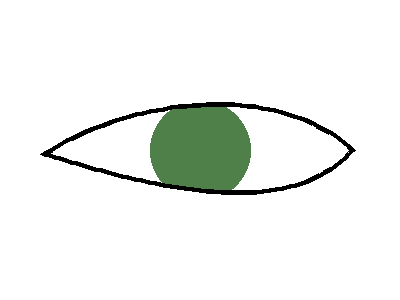
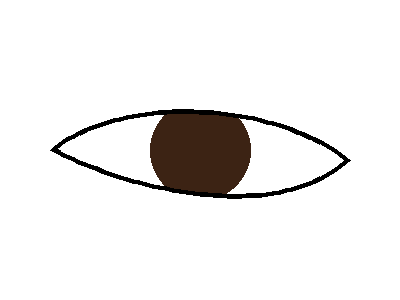
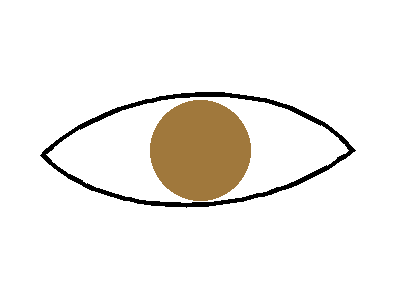
Features
- Cubic Bézier eye shapes
- Configurable eye geometry
- Iris rendering
- Iris clipping to the eye shape
- Eye scaling
- Independent horizontal and vertical scaling
- Eye rotation
- Custom sclera and outline colors
- Simple render pipeline
- Pillow-based image output
- Data-driven feature generation
Installation
Somato depends on Pillow.
Install dependencies with:
pip install -r requirements.txt
A minimal requirements.txt is:
Pillow
Basic Usage
Import the main Somato classes:
from somato import Somato, Eye, Iris
Create an iris:
iris = Iris(
	center=(200, 150),
	radius_x=35,
	color=(70, 130, 180)
)
Create an eye:
eye = Eye(
	p0=(50, 150),
	upper_p1=(120, 70),
	upper_p2=(280, 70),
	p3=(350, 150),
	lower_p1=(120, 230),
	lower_p2=(280, 230),
	thickness=5,
	iris=iris
)
Create a Somato canvas:
body = Somato(
	width=400,
	height=300
)
Add the eye:
body.add(
	eye
)
Save the result:
body.save(
	"eye.png"
)
Complete Example
from somato import Somato, Eye, Iris


iris = Iris(
	center=(200, 150),
	radius_x=35,
	radius_y=35,
	color=(80, 130, 75)
)


eye = Eye(
	p0=(50, 150),
	upper_p1=(120, 70),
	upper_p2=(280, 70),
	p3=(350, 150),
	lower_p1=(120, 230),
	lower_p2=(280, 230),
	thickness=5,
	iris=iris,
	sclera_color="white",
	outline_color="black"
)


somato = Somato(
	width=400,
	height=300,
	background_color="white"
)


somato.add(
	eye
)


somato.save(
	"eye.png"
)
Eye Geometry
An eye is created from two cubic Bézier curves.
The upper eyelid uses:
p0
upper_p1
upper_p2
p3
The lower eyelid uses:
p0
lower_p1
lower_p2
p3
Both curves share the same starting and ending points.
The two curves are combined into a closed shape that is filled with the sclera color.
Endpoints
p0 is the left endpoint of the eye.
p3 is the right endpoint of the eye.
For example:
p0=(50, 150)
p3=(350, 150)
These points determine the overall horizontal span of the eye.
Control Points
The control points determine the curvature of the upper and lower eyelids.
upper_p1=(120, 70)
upper_p2=(280, 70)

lower_p1=(120, 230)
lower_p2=(280, 230)
Moving these points changes the resulting eye shape.
Because the geometry is directly configurable, eye shapes can be created manually or generated from external data.
Cubic Bézier Curves
Somato uses cubic Bézier curves internally.
A cubic Bézier curve is calculated from four points:
P0
P1
P2
P3
Where:
P0 and P3 = endpoints
P1 and P2 = control points
Somato samples points along each curve and uses those points to construct the final eye shape.
You normally do not need to call the Bézier function directly when creating an eye.
Iris
An iris is represented by an ellipse.
iris = Iris(
	center=(200, 150),
	radius_x=35,
	radius_y=35,
	color="brown"
)
center
The center position of the iris:
center=(200, 150)
radius_x
The horizontal radius:
radius_x=35
radius_y
The vertical radius:
radius_y=35
If radius_y is omitted, it defaults to the same value as radius_x.
For example:
Iris(
	center=(200, 150),
	radius_x=35
)
creates a circular iris.
Different horizontal and vertical radii can create an elliptical iris:
Iris(
	center=(200, 150),
	radius_x=40,
	radius_y=30
)
color
The iris color can use any color format supported by Pillow.
For example:
color="brown"
or:
color=(70, 130, 180)
The iris is automatically clipped so that it does not render outside the eye shape.
Eye Appearance
The sclera color can be changed with:
sclera_color="white"
The outline color can be changed with:
outline_color="black"
The outline thickness is controlled by:
thickness=5
Example:
eye = Eye(
	p0=(50, 150),
	upper_p1=(120, 70),
	upper_p2=(280, 70),
	p3=(350, 150),
	lower_p1=(120, 230),
	lower_p2=(280, 230),
	thickness=8,
	sclera_color=(240, 240, 220),
	outline_color=(40, 40, 40)
)
Transformations
Eyes can be transformed without manually editing every Bézier point.
Somato currently supports:
scale
scale_x
scale_y
rotation
Scale
Uniformly scale the eye:
scale=1.25
Values above 1 enlarge the eye.
Values below 1 shrink it.
Horizontal Scale
Change only the horizontal size:
scale_x=1.5
Vertical Scale
Change only the vertical size:
scale_y=0.75
Rotation
Rotate the eye in degrees:
rotation=15
Example:
eye = Eye(
	p0=(50, 150),
	upper_p1=(120, 70),
	upper_p2=(280, 70),
	p3=(350, 150),
	lower_p1=(120, 230),
	lower_p2=(280, 230),
	thickness=5,
	scale=1.1,
	scale_x=1.2,
	scale_y=0.9,
	rotation=10
)
Transformations are applied around the center point between p0 and p3.
Rendering Multiple Body Parts
Somato stores renderable body parts in a list.
Add a body part with:
somato.add(
	body_part
)
When render() is called, each body part is drawn in the order it was added.
somato.render()
Calling:
somato.save(
	"output.png"
)
automatically renders the body parts before saving the image.
Data-Driven Generation
Somato does not determine how appearance values are created.
Instead, it accepts geometry and appearance data supplied by another part of the application.
For example:
eye_data = {
	"p0": (50, 150),
	"upper_p1": (120, 85),
	"upper_p2": (280, 75),
	"p3": (350, 140),
	"lower_p1": (120, 205),
	"lower_p2": (280, 190),
	"iris_color": (80, 130, 75)
}
That data can then be used to construct an eye:
iris = Iris(
	center=(200, 150),
	radius_x=35,
	color=eye_data["iris_color"]
)


eye = Eye(
	p0=eye_data["p0"],
	upper_p1=eye_data["upper_p1"],
	upper_p2=eye_data["upper_p2"],
	p3=eye_data["p3"],
	lower_p1=eye_data["lower_p1"],
	lower_p2=eye_data["lower_p2"],
	thickness=5,
	iris=iris
)
The data could come from any external system, including:
- Procedural generation
- Character creation
- Species templates
- Random generation
- Simulation rules
- Saved character data
- Configuration files
- External libraries
Somato is responsible only for turning those values into rendered body features.
Coordinate System
Somato uses Pillow's image coordinate system.
The origin is at the top-left corner:
(0, 0)
Increasing x moves to the right.
Increasing y moves downward.
For example:
(100, 50)
is farther right and higher on the image than:
(100, 200)
Somato Canvas
The Somato class creates the image used for rendering.
somato = Somato(
	width=800,
	height=400,
	background_color="white"
)
width
Image width in pixels.
height
Image height in pixels.
background_color
Background color used when creating the image.
Somato creates an RGBA image internally.
API Overview
Somato
Somato(
	width=800,
	height=400,
	background_color="white"
)
Methods:
add(body_part)
render()
save(file_name)
Eye
Eye(
	p0,
	upper_p1,
	upper_p2,
	p3,
	lower_p1,
	lower_p2,
	thickness,
	iris=None,
	sclera_color="white",
	outline_color="black",
	scale=1,
	scale_x=1,
	scale_y=1,
	rotation=0
)
Methods:
transform_point(point)
get_shape()
draw(image)
Iris
Iris(
	center,
	radius_x,
	radius_y=None,
	color="brown"
)
Methods:
bounds()
Design Philosophy
Somato separates appearance rendering from appearance generation.
The library does not decide why a character has a particular body feature.
It simply receives geometry and appearance values and renders them.
For example, an eye shape could come from:
- A procedural generator
- A character creator
- A species definition
- A simulation
- Random generation
- A saved character profile
Somato remains independent of the system that produced those values.
This makes it possible to use the same rendering system with many different character-generation approaches.
Current Limitations
Version 0.1.0 is an early proof of concept.
Currently:
- Eyes are the only implemented body feature
- Pupils are not yet implemented
- Procedural parameters must be supplied by the application
- Somato does not include character-generation or simulation logic
Additional body features may be added in future versions.
Version
Current version:
0.1.0
The API may change as Somato expands beyond the initial eye system.
1 maintainer

Metadata
1 maintainer
Release files for somato 0.1.0
For a detailed explanation of source distributions (sdists) and built distributions (wheels), please see the package formats documentation.
Source distribution (sdist)
| File | Size | Uploaded | Provenance | Actions |
|---|---|---|---|---|
| somato-0.1.0.tar.gz | 9.4 kB | Without provenance | Details for somato-0.1.0.tar.gz |
Built distribution (wheel)
| File | Interpreter | ABI | Platform | Actions Reset |
|---|---|---|---|---|
| somato-0.1.0-py3-none-any.whl | Python 3 | none | any | Details for somato-0.1.0-py3-none-any.whl |
Total release size: 16.4 kB
Release files / somato-0.1.0.tar.gz
| Download URL | somato-0.1.0.tar.gz |
|---|---|
| Size | 9.4 kB |
| Tags | Source |
|
SHA-256 checksum How to use checksums |
e76aa6d1005eac43a2416af820bd15f2dc8da5ce2a780b2761e1a3b6a39e4c37
|
|
BLAKE2b-256 checksum How to use checksums |
4f424fb53681dc099325accff3bfd8358af00c99026ee839ba01a6922ccacf3d
|
| Upload date | |
|
Uploaded using Trusted Publishing? What is trusted publishing? |
No |
| Uploaded via |
twine/7.0.0 CPython/3.12.7
|
Release files / somato-0.1.0-py3-none-any.whl
| Download URL | somato-0.1.0-py3-none-any.whl |
|---|---|
| Size | 7.0 kB |
| Tags | Python 3 |
|
SHA-256 checksum How to use checksums |
3f3b5091025b98790cc2f6b9f13f10dda1f8300a7b604ebcdba4042c826ad0ad
|
|
BLAKE2b-256 checksum How to use checksums |
79f3e2b67e196dc54e1f0f44ad871df4ef91545c1c25286afeb6e5ddae7a3d68
|
| Upload date | |
|
Uploaded using Trusted Publishing? What is trusted publishing? |
No |
| Uploaded via |
twine/7.0.0 CPython/3.12.7
|
Security for somato 0.1.0
Provenance
Provenance describes where a file came from. On PyPI, provenance is shared via attestations, which provide a verifiable record of the build or publishing details. View details, limitations and caveats.
No provenance found
None of the files in this release were uploaded with provenance metadata.
A note on package security
PyPI is a repository for distributing packages, not a service for auditing them. While third-party security researchers and our staff do their best to detect and remove malicious packages, PyPI cannot guarantee the quality, security or suitability of any given package.
To learn more about protecting yourself from malicious actors, visit our package security documentation.













