
SomeDL - Song+Metadata Downloader
SomeDL is a easy-to-use command-line tool for downloading music with accurate metadata. Simple installation and no login or API tokens required! Now also with a WebUI!





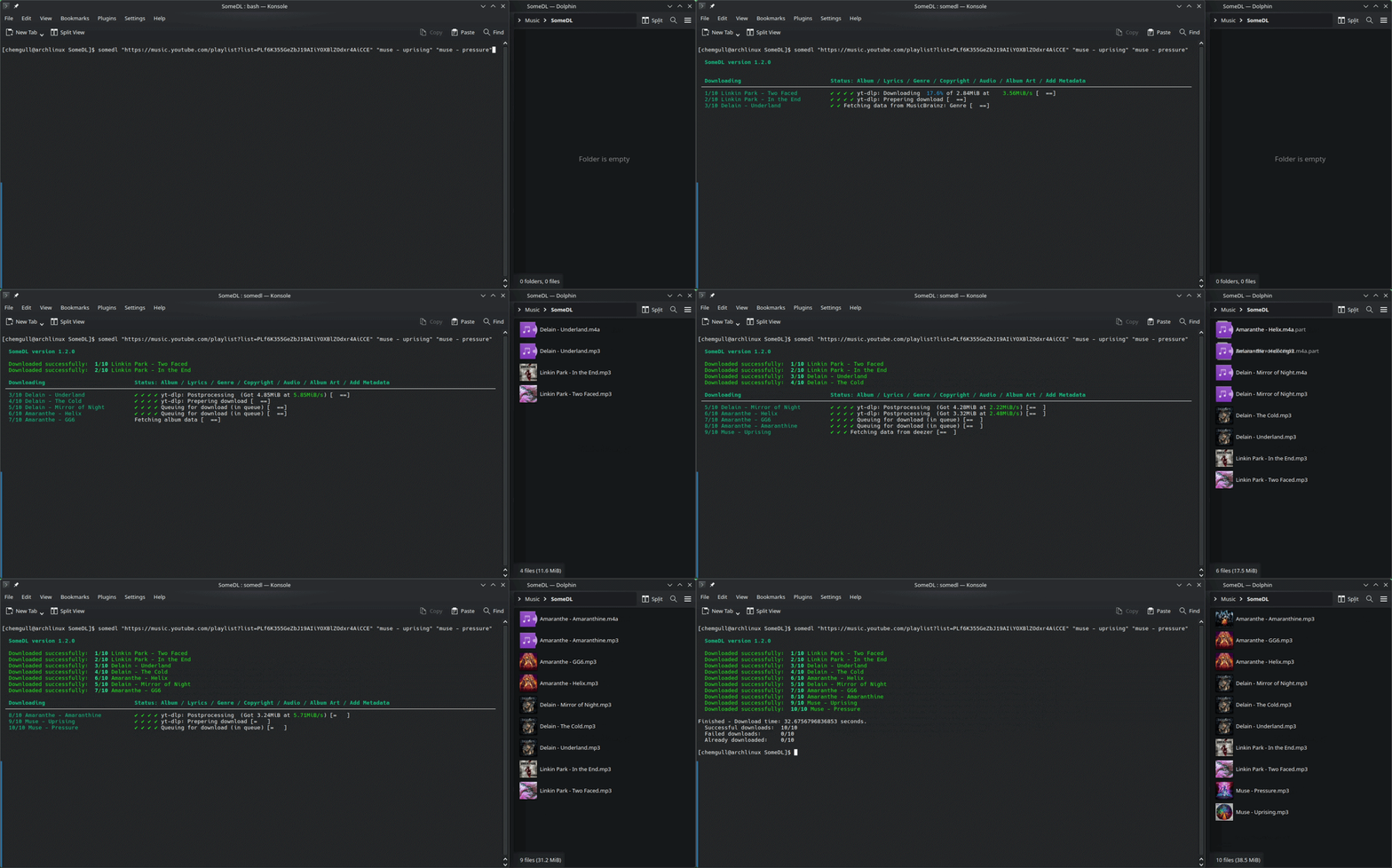
The audio is downloaded using yt-dlp. SomeDL accepts text queries, YouTube URLs and YouTube playlist URLs. Metadata is fetched from YouTube, MusicBrainz, Genius and Deezer. Setlist data is fetched from setlist.fm. No API tokens required for any of these services, it works out of the box.
[!TIP] If you have any problems, feature requests, suggestions of improvements of any kind or even general questions, do not hesitate to open an issue or start an discussion here on GitHub. I am open to add functionality based on individual usecases. See How can I give feedback or make feature requests?
Disclaimer: This project - although being fully functional - is primarily a way for me to learn the handling of APIs in python. This program is for educational purposes. SomeDL is developed on Linux and tested on Linux & Windows. This project is human-made, no code from generative AI is used.
For more information, visit the SomeDL ReadTheDocs page.
Usage
CLI
Simply type somedl followed by your search query in quotes.
somedl "Nirvana - Smells like teen spirit"
You can also search by YouTube or YouTube music URL and even by YouTube playlist URL. Search for multiple songs at once by seperating them with spaces.
somedl "https://music.youtube.com/watch?v=W0Wo5zhgvpM" "https://music.youtube.com/playlist?list=OLAK5uy_mHURRD4wyePH5Kl8wQkgyfFhbvmK2pYk4" "Iron maiden - run to the hills"
Run somedl -h to get more information for the different configuration options.
WebUI
Run somedl web in your terminal, a browser window with the SomeDL WebUI will open.
Features
- Simple usage
- Download via search query, YouTube URL, YouTube Playlist URL and even entire discographies with YouTube Music channel URLs.
- Simple installation with pip (And quick guides for the installation of the dependencies).
- No login or API tokens required.
- Complete metadata - way better than just relying on yt-dlp (see here why).
Song title | Artist name | Album name | High quality cover art (544x544) | Release date (Year) | Track number | Genre | Lyrics sycned and plain | Copyright/Label | ISRC | MusicBrainz artist ID (MBID)
- Several output formats:
opus, m4a, mp3, ogg, flac - Sort downloads automatically into folders according to a template if desired
- For example:
{album_artist}/{artist} - {song} - Or more complex:
{album_artist}/{year} - {album}/{track_pos} - {song} - You can always change your storage template later with
somedl new-template
- For example:
- Add missing metadata to existing music files with
somedl import - Download report - get a quick overview over the downloaded songs, including their metadata.
- And much more!
WebUI
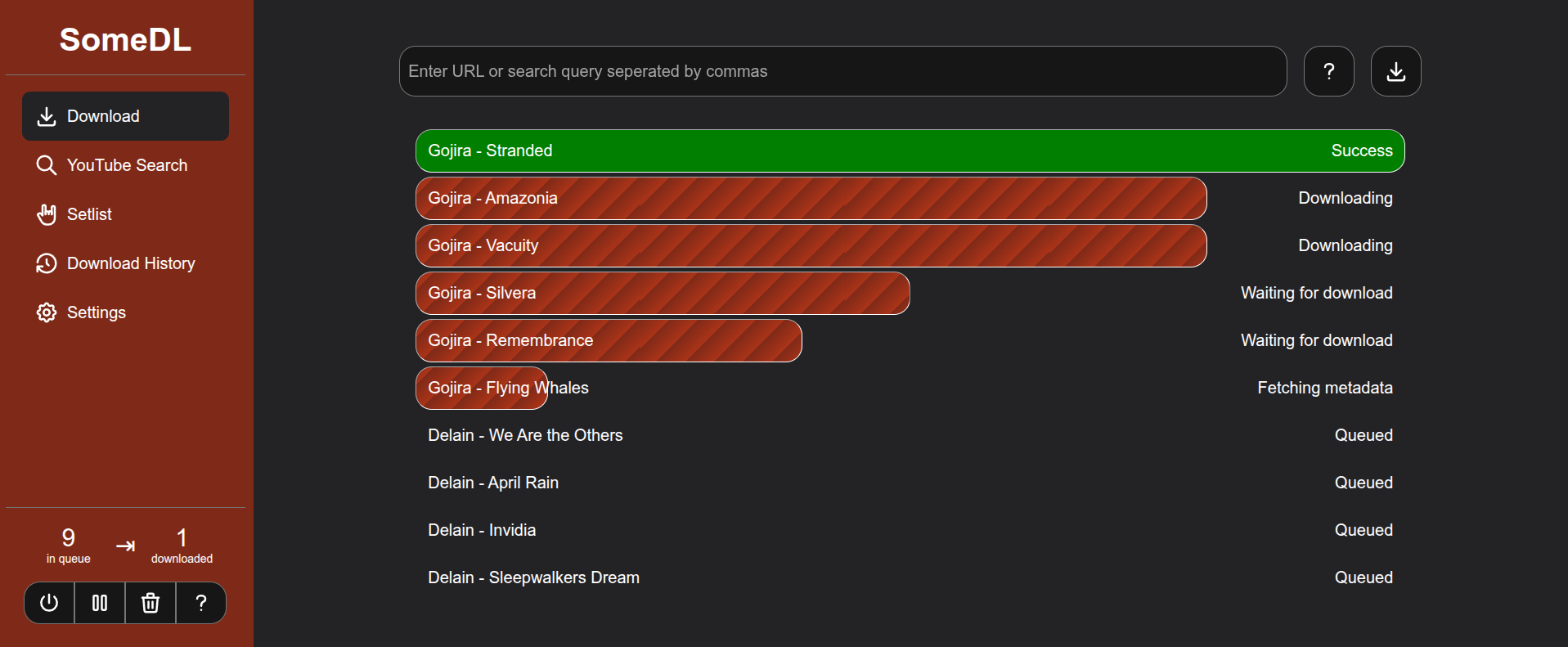
Here you can see pictures of the WebUI.
- Download songs directly from a browser-based graphical interface and track the progress
- Search for music within the WebUI using a YouTube Music–style interface.
- Look up concert setlists for bands and artists.
- View download history for the current session
- Change settings directly from the WebUI
- Customize and theme the SomeDL WebUI to match your preferences
Proposed Features
- Web-UI (NEW in 1.5.0)
- Download songs based on concert setlists, part of the new web UI (NEW in 1.5.0)
- Improvements to the WebUI (Working on, hopefully released soon)
- Mobile support for WebUI - will still require SomeDL running on a PC, Server or in termux (Currently working out feasability)
Installation
This utility can be installed using pip. Also confirm that you meet all the installation requirements!
Windows
pip install somedl
or
py -m pip install somedl
To update an existing SomeDL installation, add the --upgrade flag tho the command above.
Linux
This software is currently not packaged in any repository. Install it using your preferred Python package manager, such as pipx:
pipx install somedl
Requirements
Python (REQUIRED)
SomeDL is developed and tested on the newest version of Python (currently 3.14). Python 3.10 or newer is required. Visit How to install python for a short guide.
FFmpeg (REQUIRED)
SomeDL uses yt-dlp, which needs ffmpeg in order to convert the downloaded audio file to mp3. Visit How to install ffmpeg for a short guide.
Deno
It is also recommended to have Deno installed. yt-dlp needs deno to work properly (https://github.com/yt-dlp/yt-dlp/wiki/EJS). SomeDL should work without it, but yt-dlp will always print a warning.
- To install deno, go to https://docs.deno.com/runtime/getting_started/installation/
- If you have npm installed, you can use npm to install deno. If not, open PowerShell (not CMD!) and execute the command provided. (This downloads and installs a script, be aware to only do this from trusted sources!)
Post install
After installing, you can create a configuration file with somedl --generate-config. The config file is usually located at:
- Linux:
~/.config/SomeDL/somedl_config.toml - Windows:
C:\Users\<User>\AppData\Roaming\SomeDL\somedl_config.toml - MacOS:
~/Library/Application Support/SomeDL/somedl_config.toml
In the config files you can edit the behaviour of SomeDL, like defining an output template, setting default output format & output folder and much more. Inside this config file, there are comments that explain each setting. (For Windows users it is recommended to read and edit the config file with an editor that has syntax highlighing, like Notepad++.).
How can I give feedback or make feature requests?
- Bug report: Open an issue.
- Feature requests: Open an issue or start a discussion in the ideas category.
- General feedback: Start a discussion in the Feedback category.
- General question: Read the FAQ or ask in the Q&A category.
- Anything else: Start a discussion in the general category.
More information
For more information, FAQ and How To sections, visit the SomeDL ReadTheDocs page.
1 maintainer

Download files
Download the file for your platform. If you're not sure which to choose, learn more about installing packages.
Source Distribution
Built Distribution
Filter files by name, interpreter, ABI, and platform.
If you're not sure about the file name format, learn more about wheel file names.
Copy a direct link to the current filters
File details
Details for the file somedl-1.7.1.tar.gz.
File metadata
- Download URL: somedl-1.7.1.tar.gz
- Upload date:
- Size: 165.4 kB
- Tags: Source
- Uploaded using Trusted Publishing? No
- Uploaded via:
twine/6.2.0 CPython/3.14.6
File hashes
| Algorithm | Hash digest | |
|---|---|---|
| SHA256 |
67d378361c6c925a99c57e7b81d3d7f925638f783393924b151cfd24a3452303
|
|
| MD5 |
8310aa81ea1ce967742843ac665740c5
|
|
| BLAKE2b-256 |
62c5f6ab6e4ff55452cabc506f49093ee9ebd8c78b49c60cef039d3e8c607078
|
File details
Details for the file somedl-1.7.1-py3-none-any.whl.
File metadata
- Download URL: somedl-1.7.1-py3-none-any.whl
- Upload date:
- Size: 204.4 kB
- Tags: Python 3
- Uploaded using Trusted Publishing? No
- Uploaded via:
twine/6.2.0 CPython/3.14.6
File hashes
| Algorithm | Hash digest | |
|---|---|---|
| SHA256 |
12eccf91bfe2becef9d2a4d68388fedf60fa02565ef62f195933c68a6e644b83
|
|
| MD5 |
13cdd3c08efafd051785d9132e155e69
|
|
| BLAKE2b-256 |
a7fbbf2ed560a51058fd99f2981608089e0a6530880160af43f3587ad49b58dd
|














