
Terminal-native distributed trace visualizer — a local OpenTelemetry collector with a TUI.

Project description
Sonar (Version 1) 🚀
A Terminal-Native Distributed Trace Visualizer
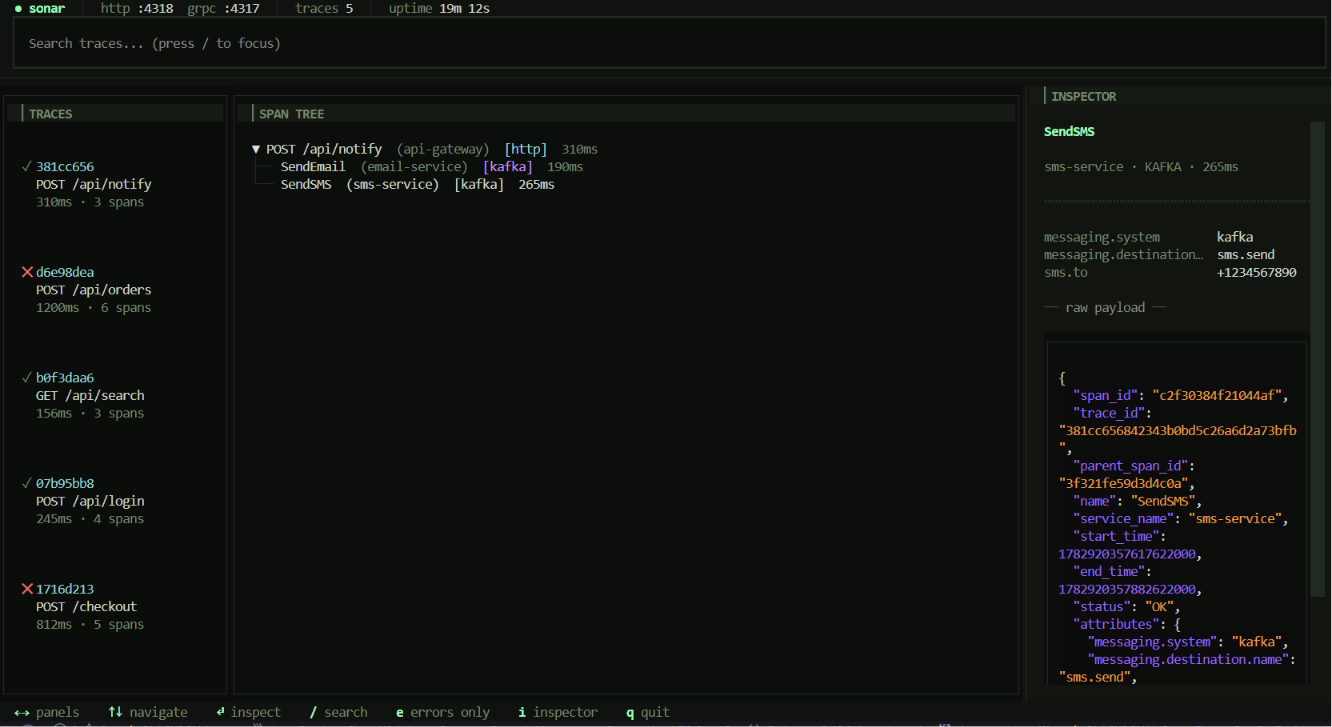
Sonar is a lightweight, terminal-based User Interface (TUI) designed to visualize distributed traces for local microservices development. It acts as a local OpenTelemetry (OTel) collector, catching telemetry data emitted by backend services and rendering the execution path of a single request across multiple network boundaries (HTTP, gRPC, and message brokers) in real-time, entirely within your command line.
📸 Screenshots
⚡ The Problem
When developing microservices locally, tracking the lifecycle of a single request is incredibly difficult.
- The Log Scavenger Hunt: Manually tailing logs across multiple tabs and copy-pasting correlation IDs.
- Heavy Tooling: Running cloud-native tools like Jaeger locally requires Docker, browsers, and high resource usage.
- Context Switching: Breaking flow to switch from the terminal to a browser.
💡 The Solution
Sonar bridges the gap by running directly in your terminal. It instantly processes OpenTelemetry data in memory and draws an interactive, hierarchical tree representing the request's journey—highlighting errors and isolating payloads with zero context-switching.
✨ Core Features
- OTLP Ingestion: Native OpenTelemetry Protocol data ingestion (no custom config needed on backend services, just point to localhost).
- Live ASCII Dependency Tree: Visually maps parent-child relationships using Unicode box-drawing characters.
- Instant Payload Inspection: Dedicated side-panel for raw metadata, HTTP headers, gRPC statuses, and more.
- Error State Bubbling: Automatically highlights failed spans and propagates warnings up the tree.
- Fuzzy Search & Filtering: Find traces fast by HTTP path, service name, or trace ID.
🛠️ Architecture Under the Hood
- Instrumentation: Attach the standard OpenTelemetry agent to your services.
- Ingestion Engine: A built-in asynchronous Python server listens for OTLP spans and parses them into a local datastore.
- State & UI Renderer: Built with Textual, the interface dynamically updates the tree and data tables as traces arrive.
🚀 Getting Started
1. Install Sonar
Since Sonar is packaged with standard Python tools, you can install it globally or in a virtual environment directly via pip:
# Clone the repository
git clone https://github.com/your-username/sonar.git
cd sonar

# Install the package and its dependencies
pip install .
2. Start Sonar
Once installed, a global sonar command is added to your terminal. Simply run:
sonar
Sonar will instantly start up its TUI and spin up background listeners on localhost:4317 (gRPC) and localhost:4318 (HTTP).
3. Connect Your Microservices (Any Framework)
Because Sonar is a compliant OpenTelemetry (OTel) receiver, you don't need to install any Sonar-specific libraries in your codebase. You just use the official OpenTelemetry SDKs for your language.
By default, standard OpenTelemetry SDKs attempt to send data to localhost:4317 (gRPC) or localhost:4318 (HTTP), which means in many cases, it just works out of the box once Sonar is running!
Here's how to explicitly configure common frameworks to point to Sonar:
🟢 Node.js / Express
Use the @opentelemetry/sdk-node package and set the exporter endpoint:
const { NodeSDK } = require('@opentelemetry/sdk-node');
const { OTLPTraceExporter } = require('@opentelemetry/exporter-trace-otlp-http');

const sdk = new NodeSDK({
  serviceName: 'my-node-service',
  traceExporter: new OTLPTraceExporter({
    url: 'http://localhost:4318/v1/traces', // Sonar's HTTP endpoint
  }),
});
sdk.start();
🐍 Python (FastAPI / Flask / Django)
Install opentelemetry-exporter-otlp and configure the tracer:
from opentelemetry import trace
from opentelemetry.exporter.otlp.proto.grpc.trace_exporter import OTLPSpanExporter
from opentelemetry.sdk.trace import TracerProvider
from opentelemetry.sdk.trace.export import BatchSpanProcessor

provider = TracerProvider()
# Exports to localhost:4317 by default (Sonar's gRPC endpoint)
processor = BatchSpanProcessor(OTLPSpanExporter())
provider.add_span_processor(processor)
trace.set_tracer_provider(provider)
☕ Java (Spring Boot)
The easiest way is to use the OpenTelemetry Java Agent (no code changes required!). Just run your .jar with the agent attached:
java -javaagent:path/to/opentelemetry-javaagent.jar \
     -Dotel.service.name=my-spring-boot-service \
     -Dotel.exporter.otlp.endpoint=http://localhost:4318 \
     -jar myapp.jar
🐹 Go
Use the go.opentelemetry.io/otel/exporters/otlp/otlptrace/otlptracegrpc package:
import "go.opentelemetry.io/otel/exporters/otlp/otlptrace/otlptracegrpc"

exporter, err := otlptracegrpc.New(ctx,
    otlptracegrpc.WithInsecure(),
    otlptracegrpc.WithEndpoint("localhost:4317"), // Sonar's gRPC endpoint
)
4. Watch the Magic Happen ✨
As soon as your services handle a request, they will beam the telemetry data to Sonar. The TUI will instantly populate with a live dependency tree of your request's journey!
Release history Release notifications | RSS feed

Download files
Download the file for your platform. If you're not sure which to choose, learn more about installing packages.
Source Distribution
Built Distribution
Filter files by name, interpreter, ABI, and platform.
If you're not sure about the file name format, learn more about wheel file names.
Copy a direct link to the current filters
File details
Details for the file sonar_tui-0.1.0.tar.gz.
File metadata
- Download URL: sonar_tui-0.1.0.tar.gz
- Upload date:
- Size: 26.9 kB
- Tags: Source
- Uploaded using Trusted Publishing? Yes
- Uploaded via: twine/6.1.0 CPython/3.13.12
File hashes
| Algorithm | Hash digest | |
|---|---|---|
| SHA256 |
2946c733bf6a3be4aac4e3d0f4fb24b670047ea33c37fead3f7a956fba513ed9
|
|
| MD5 |
daa763250e448619e0ce885c6173d5af
|
|
| BLAKE2b-256 |
288f7f250c82102ee6deb1be7077d18b8e4ec3547701ce6e15e89e44a8eb9749
|
Provenance
The following attestation bundles were made for sonar_tui-0.1.0.tar.gz:
Publisher:
publish.yml on sidbhaskar/Sonar
-
Statement:
-
Statement type:
https://in-toto.io/Statement/v1 -
Predicate type:
https://docs.pypi.org/attestations/publish/v1 -
Subject name:
sonar_tui-0.1.0.tar.gz -
Subject digest:
2946c733bf6a3be4aac4e3d0f4fb24b670047ea33c37fead3f7a956fba513ed9 - Sigstore transparency entry: 2039407410
- Sigstore integration time:
-
Permalink:
sidbhaskar/Sonar@45e82c085f49c8a58482796c52bc0c87b122adb8 -
Branch / Tag:
refs/tags/v0.1.0 - Owner: https://github.com/sidbhaskar
-
Access:
public
-
Token Issuer:
https://token.actions.githubusercontent.com -
Runner Environment:
github-hosted -
Publication workflow:
publish.yml@45e82c085f49c8a58482796c52bc0c87b122adb8 -
Trigger Event:
release
-
Statement type:
File details
Details for the file sonar_tui-0.1.0-py3-none-any.whl.
File metadata
- Download URL: sonar_tui-0.1.0-py3-none-any.whl
- Upload date:
- Size: 29.7 kB
- Tags: Python 3
- Uploaded using Trusted Publishing? Yes
- Uploaded via: twine/6.1.0 CPython/3.13.12
File hashes
| Algorithm | Hash digest | |
|---|---|---|
| SHA256 |
d71a78bd9b8148da959cd099ebff80449ccd6561d9fb60be61913fd15301844c
|
|
| MD5 |
3e5c68d45658ffab5d973ce09a923aef
|
|
| BLAKE2b-256 |
3aa06d570dcba4c82cc53f67685cd3b1637560ad4e4a29700b9e6ac05584ace1
|
Provenance
The following attestation bundles were made for sonar_tui-0.1.0-py3-none-any.whl:
Publisher:
publish.yml on sidbhaskar/Sonar
-
Statement:
-
Statement type:
https://in-toto.io/Statement/v1 -
Predicate type:
https://docs.pypi.org/attestations/publish/v1 -
Subject name:
sonar_tui-0.1.0-py3-none-any.whl -
Subject digest:
d71a78bd9b8148da959cd099ebff80449ccd6561d9fb60be61913fd15301844c - Sigstore transparency entry: 2039407628
- Sigstore integration time:
-
Permalink:
sidbhaskar/Sonar@45e82c085f49c8a58482796c52bc0c87b122adb8 -
Branch / Tag:
refs/tags/v0.1.0 - Owner: https://github.com/sidbhaskar
-
Access:
public
-
Token Issuer:
https://token.actions.githubusercontent.com -
Runner Environment:
github-hosted -
Publication workflow:
publish.yml@45e82c085f49c8a58482796c52bc0c87b122adb8 -
Trigger Event:
release
-
Statement type:






