
song2mv


Song in, beat-synced lyric timing and a code-drawn music video out — built for coding agents.
song2mv turns an audio file and its lyrics into synced lyrics (LRC, SRT, word-timed JSON) on the song's beat grid, then into a lyric or music video drawn entirely in code. Each step is its own command, so a coding agent such as Claude Code or Codex — or a person — can use just the part they need.
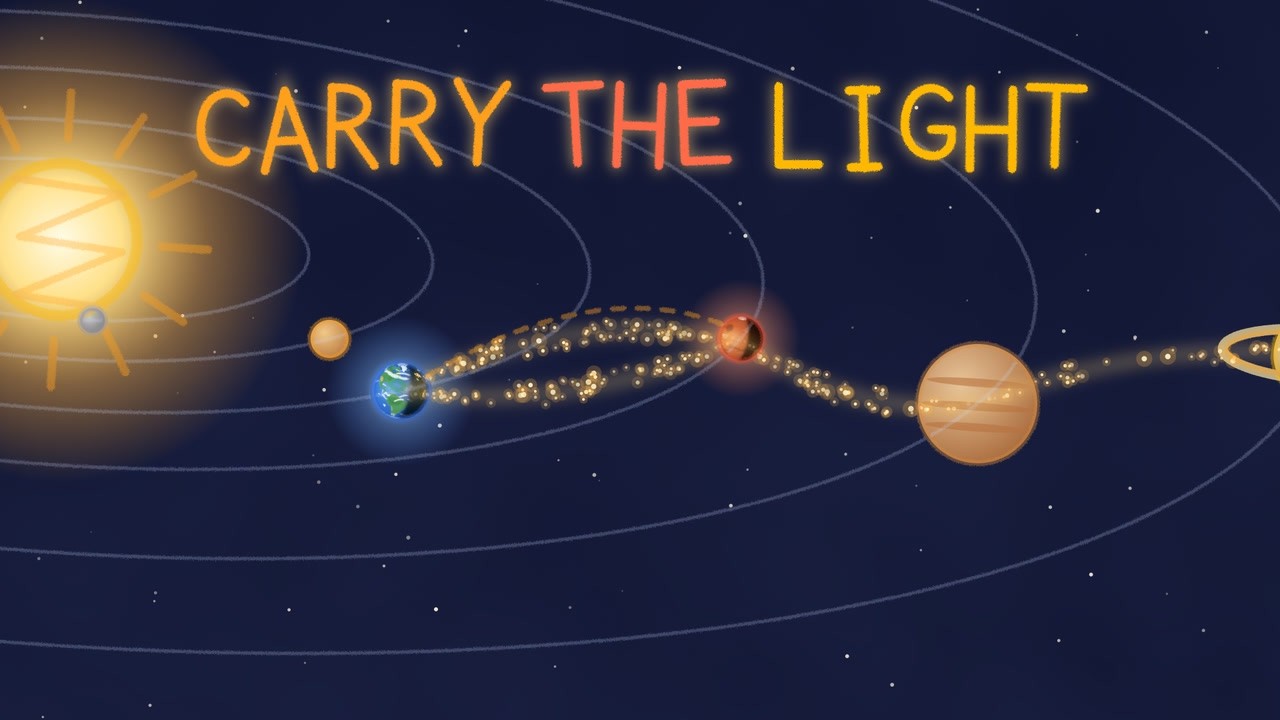
Two songs made with Suno, each turned into a music video and a Short by Claude Code with song2mv:
 |
 |
|---|---|
Till Money Means Nothing (4:55, Short): a launch broadcast that ends on Mars, inked with the toon style pack |
Carry the Light (4:48, Short): a child's crayon drawing of a launch tower that becomes real, in watercolour from the paint style pack |
How they were made: one Claude Code session (Opus 5.5, max effort) split the work among agents, as step 4 of the skill describes: five drew the shared pieces, then seven built the sections, in about two hours for both songs. One of these videos is about 12,000 lines of drawing code, where a single agent wrote 750–1,200 in our trial videos: expect a simpler video from one agent, or give each brief to a session of its own.
Alpha (0.x). Commands, flags and file formats may change between releases; every JSON file carries a
schema_versionand every change is listed in CHANGELOG.md.syncandbeatsare the most tested parts.checkandrenderare experimental.
| command | what it does | status |
|---|---|---|
song2mv sync |
audio + lyrics → beat grid, word-timed lyrics, LRC, SRT, and mv.json for the video template |
alpha |
song2mv beats |
audio → tempo and beat grid only (no lyrics, no speech recognition) | alpha |
song2mv click |
a stretch of the song with clicks on the beat grid and ticks on the lyric words, to check the timing by ear | alpha |
song2mv check |
measures a rendered video per sung line: frozen picture, empty screen, repeated chorus, cut rhythm | experimental |
song2mv sheet |
a contact sheet of a rendered video: frames at song times (or one per shot), labelled with the time and line | alpha |
song2mv render |
renders mv.json as a 16:9 and/or 9:16 lyric video with a Remotion template |
experimental |
Install
Install it with uv:
uv tool install --python 3.13 "song2mv[sync]"
Or run it once without installing anything:
uvx --python 3.13 --from "song2mv[sync]" song2mv --help
Inside a virtual environment, pip install "song2mv[sync]" works too.
You also need ffmpeg (brew install ffmpeg, apt install ffmpeg). render also needs Node 18+.
Python 3.10–3.14. The sync extra needs faster-whisper, which has no Python 3.15 wheels yet, hence
--python 3.13 above (Homebrew's python3 may already be 3.15). check, beats and render also run on 3.15.
Install only what you use — the parts differ a lot in size:
| you run | install | adds roughly |
|---|---|---|
check, sheet |
song2mv |
numpy (35 MB) |
beats, click |
song2mv[beats] |
librosa, scipy, numba (300 MB) |
sync |
song2mv[sync] |
beats + faster-whisper (130 MB) + a whisper model on first run (small: 460 MB) |
render |
Node 18+ | Remotion and a headless Chrome on first render (~700 MB) |
8 GB of RAM is plenty, and no GPU is needed. On a 12-core M4 Pro, a 3-minute song's sync (whisper small, three
runs on the CPU) took 160 s at 1.4 GB at most; a 15 s render at 1080p took 20 s at 2.3 GB, Chrome's tabs included,
and a draft of the whole song 24 s. A slower CPU takes longer. Everything installed takes about 2.2 GB of disk, of
which about 1.2 GB downloads on first use. Tested on macOS (Apple silicon) and Linux; not yet on Windows.
Quick start
song2mv sync song.mp3 --lyrics lyrics.txt --language en --title "My Song"   # → song2mv-work/song/
song2mv render song2mv-work/song/mv.json --from 60 --to 75 --aspect both
song2mv check song2mv-work/song/renders/song-16x9-60-75.mp4 --song song2mv-work/song/mv.json --from 60 --to 75
song2mv sheet song2mv-work/song/renders/song-16x9-60-75.mp4 --song song2mv-work/song/mv.json --from 60 --every 1
The work folder is relative to where you run it: run it outside your code repositories, or pass --out. If the
audio file has a lyrics tag (Suno writes one), --lyrics is optional. Want subtitles for CapCut, Premiere or
DaVinci Resolve? Stop after sync and import song.srt or song.lrc.
With a coding agent
Open this repository (or your own project with song2mv installed) in Claude Code, Codex or another agent and ask, for example: "make a music video for ~/Music/my-song.mp3" or "give me word-timed LRC for this song".
AGENTS.md— the operating rules: which command to run when, what to check by ear, what never to commit. Codex reads it, and Claude Code reads it throughCLAUDE.md, when this repository is open..claude/skills/song2mv/— the full music-video loop (timing → reading the lyrics → scene design → render → check → fix) as a Claude Code skill. Copy it to~/.claude/skills/to use it in any project.- Both ship in the package, in
song2mv/guide/:song2mv --help(and the help of every command) prints the installed skill's path, under a line telling the agent to read it first, so an agent in any project finds it. - Every command takes
--json: progress goes to stderr and stdout carries one JSON result. See docs/contract.md.
song2mv sync
song2mv sync song.mp3 [--lyrics lyrics.txt] [--language ko] [--title "My Song"] [--out DIR] [--runs 5] [--model medium] [--bpm 90]
song2mv sync DIR/song.json [--from grid] [--runs 5]   # rerun after editing song.json; options given here are saved
                                                     # to it, finished whisper runs are reused
| step | output | what happens |
|---|---|---|
| lyrics | lyrics.txt |
the lyric sheet ([Verse], [Chorus] … lines name sections; a sheet without them gets sections proposed from its repeated lines, in lyrics.sections.txt) |
| asr | asr/runN.json |
faster-whisper, several runs with word timestamps; finished runs are reused |
| align | merged.json |
each run aligned to the lyric sheet character by character, then merged per word |
| grid | grid.json |
tempo, first beat, which beat starts a bar, where the song leaves that grid, and its swing |
| build | lyrics.json, mv.json, song.lrc, song.words.lrc, song.srt |
gaps re-heard, manual values applied, times snapped to the beat grid |
| music | music.json |
loudness curve and likely section boundaries, for scene design |
Why it works the way it does:
- Whisper gives a different answer every run. On a test song, two runs with the same file and settings found 342 and 380 words, and one of them skipped 15 seconds (five sung lines). So run k uses seed k and a different lead-in silence, and the runs are merged in lyric space: per line, only runs that matched at least half of it count, outliers more than 1 s from the rest are dropped, and each word takes the median.
- A chorus repeats word for word. Matched to the sheet by difflib alone, a run that heard the second chorus
better gave its audio to the sheet's first chorus, and the lines in between were left with none: on the
JamendoLyrics benchmark that was nearly all of the large error. Each run is also aligned over the whole song, which
keeps each copy on its own audio; where the two alignments disagree, the one that matched more of that stretch
wins. A line the runs still place out of the sheet's order is merged again from the runs that kept the order, and
goes on
check_by_ear. librosa.beat.beat_trackcan be off by a ratio (it reported 123 BPM for a 90 BPM song with a dotted-8th rhythm). The grid is fitted to percussive onsets instead, andautotempo prefers the candidate where most gaps between lyric lines are whole bars, unless its grid is off the music for more of the song than the strongest onsets' grid is. The bar's first beat is the beat position with the strongest kick.- The grid has one tempo, and songs do not always keep one. A live band drifts, jazz speeds up for a solo, a song
slows down at the end, an AI-generated song can jump by a 16th note between sections. So tempo and phase are fitted
again in windows of 4 bars, and where the music's beats are more than half a 16th note off the grid (a tempo
change, a drift, or a beat that moved),
grid.jsonlists the stretch underoff_gridand the--jsonresult says so underwarnings. Where those windows can be chained beat by beat, as in AI-made songs that drift,grid.jsongets a beat map (beats, the time of every beat): words snap to it, and the clicks and the video's beat effects follow it. Where they cannot (a beat that jumps, a weak pulse), lyric words in the stretch keep whisper's times instead of being snapped, and beat effects stay on the one tempo. - Shouts, chants and whispers are what whisper misses. Lines no run placed are re-heard with just that stretch of
audio and the expected words as the prompt. Those lines are marked
repromptand listed in the--jsonresult undercheck_by_ear; pin anything wrong inmanual. A line heard there more often than the lyric sheet has it takes the earliest hearing whose word timing is believable (whisper can stretch a word over seconds of music or time it at zero length), andwarningslists the other hearings. - A pin only constrains. Pinning a line in
manualsplits the gap around it, and hearing the pieces again with shorter prompts moved lines that were right: on a test song, two pins sent the re-heard line after them 1.2 s early, into a pinned line. So a re-heard line keeps its time while it still fits between the pinned and placed lines around it, and only the lines a pin contradicts are heard again, in the window between the pins. Pin what is wrong; the lines you did not pin stay where they were. - One run is not enough. A line only one of the runs placed can be seconds off, so it goes on
check_by_eartoo. - A word no run heard is a guess. It is spread between the words around it, and where those are more than 1 s
apart per word, half such words were more than 1 s off on the benchmark; that line goes on
check_by_ear. - A lyric sheet can leave out what was sung. One had a hook's couplet once that Suno sang twice: the couplet's
lines were matched on both copies, one stayed on screen for 8 s with its last two words 6 s late, and nothing was
listed. A line spread over far more time than it is sung in now goes on
check_by_ear,off_sheetlists stretches where the runs agree on words that no line has (chants, ad-libs, changed lines), and where the sheet and the audio's lyrics tag differ,warningssays which of the two the runs support. - Both can be wrong in the same way. Suno sang a repeated hook line as "Back it, back it up" where both say "Beep,
beep": the line's last words match, so nothing looked off. When the runs hear a line alike and not as written,
while two or more of them hear another copy of the same line as written,
warningsnames it and what they heard, and it goes oncheck_by_ear. Whisper can mishear a line the same way in every run, too (all 8 lines it names on the JamendoLyrics benchmark), so only an ear can tell which words are sung there. - The runs can agree on a line and still be wrong about a word. Three words of a line at almost one time (the runs
timed "Beep, beep" on "Brooklyn"), runs whose starts for a line are more than 0.7 s apart, and a word whose merged
time is more than 0.5 s from every run's time for it (two runs that disagree, merged to their middle) put a line on
check_by_ear: on the JamendoLyrics benchmark, 56 of the 65 lines these add have a word more than 0.3 s off (of all lines, 37 % have). Two words at one time are listed where another copy of the line has them 0.2 s apart or more ("beep" and "Brooklyn" on one 16th in one hook, 0.33 s apart in the other); alone they are not, since fast singing puts two words on one 16th all the time.
To hear whether the grid and timing are right, mix a click track over a stretch — a high click on the first beat
of each bar, a low click on the other beats and, with --words, a soft tick on every lyric word:
song2mv click song2mv-work/song --from 90 --to 110 --words # → song2mv-work/song/click-90-110.wav
Song config (song.json)
sync writes a minimal song.json (the audio, a title and the options you passed) into the work folder. Add or
change keys there and rerun song2mv sync DIR/song.json. Only audio is required; paths are relative to the file.
See examples/song.example.json.
| key | default | meaning |
|---|---|---|
audio |
— | the song file |
lyrics |
null |
lyric sheet; null = the audio's lyrics tag |
title, subtitle |
file name, "" |
the title goes into the LRC and the video; the subtitle is drawn under it in 9:16 |
language |
null |
whisper language code ("en", "ko", "ja" …). Set it — auto-detection hears only the first 30 s |
keep_parenthesized_in |
[] |
sections, by their name in the lyric sheet ("Chorus", "Verse 1"), where a line written entirely in ( ) is sung, not a stage direction. "*" = everywhere |
section_ids, section_kinds |
{} |
override the short id ("Verse 1" → v1) or kind (calm / mid / hot) of a section. Without one, the kind comes from the section's name, and a section named calm (intro, bridge, outro …) that is about as loud as the mid sections is mid |
bpm |
"auto" |
a number forces the tempo |
downbeat_mod4 |
null |
force which beat index (mod 4) starts a bar |
snap_per_beat |
4 |
snap word times to 1/4 beat (16th notes, swung where grid.json has swing); 3 = a triplet grid (8th-note triplets, for a shuffle or swung 8ths), 2 = 8th notes, 0 = off. On the beat map when grid.json has one; without it, never inside an off_grid stretch. Words pinned in manual are never snapped |
whisper |
small × 3, CPU int8 | model, runs, device, compute_type, threads, beam_size |
auto_reprompt |
true |
re-hear gaps where no run found a line |
reprompt |
[] |
extra windows found by ear: [{"from": 17.5, "to": 30.5, "prompt": "the words sung there"}] |
manual |
{} |
{"ch1-01": [98.5, 99.2]} — word start times that override everything. A single number pins the first word. Re-heard lines around a pin keep their times while they fit between the pins |
end |
null |
song end used after the last line; null = file length |
theme |
{} |
copied into mv.json for the template (colours, font) |
vignette |
true |
copied into mv.json: false takes the template's dark vignette off the scenes |
flashes |
one at the start of each hot section | copied into mv.json: the template's white flashes, [[song time, strength 0–1], …]; [] = none |
Line ids are <section>-<nn>: in-01, v1-03, pc2-01, ch1-05, br-02, ou-01. A section name that appears
more than once without a number ([Chorus] twice) is numbered by occurrence (ch1, ch2); one that appears once
keeps the bare id (ch-01 in a song with one chorus).
song2mv beats
song2mv beats song.mp3 [--out song.grid.json] [--bpm 128] [--downbeat 0]
Tempo, first beat and bar start for cutting video to the beat — no lyrics needed. Without lyrics, auto tempo
picks the candidate with the strongest onset score, so check the result by ear or pass --bpm. Stretches where the
song leaves that one tempo are in off_grid (and warnings): cut to beats there when the file has a beat map, and
don't cut to the grid there when it has none.
song2mv check (experimental)
song2mv check video.mp4 --song mv.json [--from 92 --to 102] [--goals my-goals.json] [--src "video/src/scenes/**/*.tsx"]
| check | measures (per sung line, 10 fps, the area above the captions) |
|---|---|
motion.min / motion.max |
mean frame difference: nothing frozen for a whole line; verses not frantic |
coverage.min / coverage.median |
share of lit pixels: no empty black screens |
variation.repeats |
chorus 2 should not look like chorus 1, line by line; other repeated sections, on average |
cuts.rhythm.<section> / cuts.max_gap |
uneven cut intervals inside verses; no long stretch without a cut |
text.min_font |
no fontSize, or size on the kit's text (Slam, Quiet, Captions, comic Balloon, Caption, Sfx), under 36 px in scene sources (with --src) |
--from is the song time of the video's first frame; the measured stretch ends with the video unless --to ends it
earlier. Checks that cannot run on a stretch (no repeated section in it, too few cuts) are listed as skipped, not
passed. It works on any mp4 that follows the song's timing, not only on song2mv renders. A failing line says where:
the stretch measured, the cuts in it, and its still or empty part, or for a frantic line its biggest frame change and
its motion without the cuts (without a cut: whether the whole frame changes, as under a camera drift over fine detail).
A long stretch without a cut names the sudden changes in it that did not count as one, with their correlation and
difference: a reframe of a smooth picture can stay too alike to count, and one of a dark picture too dim.
The default goals are a starting point measured on one video; your own goals file only needs the values you change. Passing is necessary, not proof of fun.
song2mv sheet
song2mv sheet video.mp4 --song mv.json --every 3                  # a frame from the middle of every 3 s
song2mv sheet video.mp4 --song mv.json --from 92 --times 93.1,97.6   # frames at these song times
song2mv sheet video.mp4 --song mv.json --lines v1-03,ch1-02       # a frame in the last word of each line
song2mv check video.mp4 --song mv.json --json > check.json
song2mv sheet video.mp4 --cuts check.json                         # a frame 0.3 s into each shot
song2mv sheet video.mp4 --every 2 --crop 700,380,312,400 --cols 3 # one region, zoomed
A contact sheet of the video as rendered, captions, title and strips included: a way to review a video without
watching it. Each tile is the frame on screen at its song time, labelled with that time and, with --song, the id of
the line sung then (or of the section between lines). --from is the song time of the video's first frame, as for
check; without it, a stretch keeps the start in the name render gave it (song-9x16-49.72-72.2.mp4 starts at
49.72). --cuts reads the start and the cuts of a saved check --json result and also takes its --from and
--song. --lines ID,ID takes a frame in the last word of each line named, halfway from the word's start to the
line's end in --song (the line's middle without word times).
--crop X,Y,W,H shows one region of each frame, in the video's pixels, scaled to the tile width (--cols
sets the zoom; the label shows it). The sheet is a PNG 1920 px wide, video-sheet.png next to video.mp4 unless
--out names it; frames that do not fit on one page, about 2400 px tall, continue on video-sheet-2.png and so on.
The labels come from a built-in bitmap font, so it needs nothing but ffmpeg and numpy: no drawtext, no image library.
song2mv render (experimental)
song2mv render mv.json                                        # whole song, 16:9, plain lyric video
song2mv render mv.json --from 95 --to 111 --aspect 9x16 --hold 2.5   # a hook cut whose first frame shows the payoff
song2mv render mv.json --from 95 --to 111 --draft             # 10 fps at half size, for the render → check loop
song2mv render mv.json --still 98.5 --aspect both            # PNG frames to look at
song2mv render mv.json --max-mb 200                          # the finished video, at most 200 MB (an upload limit)
song2mv render mv.json --cover 3.2                           # a 1080×1080 cover from the frame at 3.2 s
song2mv render mv.json --template video/                     # your own copy of the template, for your own scenes
--draft renders the same frames at 10 fps, the rate check measures at, and at half size (960×540), and names the
file …-draft.mp4. On 30 s of a paper-cut scene it rendered in 15 s, against 55–70 s at full size and about 2.5 min
for the finished video, and check gave drafts the same passes, fails and cuts as full-size renders. Iterate on drafts
and render the finished video once without it.
A finished video is capped at 8 Mbit/s, the rate YouTube asks for at 1080p30. Flat styles stay far below it; the paper
pack's grain ran near 14 Mbit/s, and at the cap a 4-minute video is about 250 MB instead of 440. --max-mb N encodes a
video that is still over N MB again, in two passes, to fit an upload limit, and keeps its sound. --cover T writes a
square cover for album and playlist pages: the 16:9 frame at song time T, whole, over a blurred fill of itself.
Next to them, sync already wrote song.lrc (line times, which most players and music platforms import),
song.words.lrc (word times) and song.srt (subtitles).
Out of the box you get a plain lyric video that follows the song's structure: calm sections with a low moon and
embers, mid sections with a floor grid rolling on the beat, hot sections with rays on the beat and the line itself
huge in the middle, lit word by word. Colours come from theme in the song config.
The real music video is your own scenes, with a look made for the song. Start from a concept: two or three ideas in
different art styles, a rough still of each, and pick one (the skill walks through it). With --template DIR, DIR gets
its own copy of the template: write the scenes in DIR/src/scenes/, reuse and change what fits the concept from the
kit in DIR/src/kit/, and draw the rest. Besides useSong(), beat-grid helpers, Slam, BigLine and karaoke
Captions, the kit holds:
- people: a posable person (standing, walking, running, lying), a crowd;
- places: a city, a street, a room, a bed, hills, the sea;
- sky: sky by time of day, sun, moon and clouds;
- objects: a phone with a chat, a clock, a heart, a car, a plane, lanterns;
- camera: one world filmed as shots that cut on bars and words, with a punch on hits;
- effects: rain, fireworks, confetti, hits (burst, sparkle, ring), flames, lightning and storms, tears, falling cash. Their colours and shapes are props, so they fit any art style;
- recipes: new assets combined from these parts in a few lines, such as a sleepless night in a storm;
- style packs (
kit/styles/): drawing pieces that put any object in one art style.papercuts outlines by hand and stacks them with shadows and grain;pixeldraws sprites on a canvas of big pixels, big outlined type (Korean too) and a game dialog box that letters the line as it is sung, and turns any kit drawing into the same pixels;comicinks drawings over off-register colour and Ben-Day dots, characters in one heavy outline with tapered inner lines, in panels that each film the scene with their own camera, with speech balloons and captions lettered as the line is sung;toonputs one ink outline round any drawing, kit pieces included, with shading and shines;linetraces any drawing as ink on paper, chalk on a blackboard, a blueprint or neon on brick;paintturns any drawing into watercolour over pencil;finishlays an old film, a VHS tape or a halftone print over a whole frame. New assets and packs are welcome (CONTRIBUTING.md).
The people, places and objects are drawn in one flat style. To see everything, run
node render.mjs src/sample-song.json --composition Kit-Gallery in DIR. Rules that held up: a scene is a pure
function of song time T; text pops once and then holds still while it is read; lay out on the 1920×1080 stage. For
9:16, a song can also export a VerticalScene that draws the whole 1080×1920 frame, instead of the stage shrunk into a
band; the kit's verticalView films the 16:9 world for it, its subject above the captions and inside the apps' safe
box. In 16:9 a storyboard films through wideView, which keeps each shot's subject above the captions in the same way.
Remotion is not MIT: it is free for individuals and companies with up to 3 employees; larger companies need a
company license (remotion.dev/license). Only render uses it.
How it compares
Other open-source projects turn songs into videos in five broad ways:
| kind of project | examples | what song2mv does differently |
|---|---|---|
| AI-generated music videos | AutoMV, Deforum-style audio-reactive animation | They generate the picture with image and video models, which needs paid APIs or a GPU. song2mv draws every frame in code: no model cost, the same input always gives the same frames, and the lyrics are timed against your lyric sheet rather than taken from a transcription. |
| Karaoke and synced-lyrics tools | karaoke-gen, python-lyrics-transcriber | They have more lyric-sync tooling (online lyric lookup, a review UI, a choice of transcription engines) and karaoke formats. Their focus is the lyric display; song2mv also puts every word on the song's beat grid and every section on a bar line, so cuts and effects can follow the music. |
| Remotion lyric-video templates | Lyrics-Video-Generator, lyric-motion-studio | They render timing you already have (an LRC or SRT file) or a forced alignment, in a fixed set of styles. song2mv makes the timing itself, and its template gives your own scenes beat-grid helpers and a scene kit. |
| Remotion skills for coding agents | remotion-video-skill, remotion-dev/skills | General video-making skills, without beat detection or lyric alignment. song2mv's skill works from measured timing, with click and check for what an agent cannot hear or watch. |
| Agent video frameworks | HyperFrames | It renders HTML to video for coding agents and times a song's words by transcribing it, or takes a word list from another tool. song2mv can be that tool: docs/timing-layer.md turns its timing into HyperFrames' word list and beat file, and into Remotion captions. |
In short, song2mv is a timing layer — word-timed lyrics on the beat grid, as plain files — plus a code-drawn video
that an agent can measure and fix. grid.json and lyrics.json can drive cuts in other tools too, generative ones
included.
Where it is weaker today:
- Timing: on the JamendoLyrics benchmark (79 songs in English, German, Spanish and French), 87 % of a song's words
land within 0.3 s of where people put them, on average; the best dedicated aligner reaches 94 %
(docs/benchmark.md). Most wrong line starts are a line's first word alone, early or late by a
fraction of a second, and lines whisper hears badly (vocalisations, shouts, chants) can still be far off and need
a few
manualvalues. Separating the vocals first, as karaoke tools do, made the timing worse on our Korean test song. - No generated imagery: out of the box you get a plain lyric video, and anything richer is scene code that you or your agent write.
- No karaoke formats (CDG, karaoke ASS).
renderneeds Node and Remotion (a company license above 3 employees) and takes ~700 MB of disk on first use.
Roadmap
- A basic
renderwithout Node (Python + ffmpeg), so everyone gets a lyric video with no extra install. checkmeasured against the song itself (music energy vs. motion, chorus vs. verse) instead of fixed numbers.- An MCP server (
song2mv mcp) for agents and apps without a terminal.
Rights
This repository contains no songs and no lyrics. Before you publish a video, make sure you may: the song's licence (including an AI music service's plan terms) and the lyrics' copyright apply to the video too.
License
MIT — see LICENSE. song2mv is developed with the help of coding agents (Claude Code, Codex).
1 maintainer

Metadata
1 maintainer
Release files for song2mv 0.2.0
For a detailed explanation of source distributions (sdists) and built distributions (wheels), please see the package formats documentation.
Source distribution (sdist)
| File | Size | Uploaded | Provenance | Actions |
|---|---|---|---|---|
| song2mv-0.2.0.tar.gz | 597.5 kB | With provenance | Details for song2mv-0.2.0.tar.gz |
Built distribution (wheel)
| File | Interpreter | ABI | Platform | Actions Reset |
|---|---|---|---|---|
| song2mv-0.2.0-py3-none-any.whl | Python 3 | none | any | Details for song2mv-0.2.0-py3-none-any.whl |
Total release size: 1.1 MB
Release files / song2mv-0.2.0.tar.gz
| Download URL | song2mv-0.2.0.tar.gz |
|---|---|
| Size | 597.5 kB |
| Tags | Source |
|
SHA-256 checksum How to use checksums |
5f86a895feae66ae4fa4dbdaa5a9dd9770f39237b114af0321a517acfe6e2aed
|
|
BLAKE2b-256 checksum How to use checksums |
7316ea99487433151ce10f3e063fa2dccad8daf9d382ddea3e4b52454b8db19c
|
| Upload date | |
|
Uploaded using Trusted Publishing? What is trusted publishing? |
Yes |
| Uploaded via |
twine/7.0.0 CPython/3.13.16
|
Provenance
Provenance describes where a file came from. On PyPI, provenance is shared via attestations, which provide a verifiable record of the build or publishing details. View details, limitations and caveats.


PyPI Publish Attestation
PyPI verified that this artifact, at this checksum, originated from the publisher listed below.
Signed by GitHub Actions, verified by PyPI on Oct 30, 2026.
Transparency logRelease files / song2mv-0.2.0-py3-none-any.whl
| Download URL | song2mv-0.2.0-py3-none-any.whl |
|---|---|
| Size | 484.6 kB |
| Tags | Python 3 |
|
SHA-256 checksum How to use checksums |
2a01737bb372c92a3330c356e4d80ac039fc59ea22eacb99cdd933c08251f4c8
|
|
BLAKE2b-256 checksum How to use checksums |
decfb40de1d34ff4dbd6a96ee96a28027f77af12cfc75a7b3280ddcface6ff24
|
| Upload date | |
|
Uploaded using Trusted Publishing? What is trusted publishing? |
Yes |
| Uploaded via |
twine/7.0.0 CPython/3.13.16
|
Provenance
Provenance describes where a file came from. On PyPI, provenance is shared via attestations, which provide a verifiable record of the build or publishing details. View details, limitations and caveats.
PyPI Publish Attestation
PyPI verified that this artifact, at this checksum, originated from the publisher listed below.
Signed by GitHub Actions, verified by PyPI on Oct 30, 2026.
Transparency logSecurity for song2mv 0.2.0
Provenance
Provenance describes where a file came from. On PyPI, provenance is shared via attestations, which provide a verifiable record of the build or publishing details. View details, limitations and caveats.
Full provenance
All 2 files in this release have been uploaded with provenance metadata.
Attestation for song2mv-0.2.0.tar.gz
PyPI Publish Attestation
PyPI verified that this artifact, at this checksum, originated from the publisher listed below.
Signed by GitHub Actions, verified by PyPI on Oct 30, 2026.
Transparency logA note on package security
PyPI is a repository for distributing packages, not a service for auditing them. While third-party security researchers and our staff do their best to detect and remove malicious packages, PyPI cannot guarantee the quality, security or suitability of any given package.
To learn more about protecting yourself from malicious actors, visit our package security documentation.














