
Songhive







- 🌟 Overview
- ⚡ Features
- 📐 Architecture
- 📦 Installation
- ⚙️ Configuration
- ⚡ Running the service
- ▶️ Testing the installation
- 🔔 Notifications
- 🧩 Integrations
- 🛠️ Development
- API
- 📜 License
A federated and self-hosted music sharing service, built with ActivityPub federation support.
🌟 Overview
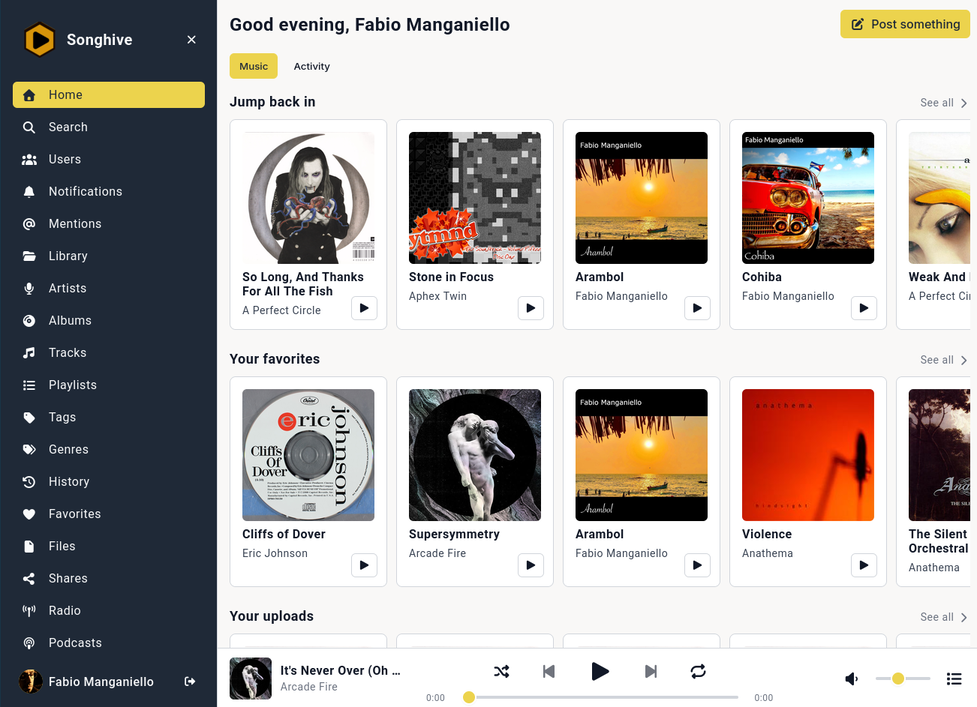
Songhive is a self-hosted music streaming and sharing platform — think Funkwhale meets Mastodon — where your music library lives on your hardware, but your music can travel across the fediverse.
Where most self-hosted media servers (Jellyfin, Mopidy, plain Subsonic) are single-player islands, and Funkwhale's federation is mostly library-oriented, Songhive treats music as social content: tracks, albums and playlists are first-class ActivityPub objects that can be published, followed, replied to, boosted and quoted from Mastodon and any other ActivityPub-compatible service. It is a music library, a streaming server, and a fediverse social hub in a single package.
⚡ Features
🎵 Music streaming
- 💿 Music Library: Upload and organize artists, albums, and tracks, with automatic tag extraction, duplicate detection, and metadata enrichment from MusicBrainz and the Cover Art Archive
- ၊၊||၊ Streaming: Audio streaming with on-the-fly transcoding (MP3, OGG, FLAC, AAC, Opus), range requests, and per-user/per-role bitrate caps
- 🔀 Server-side outputs: Route playback to persistent audio outputs instead
of the browser — stream to an external Icecast server, cast to a Snapcast
multi-room setup via a snapserver pipe or TCP source, or host your own
mountpoints entirely inside Songhive (
/streams/<mount>) with fan-out to multiple listeners. Playback keeps running on the server even after you close the tab - 📻 Playlists & Radios: Create playlists and dynamic radio stations
- ❤️ Listening history, favorites and scrobbling: every play is recorded, and submissions to Last.fm and Libre.fm work out of the box
- </> Subsonic API: Compatibility layer for Subsonic clients — use the mobile or desktop player you already have (see Subsonic-compatible clients)
- 🐍 Mopidy: browse and play your instance's library from a Mopidy server via
the
mopidy-songhiveextension
📢 Social & federated
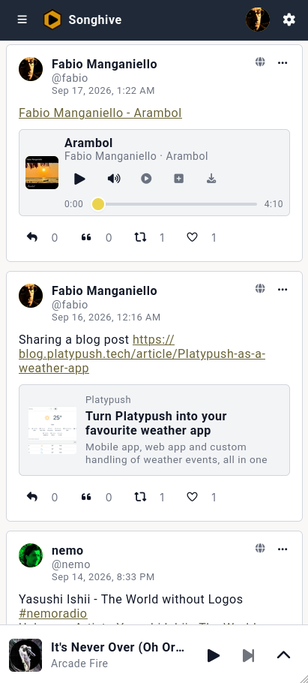
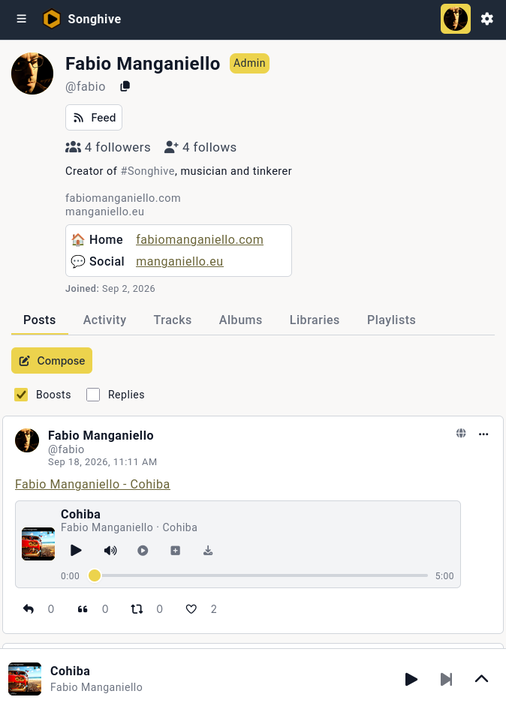
- 🌐 Federation: Full ActivityPub support via pubby — federate with Mastodon and other AP-compatible services. Follow remote actors, receive their posts in your timeline, and reply, boost, quote and like from Songhive or from your Mastodon client
- 👍 Posts & interactions: Mastodon-style statuses with mentions, hashtags, Markdown support, threaded replies, quotes and link preview cards
- 🔎 Remote discovery: Explicit lookup of remote actors, posts and resources by handle or URL — SSRF-guarded, domain-moderated, cached, and gated by a per-instance access policy
- 🎶 Federated music entities: full bidirectional music federation with Funkwhale and other Songhive instances — remote libraries, albums, artists and tracks resolve as browsable remote resources that can be followed and added to your collection, and local artists, albums, libraries and tracks are published in the Funkwhale-compatible ActivityPub dialect so remote instances can discover and follow them
- 🔔 Notifications: in-app real-time notifications over WebSocket, with per-type email and daily-digest preferences
- ⚖️ Moderation: Mastodon-style moderation — users can mute/block local and
remote actors; admins can limit/suspend actors and defederate or restrict
instances to followers-only delivery. Users can also report accounts to local
moderators, optionally forwarding the report to the reported actor's home
instance via ActivityPub
Flag - 🛜 RSS/Atom feeds: every profile, artist, playlist, library, tag and genre
exposes RSS 2.0 and Atom feeds, with
<link rel="alternate">discovery tags served to feed readers
🔁 Sharing & privacy
- 🔒 Fine-grained visibility: keep tracks, albums, playlists and libraries
private,local(instance-only) orpublic - 🔁 Sharing: grant access to specific users, or generate revocable short links that render a preview page with an audio player for anyone
- </> Embeddables: embed public tracks and collections on any web page via
<audio>tags, Markdown links,<script>widgets or iframes — withAccess-Control-Allow-Originon media endpoints so Fediverse clients can embed your audio too - 💬 Webmentions: bidirectional notifications support for public content. Any blog or social media platform that links to your song and supports Webmentions will send you a notification. Every content you share, link or comment on on a source that supports Webmentions will send a Webmention back to the source
🛠️ Platform
- 👥 Multi-user: User registration (open, invite-only or closed), profiles with per-user profile visibility, and admin management
- 🔑 OAuth2 Provider: Third-party app authorization, plus API tokens for scripts and Subsonic clients
- 💾 Flexible Storage: Local filesystem or S3-compatible object storage
- 🗃️ External Libraries: Attach external music storage (local folders, S3, SFTP, cloud adapters) to Songhive libraries; index, stream, and write metadata back to the provider. See docs/ARCHITECTURE.md#external-libraries.
- 🏷️ Metadata enrichment: automatic MusicBrainz MBID lookup, cover art from the Cover Art Archive, and artist image fetching; tags are written back to the audio files themselves (content-hashed, so re-tagging never moves files)
📐 Architecture
- Backend: FastAPI (REST API) + Tornado (WebSocket, streaming, process server)
- Models: Pydantic (validation) + SQLAlchemy (async ORM)
- Tasks: Celery + Redis (background import, transcoding, federation delivery)
- Frontend: Vue.js 3 + TypeScript + Pinia
See docs/ARCHITECTURE.md for detailed architecture documentation.
📦 Installation
Songhive can be run either as a complete Docker stack or installed locally with
pip.
🏗️ Docker
The Docker Compose setup builds the frontend and backend images, starts
PostgreSQL and Redis, and wires everything together behind an Nginx reverse
proxy. The songhive, worker, postgres and redis services all run as the
same non-root UID/GID as the host user, so the files in ./volumes are owned by
you and are easy to access from the host.
Latest image
# Run the docker-compose bootstrap script
curl -fsSL https://git.fabiomanganiello.com/songhive/raw/branch/main/docker/bootstrap.sh | sh
From a local checkout
# Clone the repository
git clone https://git.fabiomanganiello.com/songhive
# Or from GitHub: git clone https://github.com/blacklight/songhive
cd songhive

# Set the UID/GID to match the host user (the same value is used by all
# rootless services and by the setup step that fixes volume permissions).
export PUID=$(id -u)
export PGID=$(id -g)

# Build the images
docker compose build
🐍 pip
This path is useful for local development or running on an existing Python host. A published package is also available on PyPI and ships the built web UI, so the frontend does not need to be built manually when installing from PyPI.
Prerequisites:
- Python >= 3.10
- PostgreSQL (a SQLite database will also work, but it's not recommended for large installations)
- Redis/Valkey
- ffmpeg
- Node.js and npm (for the frontend)
Latest stable package
# Install from PyPI
pip install songhive
From a local checkout
Or, clone the repository and install in editable mode for development
git clone https://git.fabiomanganiello.com/songhive
# Or from GitHub: git clone https://github.com/blacklight/songhive
cd songhive

# Optional: create and activate a virtual environment
python -m venv .venv
source .venv/bin/activate  # On Windows: .venv\Scripts\activate

pip install -e .

# Build the web UI (outputs to songhive/static/)
cd frontend
npm install
npm run build
cd ..
🌐 nginx setup
If you are planning to serve Songhive behind a reverse proxy, you can reuse the
nginx.conf used by the Docker setup.
⚙️ Configuration
Getting the default configuration
-
If you installed Songhive through the docker-compose bootstrap script, then
config.tomlshould be already downloaded under the same folder asdocker-compose.yml. -
If you built Songhive from a local checkout, then copy the example configuration file:
cp config.toml.example config.toml
-
Otherwise, download the latest
config.toml:wget https://git.fabiomanganiello.com/songhive/raw/branch/main/config.toml.example
The application looks for config.toml in this order: the path given with
--config or the SONGHIVE_CONFIG environment variable, then ./config.toml,
then $XDG_CONFIG_HOME/songhive/config.toml (or ~/.config/songhive/config.toml),
and finally /etc/songhive/config.toml.
Base configuration
Set at least the following values in config.toml:
[auth]
secret_key = "..."  # Generate with: python -c "import secrets; print(secrets.token_urlsafe(64))"

[storage]
local_path = "/path/to/writable/media"  # e.g. ./data/media

[server]
cors_origins = ["*"]  # Replace with your frontend origin(s) in production

[federation]
enabled = false  # Set a real instance_domain to enable federation
# instance_domain = "music.example.com"
From environment variables
All the config.toml configuration entries can be overridden via environment
variables.
For example:
[database]
url = "postgresql+asyncpg://songhive:songhive@localhost:5432/songhive"
becomes:
SONGHIVE_DATABASE__URL="postgresql+asyncpg://songhive:songhive@localhost:5432/songhive"
User-facing features and toggles
Beyond the base setup, config.toml exposes a few knobs for the features
described above. Most of them are enabled by default — check
config.toml.example for the full annotated list.
| Section | What it controls |
|---|---|
[auth] registration_mode |
open, invite-only, approval-required or closed registration |
[federation] enabled / instance_domain |
ActivityPub federation; also enables remote discovery and Webmention delivery |
[webmentions] |
Incoming/outgoing Webmention link-backs for public content |
[feeds] enabled |
RSS 2.0 / Atom feeds under /feeds |
[streaming] |
Default and max audio bitrate (globally or per user role), transcode cache |
[streams] |
Server-side outputs (Icecast, Snapcast, native HTTP mounts): enable/disable, who may create outputs, allowed remote output hosts, worker timings, native HTTP stream buffering and listener caps |
[subsonic] enabled |
The Subsonic compatibility layer (on by default) |
[scrobbling] |
Instance API keys for Last.fm / Libre.fm scrobbling |
[musicbrainz] |
Metadata enrichment: MBID lookup, cover art and artist images |
[email] |
SMTP settings for verification emails, password resets and notification digests |
Some of these can also be changed at runtime from the admin UI (stored as instance settings) without restarting the server — e.g. link preview cards and registration mode.
Users control their own experience from the web UI's Settings page:
profile visibility (public/local/private), notification preferences
(in-app, email, daily digest), API tokens, active sessions, mutes and blocks,
and scrobbling thresholds.
⚡ Running the service
Docker installation
cd /path/to/your/songhive/installation
docker compose up -d
Then take down the stack with:
docker compose down
pip installation
SONGHIVE_CONFIG="/path/to/your/songhive/installation/config.toml"
songhive -c "$SONGHIVE_CONFIG"
Celery
This is only required in a non-Docker setup. The Docker stack already runs a separate container for the Celery workers.
Start the Celery worker in a second terminal:
celery -A songhive.tasks worker -B -l info
Local library watchdog
If you are using the built-in local external-library provider, start the
filesystem watcher in another terminal or under a supervisor such as systemd:
songhive watch-external-libraries
The Docker stack runs this as a separate watcher container. The watcher is kept
as a standalone process rather than a child of the web server so that a single
host has exactly one watchdog, even when the web server is scaled to multiple
workers.
Stream worker
Server-side audio outputs (Icecast relays, Snapcast casting and native HTTP mountpoints) are driven by a dedicated process:
songhive stream-worker
It claims outputs through a Redis lock, so a single worker process is enough —
running more than one is safe (they just split the outputs), and none is
required if you don't use server-side outputs. The Docker stack runs it as an
optional stream-worker container under the streams profile:
docker compose --profile streams up -d
systemd service
Songhive ships with systemd unit files under config/systemd/
and an install.sh script that sets up a virtual environment,
copies the example config, installs the units, and creates the required
directories.
The master songhive.service unit pulls in four units:
songhive-server.service— the main web serversonghive-celery.service— the Celery worker and schedulersonghive-watch-extlib.service— the external-library watchdogsonghive-stream-worker.service— the audio stream worker for server-side outputs
Run the installer as root for a system-wide service:
sudo ./install.sh
This creates /opt/songhive (the virtual environment), /etc/songhive,
/var/lib/songhive, /var/cache/songhive, and /var/log/songhive, installs
the units to /etc/systemd/system/, and reminds you to copy
/etc/songhive/config.toml.example to /etc/songhive/config.toml and edit it.
Then start and enable the service:
sudo systemctl start songhive.service
sudo systemctl enable songhive.service
Run the installer as a normal user for a user service:
./install.sh
This creates a virtual environment under ~/.local/share/virtualenvs/songhive,
copies the example config to ~/.config/songhive/, creates
~/.local/share/songhive, ~/.cache/songhive, and ~/.local/state/songhive,
and installs the units to ~/.config/systemd/user/. Copy
~/.config/songhive/config.toml.example to
~/.config/songhive/config.toml, edit it, then start the user service:
systemctl --user start songhive.service
systemctl --user enable songhive.service
Creating the admin user
Docker installation
cd /path/to/your/songhive/installation
docker compose exec songhive songhive admin create-user \
    --username admin \
    --email admin@example.com \
    --password secret \
    --admin
pip installation
SONGHIVE_CONFIG="/path/to/your/songhive/installation/config.toml"
songhive -c "$SONGHIVE_CONFIG" admin create-user \
    --username admin \
    --email admin@example.com \
    --password secret \
    --admin
▶️ Testing the installation
Open:
- Web UI: http://localhost:8000/
- Swagger UI: http://localhost:8000/swagger-ui/
- OpenAPI spec: http://localhost:8000/openapi.json
🔔 Notifications
For OS-native notifications, generate your VAPID keys with:
songhive admin generate-vapid-keys
Then add them to your configuration and restart the service.
🧩 Integrations
Subsonic-compatible clients
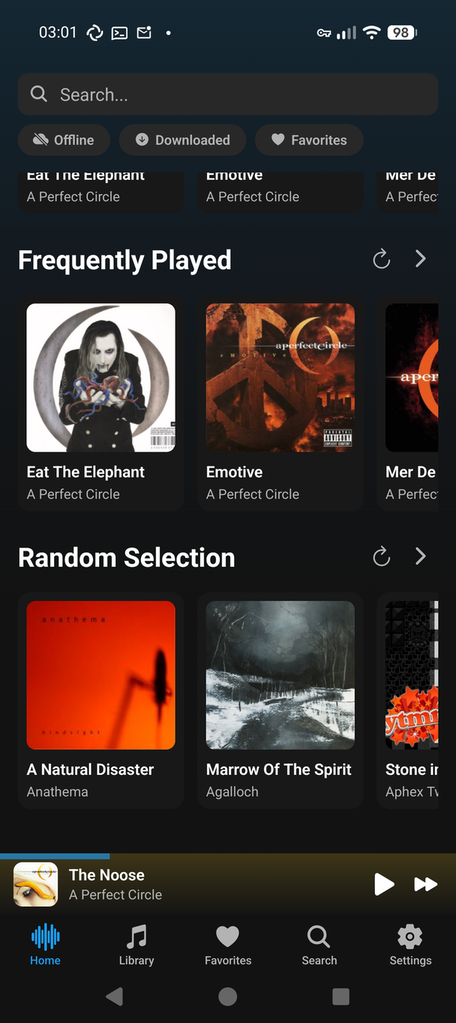
Songhive implements the
Subsonic API under the
/rest/*.view namespace (with the OpenSubsonic apiKeyAuthentication
extension advertised through getOpenSubsonicExtensions), so any
Subsonic-compatible client can browse and stream the instance's library.
To connect a client:
- Enter the base URL of your instance (e.g.
https://music.example.com) as the server address. - Log in with your Songhive username and an API token generated under
Settings → API tokens. Using a token rather than your account
password is recommended — it keeps the real password out of third-party
apps and works with every authentication scheme clients may use
(
p, OpenSubsonicapiKey, and saltedt/stokens). Your account password also works, but only with clients that send it viap: saltedt/stokens cannot be verified against bcrypt-hashed passwords, while an API token can be reconstructed and verified.
Some Subsonic-compatible clients:
- Substreamer — iOS and Android
- Tempus — Android (actively maintained fork of Tempo)
- Ultrasonic — Android
- Symfonium — Android
- Supersonic — Windows, macOS and Linux
The adapter is enabled by default; set subsonic.enabled = false in
config.toml to disable it.
Mopidy
The mopidy-songhive extension can be installed in your Mopidy instance:
pip install mopidy-songhive
It allows you to browse and play your libraries, playlists, albums etc. directly from your Mopidy instance.
🛠️ Development
# Run tests
python -m pytest

# Run linting
python -m flake8 songhive tests

# Format code
python -m black .

# Start Celery worker
celery -A songhive.tasks worker -l info
Frontend
cd frontend
npm install
npm run dev     # Development server
npm run build   # Production build (outputs to songhive/static/)
</> API
REST API available at /api/v1/:
| Endpoint | Description |
|---|---|
/api/v1/auth/ |
Authentication (login, register, refresh) |
/api/v1/auth/api-tokens/ |
API token management (create, list, revoke) |
/api/v1/users/ |
User profiles |
/api/v1/artists/ |
Artists |
/api/v1/albums/ |
Albums |
/api/v1/tracks/ |
Tracks |
/api/v1/playlists/ |
Playlists |
/api/v1/libraries/ |
User libraries |
/api/v1/favorites/ |
Favorites |
/api/v1/history/ |
Listening history |
/api/v1/radios/ |
Dynamic radios |
/api/v1/stream/{id} |
Audio streaming |
/api/v1/outputs/ |
Server-side audio outputs (Icecast relays, Snapcast casting, native HTTP mounts) |
/streams/{mount} |
Native HTTP stream mountpoints (listener-facing) |
/api/v1/admin/ |
Admin endpoints |
WebSocket: /ws/events (real-time notifications)
Federation: /.well-known/webfinger, /ap/actor, /ap/inbox, /ap/outbox
📜 License
1 maintainer

Release files for songhive 0.3.1
For a detailed explanation of source distributions (sdists) and built distributions (wheels), please see the package formats documentation.
Source distribution (sdist)
| File | Size | Uploaded | |
|---|---|---|---|
| songhive-0.3.1.tar.gz | 5.2 MB | Details |
Built distribution (wheel)
| File | Interpreter | ABI | Platform | Reset |
|---|---|---|---|---|
| songhive-0.3.1-py3-none-any.whl | Python 3 | none | any | Details |
Total release size: 10.2 MB
Release files / songhive-0.3.1.tar.gz
| Download URL | songhive-0.3.1.tar.gz |
|---|---|
| Size | 5.2 MB |
| Tags | Source |
|
SHA-256 checksum How to use checksums |
235468a59dbea360f40f69cd5f3accc1be4675429cd424d15312d2f0a1f739f5
|
|
BLAKE2b-256 checksum How to use checksums |
f339c465fe13291ba5ac6f3a5feb996253e49af48bb54f128bf0cdc26b4fef8a
|
| Upload date | |
|
Uploaded using Trusted Publishing? What is trusted publishing? |
No |
| Uploaded via |
twine/6.1.0 CPython/3.14.7
|
Release files / songhive-0.3.1-py3-none-any.whl
| Download URL | songhive-0.3.1-py3-none-any.whl |
|---|---|
| Size | 5.0 MB |
| Tags | Python 3 |
|
SHA-256 checksum How to use checksums |
95efa5708950d63a9a6ee5ac323df99ae9956aa78ce4a9c5a0713627e9b37beb
|
|
BLAKE2b-256 checksum How to use checksums |
b6ad9afdb75857a2276432491a6a002ee96904c465a17cbe6bfadf3e2d5d1b47
|
| Upload date | |
|
Uploaded using Trusted Publishing? What is trusted publishing? |
No |
| Uploaded via |
twine/6.1.0 CPython/3.14.7
|














