
Sonicproof
Does your AI-generated sound match what you asked for?
Sonicproof is a local QA tool for generative audio — sound effects, music and ambience from Stable Audio and friends. It listens with one multilingual model, Google's EmbeddingGemma 2, which puts text, sound, images and video in one shared space:
- check — does this clip sound like the prompt? Prompts can be English, 中文, 日本語 or any other language.
- rank — you generated four seeds; which one should you keep?
- qc — is it technically clean? Loudness, true peak, clipping, DC, silence, cut-off tails, clicks, phase, loop seams — with a one-line fix for every problem.
- fit — does this sound suit the picture? A frame, a piece of concept art, a video clip, or a video's own soundtrack.
- search — find sounds in your own library by words (any language), by example, or by picture.
- dedupe — find the re-encoded, re-levelled and trimmed copies cluttering your library, and which one to keep.
Everything runs on your machine. No uploads, no API keys. Use it three ways:
- Workbench —
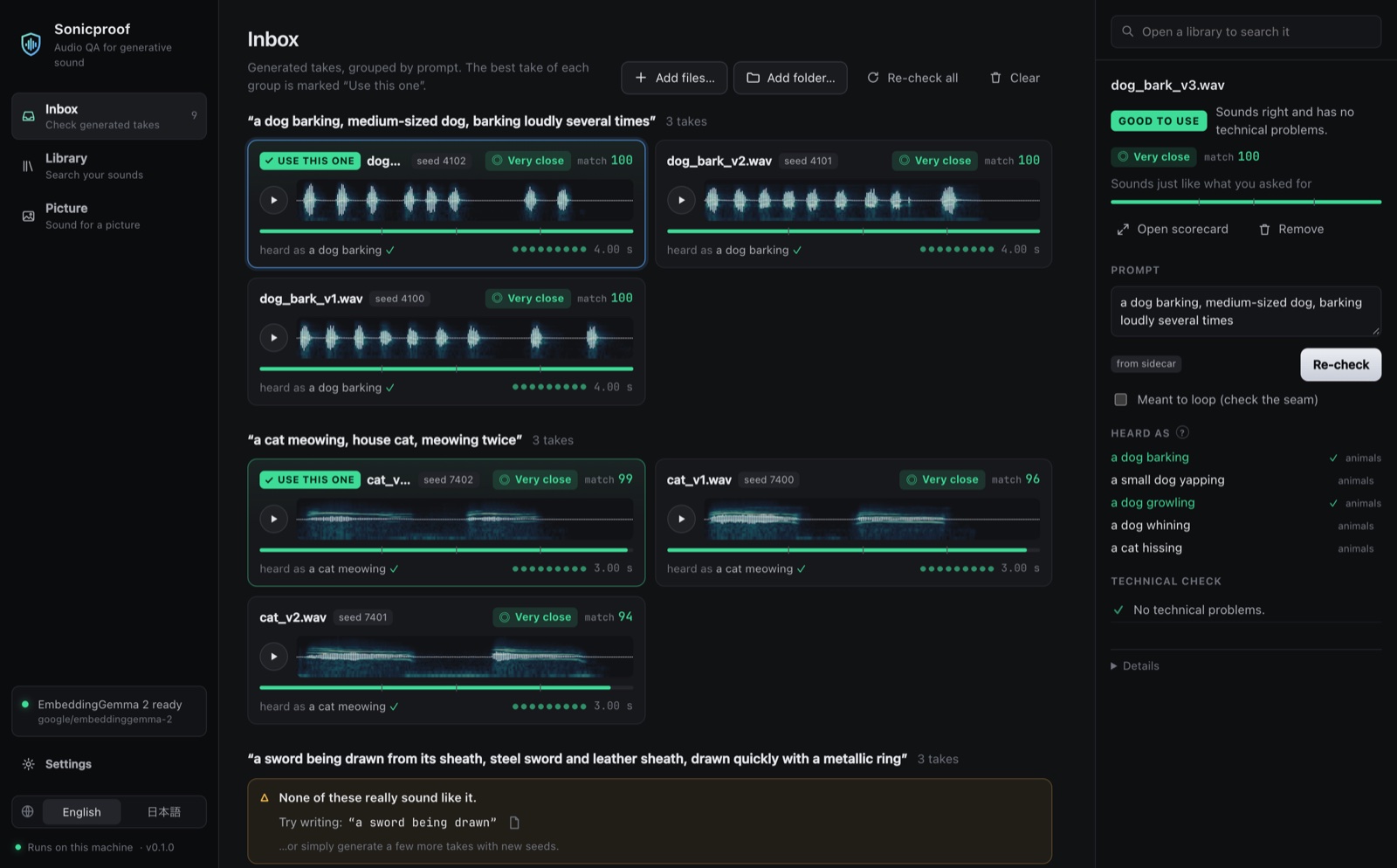
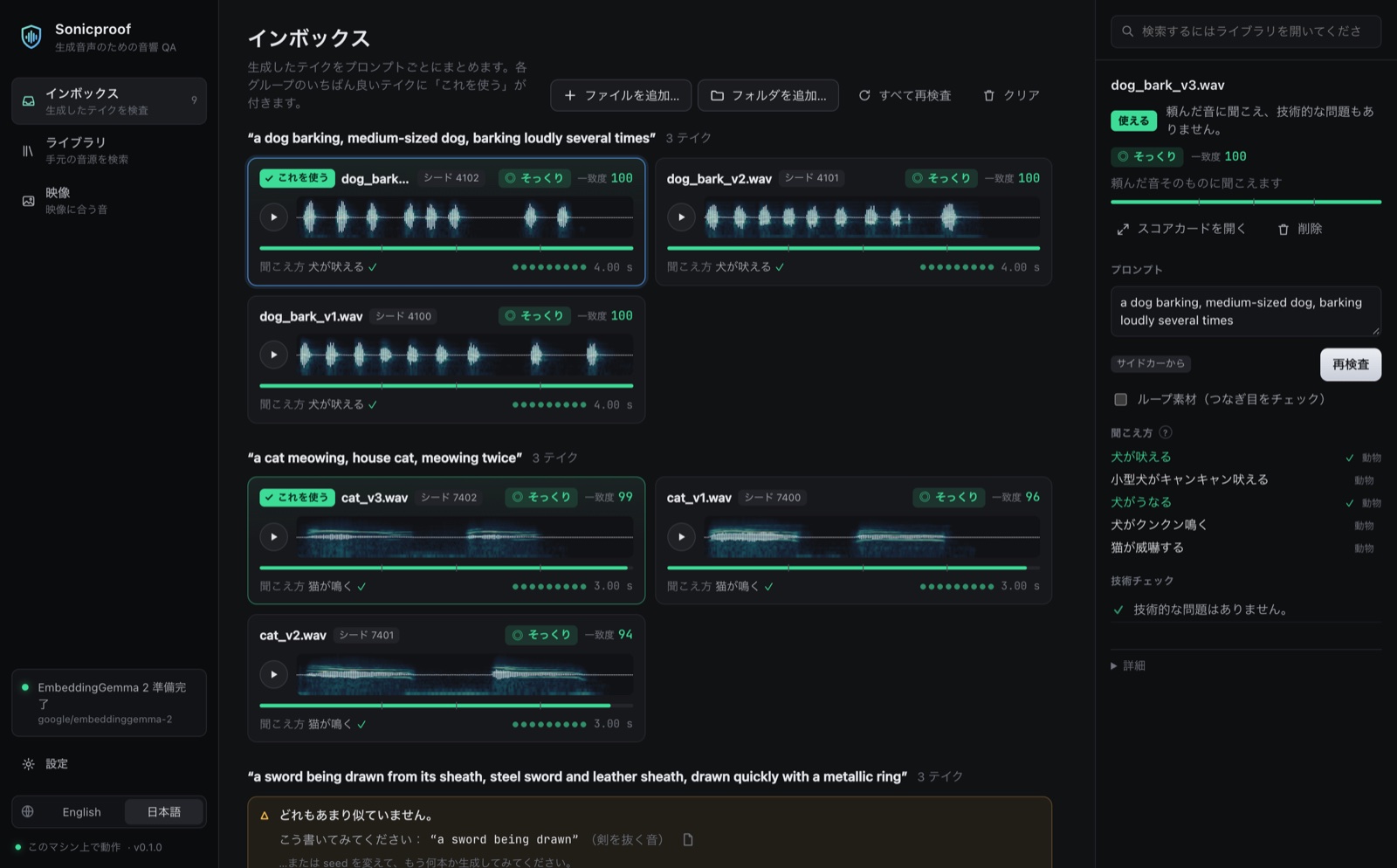
sonicproof serveopens a local web app: drop files in, see waveforms, spectrograms, scores and one-line fixes. English and 日本語. - Agents — an MCP server and an agent skill, so Claude Code, Codex and friends can listen to what they generate. See Use it from your AI agent.
- CLI / Python — every analysis command has
--json.
$ sp check dog_bark.wav "狗在叫"          # output trimmed: 3 of the 5 "Heard as" lines
╭─ dog_bark.wav ─────────────────────────────────────────────────────╮
│                                                                    │
│   STRONG   +2.97σ  ━━━━━━━━━━━━━━━━━━━━━━━━━━━━                    │
│  clearly sounds like the prompt                                    │
│                                                                    │
│    prompt  “狗在叫”                                                │
│   ranking  #2 of 438 descriptions for this clip                    │
│  evidence  cos 0.736 · clip-side +3.19σ · prompt-side +2.74σ       │
│                                                                    │
│  Heard as                                                          │
│  +3.24σ  a dog barking  ✓  animals                                 │
│  +2.85σ  a dog whining  ✓  animals                                 │
│  +2.69σ  a dog growling  ✓  animals                                │
│                                                                    │
╰────────────────────────────────────────────────────────────────────╯
Install
uv tool install "sonicproof[model]"        # or: pip install "sonicproof[model]"
sonicproof doctor --load                   # first run downloads the model once (~1.5 GB)
Until the first release, install from source: git clone https://github.com/kanaworksai-hue/sonicproof, run
uv sync --extra model inside it,
and run commands with uv run sp … (or uv run --project /path/to/sonicproof sp … from any other folder).
- Python 3.11+. Apple Silicon (MPS), CUDA and CPU all work.
spis a short alias forsonicproof. - The model — EmbeddingGemma 2, about 1.5 GB — is downloaded from Hugging Face into its usual cache on first use. No Hugging Face account or token is needed.
- ffmpeg is only needed for M4A / AAC / MP4 and other formats libsndfile can't read, and for video in
fit/search. WAV, FLAC, OGG and MP3 work without it. - Windows + NVIDIA GPU: the PyPI build of PyTorch for Windows is CPU-only. Install PyTorch with CUDA first, following pytorch.org, then install Sonicproof.
qcneeds no model at all:pip install sonicproof(without[model]) is enough for technical checks.
Use
# Prompt adherence. Omit the prompt to read it from a Stable Audio .json sidecar.
sp check explosion.wav "a huge explosion with debris"
sp check door_v2.wav "木の扉がきしみながら開く"
sp check thunder.wav

# Pick the best take
sp rank "a wooden door creaking open" door_v1.wav door_v2.wav door_v3.wav door_v4.wav

# Technical checks (no model needed). Exit code 1 if anything fails — handy in scripts.
sp qc *.wav
sp qc ambience_loop.wav --loop --target-lufs -16

# Everything in one scorecard: SHIP / REVIEW / REDO. --strict exits 1 unless it is SHIP.
sp report footsteps.wav "footsteps on gravel"
sp report footsteps.wav "footsteps on gravel" --strict

# Does the sound suit the picture? Words about the scene are optional, any language.
sp fit sizzle.wav --image kitchen.png
sp fit rumble.wav --video storm.mp4 "暴风雨夜,雷声"
sp fit trailer.mp4                          # a video's own soundtrack against its own picture
Your sound library
sp index ~/SFX                              # once; re-runs only read new or changed files
sp search "rain on a tin roof" --in ~/SFX
sp search "木の床を歩く足音" --in ~/SFX
sp search --like take_03.wav --in ~/SFX     # sounds like this one
sp search --image frame.png --in ~/SFX      # sounds that suit this picture
sp dedupe ~/SFX                             # duplicates and near-duplicates (nothing is deleted)
The library folder is always given explicitly: index DIR, search … --in DIR, dedupe DIR (your home
folder or a drive root are refused — point at the folder that holds your sounds).
The index lives in ~/SFX/.sonicproof/ (use --in-cache to keep it in ~/.cache/sonicproof instead, e.g. for
read-only folders). search and dedupe bring it up to date on the fly, so sp index is optional.
The workbench always keeps its indexes in the cache, so opening a folder there never writes into it.
Scripting: --json and exit codes
The analysis commands — check, rank, qc, report, fit, index, search, dedupe — take --json for scripts and agents (doctor, serve, mcp and skill are for people). qc --json always prints an array, one record per file,
even for a single file. A file that can't be read gets "status": "error" in that array and the rest are
still checked.
| Exit code | Meaning |
|---|---|
0 |
Done. check / rank / fit exit 0 whatever the verdict — read the verdict. |
1 |
qc found a failure, or report --strict did not say SHIP. |
2 |
A problem with the input: missing or unreadable file, empty audio, bad option value. |
3 |
A problem with the setup: model extra not installed, model not downloaded and offline, ffmpeg needed, port busy. |
With --json, errors are JSON too — {"error": {"code": "not_found", "message": "…", "file": "…"}} on stdout
— so a script never has to parse a traceback. Set SONICPROOF_DEBUG=1 to see the full traceback.
Silent clips (nothing above −60 dBFS) are never scored as a match: check, rank, fit and search give
them "verdict": "miss" with "note": "silent" and rank them last. Short one-shots such as UI clicks are
judged normally.
Workbench
sonicproof serve # opens http://localhost:7788
- Inbox — drop audio files or whole folders. Prompts are read from Stable Audio
.jsonsidecars (or type your own, in any language). Takes of the same prompt are grouped, ranked, and the best one is marked Use this one. When nothing in a group sounds right, it says so and suggests a wording to try next. Each card shows the waveform over a spectrogram, a plain verdict (◎ Very close · ○ Close · △ Somewhat · ✕ Not a match), a 0–100 match bar and a dot per technical check; technical findings are spelled out in plain words with the fix. - Library — choose a folder, index it (with progress), then search by words, by dropping a sound, or by picture. The Duplicates tab lists copies and which one to keep (nothing is deleted).
- Picture — drop an image or a video: see what it shows in sound words, score your Inbox sounds against it, find matching sounds in your library, or judge a video's own soundtrack.
The raw numbers (σ scores, cosines, every measurement) are one click away under Details, or everywhere with Settings → Pro mode. Settings also shows how much the cache uses and clears it; removing files from the Inbox deletes the copies made when they were dropped (your originals are never touched).
The language follows your browser and can be switched (English / 日本語). Sound only plays when you press play.
The server listens on localhost only and refuses requests from other sites.
Use it from your AI agent
The quickest way: give your agent the link to this repository (or the skill below) and ask it to check the sounds it generates. Everything it needs is in this section.
1. Download the model once, in a terminal. The MCP server never starts a 1.5 GB download inside a tool call (it would look like a hang); it asks you to run this instead:
uvx --from "sonicproof[model]" sonicproof doctor --load
2. Add the MCP server — tools check, rank, qc, report, fit, search, dedupe, index. Each returns
the same records the matching CLI command prints with --json. The model loads once and stays loaded.
# Claude Code
claude mcp add sonicproof -e HF_HOME="${HF_HOME:-$HOME/.cache/huggingface}" -- uvx --from "sonicproof[model]" sonicproof mcp
# Codex
codex mcp add sonicproof --env HF_HOME="${HF_HOME:-$HOME/.cache/huggingface}" -- uvx --from "sonicproof[model]" sonicproof mcp
# any client: streamable HTTP at http://127.0.0.1:7789/mcp
sonicproof mcp --http --port 7789
Other clients take the same command in their JSON config (write out the absolute path of your cache):
{ "mcpServers": { "sonicproof": {
    "command": "uvx", "args": ["--from", "sonicproof[model]", "sonicproof", "mcp"],
    "env": { "HF_HOME": "/Users/you/.cache/huggingface" } } } }
- Why
HF_HOME: MCP clients start servers with a reduced environment. Passing it makes the server use the same Hugging Face cache as your terminal, so the model is not downloaded a second time. - Use absolute paths in tool calls. A relative path resolves against the server's working directory, which is usually not yours.
- HTTP mode listens on
127.0.0.1only and refuses requests from web pages on other sites, but it has no authentication: any process on your machine can call it. Use stdio when that matters. - Before the PyPI release, run from a clone:
uv sync --extra modelinside it, then useuv run --project /absolute/path/to/sonicproof --extra model sonicproof mcpas the server command (--projectkeeps the caller's working directory;--directorywould change it).
If you are an agent reading this repository: install with uv tool install "sonicproof[model]" (or
uv sync --extra model inside a clone and prefix commands with uv run --project /absolute/path/to/sonicproof),
run sonicproof doctor --load once, then follow the skill (sp skill show prints it). Without MCP, every
analysis command works from the shell with --json — sp rank "prompt" a.wav b.wav --json,
sp report take.wav "prompt" --json, sp qc *.wav --json. Pass absolute local file paths; never play audio
to "listen" — Sonicproof is your ears.
Agent skill — the skill teaches an agent the loop that makes generated audio trustworthy: generate several takes → rank them → check the best one → rephrase or reseed when nothing matches → deliver the pick with its scorecard. It ships with the package:
sp skill install              # → ~/.claude/skills/sonicproof/SKILL.md
sp skill install --project    # → ./.claude/skills/sonicproof/SKILL.md (this project only)
sp skill show                 # print it, for agents that read skills from elsewhere
In a clone it lives at src/sonicproof/skill/SKILL.md.
examples/stable_audio_loop.py runs the same loop as a script, with one MCP
client for a Stable Audio server and one for Sonicproof.
How to read a score
Raw similarity between a prompt and a clip is not very informative — almost any caption scores about the same against any clip. Sonicproof turns it into a calibrated score in σ by asking two relative questions:
- Clip side — compared with ~440 everyday sound descriptions, how well does your prompt describe this clip?
- Prompt side — compared with a bank of 110 reference sounds, how much closer is this clip to your prompt?
The two are averaged:
| Verdict | Score | Meaning |
|---|---|---|
| strong | ≥ 2.0σ | clearly sounds like the prompt |
| plausible | ≥ 1.1σ | sounds like the prompt |
| weak | ≥ 0.3σ | only loosely matches |
| miss | < 0.3σ | does not sound like the prompt |
Heard as lists what the clip sounds most like; ✓ marks descriptions that agree with your prompt. When a verdict surprises you, that list usually explains why.
fit
fit weighs two pieces of evidence, both calibrated the same way and read on the same verdict scale:
- direct — how much closer is the picture to this clip than to the reference sounds?
- described — the picture is first described in words (Pictured as), and the clip is checked against those descriptions as if they were the prompt. Add your own words about the scene and they count too.
Pictured as marks with ✓ what the clip also sounds like; Heard as marks what the picture also shows. When the fit is weak, Sonicproof suggests a prompt drawn from the picture — useful for regenerating. Videos are sampled at one frame per second (up to 32 frames, spread evenly over longer clips).
dedupe
Two sounds can be close in meaning without being the same file — four seeds of the same prompt, say.
dedupe therefore uses the embeddings only to find candidates, then compares the signals themselves
(time-aligned spectral fingerprints), so it groups copies that differ in format, codec, level, sample rate,
channel count or trimmed ends, and leaves different takes alone. In each group it keeps the best copy —
lossless over lossy, not clipped, higher sample rate, more channels, longest — and says why.
Sonicproof is a second opinion, not a judge: short, concrete prompts ("glass shattering") work better than long ones full of mixing notes, and very short transient sounds are the hardest to tell apart. Always listen before you ship.
Python
from sonicproof.judge import Judge

judge = Judge(vision=True)    # one model for everything; Judge() alone is lighter but can't see pictures
result = judge.check("door.wav", "a creaky wooden door")
print(result.verdict, result.score, [a.text for a in result.heard_as])

fit = judge.fit("sizzle.wav", "kitchen.png", "image")
print(fit.verdict, [a.text for a in fit.pictured_as])

from sonicproof.library import Library, find_duplicates, search_text

lib = Library("~/SFX")
lib.update(lambda wave: judge.embedder.embed_audio([wave])[0])
for hit in search_text(lib, judge, "rain on a tin roof"):
    print(hit.path, hit.score, hit.verdict)
Development
uv sync --extra model --group dev && uv run pytest
cd web && npm ci && npm run dev             # UI with hot reload; proxies /api to `sp serve` on :7788
npm run build                               # writes the bundled UI into src/sonicproof/web
UI strings live in web/src/i18n/ (en.ts, ja.ts); the type checker makes sure both have the same keys.
See CONTRIBUTING.md for tests, linting and pull requests.
License
Sonicproof is licensed under the Apache License 2.0 (see also NOTICE). It downloads EmbeddingGemma 2 from Hugging Face on first run — the model is not bundled. The model is released by Google under Apache 2.0, and its model card asks that deployments follow the Gemma Prohibited Use Policy.
1 maintainer

Metadata
1 maintainer
Release files for sonicproof 0.1.0
For a detailed explanation of source distributions (sdists) and built distributions (wheels), please see the package formats documentation.
Source distribution (sdist)
| File | Size | Uploaded | |
|---|---|---|---|
| sonicproof-0.1.0.tar.gz | 387.0 kB | Details |
Built distribution (wheel)
| File | Interpreter | ABI | Platform | Reset |
|---|---|---|---|---|
| sonicproof-0.1.0-py3-none-any.whl | Python 3 | none | any | Details |
Total release size: 686.2 kB
Release files / sonicproof-0.1.0.tar.gz
| Download URL | sonicproof-0.1.0.tar.gz |
|---|---|
| Size | 387.0 kB |
| Tags | Source |
|
SHA-256 checksum How to use checksums |
792ea668b3d48a9c68e2b411b28b13d70addd2670f5337f1759df602967a55cd
|
|
BLAKE2b-256 checksum How to use checksums |
26e2776b0e405e70289ef6f2aaacf8c5c3303722a9e7c4dade7428810168f30a
|
| Upload date | |
|
Uploaded using Trusted Publishing? What is trusted publishing? |
Yes |
| Uploaded via |
twine/7.0.0 CPython/3.13.14
|
Provenance
Provenance describes where a file came from. On PyPI, provenance is shared via attestations, which provide a verifiable record of the build or publishing details. View details, limitations and caveats.


PyPI Publish Attestation
PyPI verified that this artifact, at this checksum, originated from the publisher listed below.
Signed by GitHub Actions, verified by PyPI on Oct 18, 2026.
Transparency logRelease files / sonicproof-0.1.0-py3-none-any.whl
| Download URL | sonicproof-0.1.0-py3-none-any.whl |
|---|---|
| Size | 299.2 kB |
| Tags | Python 3 |
|
SHA-256 checksum How to use checksums |
6d619edc63eb2c6c553dac0c3277cd2f4cdf863fbd50d4d665d871a4efb313c1
|
|
BLAKE2b-256 checksum How to use checksums |
d847c378d652ecbde1b6f12297a3c92ebd4b7c74f7b2ef5cf534941f290631b1
|
| Upload date | |
|
Uploaded using Trusted Publishing? What is trusted publishing? |
Yes |
| Uploaded via |
twine/7.0.0 CPython/3.13.14
|
Provenance
Provenance describes where a file came from. On PyPI, provenance is shared via attestations, which provide a verifiable record of the build or publishing details. View details, limitations and caveats.
PyPI Publish Attestation
PyPI verified that this artifact, at this checksum, originated from the publisher listed below.
Signed by GitHub Actions, verified by PyPI on Oct 18, 2026.
Transparency log












