
Sonorus AI (sonorus-ai)
Sonorus AI is an enhanced, robust speech recognition library built on top of OpenAI's Whisper, featuring:
- Native Hinglish Transcription: Transcribes Hindi speech directly into clean, phonetic Roman English letters (
--language Hinglish). - Phonetic Corrections: Built-in vocabulary post-processing to correct common speech transliteration slips (e.g.
bina bikhar,mohabbat,guroor). - Clean Output Organization: Automatically organizes transcriptions into language folders (e.g.
outputs/Hindi/,outputs/Hinglish/,outputs/English/) in.txtformat without cluttering the project root.
Setup
You can install Sonorus AI directly using pip:
pip install sonorus-ai
Or install in editable mode for local development:
pip install -e .
To update the package to the latest version of this repository, please run:
pip install --upgrade --no-deps --force-reinstall git+https://github.com/Krishnanshu/sonorus-ai.git
It also requires the command-line tool ffmpeg to be installed on your system, which is available from most package managers:
# on Ubuntu or Debian
sudo apt update && sudo apt install ffmpeg

# on Arch Linux
sudo pacman -S ffmpeg

# on MacOS using Homebrew (https://brew.sh/)
brew install ffmpeg

# on Windows using Chocolatey (https://chocolatey.org/)
choco install ffmpeg

# on Windows using Scoop (https://scoop.sh/)
scoop install ffmpeg
You may need rust installed as well, in case tiktoken does not provide a pre-built wheel for your platform. If you see installation errors during the pip install command above, please follow the Getting started page to install Rust development environment. Additionally, you may need to configure the PATH environment variable, e.g. export PATH="$HOME/.cargo/bin:$PATH". If the installation fails with No module named 'setuptools_rust', you need to install setuptools_rust, e.g. by running:
pip install setuptools-rust
Available models and languages
There are six model sizes, four with English-only versions, offering speed and accuracy tradeoffs. Below are the names of the available models and their approximate memory requirements and inference speed relative to the large model. The relative speeds below are measured by transcribing English speech on a A100, and the real-world speed may vary significantly depending on many factors including the language, the speaking speed, and the available hardware.
| Size | Parameters | English-only model | Multilingual model | Required VRAM | Relative speed |
|---|---|---|---|---|---|
| tiny | 39 M | tiny.en |
tiny |
~1 GB | ~10x |
| base | 74 M | base.en |
base |
~1 GB | ~7x |
| small | 244 M | small.en |
small |
~2 GB | ~4x |
| medium | 769 M | medium.en |
medium |
~5 GB | ~2x |
| large | 1550 M | N/A | large |
~10 GB | 1x |
| turbo | 809 M | N/A | turbo |
~6 GB | ~8x |
The .en models for English-only applications tend to perform better, especially for the tiny.en and base.en models. We observed that the difference becomes less significant for the small.en and medium.en models.
Additionally, the turbo model is an optimized version of large-v3 that offers faster transcription speed with a minimal degradation in accuracy.
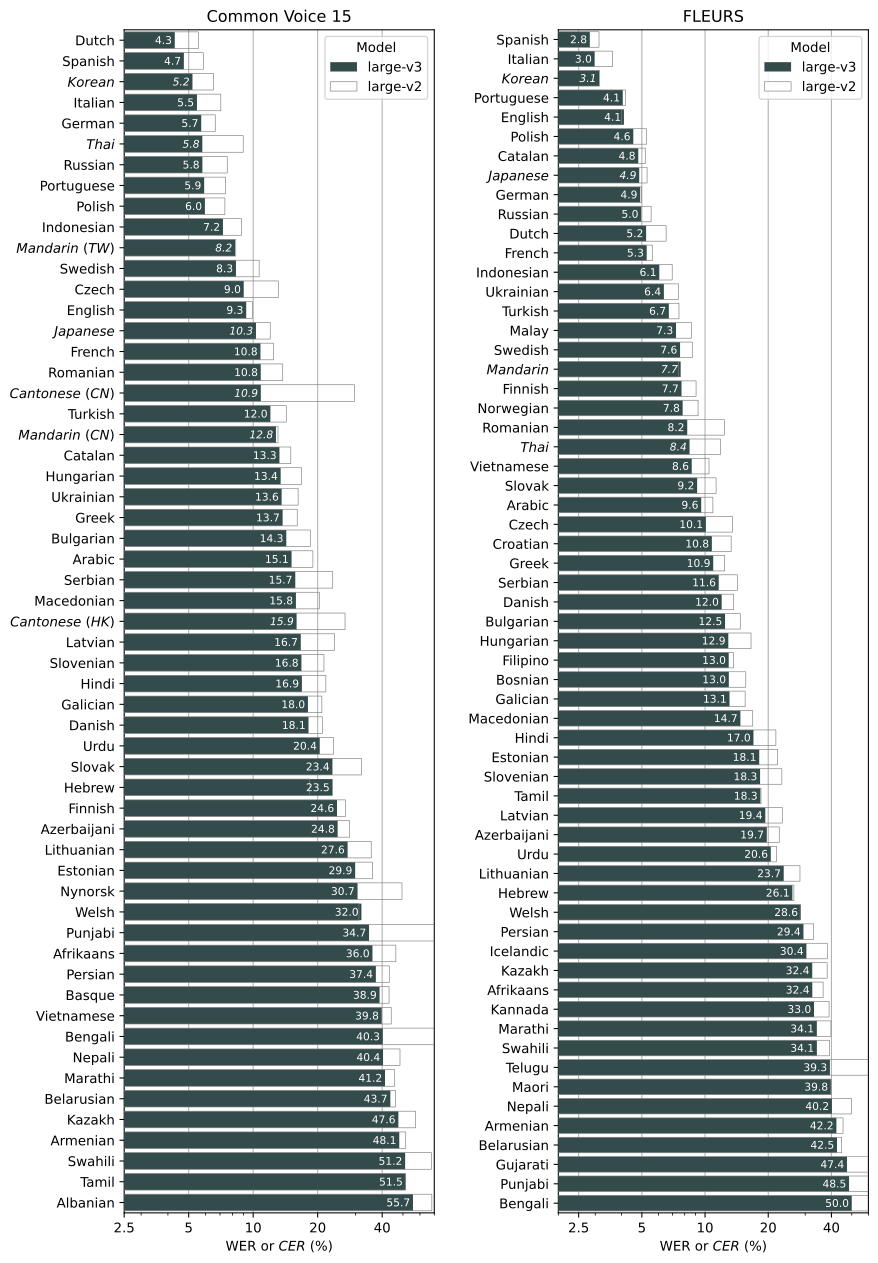
Model performance varies depending on the language. The figure below shows a performance breakdown of large-v3 and large-v2 models by language, evaluated on the Common Voice 15 and Fleurs datasets.
Command-line usage
Transcribe speech in audio/video files directly from your terminal using sonorus (or sonorus-ai):
# Transcribe Hinglish with automated phonetic correction & clean folder organization
sonorus "audio.mp4" --model turbo --language Hinglish

# Transcribe multiple files
sonorus audio.flac audio.mp3 audio.wav --model turbo
The default setting (which selects the turbo model) works well for transcribing English and Hinglish. However, the turbo model is not trained for translation tasks. If you need to translate non-English speech into English, use one of the multilingual models (tiny, base, small, medium, large) instead of turbo.
For example, to transcribe an audio file containing non-English speech, you can specify the language:
sonorus japanese.wav --language Japanese
To translate speech into English, use:
sonorus japanese.wav --model medium --language Japanese --task translate
Note: The
turbomodel will return the original language even if--task translateis specified. Usemediumorlargefor the best translation results.
Run the following to view all available options:
sonorus --help
Python usage
Transcription can also be performed within Python:
import sonorus

model = sonorus.load_model("turbo")
result = model.transcribe("audio.mp3")
print(result["text"])
Internally, the transcribe() method reads the entire file and processes the audio with a sliding 30-second window, performing autoregressive sequence-to-sequence predictions on each window.
Below is an example usage of sonorus.detect_language() and sonorus.decode() which provide lower-level access to the model:
import sonorus

model = sonorus.load_model("turbo")

# load audio and pad/trim it to fit 30 seconds
audio = sonorus.load_audio("audio.mp3")
audio = sonorus.pad_or_trim(audio)

# make log-Mel spectrogram and move to the same device as the model
mel = sonorus.log_mel_spectrogram(audio, n_mels=model.dims.n_mels).to(model.device)

# detect the spoken language
_, probs = model.detect_language(mel)
print(f"Detected language: {max(probs, key=probs.get)}")

# decode the audio
options = sonorus.DecodingOptions()
result = sonorus.decode(model, mel, options)

# print the recognized text
print(result.text)
More examples
Please use the 🙌 Show and tell category in Discussions for sharing more example usages of Whisper and third-party extensions such as web demos, integrations with other tools, ports for different platforms, etc.
License
Whisper's code and model weights are released under the MIT License. See LICENSE for further details.
1 maintainer

Metadata
1 maintainer
Release files for sonorus-ai 0.1.0
For a detailed explanation of source distributions (sdists) and built distributions (wheels), please see the package formats documentation.
Source distribution (sdist)
| File | Size | Uploaded | Provenance | |
|---|---|---|---|---|
| sonorus_ai-0.1.0.tar.gz | 808.9 kB | Without provenance | Details |
Built distribution (wheel)
| File | Interpreter | ABI | Platform | Reset |
|---|---|---|---|---|
| sonorus_ai-0.1.0-py3-none-any.whl | Python 3 | none | any | Details |
Total release size: 1.6 MB
Release files / sonorus_ai-0.1.0.tar.gz
| Download URL | sonorus_ai-0.1.0.tar.gz |
|---|---|
| Size | 808.9 kB |
| Tags | Source |
|
SHA-256 checksum How to use checksums |
4fc637c178ee2ea446911e23a1e6ae4f538ce1a503608532f4370fb3956544d3
|
|
BLAKE2b-256 checksum How to use checksums |
c9cee6d07d341d5542ba541c31eff5a974ae7a19b726cad6669e54ddb9ff1475
|
| Upload date | |
|
Uploaded using Trusted Publishing? What is trusted publishing? |
No |
| Uploaded via |
twine/7.0.0 CPython/3.13.14
|
Release files / sonorus_ai-0.1.0-py3-none-any.whl
| Download URL | sonorus_ai-0.1.0-py3-none-any.whl |
|---|---|
| Size | 805.2 kB |
| Tags | Python 3 |
|
SHA-256 checksum How to use checksums |
76358e34fef9ab4e553cdf767ab302f5490532ef156ffdc4f9561c5af23e2b98
|
|
BLAKE2b-256 checksum How to use checksums |
570de949ca2bb8e202608c671de7bf67c4e193bec4f0e9e432ae43983994a2c2
|
| Upload date | |
|
Uploaded using Trusted Publishing? What is trusted publishing? |
No |
| Uploaded via |
twine/7.0.0 CPython/3.13.14
|
Security for sonorus-ai 0.1.0
Provenance
Provenance describes where a file came from. On PyPI, provenance is shared via attestations, which provide a verifiable record of the build or publishing details. View details, limitations and caveats.
No provenance found
None of the files in this release were uploaded with provenance metadata.
A note on package security
PyPI is a repository for distributing packages, not a service for auditing them. While third-party security researchers and our staff do their best to detect and remove malicious packages, PyPI cannot guarantee the quality, security or suitability of any given package.













