
Tool for sorting photos based on Exif.

Project description
sorting-assistant


A tool that determines sets of photos taken consecutively based on the Exif shooting date and exposure time, and creates a directory for each set.
[ja]
Exif の撮影日時と露光時間から、連続撮影された写真のセットを判断し、セットごとにディレクトリを作成するツール。
Table of Contents
Specification
- Only JPEG-format photos with Exif data are acceptable.
- If the difference between the date and time of shooting in the Exif is within ±2 seconds of the exposure time, the camera is considered to have taken consecutive shots.
- Directories for each set are created in the directory to be sorted.
- The directory names created will be sequentially numbered from 0000.
[ja]
- Exif が記録されている JPEG 形式の写真のみ対象です。
- Exif の撮影日時の差が、露光時間 ±2 秒以内の場合に、連続撮影されたと判断します。
- セットごとのディレクトリは、仕分け対象のディレクトリ内に作成します。
- 作成されるディレクトリ名は 0000 からの連番となります。
Installation
pip install sorting-assistant
Dependency
-
Modules
-
Libraries
If you do not use the GUI, you can omit installation.
[ja]
GUI を使用しない場合は、インストールを省略できます。# For Ubuntu 20.04; Mac and Windows do not require installation. sudo apt install libgtk-3-dev libgstreamer-plugins-base1.0-dev libmpv-dev zenity
Usage
$ python -m sorting_assistant -h
usage: python -m sorting_assistant [-h] [--input-directory INPUT_DIRECTORY] [--grouping-threshould GROUPING_THRESHOULD] [--cli]

Sort photos based on Exif.

options:
  -h, --help            show this help message and exit
  --input-directory INPUT_DIRECTORY, -d INPUT_DIRECTORY
                        [required in cli] directory containing photos to be sorted.
  --grouping-threshould GROUPING_THRESHOULD, -t GROUPING_THRESHOULD
                        [optional, default: 1] threshold for the number of photos to be directory (0-99).
  --cli, -c             [optional, default: launch with gui] execute with CLI.
CLI
# Use as module.
python -m sorting_assistant -d /path/to/image/dir -t 1 -c
# Or, use with pyproject script.
sorting-assistant-cli -d /path/to/image/dir -t 1
GUI
# Use as module.
python -m sorting_assistant
python -m sorting_assistant -d /path/to/image/dir -t 1
# Or, use with pyproject script.
sorting-assistant-gui
sorting-assistant-gui -d /path/to/image/dir -t 1
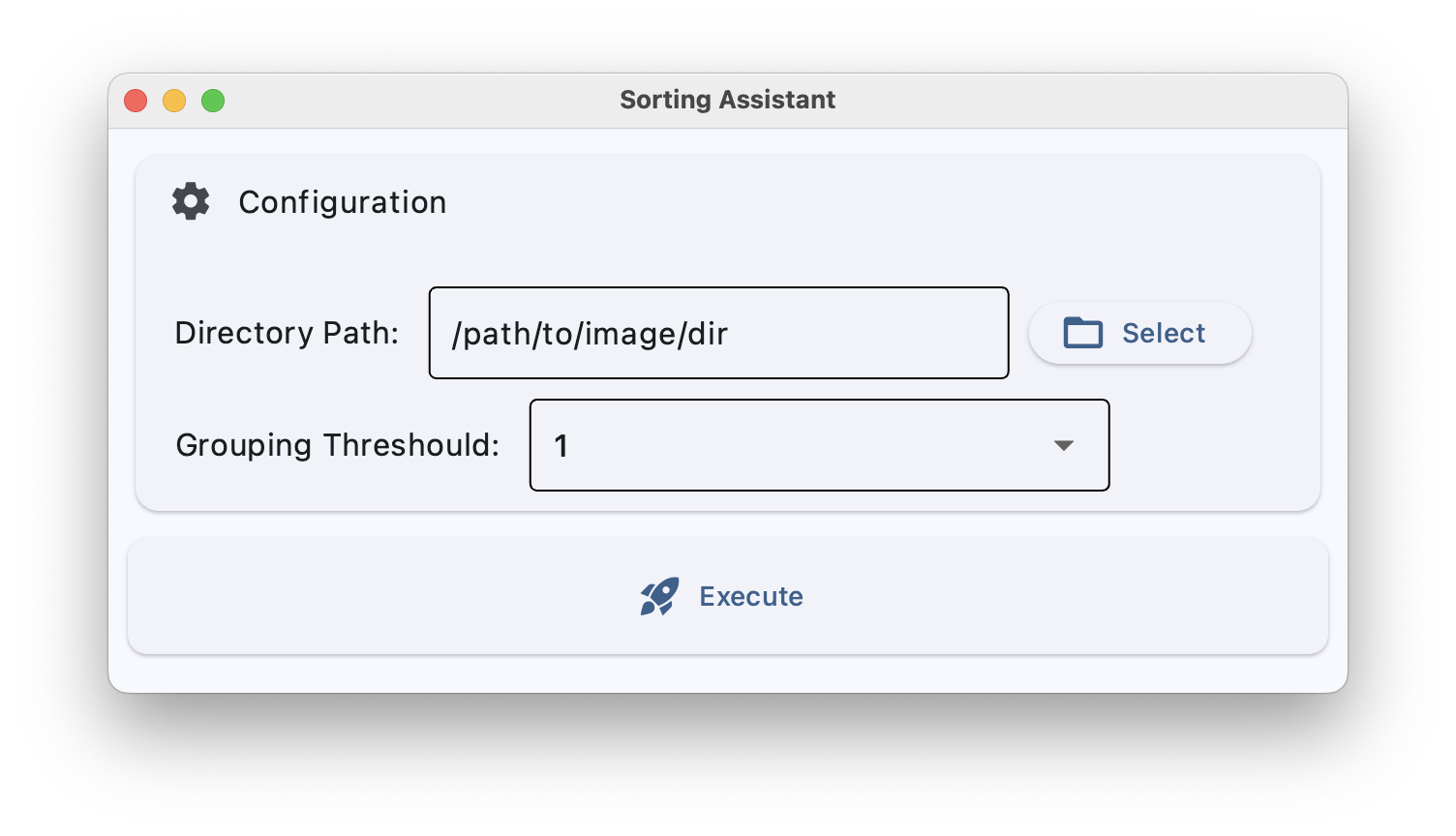
- Set the
Directory PathandGrouping threshouldand press theExecutebutton to execute. - When specifying the
Directory Path, you can pressSelectto display the file selection dialog. - DnD is not supported because flet does not support DnD (flet-dev/flet#112).
[ja]
Directory PathとGrouping threshouldを設定して、Executeボタンを押すと実行されます。Directory Pathを指定する際、Selectを押すとファイルセレクションダイアログを表示できます。- flet が DnD に対応していない (flet-dev/flet#112) ため、DnD は非対応です。
License
sorting-assistant is distributed under the terms of the MIT license.
[ja]
sorting-assistant は MITライセンス の下で配布されています。
Acknowledgment
This tool uses the following libraries. Thank you.
[ja]
このツールでは、以下のライブラリを使用しています。ありがとうございます。
| Library | Author | License |
|---|---|---|
| exif | Tyler Thieding | MIT License |
| flet | flet-dev | Apache License 2.0 |
Release history Release notifications | RSS feed


Download files
Download the file for your platform. If you're not sure which to choose, learn more about installing packages.
Source Distribution
Built Distribution
Filter files by name, interpreter, ABI, and platform.
If you're not sure about the file name format, learn more about wheel file names.
Copy a direct link to the current filters
File details
Details for the file sorting_assistant-0.0.3.tar.gz.
File metadata
- Download URL: sorting_assistant-0.0.3.tar.gz
- Upload date:
- Size: 244.2 kB
- Tags: Source
- Uploaded using Trusted Publishing? No
- Uploaded via: twine/5.1.1 CPython/3.9.19
File hashes
| Algorithm | Hash digest | |
|---|---|---|
| SHA256 |
8a3ce7c1742da9589985de8b5a6c6b53739783e9b80f60e3feb491c5f4fb2e58
|
|
| MD5 |
47ff5db2fe1cb15be60c230d383b564c
|
|
| BLAKE2b-256 |
c06db8b14e35b127773a9f3695cce015f5f68d35036b39f02f5f03fdd01e6bea
|
File details
Details for the file sorting_assistant-0.0.3-py3-none-any.whl.
File metadata
- Download URL: sorting_assistant-0.0.3-py3-none-any.whl
- Upload date:
- Size: 8.6 kB
- Tags: Python 3
- Uploaded using Trusted Publishing? No
- Uploaded via: twine/5.1.1 CPython/3.9.19
File hashes
| Algorithm | Hash digest | |
|---|---|---|
| SHA256 |
ac5961cac930376320d5317f7831ba1e31ec5b8b9dab7eed6929205a2b2236ae
|
|
| MD5 |
8a2846cd8174cc1ffe01bcb72776ddb7
|
|
| BLAKE2b-256 |
7e8ed898891e681f24711f74d7b59df273b447d6cdee70a0122d8cd9b60bb833
|






