
soul-toolkit




A recon tool for authorized labs, CTFs and TryHackMe / Hack The Box boxes, built for people who are still learning what to do with a port list.
Tools like AutoRecon already scan broadly. toolkit recon scans, then tells you exactly what
to try next, ranked, with a copy-paste command for each - and hands you output you can use
straight away: a Markdown report, a self-contained HTML report, and a writeup skeleton for your
notes vault.
⚠️ Authorized use only. Only point this at machines you own or have explicit permission to test. Read DISCLAIMER.md.
pipx install git+https://github.com/Soulsagate/soul-toolkit
toolkit doctor                           # what's installed, how to get the rest
sudo "$(which toolkit)" recon 10.10.42.17
New to this? The step-by-step Getting started guide walks you from a fresh machine to your first report: install commands for your distro, connecting the VPN, reading the results, and fixes for the common errors.
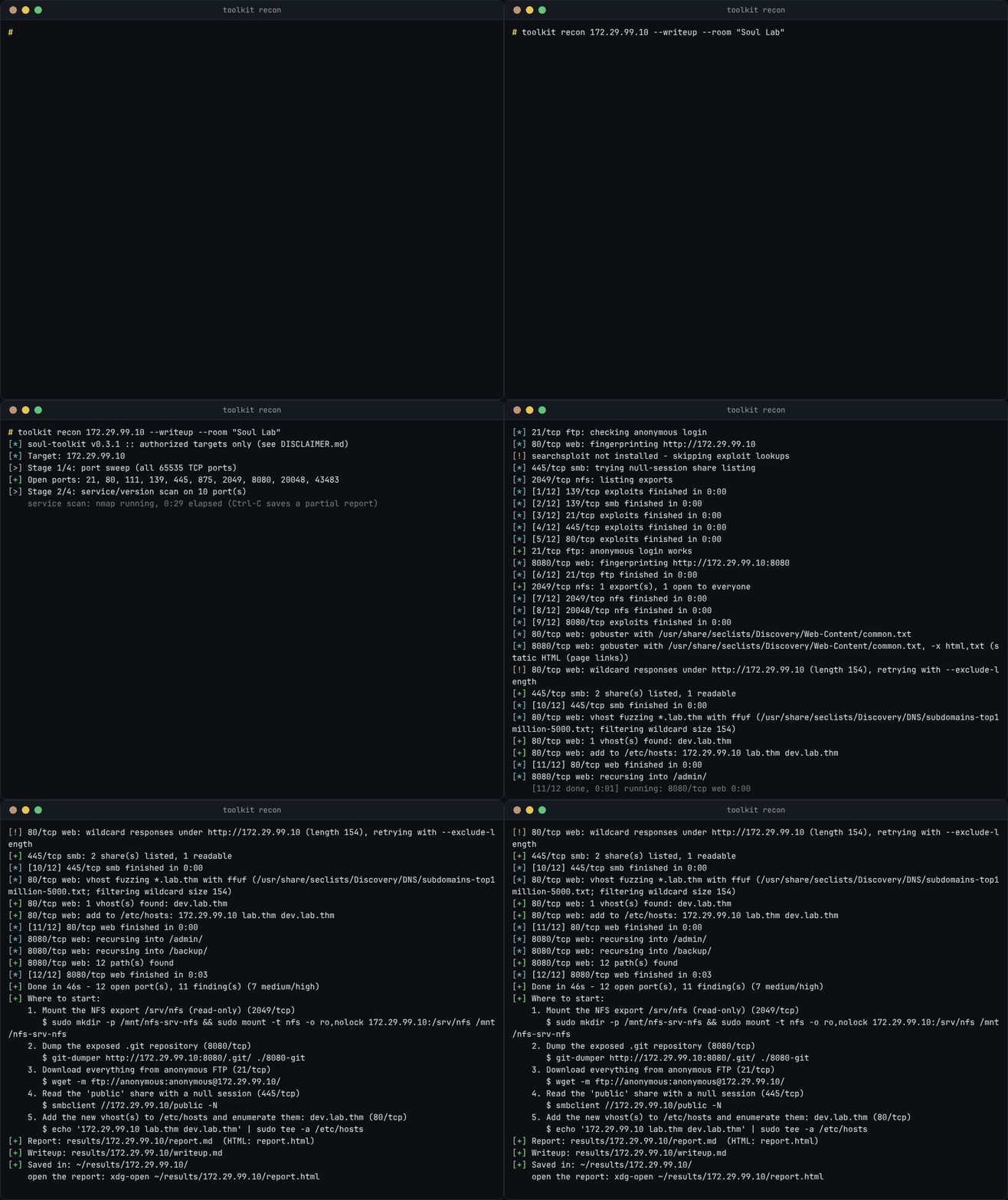
A real run against the bundled lab, with the long waits sped up.
What you get
Everything below is real output from one run against the deliberately vulnerable lab in
tests/lab/ (anonymous FTP, a web app with an exposed .git and a hidden vhost,
null-session SMB, a world-readable NFS export), run as root with the default profile:
toolkit recon 172.29.99.10 --writeup --room "Soul Lab".
1. Where to start
The run ends with the most promising leads across all services - ranked by fixed rules, not by which port happened to be scanned first - each with the command to run next. It's also the first section of the report.
[*] soul-toolkit v0.3.0 :: authorized targets only (see DISCLAIMER.md)
[*] Target: 172.29.99.10
[>] Stage 1/4: port sweep (all 65535 TCP ports)
[+] Open ports: 21, 80, 111, 139, 445, 875, 2049, 8080, 20048, 33763
[>] Stage 2/4: service/version scan on 10 port(s)
[*]   21/tcp     ftp            vsftpd 2.0.8 or later
[*]   80/tcp     http           nginx 1.24.0 (Ubuntu)
[*]   111/tcp    rpcbind        2-4 (RPC #100000)
[*]   139/tcp    netbios-ssn    Samba smbd 4.6.2
[*]   445/tcp    netbios-ssn    Samba smbd 4.6.2
[*]   875/tcp    rquotad        1-2 (RPC #100011)
[*]   2049/tcp   nfs            3-4 (RPC #100003)
[*]   8080/tcp   http           nginx 1.24.0 (Ubuntu)
[*]   20048/tcp  mountd         1-3 (RPC #100005)
[*]   33763/tcp  nlockmgr       4 (RPC #100021)
[>] Stage 3/4: UDP scan (top 100 ports)
[+] Open UDP ports: 111, 2049
[*]   111/udp    rpcbind        2-4 (RPC #100000)
[*]   2049/udp   nfs            3-4 (RPC #100003)
[>] Stage 4/4: service modules (web, ftp, ssh, smb, nfs, smtp, snmp, mysql, postgres, redis, rdp, winrm, ldap, exploits)
[*] 21/tcp ftp: checking anonymous login
[*] 80/tcp web: fingerprinting http://172.29.99.10
[!] searchsploit not installed - skipping exploit lookups
[*] 445/tcp smb: trying null-session share listing
[*] 2049/tcp nfs: listing exports
[+] 21/tcp ftp: anonymous login works
[*] 8080/tcp web: fingerprinting http://172.29.99.10:8080
[+] 2049/tcp nfs: 1 export(s), 1 open to everyone
[*] 80/tcp web: gobuster with /usr/share/seclists/Discovery/Web-Content/common.txt
[!] 80/tcp web: wildcard responses under http://172.29.99.10 (length 154), retrying with --exclude-length
[*] 8080/tcp web: gobuster with /usr/share/seclists/Discovery/Web-Content/common.txt, -x html,txt (static HTML (page links))
[+] 445/tcp smb: 2 share(s) listed, 1 readable
[*] 80/tcp web: vhost fuzzing *.lab.thm with ffuf (/usr/share/seclists/Discovery/DNS/subdomains-top1million-5000.txt; filtering wildcard size 154)
[+] 80/tcp web: 1 vhost(s) found: dev.lab.thm
[+] 80/tcp web: add to /etc/hosts: 172.29.99.10 lab.thm dev.lab.thm
[*] 8080/tcp web: recursing into /admin/
[*] 8080/tcp web: recursing into /backup/
[+] 8080/tcp web: 12 path(s) found
[+] Done in 46s - 12 open port(s), 11 finding(s) (7 medium/high)
[+] Where to start:
    1. Mount the NFS export /srv/nfs (read-only) (2049/tcp)
       $ sudo mkdir -p /mnt/nfs-srv-nfs && sudo mount -t nfs -o ro,nolock 172.29.99.10:/srv/nfs /mnt/nfs-srv-nfs
    2. Dump the exposed .git repository (8080/tcp)
       $ git-dumper http://172.29.99.10:8080/.git/ ./8080-git
    3. Download everything from anonymous FTP (21/tcp)
       $ wget -m ftp://anonymous:anonymous@172.29.99.10/
    4. Read the 'public' share with a null session (445/tcp)
       $ smbclient //172.29.99.10/public -N
    5. Add the new vhost(s) to /etc/hosts and enumerate them: dev.lab.thm (80/tcp)
       $ echo '172.29.99.10 lab.thm dev.lab.thm' | sudo tee -a /etc/hosts
[+] Report: results/172.29.99.10/report.md  (HTML: report.html)
[+] Writeup: results/172.29.99.10/writeup.md
Per-module progress lines ([*] [3/12] 445/tcp smb finished in 0:00) are trimmed from this
excerpt. searchsploit wasn't installed on the machine that made this run, so the exploits
module skipped itself - which is exactly what a missing optional tool does. The closing Saved in: /
open the report: lines are trimmed too, since they show the folder on your own machine (see
Output).
Each lead in the report also says why it matters, for example:
- Mount the NFS export /srv/nfs (read-only) (2049/tcp) It's exported to everyone. Exports often hold home directories, backups and SSH keys. Note file owners - root-owned files you can create there mean no_root_squash (a privesc lead later).
2. Reports you can read, share and keep
results/10.10.42.17/ (named after the target, created in the folder you run it from - see Output to find,
open or relocate it) gets:
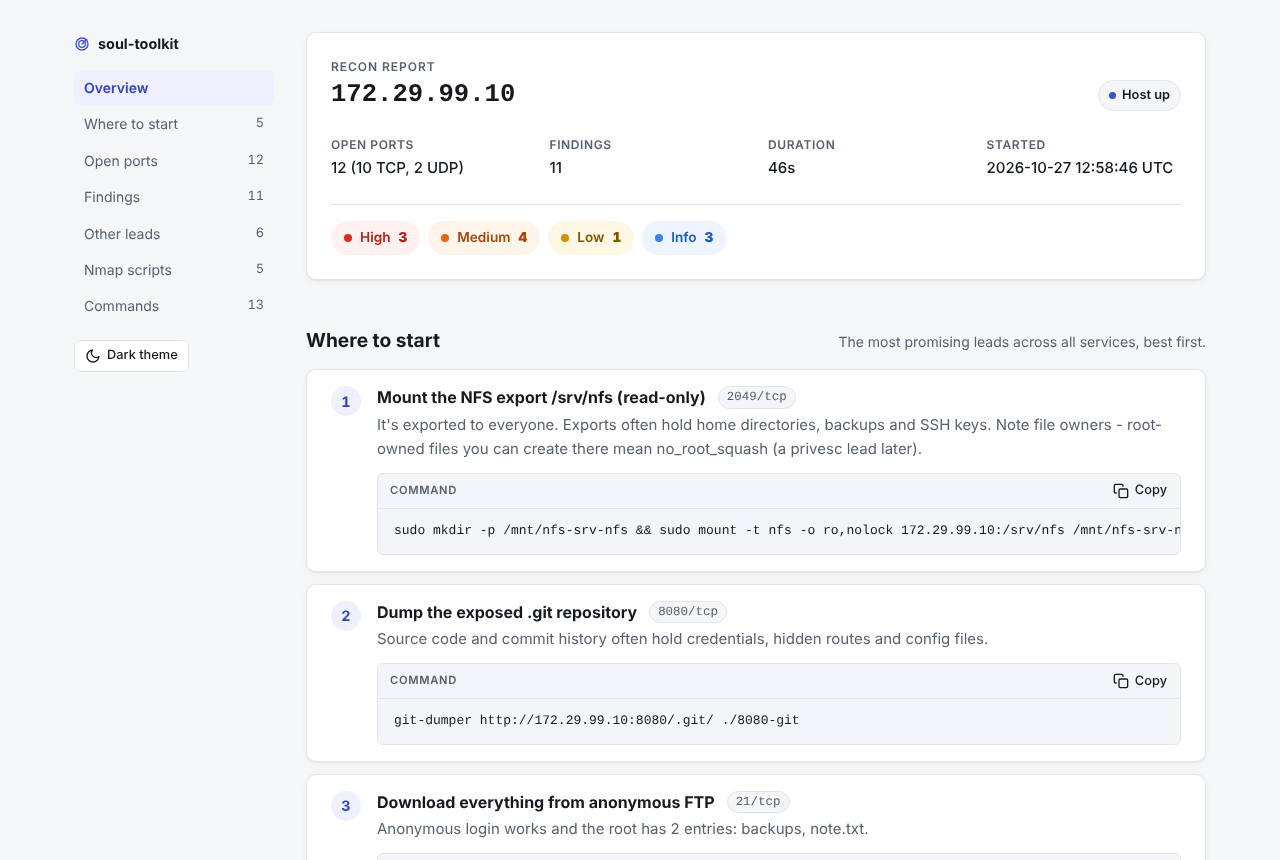
report.md- Where to start, open ports, findings by severity, nmap script output, every command that was run. Full sample: docs/sample-report.mdreport.html- the same in one self-contained file you can open offline: a summary card, section nav, findings you can filter by severity, a Copy button on every command, light and dark themes, and a print stylesheet. No CDNs, fonts or other network requests, and it reads fine with JavaScript off. Sample: docs/sample-report.html (download and open it)findings.json- everything, for your own scripts
| Light | Dark |
|---|---|
 |
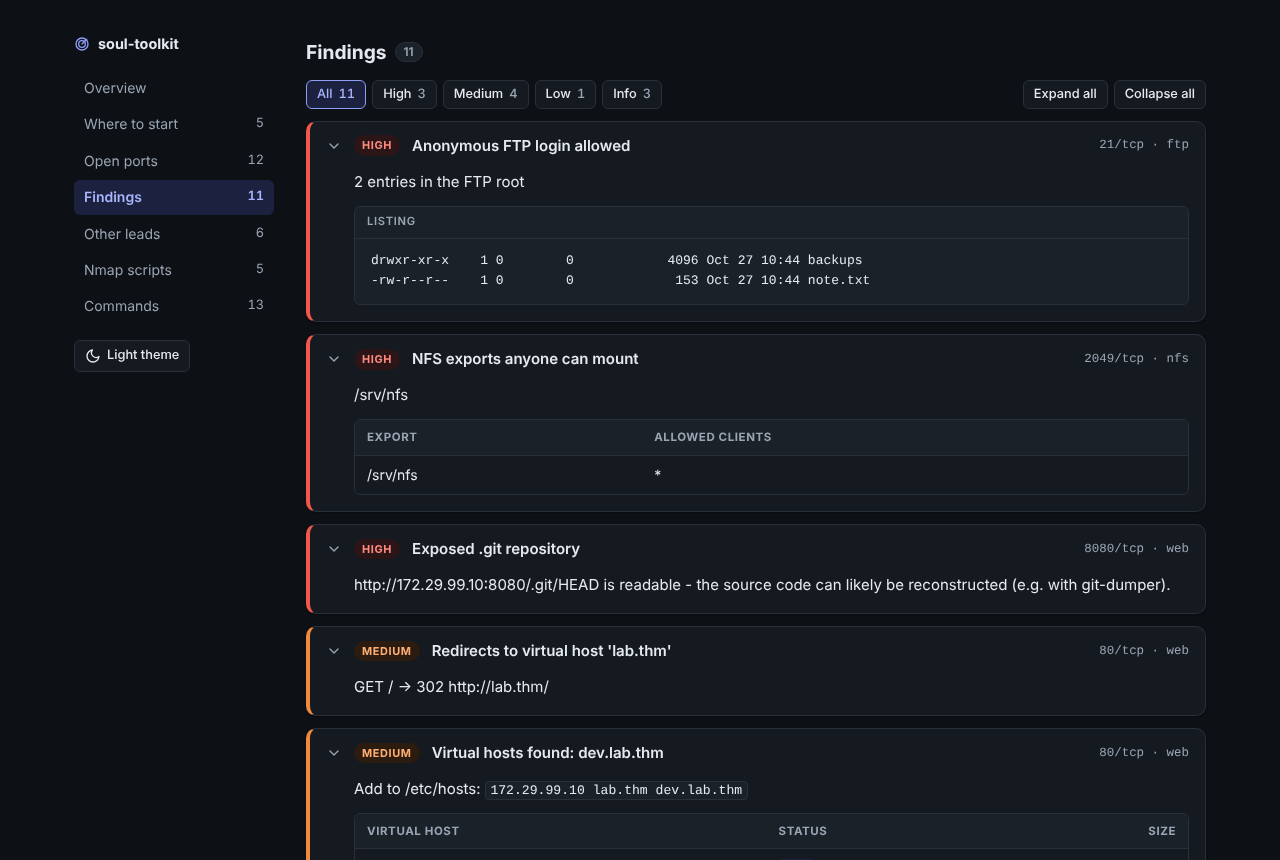 |
Both screenshots are of the sample report above, from a real run against the lab.
3. A writeup that's already started
With --writeup (or --room NAME) you also get writeup.md: Obsidian-friendly frontmatter, the
Recon section filled in, and empty Foothold / Privilege Escalation / Flags sections waiting for
you. Sample: docs/sample-writeup.md. From the same run:
---
title: "Soul Lab"
room: "Soul Lab"
target: "172.29.99.10"
date: 2026-10-27
tags:
  - writeup
  - ftp
  - web
  - rpc
  - smb
  - nfs
status: in-progress
---
...
### Leads to try

- [ ] **Mount the NFS export /srv/nfs (read-only)** (2049/tcp) - `sudo mkdir -p /mnt/nfs-srv-nfs && sudo mount -t nfs -o ro,nolock 172.29.99.10:/srv/nfs /mnt/nfs-srv-nfs`
- [ ] **Dump the exposed .git repository** (8080/tcp) - `git-dumper http://172.29.99.10:8080/.git/ ./8080-git`
- [ ] **Download everything from anonymous FTP** (21/tcp) - `wget -m ftp://anonymous:anonymous@172.29.99.10/`
- [ ] **Read the 'public' share with a null session** (445/tcp) - `smbclient //172.29.99.10/public -N`
- [ ] **Add the new vhost(s) to /etc/hosts and enumerate them: dev.lab.thm** (80/tcp) - `echo '172.29.99.10 lab.thm dev.lab.thm' | sudo tee -a /etc/hosts`
How it works
It runs in stages, and each stage decides what the next one does:
| Stage | What happens |
|---|---|
| 1. Port sweep | nmap across all 65535 TCP ports (top 1000 with --quick / --profile quick) |
| 2. Service scan | nmap -sV -sC on only the open ports |
| 3. UDP scan | top 100 UDP ports, then -sV -sC on the ones that answer (root only: on by default under sudo unless -p is given) |
| 4. Service modules | follow-ups chosen per service, run in parallel (see below) |
| 5. Leads + reports | every module's leads ranked into Where to start; report.md, report.html, findings.json (+ writeup.md) |
A live status line shows what's running and for how long. Ctrl-C is safe: running tools are
stopped and you get a partial report with everything that finished. --resume reuses the nmap
results of an earlier run.
Service modules
| Module | Triggers on | Does |
|---|---|---|
web |
HTTP/HTTPS | fingerprint (server, title, generator), vhost-redirect detection, vhost fuzzing (ffuf, else gobuster vhost) when the target is a hostname or redirects to one - with the wildcard size filtered out and the /etc/hosts line to add, robots.txt, exposed .git, gobuster content discovery with extensions picked from the fingerprint (PHP → php,txt,bak, ASP.NET → aspx,asp,txt, Java → jsp,do,txt), one level of recursion into found directories, automatic wildcard handling and a time cap per port, flags interesting paths |
ftp |
FTP | anonymous login check + root listing (nothing is downloaded), known-backdoor version check |
ssh |
SSH | version notes (e.g. CVE-2018-15473 user enumeration on OpenSSH ≤ 7.7) |
smb |
139 / 445 | null-session share listing via smbclient, then a read check on each share (one ls, never anything that writes) shown as READ / NO ACCESS; a readable non-default share ranks near the top. Message-signing check |
nfs |
NFS (2049 / mountd) | showmount -e export listing; exports open to everyone are flagged with a ready read-only mount command |
smtp |
SMTP (25 / 465 / 587) | banner + EHLO capabilities; checks whether VRFY / EXPN tell real users from made-up ones (one probe each) and hands you the smtp-user-enum command |
mail |
POP3 / IMAP (110 / 143 / 993 / 995) | banner and capabilities from nmap, flags servers that take passwords in clear text (no STLS / STARTTLS); a "keep the mail server for when you have credentials" lead with ready curl / nc commands. No login attempts |
snmp |
SNMP (161/udp) | tries the default public / private communities (onesixtyone, else snmpwalk), then reads system info, process command lines that look like they carry passwords, and Windows users |
mysql |
MySQL / MariaDB (3306) | version from the server greeting; tries root and the anonymous account with an empty password (one login each, nothing else) |
postgres |
PostgreSQL (5432) | asks how user postgres must log in: trust (no password at all) is flagged, otherwise the method (SCRAM / md5) is noted |
redis |
Redis (6379) | one unauthenticated INFO: version, role, config path and how many keys it holds; tells needs a password and protected mode apart |
rdp |
RDP (3389) | host/domain names and the Windows release from nmap's NTLM info, /etc/hosts line for the domain, BlueKeep check command on Windows 7 / 2008 R2, xfreerdp for later |
winrm |
WinRM (5985 / 5986) | notes + the evil-winrm command for when you have credentials |
ldap |
LDAP (389 / 636 / 3268 / 3269) | AD domain and DC name from nmap, /etc/hosts line, ldapsearch anonymous-read command |
exploits |
any service with a product + version | searchsploit lookup, deduped across ports, top matches with EDB-IDs (remote exploits first) |
Each module is one small file in src/soul_toolkit/recon/modules/. Adding a service = one class with matches() and run().
Missing an optional tool only skips that check, with an install hint - toolkit doctor shows what
you have. Want another service? docs/writing-a-module.md walks through
adding one.
Install
First time? Follow the Getting started guide instead - it covers the same steps one at a time, per distro, plus troubleshooting.
Requires Python 3.9+ and nmap. Runs on any modern Linux: Kali, the TryHackMe AttackBox, Arch/EndeavourOS, Debian, Ubuntu, Linux Mint / LMDE. WSL2 works too, as long as your VPN (e.g. OpenVPN for TryHackMe) runs inside WSL, not on the Windows side; WSL1 doesn't. macOS should work but isn't tested. No Python dependencies beyond the standard library.
1. The toolkit
pipx (recommended) - installs into its own environment and puts toolkit on your PATH:
pipx install git+https://github.com/Soulsagate/soul-toolkit
toolkit doctor                      # what's installed, what's missing
pipx reinstall soul-toolkit         # update to the latest version later
No pipx yet? sudo apt install pipx (Kali/Debian), sudo pacman -S python-pipx (Arch) or
brew install pipx (macOS), then pipx ensurepath.
venv - if you want to hack on the code:
git clone https://github.com/Soulsagate/soul-toolkit.git
cd soul-toolkit
python3 -m venv .venv
source .venv/bin/activate
pip install -e '.[dev]'
toolkit --help
On the TryHackMe AttackBox the tools below are already installed; clone and pip install -e ..
2. The tools it wraps
The toolkit runs existing tools rather than reinventing them. Only nmap is required; a missing optional tool means that check is skipped with a warning and an install hint, never a crash.
| Tool | Needed for | Arch / EndeavourOS | Kali |
|---|---|---|---|
nmap |
required | sudo pacman -S nmap |
sudo apt install nmap |
gobuster |
web content discovery |
sudo pacman -S gobuster |
sudo apt install gobuster |
ffuf |
web vhost fuzzing (falls back to gobuster) |
sudo pacman -S ffuf |
sudo apt install ffuf |
smbclient |
smb share listing |
sudo pacman -S smbclient |
sudo apt install smbclient |
showmount |
nfs export listing |
sudo pacman -S nfs-utils |
sudo apt install nfs-common |
snmpwalk |
snmp checks |
sudo pacman -S net-snmp |
sudo apt install snmp |
onesixtyone |
faster snmp community check (optional) |
yay -S onesixtyone |
sudo apt install onesixtyone |
searchsploit |
exploits lookups |
yay -S exploitdb |
sudo apt install exploitdb |
| SecLists | better wordlists (optional) | yay -S seclists |
sudo apt install seclists |
Debian / Ubuntu / Mint / LMDE: everything above is in the normal repos except exploitdb and
seclists, which are Kali-only - don't put them in an apt install line, or apt refuses the whole
command. Install those two from source instead (toolkit doctor prints exactly this for you):
sudo apt install nmap gobuster ffuf smbclient nfs-common snmp onesixtyone
sudo git clone --depth 1 https://gitlab.com/exploit-database/exploitdb.git /opt/exploitdb
sudo ln -sf /opt/exploitdb/searchsploit /usr/local/bin/searchsploit
sudo git clone --depth 1 https://github.com/danielmiessler/SecLists.git /usr/share/seclists
toolkit doctor checks all of them, says what each one enables, and prints the exact install
commands for what's missing - for Arch, Kali, Debian/Ubuntu and macOS, your platform first:
toolkit doctor          # what's installed, what's missing
toolkit doctor --all    # install commands for everything (setting up a new machine)
Running with sudo (SYN scans, UDP)
Without root, nmap falls back to TCP connect scans (-sT), which work but are slower, and the UDP
scan is skipped. sudo toolkit usually fails because sudo resets your PATH, so call it by path -
this works for both the pipx and the venv install:
sudo "$(which toolkit)" recon 10.10.42.17
Results are handed back to your user (no root-owned files in your folders), and your own config file is used, not root's.
Usage
toolkit recon TARGET [options]

scanning:
  -p, --ports PORTS       skip the sweep and scan these ports (22,80,8000-8010)
  --profile NAME          quick | default | thorough (see below); explicit flags still win
  --quick                 top 1000 ports instead of all 65535
  --min-rate N            nmap --min-rate for the sweep (default 1000, 0 = nmap default)
  --ping                  do host discovery (default is -Pn; lab boxes often drop ping)
  --no-scripts            skip nmap default scripts (-sC)
  --udp / --no-udp        force / skip the top-100 UDP scan (default: on as root unless -p is given)
  --resume                reuse finished nmap results from an earlier run in the output dir

modules:
  -m, --modules LIST      only run these modules (e.g. web,ftp)
  --no-modules            nmap only
  --list-modules          show available modules
  -j, --jobs N            module runs in parallel (default 4)
  --no-brute              skip content discovery and vhost fuzzing
  --no-vhost              skip vhost fuzzing only
  --vhost-wordlist FILE   vhost wordlist (default: SecLists subdomains-top1million-5000.txt, else bundled)
  -w, --wordlist FILE     gobuster wordlist (default: SecLists common.txt, else a small bundled list)
  -x, --extensions EXT    gobuster extensions, e.g. php,txt,html (default: picked from the fingerprint)
  --no-recurse            don't re-run gobuster inside found directories
  -t, --threads N         gobuster/ffuf threads (default 30)
  --brute-timeout SEC     max seconds of content discovery per web port, recursion included (default 600)

output:
  -o, --output DIR        output directory (default ./results)
  --writeup               also write writeup.md (Obsidian-friendly skeleton, Recon pre-filled)
  --room NAME             room/box name for the writeup (implies --writeup)
  --config FILE           settings file (default: ~/.config/soul-toolkit/config.ini)
  -v, --verbose           print every command as it runs
  -q, --quiet             warnings and errors only
Profiles
| Profile | What it does |
|---|---|
quick |
top 1000 TCP ports, no UDP, no vhost fuzzing, one gobuster pass, 3 min web budget per port |
default |
all TCP ports, top 100 UDP when root, vhost fuzzing, one level of recursion, 10 min web budget |
thorough |
default + UDP even with -p (root), SecLists' bigger lists (raft-medium, subdomains-top1million-20000) when installed, 30 min web budget |
Any flag you pass on top overrides the profile: --profile quick --udp is quick, plus UDP.
Config file
Settings you'd pass every time (your wordlists, threads, where results go, a default profile) can
live in ~/.config/soul-toolkit/config.ini:
toolkit config --init   # writes a commented example
toolkit config          # shows the file and the value + source of every setting
[recon]
profile = default
wordlist = ~/wordlists/raft-medium-directories.txt
output = ~/ctf/results
threads = 40
jobs = 4
Order of precedence: built-in defaults < profile < config file < command-line flags. Under sudo
the invoking user's config is read (and ~ means their home), not root's.
Common patterns:
# Full recon on a THM box over the VPN
sudo "$(which toolkit)" recon 10.10.42.17

# Fast first look, no brute-forcing
toolkit recon 10.10.42.17 --quick --no-brute

# Leave it running: UDP, bigger SecLists wordlists, longer web budget
sudo "$(which toolkit)" recon 10.10.42.17 --profile thorough

# Box redirected you to a vhost? Add it to /etc/hosts, then target the name
toolkit recon cheese.thm -p 80 -x php,txt,html

# Start your writeup while you scan: writeup.md lands next to the report
toolkit recon cheese.thm --room "Cheese CTF"

# Re-run modules (new wordlist, after an interrupt...) without waiting for nmap again
toolkit recon 10.10.42.17 --resume -w /usr/share/seclists/Discovery/Web-Content/raft-medium-files.txt

# Bigger wordlist for the web module only
toolkit recon 10.10.42.17 -p 80 -m web \
  -w /usr/share/seclists/Discovery/Web-Content/DirBuster-2007_directory-list-2.3-medium.txt
Output
Where it goes: every run creates results/<target>/ - for example results/10.10.42.17/ -
in the folder you run toolkit from (so running it from ~ gives ~/results/10.10.42.17/). The folders are created for you, and under
sudo they still belong to you, not root. The last lines of every run tell you exactly where
the files are and how to open the report:
[+] Saved in: ~/results/10.10.42.17/
    open the report: xdg-open ~/results/10.10.42.17/report.html
To keep every scan in one place no matter where you run it, use -o DIR or set it once in the
config file:
mkdir -p ~/.config/soul-toolkit && printf '[recon]\noutput = ~/ctf/results\n' > ~/.config/soul-toolkit/config.ini
toolkit config | grep output   # check it's picked up
Opening the files: report.html is the nicest to read (any browser). report.md and
writeup.md open in any Markdown app - in Obsidian, open the results folder as a vault or copy
writeup.md into yours.
xdg-open ~/results/10.10.42.17/report.html   # browser (macOS: open ...)
xdg-open ~/results/10.10.42.17/writeup.md    # default Markdown app
xdg-open ~/results/10.10.42.17/              # file manager
What's inside:
results/10.10.42.17/
├── report.md            # human-readable report (the main thing)
├── report.html          # same report, one self-contained file: light/dark, collapsible, copy buttons
├── findings.json        # everything, machine-readable
├── writeup.md           # with --writeup: frontmatter, Recon filled in, empty Foothold/PrivEsc/Flags
├── nmap-ports.xml       # raw stage 1 output
├── nmap-services.xml    # raw stage 2 output
├── nmap-udp.xml         # raw UDP sweep (root only)
├── nmap-udp-services.xml  # raw UDP service scan
├── gobuster-80.txt      # raw gobuster output, one per web port
├── gobuster-80-admin.txt  # one per directory recursed into
└── vhosts-80.json       # raw ffuf vhost results (.txt when gobuster was used)
writeup.md has YAML frontmatter (room, platform, date, tags from the open services) and uses
Obsidian callouts, so it drops straight into a notes vault or a writeups repo; it renders fine on
GitHub too. An existing writeup.md is never overwritten - a timestamped copy is written instead.
Reports replace your home directory with ~, so they're safe to paste into writeups.
results/ is git-ignored so scan data never ends up in a commit.
Development
pip install -e '.[dev]'
ruff check .
pytest -q
Tests use recorded tool output and throwaway servers on 127.0.0.1, so they run anywhere without
touching real targets; tests that need a real tool skip when it isn't installed. CI runs the same
on Python 3.9-3.13.
- CONTRIBUTING.md - ground rules and workflow
- docs/writing-a-module.md - add a service module, step by step
- CHANGELOG.md - what changed in each version
Roadmap
recon is the first command. Planned, roughly in order:
scan- raw-socket port scannerprivesc- Linux privilege-escalation enumeration (sudo -l, SUID, cron, writable paths)report- log commands and screenshots during a box, export an engagement reportweb- deeper web checks (headers, CMS-specific enumeration)hash,wordlist,shell,loot,vpn
License
MIT. Use it, learn from it, break it, improve it. Just only on things you're allowed to.
1 maintainer

Metadata
1 maintainer
Release files for soul-toolkit 0.3.2
For a detailed explanation of source distributions (sdists) and built distributions (wheels), please see the package formats documentation.
Source distribution (sdist)
| File | Size | Uploaded | Provenance | Actions |
|---|---|---|---|---|
| soul_toolkit-0.3.2.tar.gz | 163.3 kB | With provenance | Details for soul_toolkit-0.3.2.tar.gz |
Built distribution (wheel)
| File | Interpreter | ABI | Platform | Actions Reset |
|---|---|---|---|---|
| soul_toolkit-0.3.2-py3-none-any.whl | Python 3 | none | any | Details for soul_toolkit-0.3.2-py3-none-any.whl |
Total release size: 269.5 kB
Release files / soul_toolkit-0.3.2.tar.gz
| Download URL | soul_toolkit-0.3.2.tar.gz |
|---|---|
| Size | 163.3 kB |
| Tags | Source |
|
SHA-256 checksum How to use checksums |
26313e30315bef372f0d4476dea8e7996b40d75e84bdcc2800249140a910993a
|
|
BLAKE2b-256 checksum How to use checksums |
a73dd356fbdfd33d4f2c9ded6818a5d32315ff14a3e847876c82edb962e47719
|
| Upload date | |
|
Uploaded using Trusted Publishing? What is trusted publishing? |
Yes |
| Uploaded via |
twine/7.0.0 CPython/3.13.16
|
Provenance
Provenance describes where a file came from. On PyPI, provenance is shared via attestations, which provide a verifiable record of the build or publishing details. View details, limitations and caveats.


PyPI Publish Attestation
PyPI verified that this artifact, at this checksum, originated from the publisher listed below.
Signed by GitHub Actions, verified by PyPI on Oct 27, 2026.
Transparency logRelease files / soul_toolkit-0.3.2-py3-none-any.whl
| Download URL | soul_toolkit-0.3.2-py3-none-any.whl |
|---|---|
| Size | 106.3 kB |
| Tags | Python 3 |
|
SHA-256 checksum How to use checksums |
d6e7d0e53dd552fe1286f84bd0039a4dc6e4737f7ceb8987512ad7b503101430
|
|
BLAKE2b-256 checksum How to use checksums |
dc821e0073fad7a0b3bb4699ca0ba70bb6ed8786565274bc2c3b75fc5847effc
|
| Upload date | |
|
Uploaded using Trusted Publishing? What is trusted publishing? |
Yes |
| Uploaded via |
twine/7.0.0 CPython/3.13.16
|
Provenance
Provenance describes where a file came from. On PyPI, provenance is shared via attestations, which provide a verifiable record of the build or publishing details. View details, limitations and caveats.
PyPI Publish Attestation
PyPI verified that this artifact, at this checksum, originated from the publisher listed below.
Signed by GitHub Actions, verified by PyPI on Oct 27, 2026.
Transparency logSecurity for soul-toolkit 0.3.2
Provenance
Provenance describes where a file came from. On PyPI, provenance is shared via attestations, which provide a verifiable record of the build or publishing details. View details, limitations and caveats.
Full provenance
All 2 files in this release have been uploaded with provenance metadata.
Attestation for soul_toolkit-0.3.2.tar.gz
PyPI Publish Attestation
PyPI verified that this artifact, at this checksum, originated from the publisher listed below.
Signed by GitHub Actions, verified by PyPI on Oct 27, 2026.
Transparency logA note on package security
PyPI is a repository for distributing packages, not a service for auditing them. While third-party security researchers and our staff do their best to detect and remove malicious packages, PyPI cannot guarantee the quality, security or suitability of any given package.
To learn more about protecting yourself from malicious actors, visit our package security documentation.













