
Space Avocado X12 Parser
A simple X12 file parser, allowing to parse X12 loops and segment based on schema.
Credit: Inspired by Maven Central X12 Parser.
X12 is a message formatting standard used with Electronic Data Interchange (EDI) documents for trading partners to share electronic business documents in an agreed-upon and standard format. It is the most common EDI standard used in the United States.
X12 Document List: https://en.wikipedia.org/wiki/X12_Document_List
X12 Schematic:
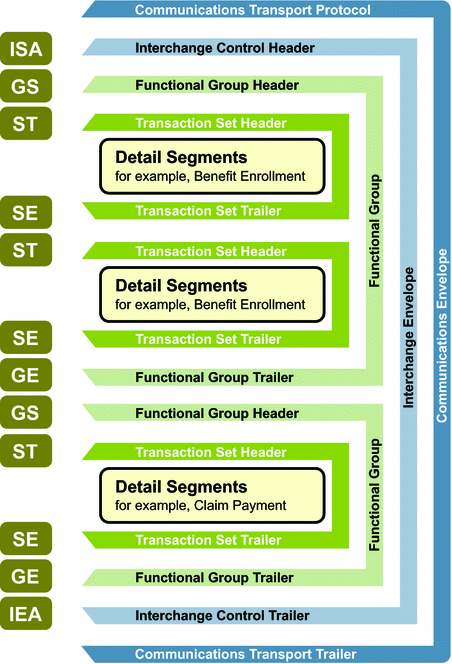
See more details at https://x12.org/.
Table of Content
Installation
You can install the Space Avocado X12 Parser from PyPI:
python -m pip install spaceavocado-x12
The reader is supported on Python 3.7 and above.
How to use
1. Define a schema for the x12 file to be parsed.
from x12.schema.schema import Schema, Usage, by_segment, by_segment_element

def schema() -> Schema:
    x12 = Schema('X12')
    isa = x12.add_child('ISA', Usage.REQUIRED, by_segment('ISA'))
    gs = isa.add_child('GS', Usage.REQUIRED, by_segment('GS'))
    st = gs.add_child('ST', Usage.REQUIRED, by_segment_element('ST', 1, ['835']))

    st.add_child('1000A', Usage.REQUIRED, by_segment_element('N1', 1, ['PR']))
    st.add_child('1000B', Usage.REQUIRED, by_segment_element('N1', 1, ['PE']))

    mm = st.add_child('2000', Usage.REQUIRED, by_segment('LX'))
    mmc = mm.add_child('2100', Usage.REQUIRED, by_segment('CLP'))
    mmc.add_child('2110', Usage.REQUIRED, by_segment('SVC'))

    gs.add_child('SE', Usage.REQUIRED, by_segment('SE'))
    isa.add_child('GE', Usage.REQUIRED, by_segment('GE'))
    x12.add_child('IEA', Usage.REQUIRED, by_segment('IEA'))

    return x12
To see the structure of the schema: print(schema()).
+--X12
|  +--ISA
|  |  +--GS
|  |  |  +--ST
|  |  |  |  +--1000A
|  |  |  |  +--1000B
|  |  |  |  +--2000
|  |  |  |  |  +--2100
|  |  |  |  |  |  +--2110
|  |  |  +--SE
|  |  +--GE
|  +--IEA
The above is an example of true nested structure of x12 835 document schema but schema could be defied in any, i.e. you can get flat structure if needed, e.g.:
from x12.schema.schema import Schema, Usage, by_segment, by_segment_element

def schema() -> Schema:
    x12 = Schema('X12')

    x12.add_child('1000A', Usage.REQUIRED, by_segment_element('N1', 1, ['PR']))
    x12.add_child('1000B', Usage.REQUIRED, by_segment_element('N1', 1, ['PE']))

    x12.add_child('2000', Usage.REQUIRED, by_segment('LX'))
    x12.add_child('2100', Usage.REQUIRED, by_segment('CLP'))
    x12.add_child('2110', Usage.REQUIRED, by_segment('SVC'))

    return x12
+--X12
|  +--1000A
|  +--1000B
|  +--2000
|  +--2100
|  +--2110
Loop/Segment Matcher Predicate
There are 2 build-in predicates, for the most commonly used situations:
by_segment
- Used to determine a loop by segment ID.
- E.g.:
by_segment('LX')matches this segmentLX*DATA_1*DATA_N~.
by_segment_element
- Used to determine a loop by segment ID and element value(s) at given element index.
- In many situations loop could start with the same segment id but differing the element values.
- E.g.:
by_segment_element('N1', 1, ['PR', 'PE'])matches this segmentN1*PR*DATA_N~orN1*PE*DATA_N~but notN1*QE*DATA_N~.
A custom predicate function could be used:
x12.add_child('2000', Usage.REQUIRED, lambda tokens: tokens[0] == "LX").- The above is an equivalent of
x12.add_child('2000', Usage.REQUIRED, by_segment('LX')).
Loop schema could be decorated with segment schemas
This is useful of Analyze parsed loop.
Example:
from x12.schema.schema import Segment

gs.add_child('ST', Usage.REQUIRED, by_segment_element('ST', 1, ['835'])).with_segments(
    Segment('ST', Usage.REQUIRED, by_segment('ST')),
    Segment('BPR', Usage.REQUIRED, by_segment('BPR')),
    Segment('TRN', Usage.REQUIRED, by_segment('TRN')),
    Segment('REF', Usage.REQUIRED, by_segment('REF')),
    Segment('DTM', Usage.REQUIRED, by_segment('DTM'))
)
- Uses the same Usage and predicates as Loop schema.
- The segment schemas are in sequential order of anticipated segments within the given loop.
2. Parse
from x12.schema.schema import Schema, Usage
from x12.parser.parse import parse

# Real schema here
schema = Schema("X12")

loop = parse(filepath_to_x12_file, schema)
Note: if the x12 file does use the standard segment, element and composite separators, you can provide custom definition:
from x12.parser.context import Context

loop = parse(filepath_to_x12_file, schema, Context("~", "*", ":"))
Loop Operations
Serialization: Loop could be serialized to:
- XML:
loop.to_xml() - original x12 format
str(loop) - Debug view:
loop.to_debug(). This provides visual distinction for loops and segments.
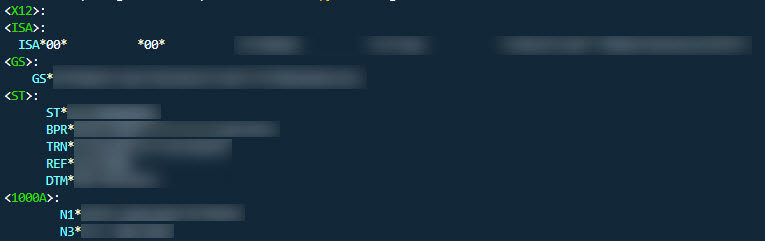
Find Child Loops:
# find loop by loop schema name

# Non recursive, search only within loop's direct children loops
loops = loop.find_loops("ST")

# Recursive, find loops anywhere in the downstream tree structure.
loops = loop.find_loops("NM1", True)
Find Segments:
# find segment by segment ID

# Non recursive, search only within loop's segments
segments = loop.find_segments("ST")

# Recursive, find segments anywhere in the downstream tree structure.
segments = loop.find_segments("NM1", True)
Other operations:
- To access loop parent:
loop.parent - Direct access to children loops:
loop.loops - Direct access to segments:
loop.segments
Segment Operations
Serialization: Segment could be serialized to:
- XML:
segment.to_xml() - original x12 format
str(segment) - Debug view:
segment.to_debug(). This provides visual distinction for segments.

Access segment elements
segment.elements
3. Optional: Analyze parsed loop.
This is an optional step to analyze the parsed document to see missing and unexpected loops/segments based on the schema.
from x12.schema.schema import Schema, Usage
from x12.parser.parse import parse
from x12.parser.analyze import analyze

# Real schema here
schema = Schema("X12")

loop = parse(filepath_to_x12_file, schema)

print(analyze(loop))
Example:
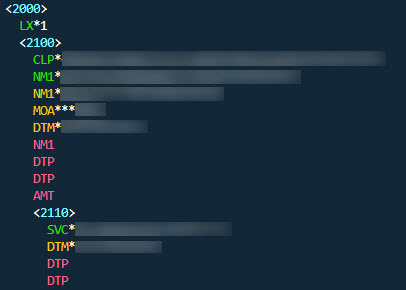
- Red indicates missing loops / segments.
- Yellow indicates unexpected segments.
Contributing
See contributing.md.
License
Space Avocado X12 Parser is released under the MIT license. See LICENSE.md.
1 maintainer

Metadata
1 maintainer
Release files for spaceavocado-x12 1.0.1
For a detailed explanation of source distributions (sdists) and built distributions (wheels), please see the package formats documentation.
Source distribution (sdist)
| File | Size | Uploaded | |
|---|---|---|---|
| spaceavocado-x12-1.0.1.tar.gz | 12.5 kB | Details |
Built distribution (wheel)
| File | Interpreter | ABI | Platform | Reset |
|---|---|---|---|---|
| spaceavocado_x12-1.0.1-py3-none-any.whl | Python 3 | none | any | Details |
Total release size: 24.4 kB
Release files / spaceavocado-x12-1.0.1.tar.gz
| Download URL | spaceavocado-x12-1.0.1.tar.gz |
|---|---|
| Size | 12.5 kB |
| Tags | Source |
|
SHA-256 checksum How to use checksums |
82276e0c4517007535288ec8fc0d720e8377a3856d731dbff3d1d61adf96b42b
|
|
BLAKE2b-256 checksum How to use checksums |
be8328e3c52124f1fa330cf1e73304ee27d47a1565a3cb1c5786088b0947f684
|
| Upload date | |
|
Uploaded using Trusted Publishing? What is trusted publishing? |
No |
| Uploaded via |
twine/4.0.2 CPython/3.10.10
|
Release files / spaceavocado_x12-1.0.1-py3-none-any.whl
| Download URL | spaceavocado_x12-1.0.1-py3-none-any.whl |
|---|---|
| Size | 11.9 kB |
| Tags | Python 3 |
|
SHA-256 checksum How to use checksums |
d149419e3af40f0027b652b65772cf079b1e7d7e5468df3e91d77d2ac111d9f3
|
|
BLAKE2b-256 checksum How to use checksums |
f347bf972266e2352b076574ca26cf055f012c58c6e7dc3dd334356ba9bfb121
|
| Upload date | |
|
Uploaded using Trusted Publishing? What is trusted publishing? |
No |
| Uploaded via |
twine/4.0.2 CPython/3.10.10
|














