
spacecubes
Overview
spacecubes is a simple voxel renderer for three-dimensional NumPy arrays. It is made to be easy to use and allowing fast visualization. It is not made to produce good looking images or be feature rich.
Installation
pip install 'spacecubes[all]'
Demo

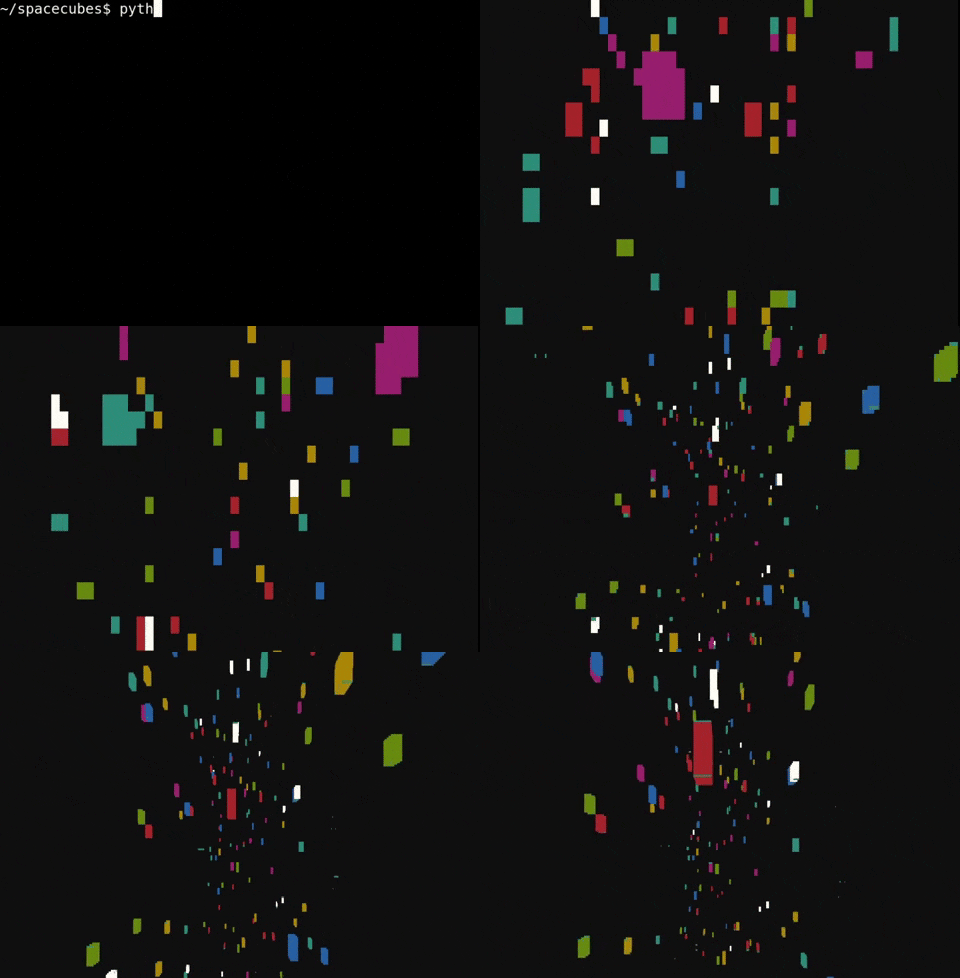
Below is how the Windows 95 screensaver-esque demo was created using spacecubes (examples/screensaver_opencv).
import numpy as np
from spacecubes import Camera
from spacecubes.io_devices import OpenCV

world = np.zeros((50, 50, 100))
color_mask = np.random.randint(0, 1000, size=world.shape)
random_mask = np.random.random(size=world.shape)
world[random_mask < 0.001] = color_mask[random_mask < 0.001]
colors = {i: np.random.random(3) * 255 for i in range(1, 1000)}
device = OpenCV(colors, resolution=(1080, 1920))
camera = Camera(x=25, y=25, z=0)
camera.look_at(x=25, y=25, z=100)
while True:
    if camera.position[-1] > 1:
        camera.move_xyz(z=-1)
        world = np.roll(world, -1, axis=-1)
    camera.move(forward=0.1)
    device.render(world, camera)
You can also render directly to the terminal. In this case, colored spaces are used as pixels. This is the (examples/screensaver_terminal) script, which runs the same demo as above but rendered directly in the terminal using curses. The resolution is changed by setting the font size (e.g., CTRL +, CTRL -) in the terminal, which is what happens when the window flickers. After closing the script, you may have to run reset to reset the terminal state.
Examples
Rendering a single voxel (cube) in OpenCV and flying the camera around it can be done by running:
import numpy as np
from spacecubes import Camera
from spacecubes.io_devices import OpenCV

world = np.ones((1, 1, 1))
camera = Camera(x=-1, y=-1, z=-1)
colors = {1: (0, 255, 0)}
device = OpenCV(colors, resolution=(1080, 1920))
while True:
    camera.move(up=0.01, right=0.01)
    camera.look_at(x=0, y=0, z=0)
    device.render(world, camera)
Other examples with more a fleshed out description can be found in the examples directory.
Features
Any NumPy array with 3 dimensions can be rendered. All non-zero values in the array are considered voxels, while elements with value 0 will be treated as empty space.
IO Devices
An IO Device in spacecubes is what (optionally) handles user input and definitely handles image frame output. The output can be done e.g., through visualization or raw dump. The IO Device needs to know what colors to map each value in the numpy array with, which is what the colors argument does. The available io_devices are specified below along with how they are used:
from spacecubes.io_devices import OpenCV, Raw, Terminal
from spacecubes import Camera
import numpy as np
world = np.ones((1,1,1))
camera = Camera()

# Output the frame using OpenCV imshow
opencv_device = OpenCV(colors={i: (0, 255, 0) for i in range(1, 100)}, resolution=(1080, 1920))
opencv_device.render(world, camera)

# Returns the frame as an numpy array
raw_device = Raw(colors={i: (0, 255, 0) for i in range(1, 100)}, resolution=(1080, 1920))
frame = raw_device.render(world, camera)

# Outputs the frame directly in the terminal using ncurses
terminal_device = Terminal(colors={i: 5 for i in range(1, 100)})
terminal_device.render(world, camera)
To render the output on the IO device, device.render(world, camera) is used, where world is a 3D NumPy array and Camera is..
Camera
Camera is the object that handles the virtual camera which specifies the perspective through which the image is rendered. It supports some functions related to moving, rotating and looking at world locations:
from spacecubes import Camera

# Initialize a camera along with some world position
camera = Camera(x=1, y=2, z=3)

# Move the camera 1 unit back from the camera's perspective
camera.move(up=0, forward=-1, right=0)

# Move the camera -1 unit along the world y-axis
camera.move_xyz(x=0, y=-1, z=0)

# Move the camera to a specified world position (0, 5, 0)
camera.move_to_xyz(x=0, y=5, z=0)

# The camera can be rotated manually through yaw, pitch and roll given in radians
camera.rotate(yaw=-3.14/2, pitch=0, roll=0)

# Make the camera look at a specified world location (3, 5, 2)
camera.look_at(x=3, y=5, z=2)

# If camera.look_at is too snappy, the same can be done but interpolated.
# This is done by supplying an amount, which is a fraction between
# 0 and 1 that specifies where in the interpolation between the current camera
# pose and the target camera pose that the camera should look
for interp_amount in range(100):
    camera.look_at_interpolated(x=3, y=5, z=2, amount=interp_amount / 100)
    device.render(world, camera)
Installation tags
spacecubes can be installed using tags that specify which visualization packages to include. all will include all visualization packages, e.g., OpenCV. If no tag is specified, only Raw and Terminal IO devices can be used.
PyPI tags (with apostrophes added for the packages with brackets to be installable in e.g., zsh shells):
spacecubes'spacecubes[opencv]''spacecubes[all]'
Dependencies:
- numpy
- pyquaternion
- opencv-python (optional)
1 maintainer

Metadata
1 maintainer
Release files for spacecubes 0.3.4
For a detailed explanation of source distributions (sdists) and built distributions (wheels), please see the package formats documentation.
Source distribution (sdist)
| File | Size | Uploaded | |
|---|---|---|---|
| spacecubes-0.3.4.tar.gz | 19.9 kB | Details |
Built distribution (wheel)
| File | Interpreter | ABI | Platform | Reset |
|---|---|---|---|---|
| spacecubes-0.3.4-py3-none-any.whl | Python 3 | none | any | Details |
Total release size: 41.3 kB
Release files / spacecubes-0.3.4.tar.gz
| Download URL | spacecubes-0.3.4.tar.gz |
|---|---|
| Size | 19.9 kB |
| Tags | Source |
|
SHA-256 checksum How to use checksums |
564946d518e5e2abbb5ceef3845a7aaf1194e2f19fbbfdfa33ff09943a41a17e
|
|
BLAKE2b-256 checksum How to use checksums |
c780c4c638d58279e2cdad4cfce6f3fea3cad272475f10299dfe37a7bfaacaa5
|
| Upload date | |
|
Uploaded using Trusted Publishing? What is trusted publishing? |
No |
| Uploaded via |
twine/5.1.1 CPython/3.9.19
|
Release files / spacecubes-0.3.4-py3-none-any.whl
| Download URL | spacecubes-0.3.4-py3-none-any.whl |
|---|---|
| Size | 21.5 kB |
| Tags | Python 3 |
|
SHA-256 checksum How to use checksums |
64c38c635a63ded41a18eac26f1c83213e73b6cf72ec2b3b70c5ae54c9cad7e7
|
|
BLAKE2b-256 checksum How to use checksums |
c825eea36e68c6934795c0b9552adb61b56cd84c6c87c5c9d061febde85929ce
|
| Upload date | |
|
Uploaded using Trusted Publishing? What is trusted publishing? |
No |
| Uploaded via |
twine/5.1.1 CPython/3.9.19
|














