
Spacestills
Spacestills is a Python program for viewing NASA TV still frames. It periodically downloads the frames from a web feed and displays them in a GUI.
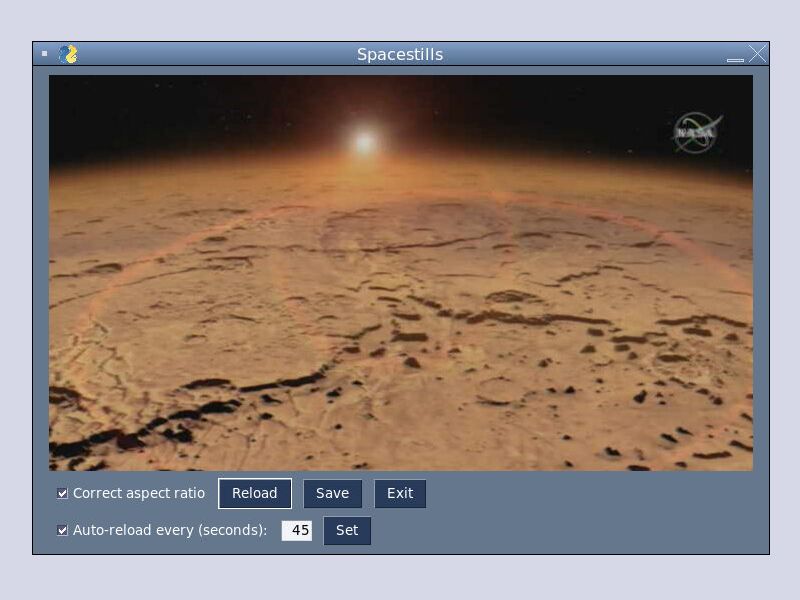
The program allows to correct the aspect ratio of the frames and save them. It downloads the latest frame automatically and gives the option to reload manually, disable the automatic reload, or change the download frequency.
Spacestills has a GUI based on the PySimpleGUI framework and relies on the Pillow and Requests libraries. More implementation details are in a blog post that discusses the design of Spacestills.
Installation
Spacestills is available on PyPI, so to install the package execute the following shell command:
$ pip install spacestills
Usage
Running on Replit
To run the program online on Replit visit the Spacestills REPL with a browser and click Run. If the program window is cropped, try marking the checkbox Correct aspect ratio.
You can also adjust the size of the X Window desktop pane when running Spacestills directly in a REPL. You may see screen redraw artifacts when dragging the window on the desktop. To force a refresh and fix the issue, restart the window manager by right-clicking on the X desktop and then clicking Restart.
Running elsewhere
You can run Spacestills from the shell by executing the command:
$ spacestills
Commands and options
The program window displays the current NASA TV still frame and automatically reloads it every 45 seconds.
The images are stretched vertically in the raw web feed. Mark the Correct aspect ratio checkbox to squeeze the image and get an undistorted view.
To manually refresh the image click the Reload button. Change the reload frequency by entering an integer number of seconds (from 45 to 300) in the text field and pressing Set. You can disable auto-reload by unmarking the Auto-reload every (seconds): checkbox.
Click the Save button to save the current image to the local file system in PNG format, or Exit to quit the program.
Known issues
Typing a file name in the save dialog without first going through the file browse dialog doesn't add the default .png extension.
Release history
See the list of releases for notes on the changes in each version.
Author
Paolo Amoroso developed Spacestills as a Python learning exercise. Email: info@paoloamoroso.com
License
This code is distributed under the MIT license, see the LICENSE file.
1 maintainer

Metadata
1 maintainer
Release files for spacestills 0.2.0
For a detailed explanation of source distributions (sdists) and built distributions (wheels), please see the package formats documentation.
Source distribution (sdist)
| File | Size | Uploaded | Provenance | |
|---|---|---|---|---|
| spacestills-0.2.0.tar.gz | 6.8 kB | Without provenance | Details |
Built distribution (wheel)
| File | Interpreter | ABI | Platform | Reset |
|---|---|---|---|---|
| spacestills-0.2.0-py3-none-any.whl | Python 3 | none | any | Details |
Total release size: 13.5 kB
Release files / spacestills-0.2.0.tar.gz
| Download URL | spacestills-0.2.0.tar.gz |
|---|---|
| Size | 6.8 kB |
| Tags | Source |
|
SHA-256 checksum How to use checksums |
dc1ca4c0d23f85c84b6d3eb372d3e34f3579da32d5dab6a1465bc4a231896a02
|
|
BLAKE2b-256 checksum How to use checksums |
fd96d53649c7ca913a2398d0cc4d524eefe00fcf55a10623e37c81f9b503e741
|
| Upload date | |
|
Uploaded using Trusted Publishing? What is trusted publishing? |
No |
| Uploaded via |
twine/3.4.2 importlib_metadata/3.10.1 pkginfo/1.7.1 requests/2.26.0 requests-toolbelt/0.9.1 tqdm/4.62.2 CPython/3.8.12
|
Release files / spacestills-0.2.0-py3-none-any.whl
| Download URL | spacestills-0.2.0-py3-none-any.whl |
|---|---|
| Size | 6.8 kB |
| Tags | Python 3 |
|
SHA-256 checksum How to use checksums |
29d0c6ed95d4453dd5062953fbe7d39a7159afa59a649b271808347f2088ad78
|
|
BLAKE2b-256 checksum How to use checksums |
bfea95e5c5480fc1a89073c0a4591190274a50e84c3264c3a5bb4b8f72ff93a4
|
| Upload date | |
|
Uploaded using Trusted Publishing? What is trusted publishing? |
No |
| Uploaded via |
twine/3.4.2 importlib_metadata/3.10.1 pkginfo/1.7.1 requests/2.26.0 requests-toolbelt/0.9.1 tqdm/4.62.2 CPython/3.8.12
|
Security for spacestills 0.2.0
Provenance
Provenance describes where a file came from. On PyPI, provenance is shared via attestations, which provide a verifiable record of the build or publishing details. View details, limitations and caveats.
No provenance found
None of the files in this release were uploaded with provenance metadata.
A note on package security
PyPI is a repository for distributing packages, not a service for auditing them. While third-party security researchers and our staff do their best to detect and remove malicious packages, PyPI cannot guarantee the quality, security or suitability of any given package.
To learn more about protecting yourself from malicious actors, visit our package security documentation.














