
Spaco: a comprehensive tool for coloring spatial data at single-cell resolution




Visualizing spatially resolved biological data with appropriate color mapping can significantly facilitate the exploration of underlying patterns and heterogeneity. Spaco (spatial colorization) provides a spatially constrained approach that generates discriminate color assignments for visualizing single-cell spatial data in various scenarios.
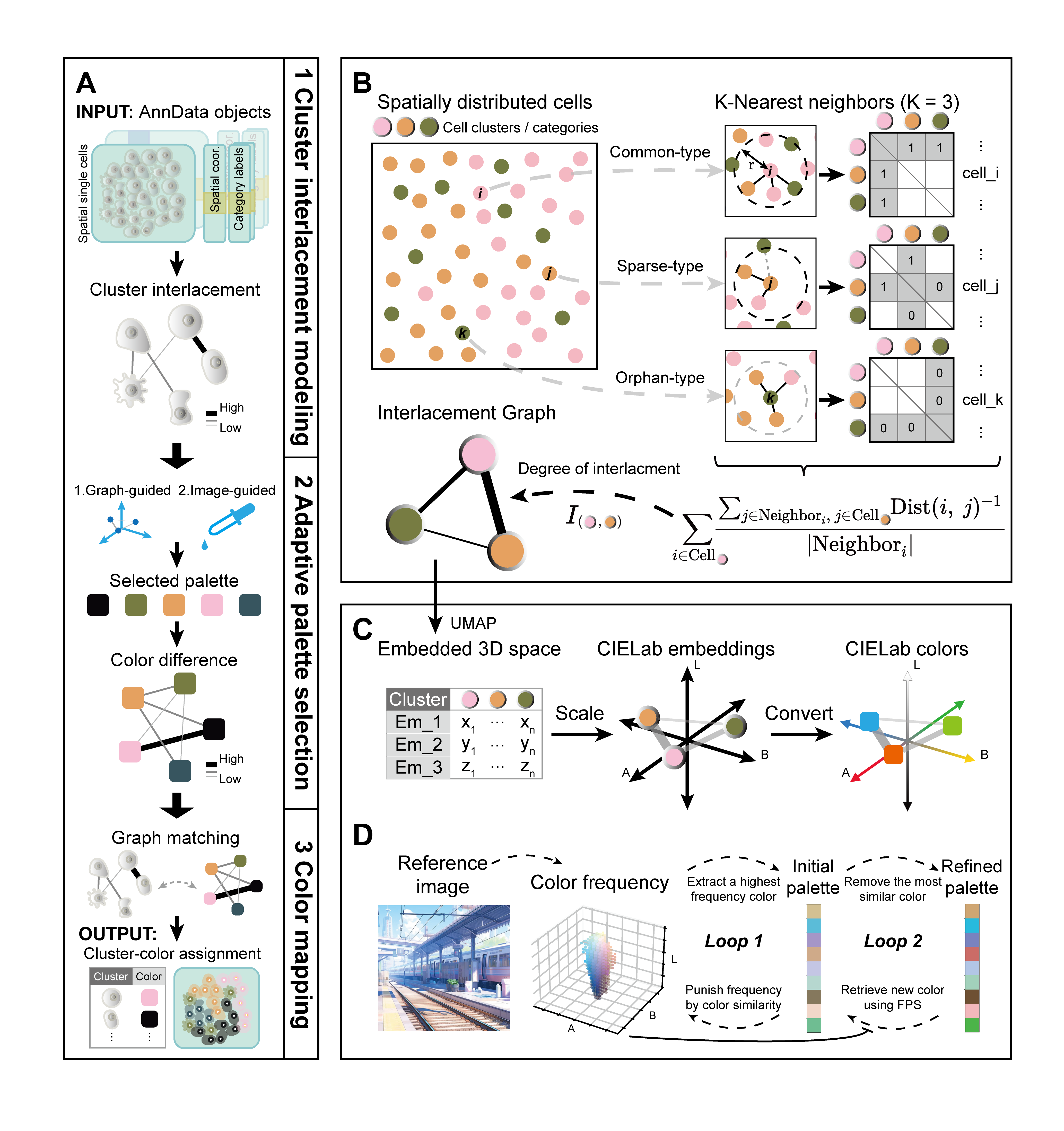
Features
Color assignment
By quantifying the complex topology between cell type clusters, We optimized color assignment of to achieve better visual recognizability.
Palette extraction
We provide a method for extracting color plates from images. While maintaining the theme color, the color differentiation is maximized.
Installation
# Latest source from github (Recommended)
pip install git+https://github.com/BrainStOrmics/Spaco.git
# PyPI
pip install spaco-release
Enviroments
- python>=3.8.0
- numpy>=1.18.0
- pandas>=0.25.1
- scipy>=1.10.0
- anndata>=0.8.0
- scikit-learn>=0.19.0
- scikit-image>=0.19.0
- colormath>=3.0.0
- pyciede2000==0.0.21
- umap-learn>=0.5.0
- logging-release>=0.0.4
- typing_extensions>=4.0.0
NOTE THAT: Currently we found numpy version (1.22.x or 1.23.x) could influence the result of graph-guided mode of Spaco; However, colorization should be acceptable with either version; To exactly reproduce the results in Spaco vignette or paper, please check the numpy version at the end of each jupyter notebook.
Usage
Quick start
import spaco
import scanpy as sc # For visualization
import squidpy as sq # For loading example dataset

# loading data
adata_cell = sq.datasets.seqfish()
palette_default = adata_cell.uns['celltype_mapped_refined_colors'].copy()

# color assignment with default palette
color_mapping = spaco.colorize(
    cell_coordinates=adata_cell.obsm['spatial'],
    cell_labels=adata_cell.obs['celltype_mapped_refined'],
    palette=palette_default,
    radius=0.05,
    n_neighbors=30,
)

# Order colors by categories in adata
color_mapping = {k: color_mapping[k] for k in adata_cell.obs['celltype_mapped_refined'].cat.categories}
palette_spaco = list(color_mapping.values())

# Spaco colorization
sc.pl.spatial(adata_cell, color="celltype_mapped_refined", spot_size=0.035, palette=palette_spaco)
Tutorials and demo-cases
- A brief demo is included in Spaco package.
- Please see our STAR Protocol for detailed description
- Working with R? See SpacoR.
Reproducibility
Scripts to reproduce benchmarking and analytic results in Spaco paper are in repository Spaco_scripts
Discussion
Users can use issue tracker to report software/code related issues. For discussion of novel usage cases and user tips, contribution on Spaco performance optimization, please contact the authors via email.
1 maintainer

Metadata
1 maintainer
Release files for spaco-release 0.2.2
For a detailed explanation of source distributions (sdists) and built distributions (wheels), please see the package formats documentation.
Source distribution (sdist)
| File | Size | Uploaded | |
|---|---|---|---|
| spaco_release-0.2.2.tar.gz | 33.5 kB | Details |
Built distribution (wheel)
| File | Interpreter | ABI | Platform | Reset |
|---|---|---|---|---|
| spaco_release-0.2.2-py3-none-any.whl | Python 3 | none | any | Details |
Total release size: 69.2 kB
Release files / spaco_release-0.2.2.tar.gz
| Download URL | spaco_release-0.2.2.tar.gz |
|---|---|
| Size | 33.5 kB |
| Tags | Source |
|
SHA-256 checksum How to use checksums |
059d77430cf17d06cc3cf7d8580393a20db0b8252dc8aa68ef2758394ed47619
|
|
BLAKE2b-256 checksum How to use checksums |
4ba0822915bff12a26e35e0a3a9208528d8425698b5c372cf59093c00d691533
|
| Upload date | |
|
Uploaded using Trusted Publishing? What is trusted publishing? |
No |
| Uploaded via |
twine/5.1.1 CPython/3.9.20
|
Release files / spaco_release-0.2.2-py3-none-any.whl
| Download URL | spaco_release-0.2.2-py3-none-any.whl |
|---|---|
| Size | 35.7 kB |
| Tags | Python 3 |
|
SHA-256 checksum How to use checksums |
5e9c12d1eeee27166bca6c4553977bfc6b7dd3f402e258b77542832cafeb0fc9
|
|
BLAKE2b-256 checksum How to use checksums |
1f27d4635ba6b5617409563983d0bd704177424de60ad98e37488b4d0407e703
|
| Upload date | |
|
Uploaded using Trusted Publishing? What is trusted publishing? |
No |
| Uploaded via |
twine/5.1.1 CPython/3.9.20
|














