
spacy-to-hf
A simple converter from SpaCy Entities (Spans) to Huggingface BILOU formatted data (tokens and ner_tags)
I've always struggled to convert my spacy formatted spans into data that can be trained on using huggingface transformers. But Spacy's Entity format is the most intuitive format for tagging entities for NER.
This repo is a simple converter that leverages spacy.gold.biluo_tags_from_offsets
and the SpaCy tokenizations repo that
creates a 1-line function to convert spacy
formatted spans to tokens and ner_tags that can be fed into any
Token Classification Transformer
Try before you buy
You can demo the functionality on streamlit or spaces
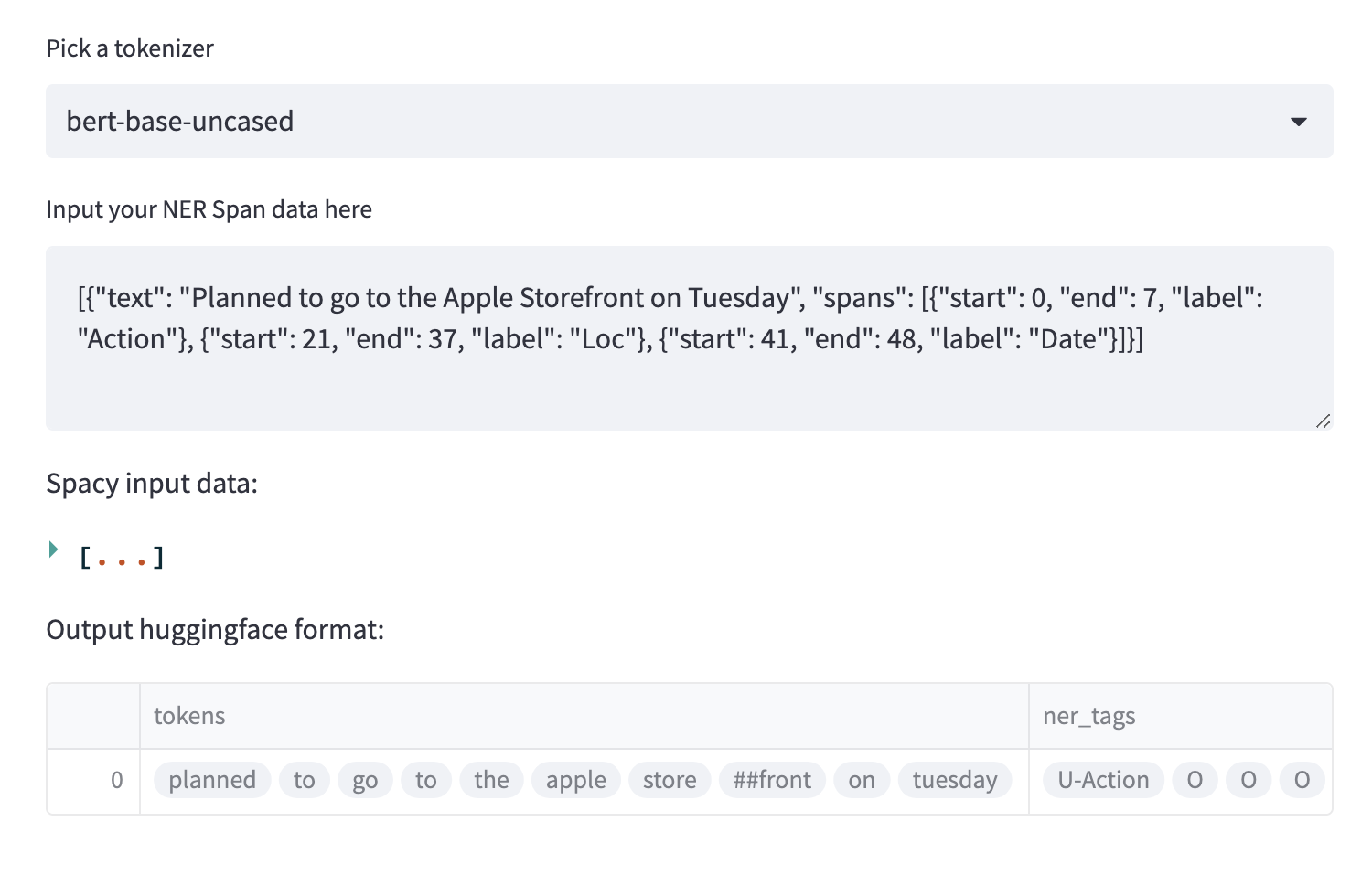
What is "Spacy" or "HuggingFace" format?
Spacy format simply means having a text input and character level span assignments.
For example:
text = "Hello, my name is Ben"
spans = [{"start": 18, "end": 21, "label": "person"}, ...]
This is the common structure of output data from labeling tools like LabelStudio or LabelBox, because it's easy and human interpretable.
Huggingface format refers to the BIO/BILOU/BIOES tagging format commonly used for fine-tuning transformers. The input text is tokenized, and each token
is given a tag to denote whether or not it's a label (and it's location, Beginning, Inside etc). Here's an example: https://huggingface.co/datasets/wikiann
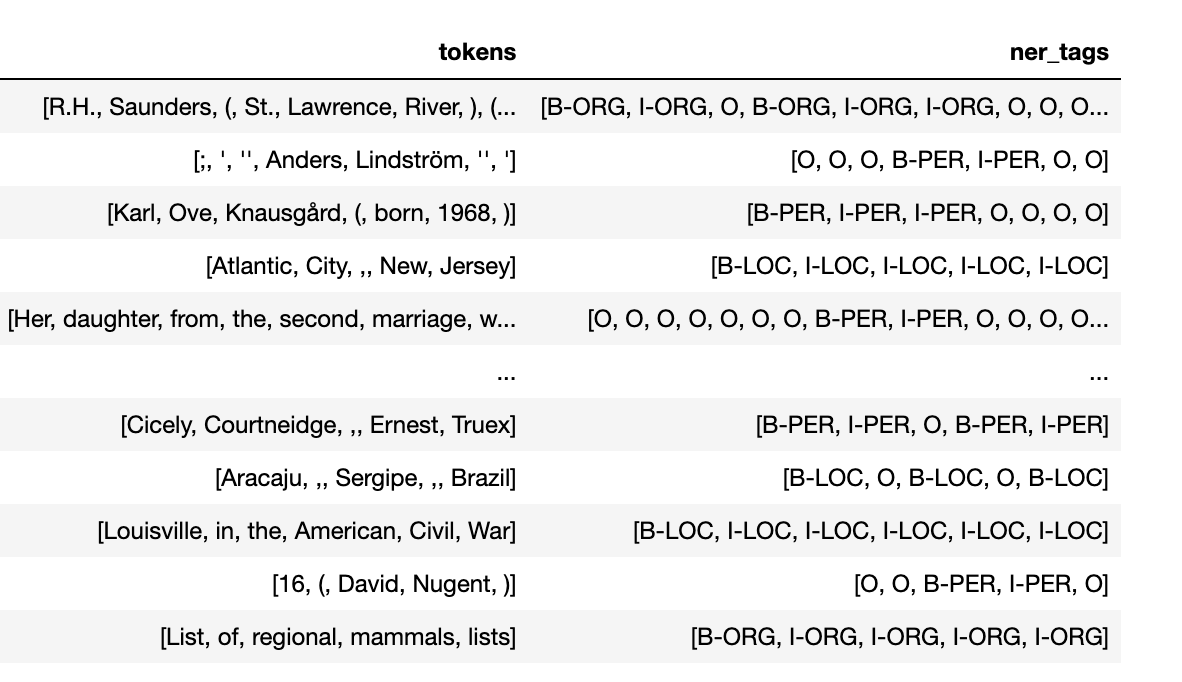
For more information about this tagging system, see wikipedia
This format is tricky, though, because it is entirely dependant on the tokenizer used. Tokens are not simply space separated words. Each tokenizer has a specific vocabulary of tokens that break down works into unique sub-words. So moving from character level spans to token level tags is a very manual process. That's a core reason I built this tool.
Installation
pip install spacy-to-hf
python -m spacy download en_core_web_sm
Usage
from spacy_to_hf import spacy_to_hf

span_data = [
    {
        "text": "I have a BSc (Bachelors of Computer Sciences) from NYU",
        "spans": [
            {"start": 9, "end": 12, "label": "degree"},
            {"start": 14, "end": 44, "label": "degree"},
            {"start": 51, "end": 54, "label": "university"}
        ]
    }
]
hf_data = spacy_to_hf(span_data, "bert-base-cased")
print(list(zip(hf_data["tokens"][0], hf_data["ner_tags"][0])))
Or, if you want to immediately start fine-tuning or upload this to huggingface, you can run
ds = spacy_to_hf(span_data, "bert-base-cased", as_hf_dataset=True)

print(ds.features["ner_tags"].feature.names)
This will return your data as a HuggingFace Dataset and will automatically
string-index your ner_tags into a ClassLabel object
Project Setup
Project setup is credited to @anthonycorletti and his awesome project template repo
1 maintainer

Metadata
1 maintainer
Release files for spacy-to-hf 0.0.4
For a detailed explanation of source distributions (sdists) and built distributions (wheels), please see the package formats documentation.
Source distribution (sdist)
| File | Size | Uploaded | Provenance | |
|---|---|---|---|---|
| spacy_to_hf-0.0.4.tar.gz | 11.3 kB | Without provenance | Details |
Built distribution (wheel)
| File | Interpreter | ABI | Platform | Reset |
|---|---|---|---|---|
| spacy_to_hf-0.0.4-py3-none-any.whl | Python 3 | none | any | Details |
Total release size: 22.3 kB
Release files / spacy_to_hf-0.0.4.tar.gz
| Download URL | spacy_to_hf-0.0.4.tar.gz |
|---|---|
| Size | 11.3 kB |
| Tags | Source |
|
SHA-256 checksum How to use checksums |
b5bea5817dc28858bae7b0fe2817fde50347f0d7b70a24b3eb86022bb5eff40f
|
|
BLAKE2b-256 checksum How to use checksums |
5eaa94f9ec4f44926bcdcb85612601ce6415b3c41629cec25601697a52afabca
|
| Upload date | |
|
Uploaded using Trusted Publishing? What is trusted publishing? |
No |
| Uploaded via |
twine/5.1.1 CPython/3.10.15
|
Release files / spacy_to_hf-0.0.4-py3-none-any.whl
| Download URL | spacy_to_hf-0.0.4-py3-none-any.whl |
|---|---|
| Size | 11.0 kB |
| Tags | Python 3 |
|
SHA-256 checksum How to use checksums |
69d89c0b87770b3a0565bd245a7285364c20cb4bf10cbf3a249607226bf63005
|
|
BLAKE2b-256 checksum How to use checksums |
a1e8b417a6d87292d284996d4bc334d4cdff7f7c1be169546a8d95e75a59c9df
|
| Upload date | |
|
Uploaded using Trusted Publishing? What is trusted publishing? |
No |
| Uploaded via |
twine/5.1.1 CPython/3.10.15
|
Security for spacy-to-hf 0.0.4
Provenance
Provenance describes where a file came from. On PyPI, provenance is shared via attestations, which provide a verifiable record of the build or publishing details. View details, limitations and caveats.
No provenance found
None of the files in this release were uploaded with provenance metadata.
A note on package security
PyPI is a repository for distributing packages, not a service for auditing them. While third-party security researchers and our staff do their best to detect and remove malicious packages, PyPI cannot guarantee the quality, security or suitability of any given package.
To learn more about protecting yourself from malicious actors, visit our package security documentation.














