

dagre graph rendering for spaday




Overview
spaday-dagre renders directed graphs in spaday from a
serializable node/edge config, laid out by @dagrejs/dagre and
drawn as light-DOM SVG. Colors ride the spaday shell's --spa-* tokens, so
bind_root_class("wa-dark", ...) re-themes the graph with the rest of the page, and application CSS
reaches every shape. dagre-node-click bubbles {id, label, x, y} and dagre-edge-click bubbles
{source, target, label, x, y} — the graph context plus the pointer position — so
SetField("selected", event_value("id")) selects and open_popup(..., x=event_value("x"), y=event_value("y")) positions. Right-clicking a node or edge bubbles dagre-node-contextmenu /
dagre-edge-contextmenu with the same shape, pairing with spaday's open_popup for context menus.
Navigation is dagre-d3-class: cursor-anchored wheel zoom, drag pan (clamped so the graph can never
be dragged out of view), double-click reset, and an optional GitHub-mermaid-style D-pad
(controls) with pan arrows around a center reset circle. The view is automatic — fit and
centered, re-fitted on every host resize or graph change, so a graph built inside a hidden or
not-yet-sized tab, accordion, or drawer fits when it is shown — until the user pans or zooms or a
node is focused; a reset, or the fit() method (Invoke(by_id("graph"), "fit")), makes it
automatic again.
The host draws into an absolutely positioned frame and contributes no intrinsic height: give
<spaday-dagre> or an ancestor an explicit height (e.g. style="height: 32rem"). An unsized host
falls back to the graph's natural height, with a one-time console warning.
Quick example
from spaday import element
from spaday.backends.starlette import serve
from spaday_dagre import Dagre, package

graph = Dagre(
    graph={
        "nodes": [{"id": "a", "label": "Alpha", "tooltip": "Start here"}, {"id": "b", "shape": "diamond"}],
        "edges": [{"source": "a", "target": "b", "label": "flow", "tooltip": "Continue to b"}],
    },
    layout={"rankdir": "LR"},
    controls=True,
)
app = serve(element("main").child(graph), packages=[package])
Node sizes default from label measurement; per-node width/height/class/shape (rect,
diamond, ellipse) and per-edge label/class override. The maxLabelWidth prop (px) caps
label-driven width: wider labels are ellipsized, with the full label as a native tooltip. layout
passes through to dagre (rankdir, align, nodesep,
ranksep, edgesep, marginx/marginy, ranker). Installing the package registers the dagre
entry point, so packages=["dagre"] also works.
Nodes, clusters, and edges accept a plain-text tooltip. Hovering a node shape, edge line,
or edge label shows the text in a popup that follows the pointer within the graph. Newlines
are preserved; HTML is displayed as text. Tooltips update when graph changes and hide on
pointer exit, pan, zoom, or removal. An ellipsized node label supplies its full text when no
custom tooltip is set.
A node with parent nests inside the cluster named by another node's id (dagre's compound
layout): the cluster renders as a rounded container behind its children, labeled along its top
edge, and clicks/right-clicks on it dispatch the node events with the same detail shape.
Parentless nodes mix freely with clustered ones; graphs without parents keep the flat layout
path.
The emphasis prop (a list of node ids; a single id string works too, null clears) toggles the
.emphasis class on the matching rendered nodes by pure class reconciliation — no re-layout, no
graph rebuild — and re-applies after re-renders, so a live selection binds directly:
.bind("emphasis", "selected"). The focusNode(id) method (declared in the
manifest for spaday's Invoke) pans — and zooms to a comfortable level when needed — so the node
or cluster is centered in the view; the bindable focus prop is a property spelling that calls
it on set, with the method as the primary API.
Theming
Component-scoped tokens layer over the shell's --spa-* tokens, so an application can theme the
graph from the host (or any ancestor) without knowing its internals — a token set once wins in both
light and dark page modes:
| Token | Themes |
|---|---|
--dagre-node-fill |
node shape fill |
--dagre-node-stroke |
node shape outline |
--dagre-node-text |
node and cluster label text |
--dagre-edge-stroke |
edge lines and arrowheads |
--dagre-edge-label |
edge label text |
--dagre-cluster-fill |
cluster container fill |
--dagre-cluster-stroke |
cluster container outline |
--dagre-accent |
hover, connected-endpoint, and emphasis affordances |
Node and edge class values are forwarded onto the rendered <g> groups (alongside
spaday-dagre-node / spaday-dagre-edge), so custom classes are CSS-targetable directly. One
variant is built in: a node or edge whose class includes emphasis gets an accent outline.
Browser examples
Python runs in a Pyodide worker with the same component tree and transports model as the local example. Node and edge selections round-trip through Python; the active-stage highlight updates without a backend server. Each browser tab has its own model.
Run the examples locally
python -m pip install -e ".[examples]"
python -m spaday_dagre.example
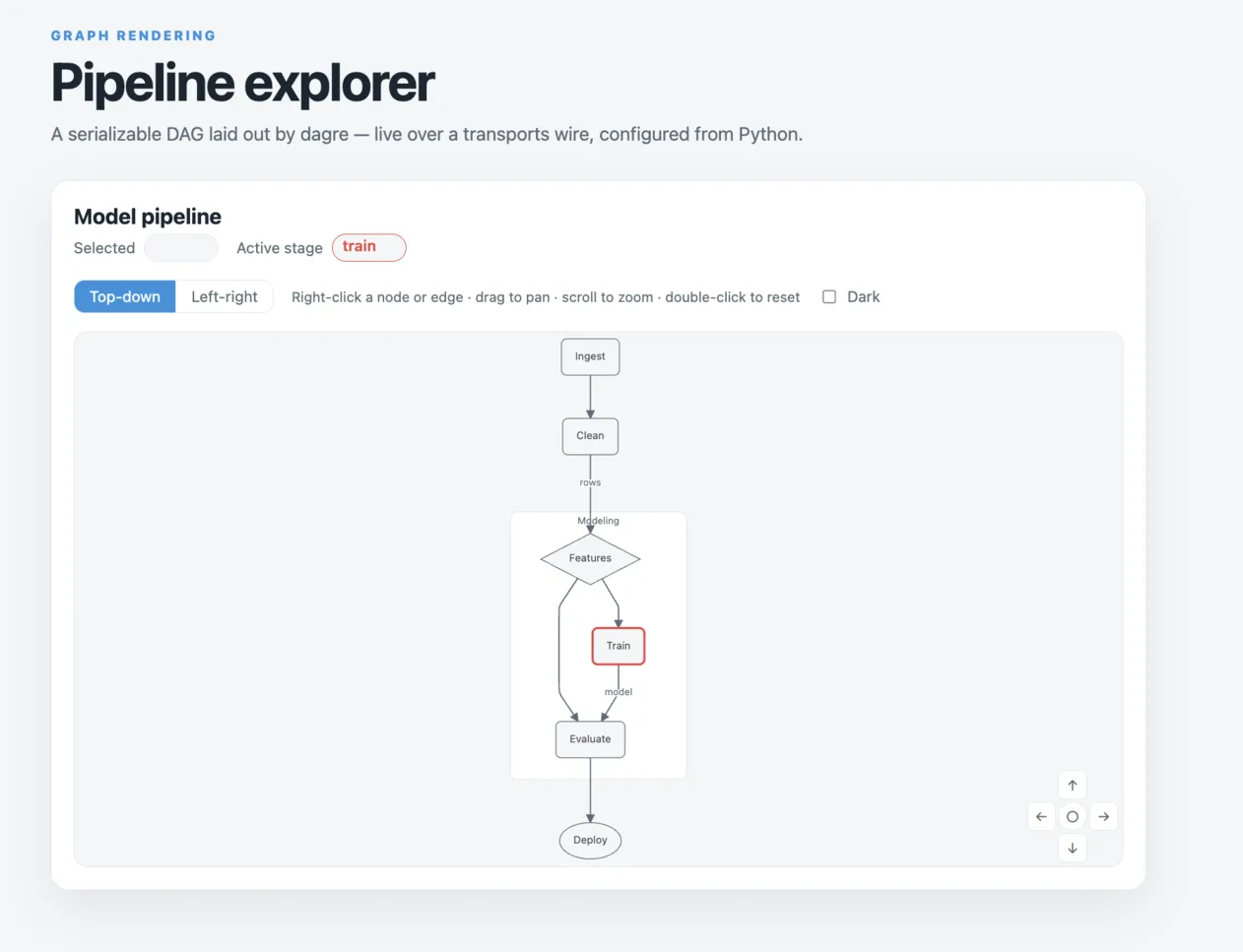
Open http://127.0.0.1:8016: a pipeline DAG live over a transports wire — the server sweeps an
active-stage highlight through the graph while node/edge selection rides back as model edits — with
direction switching, mixed node shapes, a "modeling" cluster grouping the middle stages, selection
mirrored into the emphasis prop, a right-click menu for nodes and edges (its Focus item centers
via focusNode), view controls, and the dark-mode toggle.
To build and serve the browser version from a checkout:
make develop
make pyodide-example
python -m http.server 8000 --directory dist
Open http://127.0.0.1:8000/lite/. The first load downloads Pyodide and Python dependencies;
an internet connection is required. Run make test-pyodide-example to check the browser demo.
1 maintainer

Metadata
1 maintainer
Release files for spaday-dagre 0.3.1
For a detailed explanation of source distributions (sdists) and built distributions (wheels), please see the package formats documentation.
Source distribution (sdist)
| File | Size | Uploaded | Provenance | Actions |
|---|---|---|---|---|
| spaday_dagre-0.3.1.tar.gz | 203.8 kB | Without provenance | Details for spaday_dagre-0.3.1.tar.gz |
Built distribution (wheel)
| File | Interpreter | ABI | Platform | Actions Reset |
|---|---|---|---|---|
| spaday_dagre-0.3.1-py3-none-any.whl | Python 3 | none | any | Details for spaday_dagre-0.3.1-py3-none-any.whl |
Total release size: 345.4 kB
Release files / spaday_dagre-0.3.1.tar.gz
| Download URL | spaday_dagre-0.3.1.tar.gz |
|---|---|
| Size | 203.8 kB |
| Tags | Source |
|
SHA-256 checksum How to use checksums |
ee0abed44a7b933b0f0cc876347316c6be5514312404524003b3fc7570b1feb0
|
|
BLAKE2b-256 checksum How to use checksums |
efdef9f74e14936bfba2d8c653e55f6c3f90fe3a4dc2039dd1974e1277f0db92
|
| Upload date | |
|
Uploaded using Trusted Publishing? What is trusted publishing? |
No |
| Uploaded via |
twine/7.0.0 CPython/3.12.15
|
Release files / spaday_dagre-0.3.1-py3-none-any.whl
| Download URL | spaday_dagre-0.3.1-py3-none-any.whl |
|---|---|
| Size | 141.6 kB |
| Tags | Python 3 |
|
SHA-256 checksum How to use checksums |
9f96303c4901312dd0e9e33034fc229ac4a1c93a368cbfbbc581125784def9c3
|
|
BLAKE2b-256 checksum How to use checksums |
49bfcb89add45783cb27b8cfa24ef2c2c3f931fac85b7f9143b055a416c0b56c
|
| Upload date | |
|
Uploaded using Trusted Publishing? What is trusted publishing? |
No |
| Uploaded via |
twine/7.0.0 CPython/3.12.15
|
Security for spaday-dagre 0.3.1
Provenance
Provenance describes where a file came from. On PyPI, provenance is shared via attestations, which provide a verifiable record of the build or publishing details. View details, limitations and caveats.
No provenance found
None of the files in this release were uploaded with provenance metadata.
A note on package security
PyPI is a repository for distributing packages, not a service for auditing them. While third-party security researchers and our staff do their best to detect and remove malicious packages, PyPI cannot guarantee the quality, security or suitability of any given package.
To learn more about protecting yourself from malicious actors, visit our package security documentation.














