

Typed Lion components and browser assets for spaday.




Overview
from spaday import SetField, element, serve
from spaday_lion import LionButton, LionInput

page = element("form").child(
    LionInput(label="Name", name="name"),
    LionButton().text("Approve").on("click", SetField("state", "approved")),
    element("output").bind("textContent", "state"),
)
serve(page, packages=["lion"], store={"state": "pending"})
Every element @lion/ui registers has a typed class generated from its Custom Elements Manifest,
including the attributes its form and localization mixins contribute, so props, events and slots are
checked when you author the tree. Installing the package does not inject assets; select it with
packages=["lion"] or pass the exported package descriptor.
Generic controls
Select the lion design to render spaday's generic controls as Lion elements:
from spaday import Button, Column, TextInput
from spaday.backends.starlette import serve

page = Column(
    TextInput(label="Name").bind("value", "name", mode="two-way"),
    Button(label="Save", intent="primary"),
)
app = serve(page, packages=["lion"], design="lion", store={"name": ""})
Lion realizes 12 of the 13 generic controls. Alert uses spaday's marked native fallback because
Lion does not provide a static alert component.
Browser examples
Both run Python locally through Pyodide; no install or server is required.
Run examples locally
python -m pip install -e ".[examples]"
python -m spaday_lion.example
python -m spaday_lion.gallery
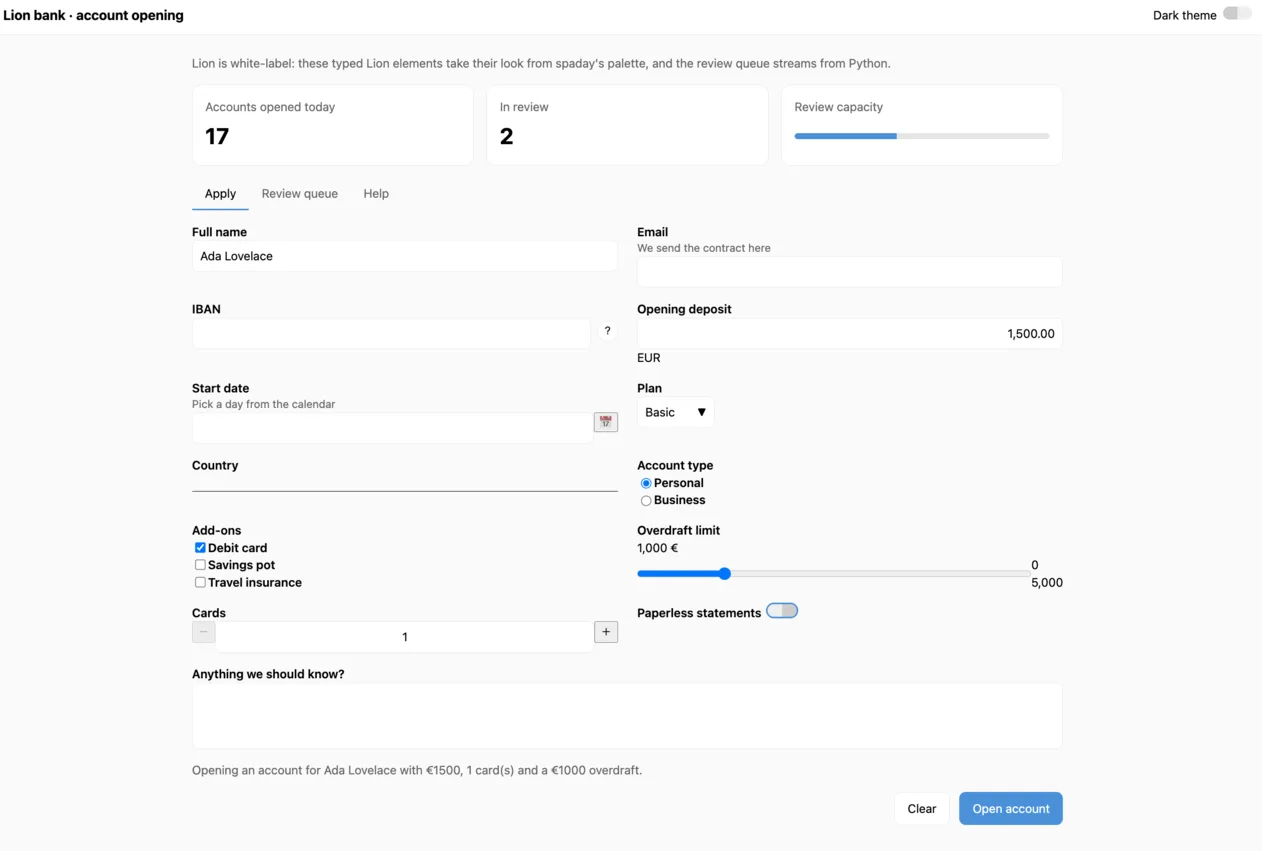
Open http://127.0.0.1:8025 for the standard account-opening app or http://127.0.0.1:8026 for the
component gallery. The standard app includes a complete lion-form, two-way bindings, an endpoint-backed
submission flow, a review queue streamed from Python, overlays, navigation, and shared dark-theme state.
The gallery includes every generated Lion component and a highlighted Python snippet for each component
family.
Both pass the local package descriptor directly, so they do not install or resolve the integration from GitHub.
Theming
Lion is white-label: its elements ship functional styles only, with no theme and no design tokens,
so TOKENS is empty and there is nothing to map onto spaday's --spa-* palette. Style them with
ordinary CSS, reading the shell's tokens where they fit:
lion-button { background: var(--spa-accent); border: 1px solid var(--spa-border); }
Sharing Lion with your own library
Lion registers global custom element names, so a second copy on the page throws from
customElements.define. The package serves Lion's modules under their own bare specifiers —
@lion/ui/button.js, @lion/ui/define/lion-button.js, the translation modules and the rest of its
exports — through the page's import map. A library built on Lion that leaves those imports out of its
bundle (external: ["@lion/ui"] with esbuild) gets this copy, and nothing registers twice.
1 maintainer

Metadata
1 maintainer
Release files for spaday-lion 0.2.0
For a detailed explanation of source distributions (sdists) and built distributions (wheels), please see the package formats documentation.
Source distribution (sdist)
| File | Size | Uploaded | |
|---|---|---|---|
| spaday_lion-0.2.0.tar.gz | 774.5 kB | Details |
Built distribution (wheel)
| File | Interpreter | ABI | Platform | Reset |
|---|---|---|---|---|
| spaday_lion-0.2.0-py3-none-any.whl | Python 3 | none | any | Details |
Total release size: 1.8 MB
Release files / spaday_lion-0.2.0.tar.gz
| Download URL | spaday_lion-0.2.0.tar.gz |
|---|---|
| Size | 774.5 kB |
| Tags | Source |
|
SHA-256 checksum How to use checksums |
85e435dde9631fc724227827985f62a239daf5b57973d61e676fdbef3296c471
|
|
BLAKE2b-256 checksum How to use checksums |
59eea341fa4e7d9be662b89dc704c93e8090617de10f6091dd9be9fc1e824426
|
| Upload date | |
|
Uploaded using Trusted Publishing? What is trusted publishing? |
No |
| Uploaded via |
twine/7.0.0 CPython/3.12.14
|
Release files / spaday_lion-0.2.0-py3-none-any.whl
| Download URL | spaday_lion-0.2.0-py3-none-any.whl |
|---|---|
| Size | 1.0 MB |
| Tags | Python 3 |
|
SHA-256 checksum How to use checksums |
bb1f43d6c9b2007ce67ae7b6e8af5ba9c6db69730e0f47bd582f6de9af1858d4
|
|
BLAKE2b-256 checksum How to use checksums |
0e1034c7f6a9788d65f5c1aa89b3f639c4dfe2710f6d4f3a443649c4ac648cd8
|
| Upload date | |
|
Uploaded using Trusted Publishing? What is trusted publishing? |
No |
| Uploaded via |
twine/7.0.0 CPython/3.12.14
|














