

Perspective for spaday




Overview
spaday-perspective moves the existing PerspectivePanel integration out of spaday core. Its
self-contained <perspective-panel> bundle includes Perspective's client, viewer (the multi-panel
workspace element since Perspective 5), datagrid, themes, and viewer WASM.
Documentation
- Build a live market workspace — guided first application.
- Stream data and change layouts — task-focused server and UI recipes.
- Add row buttons — indexed row events and server-side deletion.
- API reference — component props, layout shape, and package descriptor.
- Why Perspective uses its own data channel — integration design and tradeoffs.
Quick example
This complete app serves a live Perspective table. Add trade streams a new row into the grid, the select switches between flat and grouped layouts, and the checkbox changes the viewer theme.
import perspective
from perspective.handlers.starlette import PerspectiveStarletteHandler
from starlette.responses import JSONResponse
from starlette.routing import Route, WebSocketRoute
from starlette.websockets import WebSocket

from spaday import CallEndpoint, cond, element, eq, field, obj
from spaday.backends.starlette import serve
from spaday_perspective import PerspectivePanel

server = perspective.Server()
client = server.new_local_client()
trades = client.table(
    [
        {"id": 1, "symbol": "AAPL", "side": "buy", "price": 211.10},
        {"id": 2, "symbol": "MSFT", "side": "sell", "price": 503.02},
    ],
    name="trades",
)
next_id = 2


async def add_trade(_request):
    global next_id
    next_id += 1
    trades.update(
        [
            {
                "id": next_id,
                "symbol": "AAPL" if next_id % 2 else "MSFT",
                "side": "buy" if next_id % 2 else "sell",
                "price": 210 + next_id,
            }
        ]
    )
    return JSONResponse({"id": next_id})


async def perspective_socket(websocket: WebSocket):
    await PerspectiveStarletteHandler(perspective_server=server, websocket=websocket).run()


def layout(*, grouped=False):
    viewer = {"table": "trades", "plugin": "Datagrid", "columns": ["symbol", "side", "price"]}
    if grouped:
        viewer.update({"group_by": ["symbol"], "columns": ["price"], "aggregates": {"price": "avg"}})
    return {
        "layout": {"type": "tab-layout", "tabs": ["trades"]},
        "panels": {"trades": viewer},
    }


panel = (
    PerspectivePanel()
    .compute("theme", cond(field("dark"), "dark", "light"))
    .compute(
        "config",
        obj(
            {
                "ws_url": "/perspective",
                "tables": ["trades"],
                "layout": cond(eq(field("view"), "grouped"), layout(grouped=True), layout()),
            }
        ),
    )
    .style(display="block", height="70vh", margin_top="1rem")
)

view = element("select").bind("value", "view", mode="two-way").child(
    element("option", "Blotter", value="blotter"),
    element("option", "Average by symbol", value="grouped"),
)
dark = element("input", type="checkbox").bind("checked", "dark", mode="two-way")
page = (
    element("main")
    .style(margin="1rem", font_family="system-ui")
    .child(element("button").text("Add trade").on("click", CallEndpoint("POST", "/api/trades")))
    .child(view)
    .child(element("label").child(dark, " Dark theme"))
    .child(panel)
)

app = serve(
    page,
    packages=["perspective"],
    store={"view": "blotter", "dark": False},
    routes=[
        Route("/api/trades", add_trade, methods=["POST"]),
        WebSocketRoute("/perspective", perspective_socket),
    ],
)
Save this as app.py, then run
pip install spaday-perspective perspective-python starlette uvicorn and uvicorn app:app.
Open http://127.0.0.1:8000.
This keeps Perspective's bulk data on its native websocket. A spaday/transports model only needs to
carry the small serializable connection/layout config. Replacing config reconnects when ws_url
changes and restores changed layouts; theme accepts light, dark, or a Perspective theme name.
Installing this project registers the perspective entry point with spaday. The equivalent explicit
forms are packages=[spaday_perspective.package] and packages=["spaday_perspective:package"].
Browser example
Run the complete example in your browser — Python runs through Pyodide and Perspective uses its in-browser worker, so no install, server, or websocket is required.
Run the example locally
python -m pip install -e ".[examples]"
python -m spaday_perspective.example
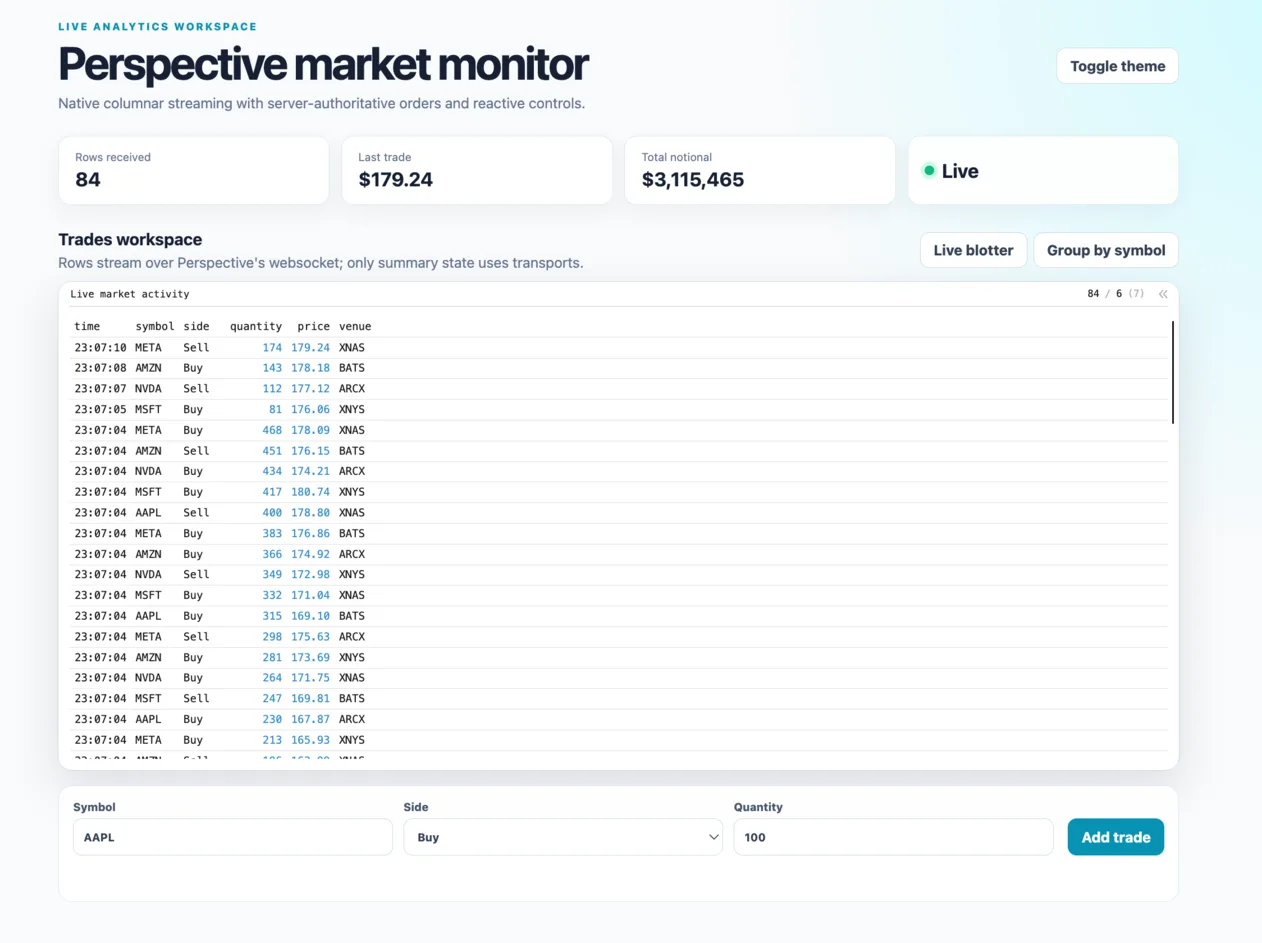
Open http://127.0.0.1:8015 to inspect the complete market-monitor example: live native
Perspective streaming, flat and grouped layouts, server-authoritative order submission, reactive metrics,
and light/dark themes. It passes the local package descriptor directly, so it does not install or resolve
the integration from GitHub.
1 maintainer

Metadata
1 maintainer
Release files for spaday-perspective 0.7.3
For a detailed explanation of source distributions (sdists) and built distributions (wheels), please see the package formats documentation.
Source distribution (sdist)
| File | Size | Uploaded | Provenance | Actions |
|---|---|---|---|---|
| spaday_perspective-0.7.3.tar.gz | 6.8 MB | Without provenance | Details for spaday_perspective-0.7.3.tar.gz |
Built distribution (wheel)
| File | Interpreter | ABI | Platform | Actions Reset |
|---|---|---|---|---|
| spaday_perspective-0.7.3-py3-none-any.whl | Python 3 | none | any | Details for spaday_perspective-0.7.3-py3-none-any.whl |
Total release size: 13.6 MB
Release files / spaday_perspective-0.7.3.tar.gz
| Download URL | spaday_perspective-0.7.3.tar.gz |
|---|---|
| Size | 6.8 MB |
| Tags | Source |
|
SHA-256 checksum How to use checksums |
42e376b04b87abcdb151408d81bf7dcca740664a36f5039d60b8cf0364289b74
|
|
BLAKE2b-256 checksum How to use checksums |
23fa77b2c5baa94ccbc9ab49af00a461f50bedc512772295fedcc8bb0588bcb4
|
| Upload date | |
|
Uploaded using Trusted Publishing? What is trusted publishing? |
No |
| Uploaded via |
twine/7.0.0 CPython/3.12.14
|
Release files / spaday_perspective-0.7.3-py3-none-any.whl
| Download URL | spaday_perspective-0.7.3-py3-none-any.whl |
|---|---|
| Size | 6.8 MB |
| Tags | Python 3 |
|
SHA-256 checksum How to use checksums |
1a8308767e7a2e9ea5d7bef07d10bdcec546bc9d395f304e960f644a851ddcab
|
|
BLAKE2b-256 checksum How to use checksums |
5c6b52f2bef80123375c6c0ea51869465e333604381f3b131df629acdee06075
|
| Upload date | |
|
Uploaded using Trusted Publishing? What is trusted publishing? |
No |
| Uploaded via |
twine/7.0.0 CPython/3.12.14
|
Security for spaday-perspective 0.7.3
Provenance
Provenance describes where a file came from. On PyPI, provenance is shared via attestations, which provide a verifiable record of the build or publishing details. View details, limitations and caveats.
No provenance found
None of the files in this release were uploaded with provenance metadata.
A note on package security
PyPI is a repository for distributing packages, not a service for auditing them. While third-party security researchers and our staff do their best to detect and remove malicious packages, PyPI cannot guarantee the quality, security or suitability of any given package.
To learn more about protecting yourself from malicious actors, visit our package security documentation.














