





Overview
spaday-spectrum provides generated Python bindings and a self-contained registration bundle for a
focused first slice of Adobe Spectrum Web Components:
- Theme
- Button, clear button, and close button
- Textfield
- Checkbox and switch
- Tabs, tab panels, and tabs overflow
Generic controls
Select the spectrum design to render spaday's generic button, text input, text area, checkbox, and
switch as Spectrum elements:
from spaday import Button, Column, TextInput
from spaday.backends.starlette import serve

page = Column(
    TextInput(label="Name").bind("value", "name", mode="two-way"),
    Button(label="Save", intent="primary"),
)
app = serve(page, packages=["spectrum"], design="spectrum", store={"name": ""})
Controls outside this focused Spectrum package use spaday's marked native fallback. The package's shared conformance test covers both the Spectrum controls and those substitutions.
Interactive example
The textfield updates the greeting immediately, the checkbox switches Spectrum themes, and the button resets state. All three interactions run in the browser through spaday's reactive store.
from spaday import SetField, cond, element, field
from spaday.backends.starlette import serve
from spaday_spectrum import SpButton, SpCheckbox, SpTextfield, SpTheme

page = (
    SpTheme(scale="medium")
    .compute("color", cond(field("dark"), "dark", "light"))
    .style(display="block", max_width="32rem", margin="2rem auto", padding="1.5rem")
    .child(element("h1").text("Spectrum profile"))
    .child(SpTextfield(label="Display name", placeholder="Your name").bind("value", "name", mode="two-way"))
    .child(SpCheckbox().text("Dark theme").bind("checked", "dark", mode="two-way"))
    .child(
        element("p")
        .child("Hello, ")
        .child(element("strong").bind("textContent", "name"))
    )
    .child(SpButton(treatment="fill").text("Reset name").on("click", SetField("name", "Ada")))
)

app = serve(page, packages=["spectrum"], store={"name": "Ada", "dark": False})
Save this as app.py, then run pip install spaday-spectrum starlette uvicorn and
uvicorn app:app. Open http://127.0.0.1:8000.
Installing this project registers the spectrum entry point with spaday. The equivalent explicit
forms are packages=[spaday_spectrum.package] and packages=["spaday_spectrum:package"].
The package pins six individual Spectrum packages to 1.12.2. It deliberately avoids the full
@spectrum-web-components/bundle; more components should be added from concrete application needs.
The typed classes are generated from those packages' Custom Elements Manifests with make catalog.
Spectrum publishes one package per component, and a published manifest leaves out what an element
inherits from another package — size, disabled, href, and on sp-switch even checked.
js/tools/manifests.mjs resolves each element's superclass and mixins through the manifests of the
packages that declare them and writes the result to spaday_spectrum/manifests/, which the classes
are generated from. base and shared publish no manifest at all, so the few declarations needed
from them are transcribed in js/tools/unpublished.json; the tool fails on any class neither covers.
Browser examples
Both run Python locally through Pyodide; no install or server is required.
Run examples locally
python -m pip install -e ".[examples]"
python -m spaday_spectrum.example
python -m spaday_spectrum.gallery
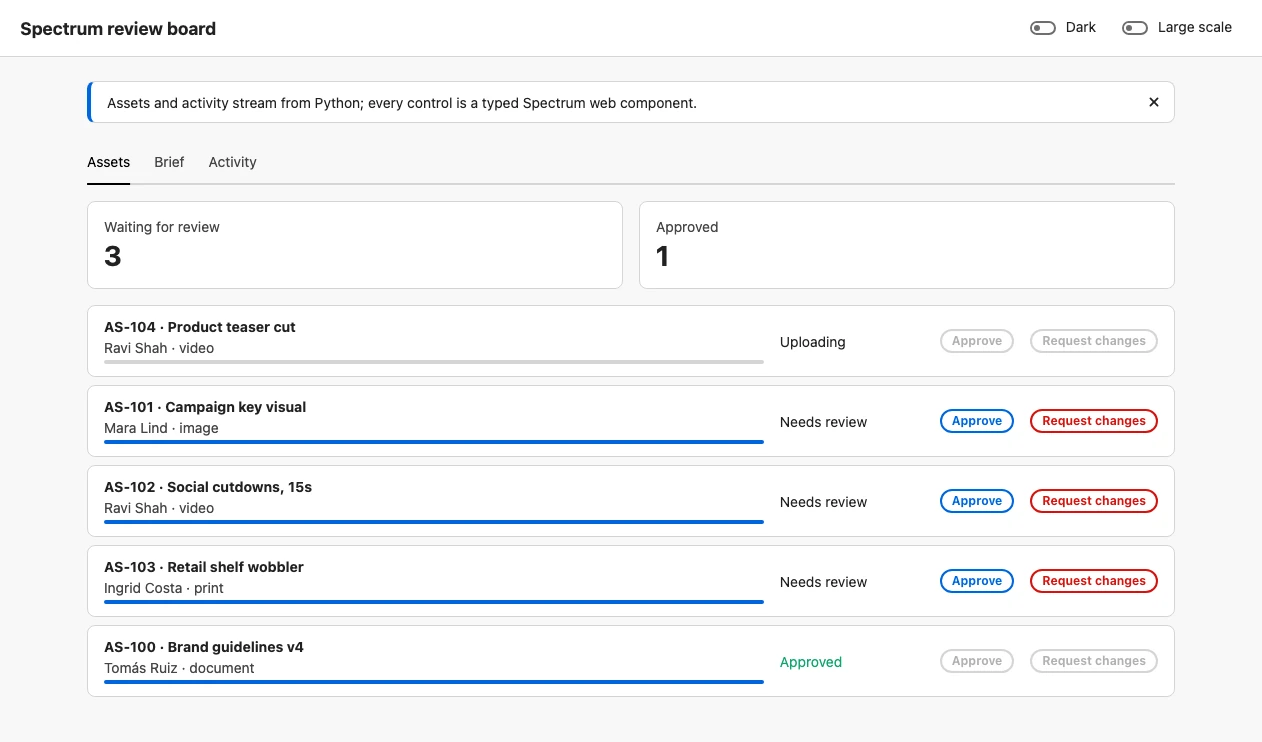
Open http://127.0.0.1:8028 for the standard creative-review app or http://127.0.0.1:8029 for the
component gallery. The standard app includes streamed assets, endpoint-backed review decisions and brief
submission, an activity feed, bound fields and switches, tabs, dismissible feedback, and shared Spectrum
color and scale state. The gallery includes every generated component in this focused package and a
highlighted Python snippet for each family.
Both pass the local package descriptor directly, so they do not install or resolve the integration from GitHub.
1 maintainer

Metadata
1 maintainer
Release files for spaday-spectrum 0.3.0
For a detailed explanation of source distributions (sdists) and built distributions (wheels), please see the package formats documentation.
Source distribution (sdist)
| File | Size | Uploaded | |
|---|---|---|---|
| spaday_spectrum-0.3.0.tar.gz | 562.6 kB | Details |
Built distribution (wheel)
| File | Interpreter | ABI | Platform | Reset |
|---|---|---|---|---|
| spaday_spectrum-0.3.0-py3-none-any.whl | Python 3 | none | any | Details |
Total release size: 1.1 MB
Release files / spaday_spectrum-0.3.0.tar.gz
| Download URL | spaday_spectrum-0.3.0.tar.gz |
|---|---|
| Size | 562.6 kB |
| Tags | Source |
|
SHA-256 checksum How to use checksums |
d8b8fed71e56b8978c5c30e57a766d6b897128fef87db1868cebd9edd9668268
|
|
BLAKE2b-256 checksum How to use checksums |
05d83f93834f491173a2831c9fe2dca1d3efbd5255f7d47db9bdfdf85ac15a33
|
| Upload date | |
|
Uploaded using Trusted Publishing? What is trusted publishing? |
No |
| Uploaded via |
twine/7.0.0 CPython/3.12.14
|
Release files / spaday_spectrum-0.3.0-py3-none-any.whl
| Download URL | spaday_spectrum-0.3.0-py3-none-any.whl |
|---|---|
| Size | 531.4 kB |
| Tags | Python 3 |
|
SHA-256 checksum How to use checksums |
9479e4917c578aad20638f284d29d72744e57054ea778c58319e6809cae1e35b
|
|
BLAKE2b-256 checksum How to use checksums |
4ab66623be71a2e712170291efb9d9af031f28673796f3c330508d78edd3df27
|
| Upload date | |
|
Uploaded using Trusted Publishing? What is trusted publishing? |
No |
| Uploaded via |
twine/7.0.0 CPython/3.12.14
|














