
spaday-ui5
Typed UI5 Web Components and browser assets for spaday.




Overview
from spaday import SetField, element, serve
from spaday_ui5 import Ui5Button, Ui5Tag

page = element("div").child(
    Ui5Button(design="Positive").text("Approve").on("click", SetField("state", "approved")),
    Ui5Tag(design="Information").bind("textContent", "state"),
)
serve(page, packages=["ui5"], store={"state": "pending"})
Every element of @ui5/webcomponents has a typed class — 125 of them — generated from its Custom
Elements Manifest, so props, events and slots are checked when you author the tree; enum props such as
design carry their choices. Installing the package does not inject assets; select it with
packages=["ui5"] or pass the exported package descriptor.
Run the local example
python -m pip install -e ".[examples]"
python -m spaday_ui5.example
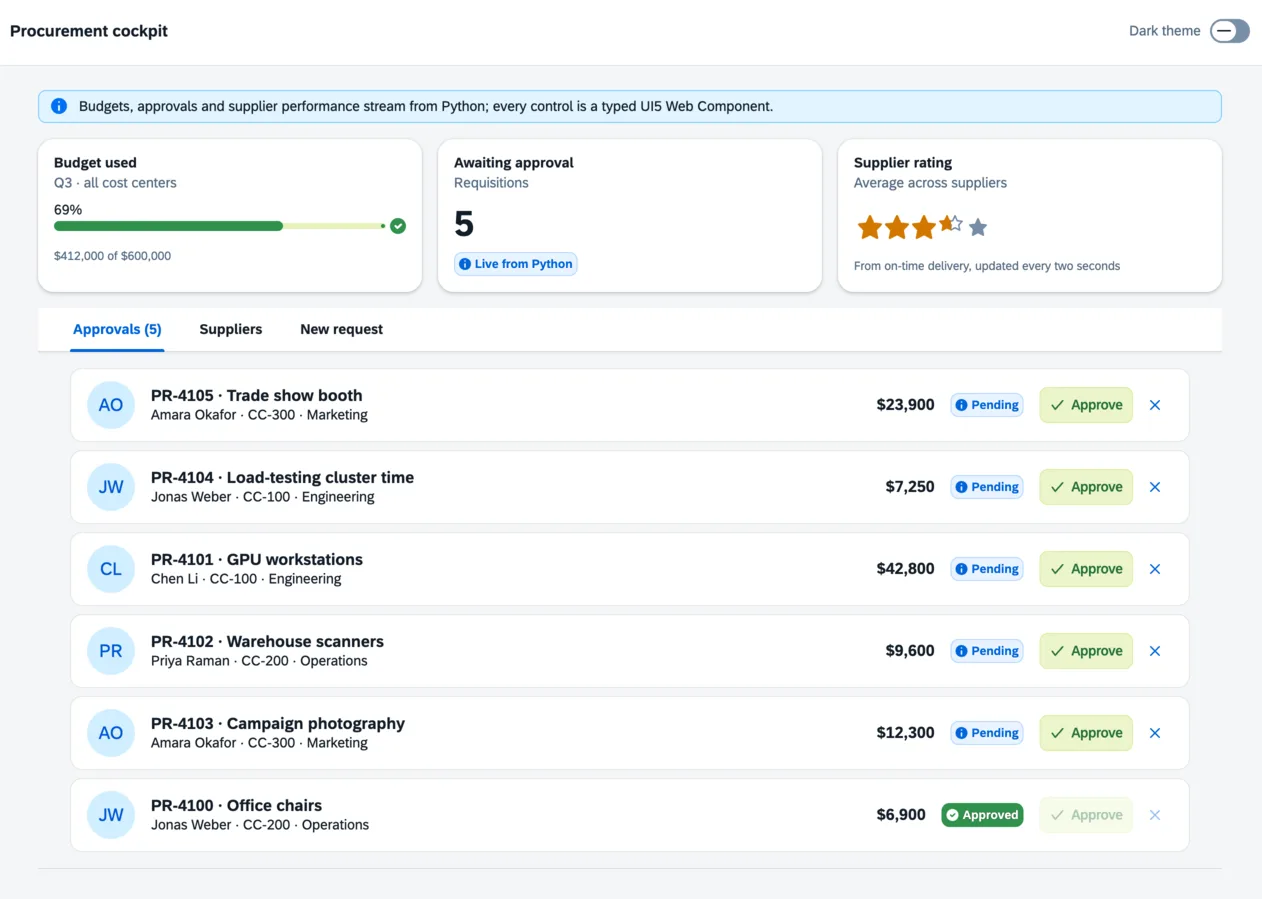
Open http://127.0.0.1:8026 for the procurement cockpit: KPI cards with a
progress indicator and rating fed live from Python, a list of requisitions streamed over transports and
approved or rejected through Python endpoints with a toast, a supplier table whose cells update in place,
a requisition form of input, select, step input, date picker, combo box, checkbox and text area two-way
bound to spaday state and confirmed in a dialog, and a dark switch that moves UI5 and the spaday shell to
sap_horizon_dark together.
Theming
The stylesheet maps spaday's --spa-* shell palette onto UI5's theme parameters, so a UI5 theme
restyles the shell and every other spaday component package with it. TOKENS lists the parameters
wired to the palette that css() can set:
App().css(sapBrandColor="#0C4253")
The theme follows spaday's page mode: a wa-dark class on the root (for example
App(...).bind_root_class("wa-dark", "dark")) switches to sap_horizon_dark and back. UI5 themes
the whole document at once, so a wa-dark island inside a light page stays light. A page that never
uses wa-dark keeps whatever theme it configures, and every UI5 theme is available to setTheme().
Sharing UI5 with your own library
UI5 registers global custom element names, and its framework keeps the configuration, theme and
icon and translation registries every element reads. The package serves UI5's modules under their
own bare specifiers — @ui5/webcomponents/dist/…, @ui5/webcomponents-base/dist/…, the icon,
theming and localization packages — through the page's import map. A library built on UI5 that
leaves those imports out of its bundle (external: ["@ui5/*"] with esbuild) gets this copy: its
elements register once, and its setTheme() and icon imports reach these.
Serving every module those packages export makes the tree large, and a page that loads the whole catalog makes several hundred module requests; serve it over HTTP/2 or with compression.
[!NOTE] This library was generated using copier from the Base Python Project Template repository.
1 maintainer

Metadata
1 maintainer
Release files for spaday-ui5 0.1.0
For a detailed explanation of source distributions (sdists) and built distributions (wheels), please see the package formats documentation.
Source distribution (sdist)
| File | Size | Uploaded | |
|---|---|---|---|
| spaday_ui5-0.1.0.tar.gz | 8.3 MB | Details |
Built distribution (wheel)
| File | Interpreter | ABI | Platform | Reset |
|---|---|---|---|---|
| spaday_ui5-0.1.0-py3-none-any.whl | Python 3 | none | any | Details |
Total release size: 21.8 MB
Release files / spaday_ui5-0.1.0.tar.gz
| Download URL | spaday_ui5-0.1.0.tar.gz |
|---|---|
| Size | 8.3 MB |
| Tags | Source |
|
SHA-256 checksum How to use checksums |
f6923996875ea473ebc23bb3dab70e6d9895137c40de8eb13065caa3cc6e20f8
|
|
BLAKE2b-256 checksum How to use checksums |
392214f0168510e26318e1246aa77df8d6556321dd55bd99f9010cd513877e92
|
| Upload date | |
|
Uploaded using Trusted Publishing? What is trusted publishing? |
No |
| Uploaded via |
twine/7.0.0 CPython/3.12.14
|
Release files / spaday_ui5-0.1.0-py3-none-any.whl
| Download URL | spaday_ui5-0.1.0-py3-none-any.whl |
|---|---|
| Size | 13.4 MB |
| Tags | Python 3 |
|
SHA-256 checksum How to use checksums |
e77a134eda996e37113eeecb3127f967768f9c0fcf5b5c2d71ea9518ed96597c
|
|
BLAKE2b-256 checksum How to use checksums |
f260eda020be9c4d0c2a1d3f98824327763241febaeacf0f01dc143d7d7259af
|
| Upload date | |
|
Uploaded using Trusted Publishing? What is trusted publishing? |
No |
| Uploaded via |
twine/7.0.0 CPython/3.12.14
|














