
a simple color palette generator that takes an image file as input

Project description
spalette
spalette breaks down the colors that comprise a digital image and generates a color palette based on those colors. Each pixel in a digital image is assigned a specific red, green, and blue value which, when combined, displays a particular color. These RGB values are commonly represented in hexadecimal form, eg '#121212' in photo editing and graphic design contexts. When you provide spalette with an image the program quantizes it to simplify the number of colors available while maintaining accuracy. Each pixel of the quantized image is read into RGB form, then converted to hexadecimal. These hex colors are then ordered by occurrence and sampled to generate a color palette.
How to run:
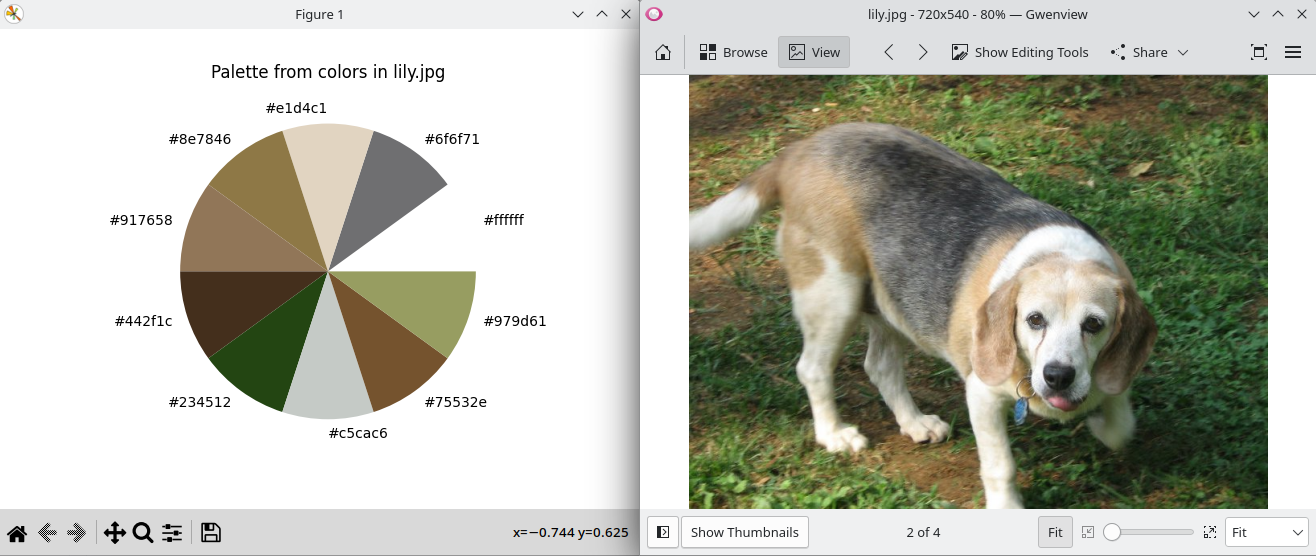
spalette is intended to be as simple as possible. The only requirement from the user is a filepath. In a terminal or CLI, type 'spalette path/to/imagefile.jpg'. A color palette will be generated, and ten hex color codes will be returned in the terminal. For a visual representation of the palette in addition, pass flag '-cw' before or after the filepath like so: 'spalette -cw path/to/imagefile.jpg'. A new window will open with the ten palette colors plotted onto a color wheel, courtesy of matplotlib.
Requirements/Installation:
spalette is available for pip installation via PyPI. If installed via pip: 'pip install spalette' the requirements will be installed for you.
This program utilizes pandas for data manipulation, opencv to read image data, and matplotlib to generate a visual output. These need to be installed for the program to work.
These libraries can be installed by running the following commands:
-
pip3 install pandas
-
pip3 install opencv-python
-
pip3 install matplotlib
These requirements are also listed in requirements.txt, which is prepared should you want to run this program in a virtual environment.
Primary Features:
Reading Image Color Data
- Reads RGB values from digital image files into an array (ndarray).
Cleaning and Manipulating Image Color Data
- The read image file is quantized to simplify the color data available while maintaining accuracy to the colors present in the image. The program creates a pandas dataframe of this data by extracting it from an ndarray and putting it into R, G, and B columns. Each row of this dataframe contains one pixel's color values. This dataframe is then converted to hexadecimal. The hexadecimal is added as an additional column, preserving the R G B values, and creating a master dataframe of all useful color data pixel by pixel.
Sorting Image Data by Occurence
- This dataframe is then sorted into a pandas series, with the values that occur more often than others at the top and the values that occur least often at the bottom. This sort is then broken up into 10 equally sized sections for sampling. From these sections, the most often occuring color in each is selected and included in the palette.
Visualizing the Occurence of Certain Colors
- These ten colors are always output to the terminal for you to use as you see fit. They may also be visualized as a color wheel (matplotlib pie chart with each color being given equal space) if so desired by passing the -cw flagat runtime.
Release history Release notifications | RSS feed

Download files
Download the file for your platform. If you're not sure which to choose, learn more about installing packages.
Source Distribution
Built Distribution
Filter files by name, interpreter, ABI, and platform.
If you're not sure about the file name format, learn more about wheel file names.
Copy a direct link to the current filters
File details
Details for the file spalette-0.1.tar.gz.
File metadata
- Download URL: spalette-0.1.tar.gz
- Upload date:
- Size: 5.1 kB
- Tags: Source
- Uploaded using Trusted Publishing? No
- Uploaded via: twine/4.0.2 CPython/3.11.2
File hashes
| Algorithm | Hash digest | |
|---|---|---|
| SHA256 |
8e87425fe74675c7d484f0f3573514cf2c7f3db5a77b170c45182eaf9e6061aa
|
|
| MD5 |
bb18266c16dd1f9c89e757d7dd100481
|
|
| BLAKE2b-256 |
5a927939daaeb722a9ac564e48b15bf72500f08bc87a8858c11ae49e2350357d
|
File details
Details for the file spalette-0.1-py3-none-any.whl.
File metadata
- Download URL: spalette-0.1-py3-none-any.whl
- Upload date:
- Size: 6.1 kB
- Tags: Python 3
- Uploaded using Trusted Publishing? No
- Uploaded via: twine/4.0.2 CPython/3.11.2
File hashes
| Algorithm | Hash digest | |
|---|---|---|
| SHA256 |
b3329a780815ae33af0dd5824d48d2d1f69a6186789d75c1911e7ca6b3582457
|
|
| MD5 |
a0bce838f2e75855eecae5e7c8c9484b
|
|
| BLAKE2b-256 |
713f4475ed19b80f0abc006ef2d1c825473e49d2f0b13b4a5c0cd5f2572d92bf
|






