
SpanMarker for Named Entity Recognition

🤗 Models | 🛠️ Getting Started In Google Colab | 📄 Documentation | 📊 Thesis
SpanMarker is a framework for training powerful Named Entity Recognition models using familiar encoders such as BERT, RoBERTa and ELECTRA. Built on top of the familiar 🤗 Transformers library, SpanMarker inherits a wide range of powerful functionalities, such as easily loading and saving models, hyperparameter optimization, automatic logging in various tools, checkpointing, callbacks, mixed precision training, 8-bit inference, and more.
Based on the PL-Marker paper, SpanMarker breaks the mold through its accessibility and ease of use. Crucially, SpanMarker works out of the box with many common encoders such as bert-base-cased, roberta-large and bert-base-multilingual-cased, and automatically works with datasets using the IOB, IOB2, BIOES, BILOU or no label annotation scheme.
Additionally, the SpanMarker library has been integrated with the Hugging Face Hub and the Hugging Face Inference API. See the SpanMarker documentation on Hugging Face or see all SpanMarker models on the Hugging Face Hub. Through the Inference API integration, users can test any SpanMarker model on the Hugging Face Hub for free using a widget on the model page. Furthermore, each public SpanMarker model offers a free API for fast prototyping and can be deployed to production using Hugging Face Inference Endpoints.
| Inference API Widget (on a model page) | Free Inference API (Deploy > Inference API on a model page) |
|---|---|
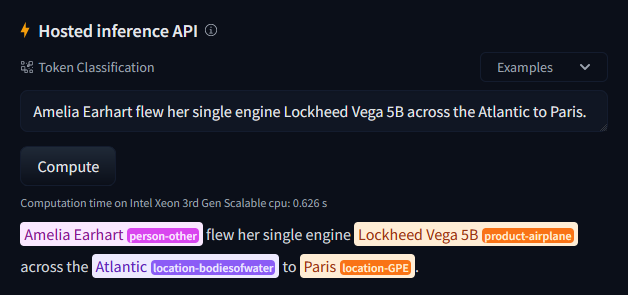 |
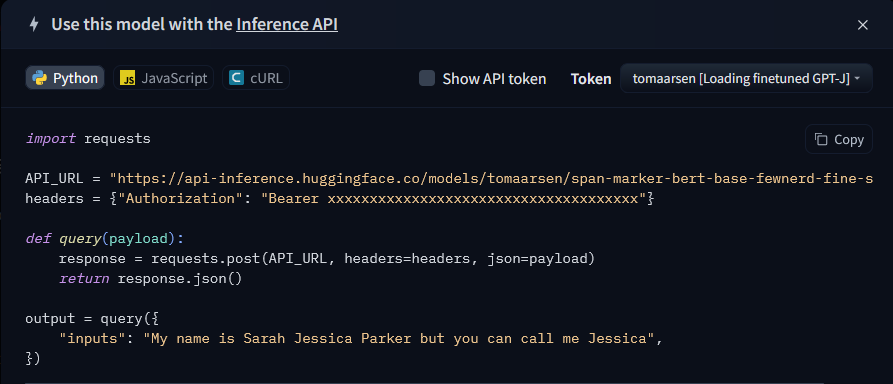 |
Documentation
Feel free to have a look at the documentation.
Installation
You may install the span_marker Python module via pip like so:
pip install span_marker
Quick Start
Training
Please have a look at our Getting Started notebook for details on how SpanMarker is commonly used. It explains the following snippet in more detail. Alternatively, have a look at the training scripts that have been successfully used in the past.
| Colab | Kaggle | Gradient | Studio Lab |
|---|---|---|---|
 |
 |
 |
 |
from pathlib import Path
from datasets import load_dataset
from transformers import TrainingArguments
from span_marker import SpanMarkerModel, Trainer, SpanMarkerModelCardData


def main() -> None:
    # Load the dataset, ensure "tokens" and "ner_tags" columns, and get a list of labels
    dataset_id = "DFKI-SLT/few-nerd"
    dataset_name = "FewNERD"
    dataset = load_dataset(dataset_id, "supervised")
    dataset = dataset.remove_columns("ner_tags")
    dataset = dataset.rename_column("fine_ner_tags", "ner_tags")
    labels = dataset["train"].features["ner_tags"].feature.names
    # ['O', 'art-broadcastprogram', 'art-film', 'art-music', 'art-other', ...

    # Initialize a SpanMarker model using a pretrained BERT-style encoder
    encoder_id = "bert-base-cased"
    model_id = f"tomaarsen/span-marker-{encoder_id}-fewnerd-fine-super"
    model = SpanMarkerModel.from_pretrained(
        encoder_id,
        labels=labels,
        # SpanMarker hyperparameters:
        model_max_length=256,
        marker_max_length=128,
        entity_max_length=8,
        # Model card arguments
        model_card_data=SpanMarkerModelCardData(
            model_id=model_id,
            encoder_id=encoder_id,
            dataset_name=dataset_name,
            dataset_id=dataset_id,
            license="cc-by-sa-4.0",
            language="en",
        ),
    )

    # Prepare the 🤗 transformers training arguments
    output_dir = Path("models") / model_id
    args = TrainingArguments(
        output_dir=output_dir,
        # Training Hyperparameters:
        learning_rate=5e-5,
        per_device_train_batch_size=32,
        per_device_eval_batch_size=32,
        num_train_epochs=3,
        weight_decay=0.01,
        warmup_ratio=0.1,
        bf16=True,  # Replace `bf16` with `fp16` if your hardware can't use bf16.
        # Other Training parameters
        logging_first_step=True,
        logging_steps=50,
        eval_strategy="steps",  # Or `evaluation_strategy` if your `transformers<4.54.1`
        save_strategy="steps",
        eval_steps=3000,
        save_total_limit=2,
        dataloader_num_workers=2,
    )

    # Initialize the trainer using our model, training args & dataset, and train
    trainer = Trainer(
        model=model,
        args=args,
        train_dataset=dataset["train"],
        eval_dataset=dataset["validation"],
    )
    trainer.train()

    # Compute & save the metrics on the test set
    metrics = trainer.evaluate(dataset["test"], metric_key_prefix="test")
    trainer.save_metrics("test", metrics)

    # Save the final checkpoint
    trainer.save_model(output_dir / "checkpoint-final")

if __name__ == "__main__":
    main()
Inference
from span_marker import SpanMarkerModel

# Download from the 🤗 Hub
model = SpanMarkerModel.from_pretrained("tomaarsen/span-marker-bert-base-fewnerd-fine-super")
# Run inference
entities = model.predict("Amelia Earhart flew her single engine Lockheed Vega 5B across the Atlantic to Paris.")
[{'span': 'Amelia Earhart', 'label': 'person-other', 'score': 0.7659597396850586, 'char_start_index': 0, 'char_end_index': 14},
 {'span': 'Lockheed Vega 5B', 'label': 'product-airplane', 'score': 0.9725785851478577, 'char_start_index': 38, 'char_end_index': 54},
 {'span': 'Atlantic', 'label': 'location-bodiesofwater', 'score': 0.7587679028511047, 'char_start_index': 66, 'char_end_index': 74},
 {'span': 'Paris', 'label': 'location-GPE', 'score': 0.9892390966415405, 'char_start_index': 78, 'char_end_index': 83}]
Pretrained Models
All models in this list contain train.py files that show the training scripts used to generate them. Additionally, all training scripts used are stored in the training_scripts directory.
These trained models have Hosted Inference API widgets that you can use to experiment with the models on their Hugging Face model pages. Additionally, Hugging Face provides each model with a free API (Deploy > Inference API on the model page).
These models are further elaborated on in my thesis.
FewNERD
-
tomaarsen/span-marker-bert-base-fewnerd-fine-superis a model that I have trained in 2 hours on the finegrained, supervised Few-NERD dataset. It reached a 70.53 Test F1, competitive in the all-time Few-NERD leaderboard usingbert-base. My training script resembles the one that you can see above. -
tomaarsen/span-marker-roberta-large-fewnerd-fine-superwas trained in 6 hours on the finegrained, supervised Few-NERD dataset usingroberta-large. It reached a 71.03 Test F1, reaching a new state of the art in the all-time Few-NERD leaderboard. -
tomaarsen/span-marker-xlm-roberta-base-fewnerd-fine-superis a multilingual model that I have trained in 1.5 hours on the finegrained, supervised Few-NERD dataset. It reached a 68.6 Test F1 on English, and works well on other languages like Spanish, French, German, Russian, Dutch, Polish, Icelandic, Greek and many more.
OntoNotes v5.0
tomaarsen/span-marker-roberta-large-ontonotes5was trained in 3 hours on the OntoNotes v5.0 dataset, reaching a performance of 91.54 F1. For reference, the current strongest spaCy model (en_core_web_trf) reaches 89.8 F1. This SpanMarker model uses aroberta-largeencoder under the hood.
CoNLL03
tomaarsen/span-marker-xlm-roberta-large-conll03is a SpanMarker model usingxlm-roberta-largethat was trained in 45 minutes. It reaches a state of the art 93.1 F1 on CoNLL03 without using document-level context. For reference, the current strongest spaCy model (en_core_web_trf) reaches 91.6.tomaarsen/span-marker-xlm-roberta-large-conll03-doc-contextis another SpanMarker model using thexlm-roberta-largeencoder. It uses document-level context to reach a state of the art 94.4 F1. For the best performance, inference should be performed using document-level context (docs). This model was trained in 1 hour.
CoNLL++
tomaarsen/span-marker-xlm-roberta-large-conllpp-doc-contextwas trained in an hour using thexlm-roberta-largeencoder on the CoNLL++ dataset. Using document-level context, it reaches a very competitive 95.5 F1. For the best performance, inference should be performed using document-level context (docs).
MultiNERD
-
tomaarsen/span-marker-xlm-roberta-base-multinerdis a multilingual SpanMarker model using thexlm-roberta-largeencoder trained on the huge MultiNERD dataset. It reaches a 91.31 F1 on all 10 training languages and 94.55 F1 on English only. The model can predict between 15 classes. For best performance, separate punctuation from your words as described here. Note thattomaarsen/span-marker-mbert-base-multinerddoes not have this limitation and performs better. -
tomaarsen/span-marker-mbert-base-multinerdis the successor oftomaarsen/span-marker-xlm-roberta-base-multinerd. It's a multilingual SpanMarker model usingbert-base-multilingual-casedtrained on the MultiNERD dataset. It reaches a state-of-the-art 92.48 F1 on all 10 training languages and 95.18 F1 on English only. This model generalizes well to languages using the Latin and Cyrillic script.
Using pretrained SpanMarker models with spaCy
All SpanMarker models on the Hugging Face Hub can also be easily used in spaCy. It's as simple as including 1 line to add the span_marker pipeline. See the Documentation or API Reference for more information.
import spacy

# Load the spaCy model with the span_marker pipeline component
nlp = spacy.load("en_core_web_sm", exclude=["ner"])
nlp.add_pipe("span_marker", config={"model": "tomaarsen/span-marker-roberta-large-ontonotes5"})

# Feed some text through the model to get a spacy Doc
text = """Cleopatra VII, also known as Cleopatra the Great, was the last active ruler of the \
Ptolemaic Kingdom of Egypt. She was born in 69 BCE and ruled Egypt from 51 BCE until her \
death in 30 BCE."""
doc = nlp(text)

# And look at the entities
print([(entity, entity.label_) for entity in doc.ents])
"""
[(Cleopatra VII, "PERSON"), (Cleopatra the Great, "PERSON"), (the Ptolemaic Kingdom of Egypt, "GPE"),
(69 BCE, "DATE"), (Egypt, "GPE"), (51 BCE, "DATE"), (30 BCE, "DATE")]
"""

Context

I have developed this library as a part of my thesis work at Argilla. Feel free to read my finished thesis here in this repository!
Changelog
See CHANGELOG.md for news on all SpanMarker versions.
License
See LICENSE for the current license.
1 maintainer

Metadata
1 maintainer
Release files for span-marker 1.8.1
For a detailed explanation of source distributions (sdists) and built distributions (wheels), please see the package formats documentation.
Source distribution (sdist)
| File | Size | Uploaded | |
|---|---|---|---|
| span_marker-1.8.1.tar.gz | 57.6 kB | Details |
Built distribution (wheel)
| File | Interpreter | ABI | Platform | Reset |
|---|---|---|---|---|
| span_marker-1.8.1-py3-none-any.whl | Python 3 | none | any | Details |
Total release size: 108.8 kB
Release files / span_marker-1.8.1.tar.gz
| Download URL | span_marker-1.8.1.tar.gz |
|---|---|
| Size | 57.6 kB |
| Tags | Source |
|
SHA-256 checksum How to use checksums |
334308e6cb9dc79ddaffd508e59a171bc118371746487af80ee42f98a229e288
|
|
BLAKE2b-256 checksum How to use checksums |
d9f47869f91a5eb3ddeeeea8b2cc67041073453b0c1233b3ff76d3cf0d866dc0
|
| Upload date | |
|
Uploaded using Trusted Publishing? What is trusted publishing? |
No |
| Uploaded via |
twine/6.2.0 CPython/3.11.15
|
Release files / span_marker-1.8.1-py3-none-any.whl
| Download URL | span_marker-1.8.1-py3-none-any.whl |
|---|---|
| Size | 51.2 kB |
| Tags | Python 3 |
|
SHA-256 checksum How to use checksums |
68ec2f8fa3fa4afff9c0a6e7db5e619ed204d0107aede41d4e964cc6ed106927
|
|
BLAKE2b-256 checksum How to use checksums |
e3acbc5fd1a51a6910b0ad98d8e437a567b5d51611a17271b0c3a7e0bceeac62
|
| Upload date | |
|
Uploaded using Trusted Publishing? What is trusted publishing? |
No |
| Uploaded via |
twine/6.2.0 CPython/3.11.15
|














