
Multi-cloud infrastructure orchestrator — unified CLI, TUI, and GUI for AWS, GCP, Azure, DigitalOcean, Vultr, OCI, and Alibaba Cloud
Verified details
These details have been verified by PyPIProject links
GitHub Statistics
Maintainers

Project description
Spancloud














Multi-cloud infrastructure orchestrator — an all-seeing eye into your cloud resources.
Spancloud provides a unified interface to discover, inspect, and manage infrastructure across multiple cloud providers from a single CLI, TUI, or desktop GUI.
Supported Providers
| Provider | Status | Resource Types |
|---|---|---|
| AWS (Amazon Web Services) | Implemented | Compute (EC2), Storage (S3), Network (VPC/Subnet/SG), Database (RDS/Aurora), Serverless (Lambda), Load Balancers (ALB/NLB/CLB), Containers (EKS), DNS (Route53), IAM (Users/Roles/Policies) |
| GCP (Google Cloud Platform) | Implemented | Compute (GCE), Storage (GCS), Network (VPC/Subnet/Firewall), Database (Cloud SQL), Serverless (Cloud Functions/Cloud Run), Load Balancers, Containers (GKE), DNS (Cloud DNS) |
| Vultr | Implemented | Compute (Instances/Bare Metal), Storage (Block/Object), Network (VPC/Firewall), Database (Managed), Containers (VKE), Load Balancers, DNS |
| Digital Ocean | Implemented | Compute (Droplets), Storage (Volumes/Spaces), Network (VPC/Firewall), Database (Managed), Containers (DOKS), Load Balancers, DNS |
| Azure (Microsoft Azure) | Implemented | Compute (VMs), Storage (Blob), Network (VNet/NSG/Public IP), Database (Azure SQL/Cosmos DB), Serverless (App Service/Functions), Containers (AKS), Load Balancers, DNS |
| Oracle Cloud (OCI) | Implemented | Compute (Instances), Storage (Object Storage + Block Volumes), Network (VCN/Subnet/Security List/NSG), Database (Autonomous DB + DB Systems), Containers (OKE), Load Balancers (LB + NLB), DNS Zones |
| Alibaba Cloud | Coming Soon | — |
Installation
Requires Python 3.12+.
pip install spancloud
After install, two entry points are available:
spancloud          # Launch desktop GUI (default; requires PySide6)
sc                 # Short alias — identical to spancloud
spancloud --tui    # Launch TUI instead
spancloud --help   # Show all CLI commands
Shell completion (bash, zsh, fish) — run once after install, then restart your shell:
spancloud --install-completion
Quick Start
Desktop GUI
pip install spancloud
spancloud               # Default — launches GUI
sc                      # Short alias, also launches GUI
spancloud gui           # Explicit GUI launch
spancloud --tui         # Launch TUI instead
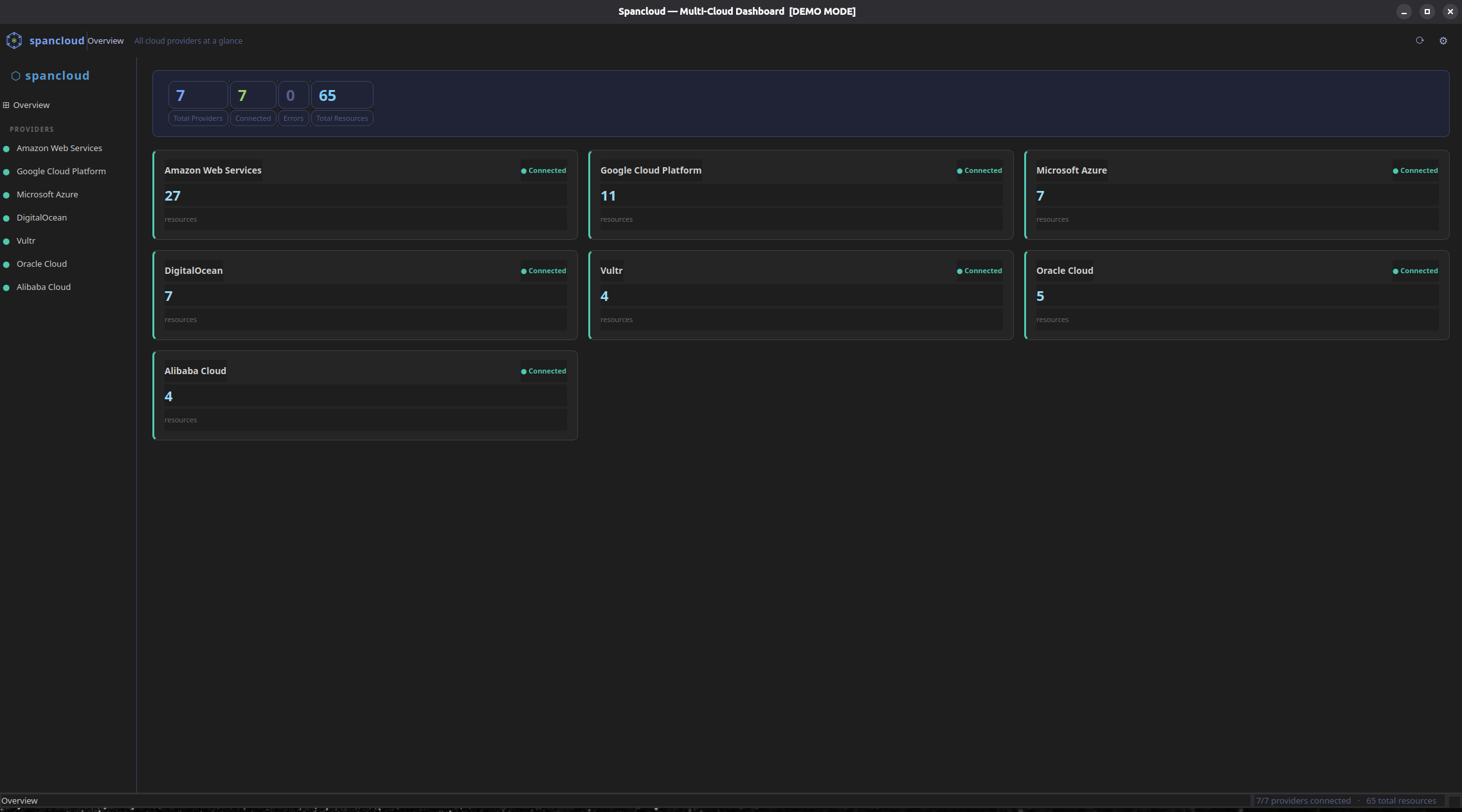
The desktop GUI provides a native Qt6 window with:
- Full-width toolbar — icon, app name, current context breadcrumb, refresh and settings buttons
- Resizable sidebar — provider list with colour-coded connection status dots; drag the splitter handle to adjust width
- Overview dashboard — provider cards in a 3-column grid showing live resource count, connection state, and a colour-coded breakdown bar by resource type
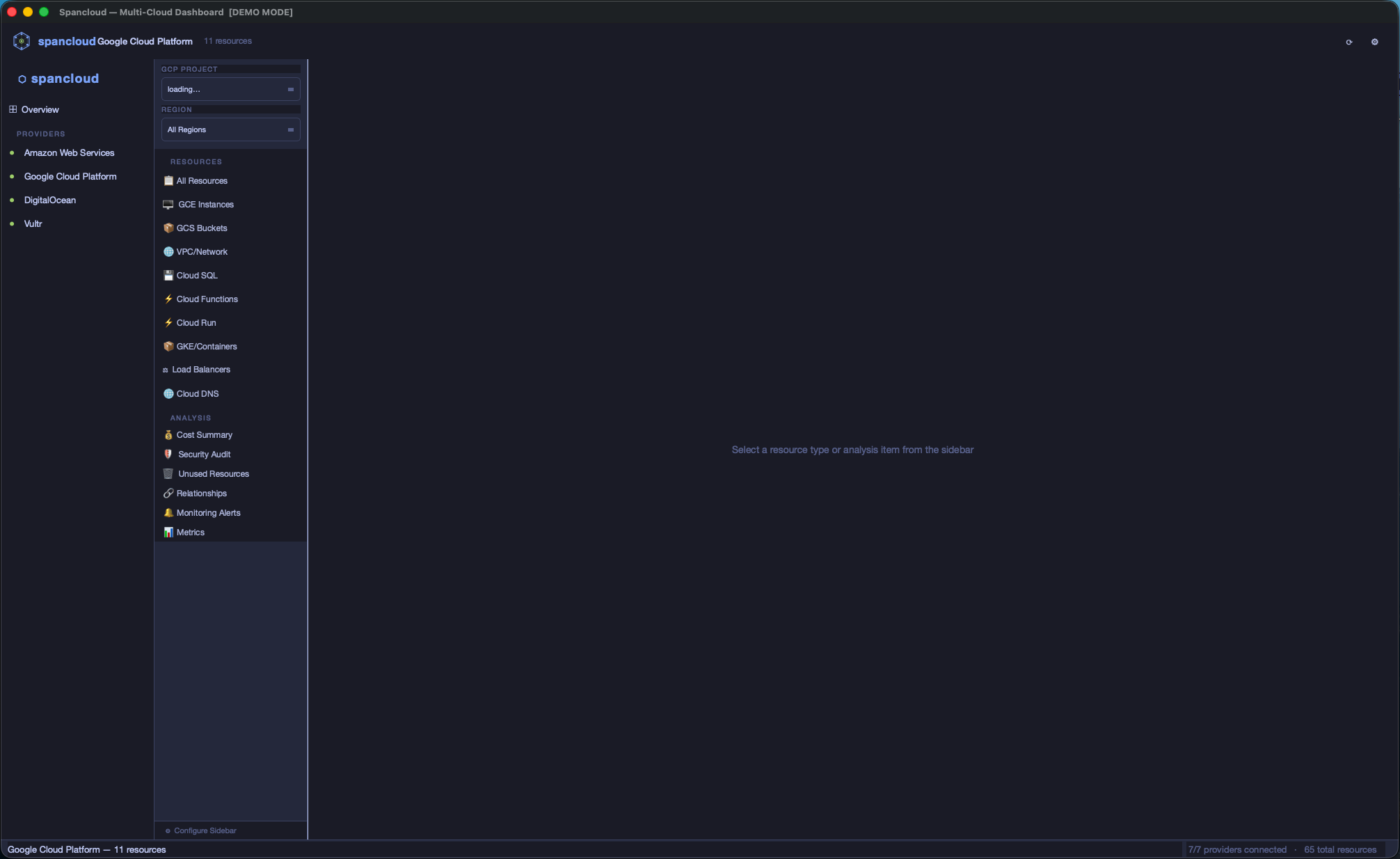
- Per-provider view — inner nav sidebar with RESOURCES (Compute, Storage, …) and ANALYSIS (Cost Summary, Security Audit, Unused Resources, Relationships, Monitoring Alerts) sections, each with resource count badges
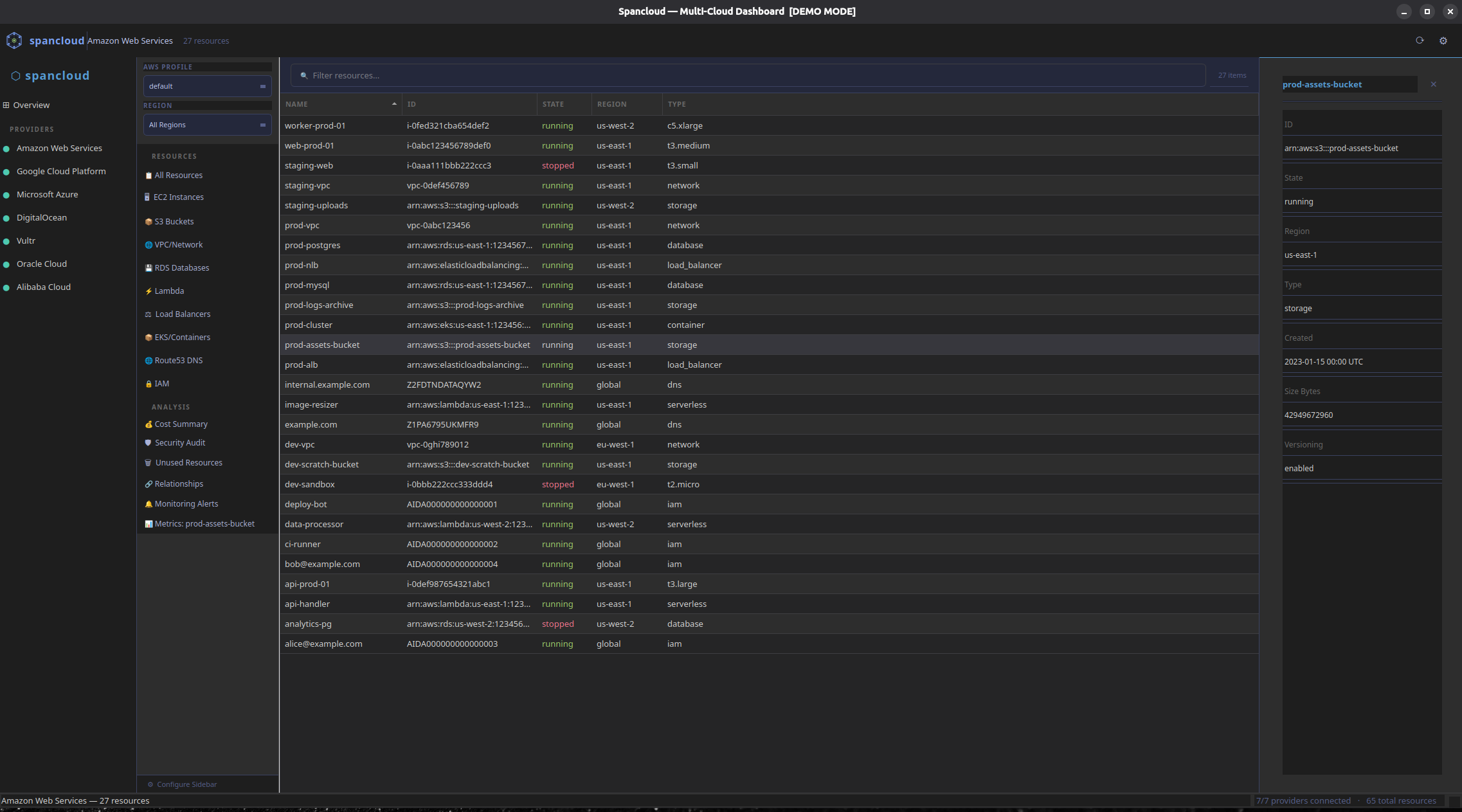
- Resource table — Name / ID / State / Region / Type columns; State column colour-coded (green=running, red=stopped, yellow=pending); click any column header to sort
- Right-side detail drawer — click any table row to open a scrollable key-value panel; close with ✕ or by clicking another resource type
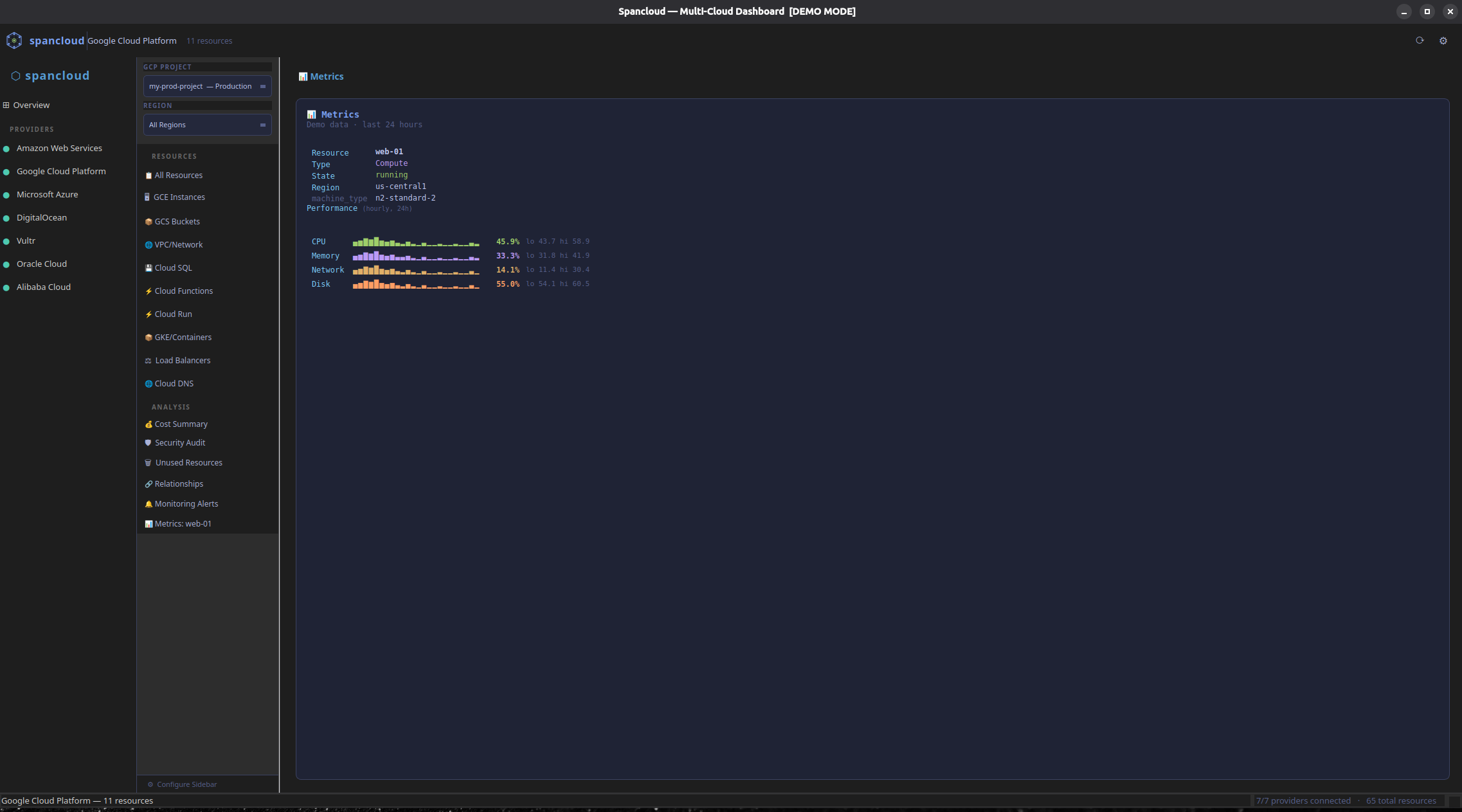
- Metrics panel — select a resource row then open the Metrics analysis to see live CloudWatch / provider time-series charts with sparklines
- Relationships panel — visualises resource dependency graphs (e.g. EC2 → VPC → Subnet → Security Group) as an inline tree
- Analysis panels — cost breakdown, security findings, unused resources, monitoring alerts, all fetched live from the provider API
- Settings dialog — toggle providers on/off; choose from 5 built-in themes (Tokyo Night, Dark, Dracula, Solarized Dark, Light)
- Status bar — active context on the left, total provider/resource count on the right
- Region / profile / project selectors — switch AWS region or profile, GCP project inline without relaunching
- Demo mode — run
spancloud --mockto explore with realistic sample data, no credentials needed; works in both GUI (spancloud gui --mock) and TUI (spancloud --tui --mock)
Screenshots
| Overview | Provider View |
|---|---|
 |
 |
| Resource Table + Detail Drawer | Metrics Panel |
|---|---|
 |
 |
TUI Dashboard
spancloud --tui         # Launch TUI (GUI is the default)
spancloud tui           # Also launches TUI explicitly
The TUI provides:
- Tabbed layout — Overview tab + one tab per enabled provider (AWS, GCP, Vultr, DigitalOcean, Azure, OCI)
- Region selector — every provider tab has a region dropdown in the sidebar
- AWS profile switcher — extra dropdown on the AWS tab for multi-account users
- GCP project switcher — extra dropdown on the GCP tab populated from Cloud Resource Manager; swap between every project the signed-in identity can see
- Resource type sidebar — emoji-labeled resource types + analysis tools, click or Enter to load
- Resource detail panel — click any row to see full metadata, tags, and state in a bottom panel
- State-colored rows — green=running, red=stopped, yellow=pending, dim=terminated
- Search/filter — press
/to search across name, type, region, metadata; filters live as you type - Export —
eon any loaded table writes JSON / CSV / YAML to disk - Analysis views — cost summary, security audit, unused resources, relationships, and monitoring alerts inline per provider
- Settings screen — click the Settings sidebar item to pick which resource types appear; matches
spancloud config sidebar - Provider enable/disable —
spancloud config providers(or the settings screen) hides tabs you don't use - Animated progress — slow analysis runs show a spinner + elapsed timer so you know Vultr / large Azure subs are still working
- Auth modals — click any unauthenticated provider tile on the Overview tab to log in; Vultr / DO save tokens to the OS keychain for the next session
- Keyboard navigation — Tab/Shift+Tab providers, Up/Down sidebar, Enter to load,
/search,eexport, Escape close,?help,qquit - Mouse support — click sidebar items, table rows, dropdowns, search input
Terminal Setup
For the best TUI experience, configure your terminal:
iTerm2 (macOS):
- Profiles > Terminal > Enable mouse reporting — must be checked for mouse/click support
- Profiles > General > Title — set to "Session Name" or include "Terminal Title" to see
Spancloud :: <provider>in the tab
Terminal.app (macOS):
- Profiles > Window > Title — check "Active process name"
CLI Usage
# Authenticate with a cloud provider (interactive)
spancloud auth login aws                         # SSO, access keys, or profile selection
spancloud auth login gcp                         # Application Default Credentials + project setup
spancloud auth login vultr                       # API key
spancloud auth login digitalocean                # Personal Access Token
spancloud auth login azure                       # Wraps 'az login' + subscription selection
spancloud auth login oci                         # Reads ~/.oci/config or shells to 'oci setup config'

# Check auth status for all providers at once
spancloud auth status

# List all registered providers
spancloud provider list

# Check detailed status for a single provider
spancloud provider status aws
spancloud provider status gcp

# List resources by type
spancloud resource list aws compute
spancloud resource list aws storage
spancloud resource list aws network              # VPCs, subnets, security groups
spancloud resource list aws database             # RDS instances + Aurora clusters
spancloud resource list aws serverless           # Lambda functions
spancloud resource list aws load_balancer        # ALB, NLB, Classic ELBs
spancloud resource list aws container            # EKS clusters, node groups, Fargate profiles

# Filter by region
spancloud resource list aws compute --region us-west-2
spancloud resource list gcp compute --region us-central1
spancloud resource list gcp network              # VPC networks, subnets, firewall rules
spancloud resource list gcp database             # Cloud SQL instances
spancloud resource list gcp serverless           # Cloud Functions + Cloud Run services
spancloud resource list gcp container            # GKE clusters + node pools
spancloud resource list gcp load_balancer        # Forwarding rules + backend services

# Scan ALL regions at once
spancloud resource list aws compute --all-regions

# Filter by tags
spancloud resource list aws compute --tag env=prod
spancloud resource list aws compute --tag env=prod --tag team=platform

# Combine filters
spancloud resource list aws compute --all-regions --tag env=prod

# Show details for a specific resource
spancloud resource show aws compute i-0abc123def --region us-east-1

# Export to JSON / CSV / YAML (to stdout or a file)
spancloud resource list aws compute --export json
spancloud resource list aws compute --export csv -o ec2.csv
spancloud resource list gcp compute --export yaml

# Show version
spancloud version

# Cost analysis (--profile for multi-account)
spancloud cost show aws                         # 30-day cost summary with daily trend
spancloud cost show aws --days 7                # Last 7 days
spancloud cost show aws --profile production    # Costs for a specific account
spancloud cost show gcp                         # GCP billing info + BigQuery export

# Security audit
spancloud audit run aws                         # Scan for misconfigurations
spancloud audit run aws --region us-west-2      # Region-specific scan
spancloud audit run gcp                         # GCP firewall, GCS, Cloud SQL checks

# Unused resource detection
spancloud unused scan aws                       # Find idle/orphaned resources
spancloud unused scan gcp --stopped-days 14     # Custom threshold for stopped VMs
spancloud unused scan aws --snapshot-days 60    # Snapshots older than 60 days

# Resource relationship mapping
spancloud map show aws                          # Table of all relationships
spancloud map show aws --tree                   # Tree view
spancloud map show aws --resource i-0abc123def  # Relationships for one resource
spancloud map show gcp --region us-central1     # GCP relationships

# --- Resource actions (start / stop / reboot / terminate) ---
# All seven providers support start/stop/reboot. Only AWS supports terminate.
spancloud action start i-0abc123 --region us-east-1
spancloud action start my-vm -p gcp --region us-central1-a
spancloud action stop <droplet-id> -p digitalocean
spancloud action reboot web-1 -p azure --region eastus
spancloud action start <ocid> -p oci --region us-ashburn-1
spancloud action stop <id> -p vultr
spancloud action terminate i-0abc123            # AWS only — requires confirmation
spancloud action start i-0abc123 --yes          # -y skips the confirmation prompt

# --- Provider-specific detail viewers ---

# S3 / GCS / Vultr Block + Object Storage detail pages
spancloud s3 info my-bucket                     # Policy, lifecycle, size, encryption
spancloud gcs info my-bucket                    # IAM, lifecycle, size, encryption
spancloud vultr block-info <block-id>           # Vultr block storage detail
spancloud vultr object-info <subscription-id>   # Vultr Object Storage detail

# --- Monitoring ---
# alerts works on AWS (CloudWatch alarms), GCP / DO / Azure / OCI (alert policies).
# metrics works on AWS, GCP, DigitalOcean, Azure, and OCI.
spancloud monitor alerts aws                    # All CloudWatch alarms
spancloud monitor alerts aws --state ALARM      # Only firing alarms
spancloud monitor alerts gcp                    # GCP alert policies
spancloud monitor alerts digitalocean           # DO droplet alert policies
spancloud monitor alerts azure                  # Azure metric alerts
spancloud monitor alerts oci                    # OCI monitoring alarms

spancloud monitor metrics i-0abc123 --hours 3                 # AWS EC2 metrics (sparklines)
spancloud monitor metrics 12345 -p gcp --region us-central1-a # GCE metrics
All cost show, audit run, unused scan, map show, and resource list
commands accept any of the seven provider names, so the examples above with
aws swap in gcp / vultr / digitalocean / azure / oci
with identical flags.
# --- Configuration (CLI-side twin of the TUI Settings screen) ---

# Customize which resource types show up in the TUI sidebar for a provider
spancloud config sidebar aws --available              # List every available service
spancloud config sidebar aws --add ebs_volumes        # Add an extended service
spancloud config sidebar aws --remove lambda          # Remove one
spancloud config sidebar aws --reset                  # Back to defaults

# Enable/disable which providers show as TUI tabs
spancloud config providers                            # Current state

# --- Credential store management ---

spancloud auth store-info                             # macOS Keychain / Secret Service / file fallback
spancloud auth logout vultr                           # Forget stored Vultr key
spancloud auth logout digitalocean
Run as a Python module
python -m spancloud --help
Authentication
The easiest way to set up credentials is the interactive login:
spancloud auth login aws           # SSO (multi-account discovery), access keys, or profile selection
spancloud auth login gcp           # Sets up Application Default Credentials + project
spancloud auth login vultr         # API key setup and validation
spancloud auth login digitalocean  # Personal Access Token (saved to OS keychain)
spancloud auth login azure         # Wraps 'az login' + subscription picker
spancloud auth login oci           # Loads ~/.oci/config or runs 'oci setup config'
spancloud auth status              # Check all providers at a glance

# AWS multi-account profile management
spancloud profile list                          # List all configured AWS profiles
spancloud profile list --verify                 # Validate each via STS (shows account IDs)
spancloud profile show                          # Show current active profile identity
spancloud profile show production               # Inspect a specific profile

# --profile works on any command for multi-account access
spancloud resource list aws compute --profile production
spancloud cost show aws --profile staging
spancloud audit run aws --profile dev-account

# --gcp-project / -G switches the active GCP project for the run
# (overrides SPANCLOUD_GCP_PROJECT_ID and the ADC default)
spancloud --gcp-project my-other-proj cost show gcp
spancloud -G prod-analytics resource list gcp compute
Under the hood, Spancloud uses each provider's native credential chain:
AWS
Uses the standard boto3 credential chain with a smart fallback:
- Environment variables (
AWS_ACCESS_KEY_ID,AWS_SECRET_ACCESS_KEY) - Shared credentials file (
~/.aws/credentials) — access-key profiles - AWS Config file (
~/.aws/config) — SSO profiles, assume-role profiles - IAM roles (EC2 instance metadata, ECS task roles)
When the default chain doesn't produce working credentials and no
explicit profile was requested, Spancloud walks every configured
profile — SSO first, then access-keys, then assume-role — looking for
one that returns a valid STS response. This means a plain
~/.aws/credentials entry works out of the box; you don't need SSO
configured to use the TUI.
The CLI spancloud auth login aws flow detects your situation and
offers all four options: SSO login, SSO multi-account setup, access
keys, or switch to an existing profile.
GCP
Uses Application Default Credentials:
gcloud auth application-default login- Service account key (
GOOGLE_APPLICATION_CREDENTIALS) - Workload Identity (GKE)
- Compute Engine metadata
Vultr
Uses API key authentication:
- Environment variable (
SPANCLOUD_VULTR_API_KEY) - Interactive setup via
spancloud auth login vultr— verified keys are saved to the OS keychain (macOS Keychain, Linux Secret Service, Windows Credential Locker) and reused on the next run - Generate keys at: https://my.vultr.com/settings/#settingsapi
DigitalOcean
Uses Personal Access Token authentication:
- Environment variable (
SPANCLOUD_DIGITALOCEAN_TOKEN) - Interactive setup via
spancloud auth login digitalocean— tokens are saved to the OS keychain and reused on the next run - Generate tokens at: https://cloud.digitalocean.com/account/api/tokens
Azure
Uses the standard DefaultAzureCredential chain:
- Service-principal env vars (
AZURE_CLIENT_ID,AZURE_CLIENT_SECRET,AZURE_TENANT_ID) - Azure CLI (
az login) —spancloud auth login azurewraps this plus subscription selection - Managed Identity (when running in Azure)
- Subscription ID persisted to
~/.config/spancloud/azure.env
Oracle Cloud (OCI)
Uses the native OCI SDK config file:
~/.oci/configwith a selectable profile (defaults toDEFAULT)spancloud auth login ocilists existing profiles or shells out tooci setup configwhen none exists- Chosen profile is persisted to
~/.config/spancloud/oci.envfor future runs - Optional
SPANCLOUD_OCI_COMPARTMENT_IDoverrides the tenancy-root compartment
Credential store
Vultr and DigitalOcean API keys are saved via the keyring
library, which writes to the OS-native secret store (macOS Keychain,
Linux Secret Service, Windows Credential Locker). On headless Linux or
in containers where no keyring backend is available, Spancloud falls
back to a Fernet-encrypted file at ~/.config/spancloud/credentials.enc
with a mode-0600 key file alongside it.
AWS / GCP / Azure / OCI use their own native credential files
(~/.aws, ADC JSON, az CLI cache, ~/.oci/config) and are not
touched by this store.
# Check which backend is in use
spancloud auth store-info

# Remove stored credentials for a provider
spancloud auth logout vultr
spancloud auth logout digitalocean
Required Permissions
Spancloud is read-only — it never creates, modifies, or deletes resources (lifecycle actions like start/stop are explicit opt-in CLI commands). The minimum permissions needed are read access to the services you want to browse.
Run spancloud permissions [provider] to print this reference in the terminal.
AWS
Attach the AWS-managed ReadOnlyAccess policy to your IAM user/role for full coverage, or use these scoped policies:
| Policy | Covers |
|---|---|
AmazonEC2ReadOnlyAccess |
Compute (EC2), VPC, security groups, load balancers |
AmazonS3ReadOnlyAccess |
Storage (S3) |
AmazonRDSReadOnlyAccess |
Databases (RDS/Aurora) |
AWSLambdaReadOnlyAccess |
Serverless (Lambda) |
AmazonEKSReadPolicy |
Containers (EKS) |
CloudWatchReadOnlyAccess |
Metrics and CloudWatch alarms |
AmazonRoute53ReadOnlyAccess |
DNS (Route 53) |
IAMReadOnlyAccess |
IAM users, roles, policies |
AWSBillingReadOnlyAccess |
Cost data (Cost Explorer) |
GCP
The simplest option is roles/viewer at the project level. For least-privilege, grant these individually via GCP Console → IAM & Admin:
| Role | Service |
|---|---|
roles/compute.viewer |
Compute Engine (VMs) |
roles/storage.objectViewer |
Cloud Storage |
roles/cloudsql.viewer |
Cloud SQL |
roles/container.viewer |
Google Kubernetes Engine |
roles/run.viewer |
Cloud Run |
roles/cloudfunctions.viewer |
Cloud Functions |
roles/dns.reader |
Cloud DNS |
roles/monitoring.viewer |
Cloud Monitoring |
roles/resourcemanager.projectViewer |
Project / org listing |
roles/billing.viewer |
Cloud Billing |
roles/bigquery.dataViewer + roles/bigquery.jobUser |
Cost data (BigQuery billing export) |
Note: Cost data requires BigQuery billing export to be enabled (GCP Console → Billing → Billing export → BigQuery export). The BigQuery roles above are needed to query the exported data.
Azure
Assign the Reader role at the subscription scope — this covers all resource discovery.
For cost data, also assign Cost Management Reader at the subscription scope.
Both can be set in Azure Portal → Subscriptions → [your subscription] → Access control (IAM) → Add role assignment.
DigitalOcean
Generate a Personal Access Token at https://cloud.digitalocean.com/account/api/tokens with read scope.
Note: Cost and billing data requires the token owner to have the Billing team role in the DigitalOcean organisation. Tokens belonging to Member accounts return 403 on billing endpoints.
Vultr
Generate an API key at https://my.vultr.com/settings/#settingsapi. The key needs at minimum:
- Read access on Servers, Bare Metal, Block Storage, Object Storage
- Read access on Billing (for cost data)
Oracle Cloud (OCI)
The simplest policy (applied in OCI Console → Identity → Policies):
Allow group SpancloudUsers to read all-resources in tenancy
Or scope it per service:
Allow group SpancloudUsers to read instances in tenancy
Allow group SpancloudUsers to read buckets in tenancy
Allow group SpancloudUsers to read volumes in tenancy
Allow group SpancloudUsers to read autonomous-databases in tenancy
Allow group SpancloudUsers to read clusters in tenancy
Allow group SpancloudUsers to read load-balancers in tenancy
Allow group SpancloudUsers to read dns in tenancy
Allow group SpancloudUsers to read usage-reports in tenancy
Configuration
Spancloud reads configuration from environment variables prefixed with SPANCLOUD_:
| Variable | Default | Description |
|---|---|---|
SPANCLOUD_LOG_LEVEL |
INFO |
Logging level |
SPANCLOUD_AWS_DEFAULT_REGION |
us-east-1 |
Default AWS region |
SPANCLOUD_AWS_PROFILE |
— | AWS CLI profile name |
SPANCLOUD_GCP_DEFAULT_REGION |
us-central1 |
Default GCP region |
SPANCLOUD_GCP_PROJECT_ID |
— | GCP project ID |
SPANCLOUD_VULTR_API_KEY |
— | Vultr API key (falls back to OS keychain) |
SPANCLOUD_DIGITALOCEAN_TOKEN |
— | DigitalOcean PAT (falls back to OS keychain) |
SPANCLOUD_AZURE_SUBSCRIPTION_ID |
— | Azure subscription ID |
SPANCLOUD_AZURE_TENANT_ID |
— | Azure tenant ID (optional) |
SPANCLOUD_OCI_CONFIG_FILE |
~/.oci/config |
Path to OCI SDK config file |
SPANCLOUD_OCI_PROFILE |
DEFAULT |
OCI config profile name |
SPANCLOUD_OCI_COMPARTMENT_ID |
— | Compartment OCID (defaults to tenancy root) |
SPANCLOUD_OCI_DEFAULT_REGION |
us-ashburn-1 |
Default OCI region |
Project Structure
src/spancloud/
├── cli/                    # Typer-based CLI commands
│   ├── main.py             # Entry point and top-level commands
│   └── commands/           # Subcommand groups
│       ├── provider.py     # Provider management commands
│       ├── resource.py     # Resource discovery commands
│       ├── cost.py         # Cost analysis commands
│       ├── audit.py        # Security audit commands
│       ├── unused.py       # Unused resource detection
│       ├── map.py          # Resource relationship mapping
│       ├── monitor.py      # Monitoring alerts + metrics (AWS + GCP)
│       ├── s3.py           # S3 bucket detail viewer
│       ├── gcs.py          # GCS bucket detail viewer
│       ├── action.py       # Resource actions (AWS + GCP)
│       └── tui.py          # TUI launcher
├── tui/                    # Textual-based TUI
│   ├── app.py              # Main Textual application
│   ├── screens/
│   │   └── dashboard.py    # Tabbed dashboard (Overview + per-provider)
│   ├── widgets/
│   │   ├── overview_tab.py # Overview: all providers at a glance
│   │   ├── provider_tab.py # Per-provider: sidebar + resource table
│   │   ├── provider_panel.py # Legacy provider status card
│   │   └── resource_table.py # Legacy resource table
│   └── styles/
│       └── app.tcss        # Tabbed layout styles
├── analysis/               # Analysis features
│   └── models.py           # CostSummary, SecurityFinding, UnusedResource, etc.
├── core/                   # Core abstractions
│   ├── provider.py         # BaseProvider ABC
│   ├── resource.py         # Resource/ResourceType models
│   ├── registry.py         # Provider registry
│   └── exceptions.py       # Custom exceptions
├── providers/              # Cloud provider implementations
│   ├── aws/                # Amazon Web Services
│   │   ├── provider.py     # Main AWS provider
│   │   ├── auth.py         # Credential chain
│   │   ├── regions.py      # Multi-region discovery + parallel scanning
│   │   ├── resources.py    # EC2 instances, S3 buckets
│   │   ├── vpc.py          # VPCs, subnets, security groups
│   │   ├── rds.py          # RDS instances, Aurora clusters
│   │   ├── lambda_.py      # Lambda functions
│   │   ├── elb.py          # ALB, NLB, Classic load balancers
│   │   ├── eks.py          # EKS clusters, node groups, Fargate
│   │   ├── cost.py         # Cost Explorer analysis
│   │   ├── security.py     # Security audit checks
│   │   ├── unused.py       # Unused resource detection
│   │   ├── relationships.py # Resource relationship mapping
│   │   ├── cloudwatch.py   # CloudWatch alarms + metrics
│   │   ├── route53.py      # Route53 hosted zones + records
│   │   ├── s3_details.py   # Bucket policies, lifecycle, size
│   │   ├── iam.py          # Users, roles, policies
│   │   └── actions.py      # Start/stop/reboot/terminate EC2
│   ├── gcp/                # Google Cloud Platform
│   │   ├── provider.py     # Main GCP provider
│   │   ├── auth.py         # Application Default Credentials
│   │   ├── resources.py    # GCE instances, GCS buckets
│   │   ├── vpc.py          # VPC networks, subnets, firewall rules
│   │   ├── cloudsql.py     # Cloud SQL instances
│   │   ├── gke.py          # GKE clusters, node pools
│   │   ├── functions.py    # Cloud Functions (2nd gen)
│   │   ├── cloudrun.py     # Cloud Run services
│   │   ├── loadbalancer.py # Forwarding rules, backend services
│   │   ├── cost.py         # Cloud Billing + BigQuery cost analysis
│   │   ├── security.py     # Security audit checks
│   │   ├── unused.py       # Unused resource detection
│   │   ├── relationships.py # Resource relationship mapping
│   │   ├── monitoring.py   # Cloud Monitoring alerts + metrics
│   │   ├── dns.py          # Cloud DNS managed zones + records
│   │   ├── gcs_details.py  # Bucket IAM, lifecycle, size
│   │   └── actions.py      # Start/stop/reset GCE instances
│   ├── vultr/              # Vultr
│   │   ├── provider.py     # Main Vultr provider
│   │   ├── auth.py         # API key auth + REST client
│   │   ├── login.py        # Interactive API key login
│   │   ├── instances.py    # Cloud instances + bare metal
│   │   ├── storage.py      # Block + object storage
│   │   ├── vpc.py          # VPCs, firewall groups
│   │   ├── database.py     # Managed databases
│   │   ├── kubernetes.py   # VKE clusters + node pools
│   │   ├── loadbalancer.py # Load balancers
│   │   ├── dns.py          # DNS domains + records
│   │   ├── cost.py         # Billing API cost analysis
│   │   ├── security.py     # Security audit checks
│   │   ├── unused.py       # Unused resource detection
│   │   ├── relationships.py # Resource relationship mapping
│   │   └── actions.py      # Start/stop/reboot instances
│   ├── digitalocean/       # Droplets, Volumes, VPC, DOKS, DBs, LBs, DNS
│   ├── azure/              # VMs, Blob Storage, VNet/NSG, AKS, SQL/Cosmos, App Service, LBs, DNS
│   ├── oci/                # Instances, Object Storage, VCN, ADB, OKE, LBs, DNS
│   └── alibaba/            # TODO: coming in a future release
├── config/                 # Configuration management
│   └── settings.py
└── utils/                  # Shared utilities
    ├── logging.py          # Rich-powered logging
    ├── retry.py            # Exponential backoff retry
    └── throttle.py         # Rate limiter for API calls
Roadmap
All seven providers now have full feature parity across resource discovery, cost, audit, unused detection, relationships, monitoring alerts, and lifecycle actions. The matrix below captures the current state:
| resources | cost | audit | unused | relationships | alerts | actions | serverless | metrics | |
|---|---|---|---|---|---|---|---|---|---|
| AWS | ✓ | ✓ | ✓ | ✓ | ✓ | ✓ | ✓ | ✓ | ✓ |
| GCP | ✓ | ✓ | ✓ | ✓ | ✓ | ✓ | ✓ | ✓ | ✓ |
| Azure | ✓ | ✓ | ✓ | ✓ | ✓ | ✓ | ✓ | ✓ | ✓ |
| DigitalOcean | ✓ | ✓* | ✓ | ✓ | ✓ | ✓ | ✓ | ✓ | ✓ |
| Vultr | ✓ | ✓ | ✓ | ✓ | ✓ | —** | ✓ | — | — |
| OCI | ✓ | ✓ | ✓ | ✓ | ✓ | ✓ | ✓ | ✓ | ✓ |
| Alibaba | TODO |
* DO cost requires an account with the Billing team role — full-access PATs on a Member account return 403. ** Vultr has no public alerts API; monitoring is dashboard-only.
Per-provider resource coverage highlights:
- AWS: EC2, EBS, S3, VPC/Subnet/SG, RDS/Aurora, Lambda, ALB/NLB/CLB, EKS, Route53, IAM, CloudWatch, Cost Explorer
- GCP: GCE, GCS, VPC/Subnet/Firewall, Cloud SQL, Cloud Functions, Cloud Run, GKE, Load Balancers, Cloud DNS, Cloud Monitoring, Billing API
- Azure: VMs, Blob Storage, VNet/Subnet/NSG/Public IP, Azure SQL + Cosmos DB, App Service + Functions, AKS, Load Balancers, DNS, Azure Monitor, Cost Management
- DigitalOcean: Droplets, Volumes, Spaces CDN, VPCs, Firewalls, Managed DBs, DOKS, Load Balancers, DNS, App Platform (serverless apps), Functions, Monitoring Alerts, Balance / Billing History
- Vultr: Instances + Bare Metal, Block + Object Storage, VPCs, Firewalls, Managed DBs, VKE, Load Balancers, DNS, Billing History
- OCI: Compute Instances, Object Storage + Block Volumes, VCN/Subnet/Security List/NSG, Autonomous DB + DB Systems, OKE, Oracle Functions, LB + NLB, DNS Zones, Monitoring Alarms, Usage API
- Alibaba Cloud: Coming in a future release
Next up
- IAM for GCP — Service accounts, custom roles, workload identity pools
- IAM for Azure — RBAC role assignments, managed identities, app registrations
- Resource diffing — Snapshot + compare "what changed since" per provider
- Tag compliance — Find resources missing required tags
- Cross-provider search — Query
"prod-*"across every authed provider in parallel - Notifications / scheduled scans — Cron-style monitoring with Slack/email alerts
- Multi-account profiles for API-key providers — Named profiles (e.g. "personal", "work") for Vultr, DigitalOcean, and Alibaba Cloud so users can switch between accounts without re-entering keys; same UX as AWS profile switching
- Alibaba Cloud — Re-enable once multi-account profile support is in place
- Vultr monitoring — Only if/when Vultr publishes a public alerts API
- Additional Azure monitoring types — Activity-log + scheduled-query alerts (currently metric alerts only)
Development
# Clone and install in editable mode with dev + GUI deps
git clone https://github.com/daytonjones/spancloud.git
cd spancloud
pip install -e ".[dev]"

# Run tests
pytest

# Lint
ruff check src/ tests/

# Type check
mypy src/
Project details
Verified details
These details have been verified by PyPIProject links
GitHub Statistics
Maintainers


Download files
Download the file for your platform. If you're not sure which to choose, learn more about installing packages.
Source Distribution
Built Distribution
Filter files by name, interpreter, ABI, and platform.
If you're not sure about the file name format, learn more about wheel file names.
Copy a direct link to the current filters
File details
Details for the file spancloud-0.1.5.tar.gz.
File metadata
- Download URL: spancloud-0.1.5.tar.gz
- Upload date:
- Size: 948.0 kB
- Tags: Source
- Uploaded using Trusted Publishing? Yes
- Uploaded via: twine/6.1.0 CPython/3.13.12
File hashes
| Algorithm | Hash digest | |
|---|---|---|
| SHA256 |
1396eeaddbce027c1762c525e1303466cc8760fc122736cd7e65bbdd7737a2c6
|
|
| MD5 |
6919b10164ade550bcda7e0e2ec1a790
|
|
| BLAKE2b-256 |
85d473d69ceeb982a31f0b57cd46b4b5439f92fbf1922c0a525cc7255b6d44a9
|
Provenance
The following attestation bundles were made for spancloud-0.1.5.tar.gz:
Publisher:
release.yml on daytonjones/spancloud
-
Statement:
-
Statement type:
https://in-toto.io/Statement/v1 -
Predicate type:
https://docs.pypi.org/attestations/publish/v1 -
Subject name:
spancloud-0.1.5.tar.gz -
Subject digest:
1396eeaddbce027c1762c525e1303466cc8760fc122736cd7e65bbdd7737a2c6 - Sigstore transparency entry: 1403945929
- Sigstore integration time:
-
Permalink:
daytonjones/spancloud@9a1fce93d8d9b5d3d9006f3664262d51dfdd7959 -
Branch / Tag:
refs/heads/main - Owner: https://github.com/daytonjones
-
Access:
public
-
Token Issuer:
https://token.actions.githubusercontent.com -
Runner Environment:
github-hosted -
Publication workflow:
release.yml@9a1fce93d8d9b5d3d9006f3664262d51dfdd7959 -
Trigger Event:
push
-
Statement type:
File details
Details for the file spancloud-0.1.5-py3-none-any.whl.
File metadata
- Download URL: spancloud-0.1.5-py3-none-any.whl
- Upload date:
- Size: 407.3 kB
- Tags: Python 3
- Uploaded using Trusted Publishing? Yes
- Uploaded via: twine/6.1.0 CPython/3.13.12
File hashes
| Algorithm | Hash digest | |
|---|---|---|
| SHA256 |
4aeb3818633e90df64902d99597f7bde1a5875c7128066d6dc6bffb4cfa70275
|
|
| MD5 |
82f8a7acf8d41eb5d0ccc0f71614a427
|
|
| BLAKE2b-256 |
0d675b8167f2a3deae54eebee7f3d57f7d0407b44ef63503fc601541aea0d4bf
|
Provenance
The following attestation bundles were made for spancloud-0.1.5-py3-none-any.whl:
Publisher:
release.yml on daytonjones/spancloud
-
Statement:
-
Statement type:
https://in-toto.io/Statement/v1 -
Predicate type:
https://docs.pypi.org/attestations/publish/v1 -
Subject name:
spancloud-0.1.5-py3-none-any.whl -
Subject digest:
4aeb3818633e90df64902d99597f7bde1a5875c7128066d6dc6bffb4cfa70275 - Sigstore transparency entry: 1403945984
- Sigstore integration time:
-
Permalink:
daytonjones/spancloud@9a1fce93d8d9b5d3d9006f3664262d51dfdd7959 -
Branch / Tag:
refs/heads/main - Owner: https://github.com/daytonjones
-
Access:
public
-
Token Issuer:
https://token.actions.githubusercontent.com -
Runner Environment:
github-hosted -
Publication workflow:
release.yml@9a1fce93d8d9b5d3d9006f3664262d51dfdd7959 -
Trigger Event:
push
-
Statement type:






