
spanmark
A lightweight span-annotation widget for interactive Python environments.
Add span annotations to text datasets in Jupyter Notebook, JupyterLab, VS Code, Google Colab, marimo, or other anywidget-compatible environments.
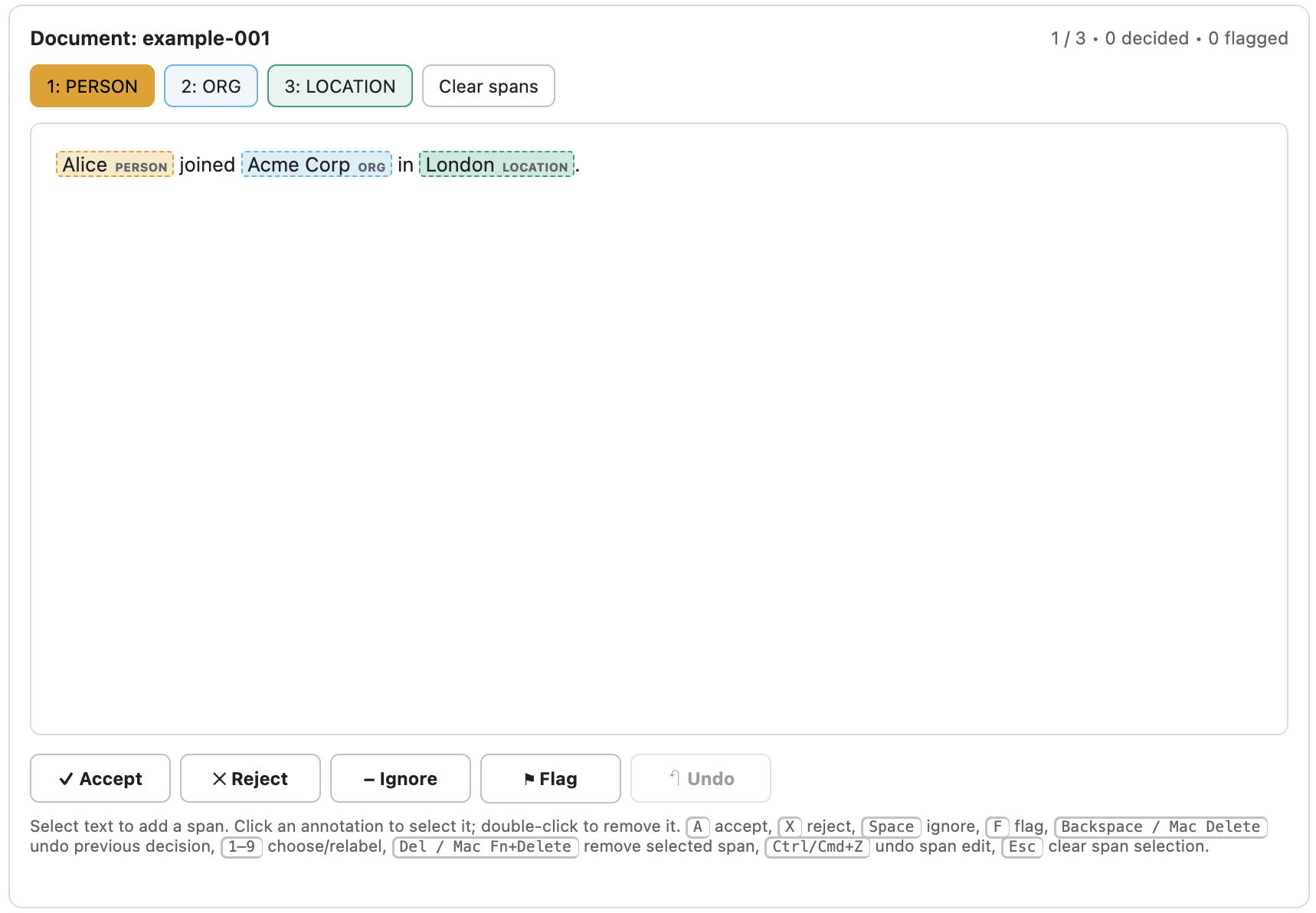
Table of contents
- Installation
- Usage
- Use cases
- Related tools
- Compatibility and versioning
- Acknowledgements
- Contributing
- License
Installation
spanmark requires Python 3.10 or later (see compatibility and versioning).
Install the latest release from PyPI:
python -m pip install spanmark
JupyterLab environments:
In most setups, installing spanmark in the notebook's Python environment is enough.
If JupyterLab itself is installed in a different environment from the notebook kernel, install anywidget in the JupyterLab environment as well so its frontend extension is available.
Usage
Quickstart
Prepare a dataset as a sequence of documents. Each document must have:
id– a string identifier, unique in the datasettext– the string to be annotated.
Each document may have suggestions, pre-annotated spans, which can be edited during annotation.
documents = [
    {
        "id": "example-001",
        "text": "Alice joined Acme Corp in London.",
        "meta": {"split": "train"},
        "suggestions": [
            {"start": 0, "end": 5, "label": "PERSON", "score": 0.99},
            {"start": 13, "end": 22, "label": "ORG", "score": 0.94},
            {"start": 26, "end": 32, "label": "LOCATION", "score": 0.97},
        ],
    },
    {
        "id": "example-002",
        "text": "Bob moved from Paris to Edinburgh.",
        "suggestions": [
            {"start": 0, "end": 3, "label": "PERSON", "score": 0.96},
            {"start": 15, "end": 20, "label": "LOCATION", "score": 0.91},
            {"start": 24, "end": 33, "label": "LOCATION", "score": 0.89},
        ],
    },
]
Make an AnnotationSession with the input data, the allowed span labels, and output JSONL path:
from spanmark import AnnotationSession

session = AnnotationSession(
    documents,
    labels=["PERSON", "ORG", "LOCATION"],
    output_path="annotations.jsonl",
)
Display the widget and annotate the documents:
session.display()
Cleanly end the annotation session:
session.close()
The completed annotations and decisions are written to the output JSONL, annotations.jsonl.
Terminology
- dataset — an ordered collection of documents
- document — one item to annotate, identified by
id - text — the string within a document to which spans refer
- span — a labelled right-open character range
[start, end)over the text - suggestion — an optional pre-annotated span, usually produced by a model
- annotation — the persisted annotation state for a document
- decision — one of Accept, Reject, or Ignore for the current document
- flag — an independent marker indicating that a document should be reviewed later
Character-based spans
spanmark spans are labelled right-open intervals of Unicode code-point offsets into the document text: [start, end), where start is inclusive and end is exclusive.
For a persisted span, the covered text is therefore exactly:
span_text = text[span["start"] : span["end"]]
Overlapping spans
The default annotation mode rejects overlapping spans.
To allow overlapping or nested spans, set allow_overlaps=True:
session = AnnotationSession(
    documents,
    labels=["PERSON", "TITLE", "ORG"],
    output_path="annotations.jsonl",
    allow_overlaps=True,
)
Workflow
spanmark supports the following workflow:
- Prepare input data
- Annotate
- Review flagged documents
- Use the output JSONL
1. Prepare input data
Prepare a sequence of documents:
{
  "id": "doc-1",
  "text": "Alice joined Acme.",
  "meta": {
    "source": "demo"
  },
  "suggestions": [
    {
      "start": 0,
      "end": 5,
      "label": "PERSON",
      "score": 0.97
    }
  ]
}
The document schema is:
| Field | Required | Type | Meaning |
|---|---|---|---|
id |
yes | string | Unique document identifier |
text |
yes | string | Text to annotate |
meta |
no | object or null | Arbitrary user metadata |
suggestions |
no | list of suggestion spans | Optional pre-annotated spans |
| other fields | no | any JSON value | Preserved unchanged |
The suggestion span schema is:
| Field | Required | Type | Description |
|---|---|---|---|
start |
yes | integer | Start character offset, inclusive |
end |
yes | integer | End character offset, exclusive |
label |
yes | string | Span label - one of the session labels |
score |
no | number | Optional model confidence score |
id |
no | string | Optional upstream suggestion identifier |
spanmark spans are labelled right-open intervals of Unicode code-point offsets into the document text: [start, end), where start is inclusive and end is exclusive.
JSONL input files must be UTF-8 encoded.
spanmark writes output JSONL files as UTF-8.
Documents can be passed directly or loaded from JSONL:
session = AnnotationSession.from_jsonl(
    "documents.jsonl",
    labels=["PERSON", "ORG", "LOCATION"],
    output_path="annotations.jsonl",
)
2. Annotate
spanmark shows one document at a time, including any suggested spans. Add, remove, or relabel spans, then select a document decision to advance to the next undecided document:
- Accept — keep the document with the current spans.
- Reject — exclude the document because it fails the annotation task criteria.
- Ignore — exclude the document without making a task judgement, for example because it is malformed, ambiguous, or cannot be annotated reliably.
You can optionally add a Flag before selecting a decision:
- Flag — mark the document to be revisited later.
The Flag can be used, for example, to indicate that an annotation is uncertain by selecting it alongside Ignore. A span edit invalidates an existing decision because the decision certifies the exact current span set.
The main keyboard shortcuts are:
| Shortcut | Action |
|---|---|
A |
Accept |
X |
Reject |
Space |
Ignore |
F |
Toggle Flag |
1–9 |
Choose a label or relabel the selected span |
Ctrl/Cmd+Z |
Undo the current span edit |
Backspace / Mac Delete |
Undo the previous submitted decision |
Delete / Mac Fn+Delete |
Remove the selected span |
Esc |
Clear the span selection |
3. Review flagged documents
When all documents have a decision, the completion screen will show. Pressing Review flagged begins a flagged review session.
Flagged documents are reviewed in dataset order. Existing spans and the existing decision are loaded as normal, and you can edit spans or change the decision. Changing the Accept/Reject/Ignore decision during flagged review autosaves but keeps you on the same document. Clearing Flag means the review item is resolved and automatically advances to the next flagged document.
Span edits still invalidate the previous decision because a decision certifies the exact current span set. If you edit spans during flagged review, submit a new Accept, Reject, or Ignore decision before clearing Flag.
If you close a completed session partway through flagged review, the unresolved flags remain in the data. Reopening that JSONL returns to the completion screen, where Review flagged continues with the remaining flagged documents. If the JSONL still contains any undecided documents, spanmark instead resumes the main pass at the first undecided document and flagged review remains unavailable until the pass is complete.
4. Use the output JSONL
The output JSONL contains one document record per line, for example:
{
  "id": "doc-1",
  "text": "Alice joined Acme.",
  "suggestions": [
    {"start": 0, "end": 5, "label": "PERSON", "score": 0.97}
  ],
  "annotation": {
    "spans": [
      {"start": 0, "end": 5, "label": "PERSON", "source": "suggestion", "score": 0.97},
      {"start": 13, "end": 17, "label": "ORG", "source": "user"}
    ],
    "answer": "accept",
    "flagged": false
  }
}
The document schema is as for the input with the addition of the annotation field.
The annotation object has the following schema:
| Field | Required | Type | Meaning |
|---|---|---|---|
spans |
yes | list of spans or null |
Current annotated spans; null means untouched |
answer |
yes | string or null |
accept, reject, ignore, or null if undecided |
flagged |
yes | boolean | Whether the document is flagged for review |
Each persisted annotation span has the following schema:
| Field | Required | Type | Meaning |
|---|---|---|---|
start |
yes | integer | Start character offset, inclusive |
end |
yes | integer | End character offset, exclusive |
label |
yes | string | Span label |
source |
yes | string | suggestion for unchanged suggestions; otherwise user |
score |
no | number | Optional confidence score, preserved when present |
spanmark spans are labelled right-open intervals of Unicode code-point offsets into the document text: [start, end), where start is inclusive and end is exclusive.
annotation.spans: null means the document has not yet been changed or decided, so the widget initializes its editable spans from suggestions.
Once the annotator edits, flags, accepts, rejects, or ignores the document, annotation.spans becomes a list.
An empty list is therefore meaningful: it can represent a deliberate zero-span annotation and will not be repopulated from suggestions on resume.
Persisted spans have one of two source values:
"suggestion"for an unchanged model suggestion"user"for a span created or edited by the annotator
Annotating in multiple sessions
At the first session for a given dataset, the selected output_path must not already exist.
spanmark writes a complete annotated copy of the input data there.
To resume annotation in another session, use AnnotationSession.from_jsonl and set the previous annotated output as both the input and the output:
session = AnnotationSession.from_jsonl(
    "annotations.jsonl",
    labels=["PERSON", "ORG", "LOCATION"],
    output_path="annotations.jsonl",
)
spanmark starts at the first undecided document. If all documents are decided, it shows the completion screen.
If a kernel or process stops between checkpoints, spanmark may leave a hidden sibling file named like .annotations.jsonl.spanmark-autosave.
Reopening the JSONL as both input and output automatically recovers the latest complete autosaved state and folds it back into the JSONL.
A clean close removes the autosave file, so the resulting JSONL is self-contained.
After reopening a session, previous-decision Undo is reconstructed in dataset order. That matches the normal one-way first pass, but it is not an exact record of arbitrary action order from an earlier session.
The JSONL reader builds a byte-offset index and loads source records on demand.
Normal annotation changes append only the complete current annotation state for the changed document to the hidden autosave overlay.
Full JSONL work is reserved for explicit save(), clean close, workflow completion, and occasional internal checkpoints when the overlay grows large.
Autosave and locking
A live AnnotationSession owns its output_path exclusively.
spanmark acquires a cross-platform lock at session creation and holds it until session.close().
Trying to open a second live session against the same output raises an error instead of risking last-writer-wins data loss.
If an output path already exists but is not the JSONL file being opened for resume, spanmark refuses to overwrite it.
Each annotation change is written as one compact JSON object to the hidden autosave overlay, then flushed and fsynced before the in-memory state is committed.
Each entry contains the complete latest annotation state for one document, so recovery is last-writer-wins by document rather than an edit-event replay.
JSONL checkpoints still use a unique temporary file in the same directory, fsync it, then atomically replace output_path.
On POSIX systems spanmark also performs a best-effort directory fsync.
The autosave overlay records a content fingerprint of the JSONL checkpoint it belongs to; spanmark refuses ambiguous recovery if that checkpoint was modified externally.
To force a complete JSONL checkpoint, call:
session.save()
Normal session close and workflow completion also checkpoint. If the process is interrupted before that happens, keep the hidden autosave file beside the JSONL so spanmark can recover it on the next open.
Use cases
spanmark helps you to make a human-verified dataset of labelled, character-based spans over document text. Such datasets are needed for the training and evaluation of span recognition tasks such as
- Named entity recognition (NER) — people, organizations, locations, products, dates, and other entity mentions
- PII and sensitive-data annotation — names, addresses, account identifiers, phone numbers, email addresses, and spans for redaction datasets
- Keyphrase, terminology, and concept extraction — domain terms in technical, legal, biomedical, financial, or product text
- Slot and field extraction — destinations, dates, quantities, order numbers, product names, and similar values in conversational or transactional text
- Event-trigger and mention detection — the exact text that expresses an event or concept
- Model correction and human-in-the-loop review — preload model suggestions, then accept, remove, relabel, or supplement them
Related tools
- Label Studio is a general-purpose data labeling across text and other modalities
- doccano is an open-source collaborative text annotation for tasks including text classification and named entity recognition
- INCEpTION is a collaborative text annotation with configurable span, relation, and chain layers plus curation workflows
- brat is a web-based structured text annotation for spans, relations, events, and attributes
- Prodigy is a commercial NLP annotation software with named-entity, overlapping-span, classification, relation, and model-assisted workflows
Compatibility and versioning
Package versioning
This project follows Semantic Versioning.
Releases have version numbers of the form MAJOR.MINOR.PATCH:
- MAJOR releases may contain backwards-incompatible changes to the public API
- MINOR releases may add functionality and deprecate public APIs while remaining backwards compatible
- PATCH releases contain backwards-compatible fixes
APIs explicitly documented as experimental are not covered by the same backwards-compatibility guarantees.
For releases before 1.0.0, the public API should be considered under development and may change between minor releases, as permitted by Semantic Versioning.
Python-version compatibility
This project supports Python feature releases from their official final release until their official end-of-life (EOL).
Support for a new Python feature release is generally introduced in the first minor release of this project following the upstream Python release. Python feature releases may be dropped once they reach the end of their upstream support cycle. The currently supported Python versions are declared in the package metadata.
Dropping an EOL Python version is considered a change to the supported runtime environment rather than a backwards-incompatible change to this project's public API, and therefore does not by itself require a new major release.
Acknowledgements
This project is developed with assistance from AI coding tools. All code included in the project is reviewed and tested by @pdhall99, who takes responsibility for its quality and maintenance.
Contributing
See the contributor guide.
License
1 maintainer

Download files
Download the file for your platform. If you're not sure which to choose, learn more about installing packages.
Source Distribution
Built Distribution
Filter files by name, interpreter, ABI, and platform.
If you're not sure about the file name format, learn more about wheel file names.
Copy a direct link to the current filters
File details
Details for the file spanmark-0.1.1.tar.gz.
File metadata
- Download URL: spanmark-0.1.1.tar.gz
- Upload date:
- Size: 157.7 kB
- Tags: Source
- Uploaded using Trusted Publishing? Yes
- Uploaded via:
twine/7.0.0 CPython/3.13.14
File hashes
| Algorithm | Hash digest | |
|---|---|---|
| SHA256 |
c575dc10f5b71130de69b0d0d535707c800c0c384ed69ab8244974b8df8c0489
|
|
| MD5 |
64744092b3c00e73c61642fe3d14c9f5
|
|
| BLAKE2b-256 |
f9e5353240ce4ed6fb4c82991caafe5be50c58b9d5eec9208ce1389116e25d8e
|
Provenance
The following attestation bundles were made for spanmark-0.1.1.tar.gz:
Publisher:
ci.yml on pdhall99/spanmark
-
Statement:
-
Statement type:
https://in-toto.io/Statement/v1 -
Predicate type:
https://docs.pypi.org/attestations/publish/v1 -
Subject name:
spanmark-0.1.1.tar.gz -
Subject digest:
c575dc10f5b71130de69b0d0d535707c800c0c384ed69ab8244974b8df8c0489 - Sigstore transparency entry: 2787151211
- Sigstore integration time:
-
Permalink:
pdhall99/spanmark@8ccc4a6c7d648e63b38d607f2c48d923e6674692 -
Branch / Tag:
refs/tags/0.1.1 - Owner: https://github.com/pdhall99
-
Access:
public
-
Token Issuer:
https://token.actions.githubusercontent.com -
Runner Environment:
github-hosted -
Publication workflow:
ci.yml@8ccc4a6c7d648e63b38d607f2c48d923e6674692 -
Trigger Event:
push
-
Statement type:
File details
Details for the file spanmark-0.1.1-py3-none-any.whl.
File metadata
- Download URL: spanmark-0.1.1-py3-none-any.whl
- Upload date:
- Size: 32.8 kB
- Tags: Python 3
- Uploaded using Trusted Publishing? Yes
- Uploaded via:
twine/7.0.0 CPython/3.13.14
File hashes
| Algorithm | Hash digest | |
|---|---|---|
| SHA256 |
36913df795a4962ab6ffc6ad8a38af12db3cb9e7396452c1301db7c80e70168d
|
|
| MD5 |
9e21c698568094c2053e79cf42273463
|
|
| BLAKE2b-256 |
c0cf8a68656bcf9c6f61830fcc4671221408e3209306eb48f28feca8264440e1
|
Provenance
The following attestation bundles were made for spanmark-0.1.1-py3-none-any.whl:
Publisher:
ci.yml on pdhall99/spanmark
-
Statement:
-
Statement type:
https://in-toto.io/Statement/v1 -
Predicate type:
https://docs.pypi.org/attestations/publish/v1 -
Subject name:
spanmark-0.1.1-py3-none-any.whl -
Subject digest:
36913df795a4962ab6ffc6ad8a38af12db3cb9e7396452c1301db7c80e70168d - Sigstore transparency entry: 2787151269
- Sigstore integration time:
-
Permalink:
pdhall99/spanmark@8ccc4a6c7d648e63b38d607f2c48d923e6674692 -
Branch / Tag:
refs/tags/0.1.1 - Owner: https://github.com/pdhall99
-
Access:
public
-
Token Issuer:
https://token.actions.githubusercontent.com -
Runner Environment:
github-hosted -
Publication workflow:
ci.yml@8ccc4a6c7d648e63b38d607f2c48d923e6674692 -
Trigger Event:
push
-
Statement type:














