
Spark EventLog MCP Server
中文版本 | English
A comprehensive Spark event log analysis MCP server built on FastMCP 2.0 and FastAPI, providing in-depth performance analysis, resource monitoring, and optimization recommendations.
Features
- 🌐 FastMCP & FastAPI Integration: MCP protocol support and analysis report APIs powered by FastAPI & FastMCP
- 📊 Performance Analysis: Shuffle analysis, resource utilization monitoring, task execution analysis
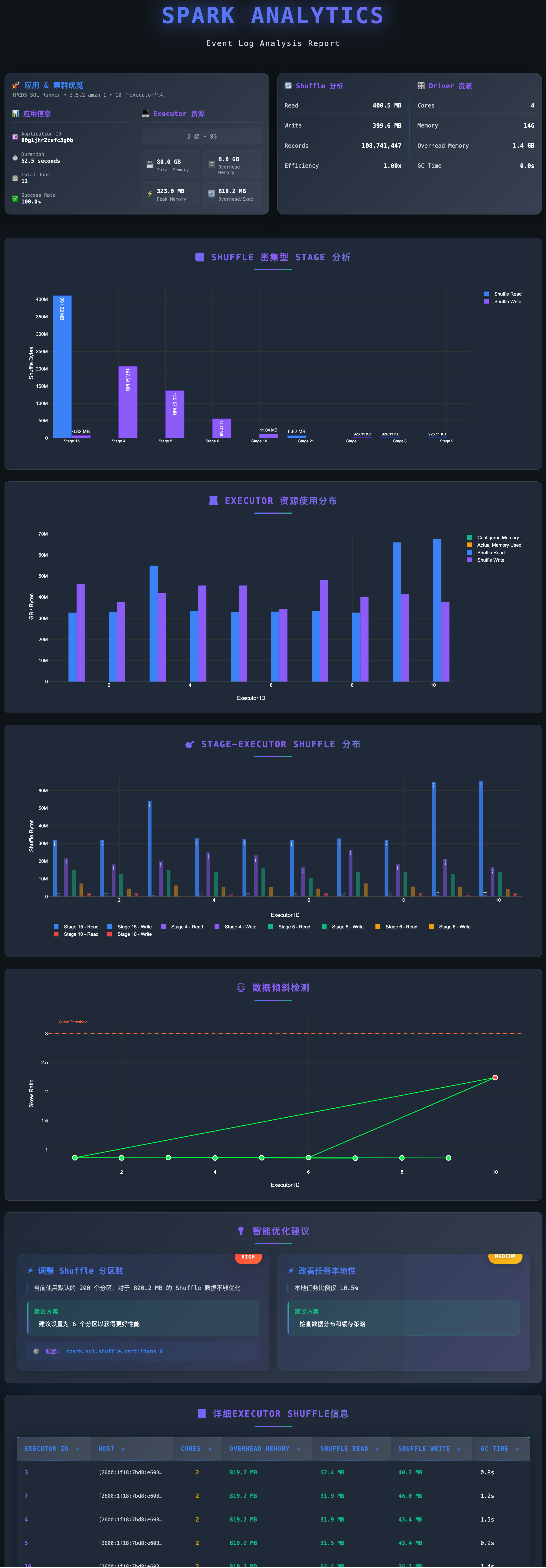
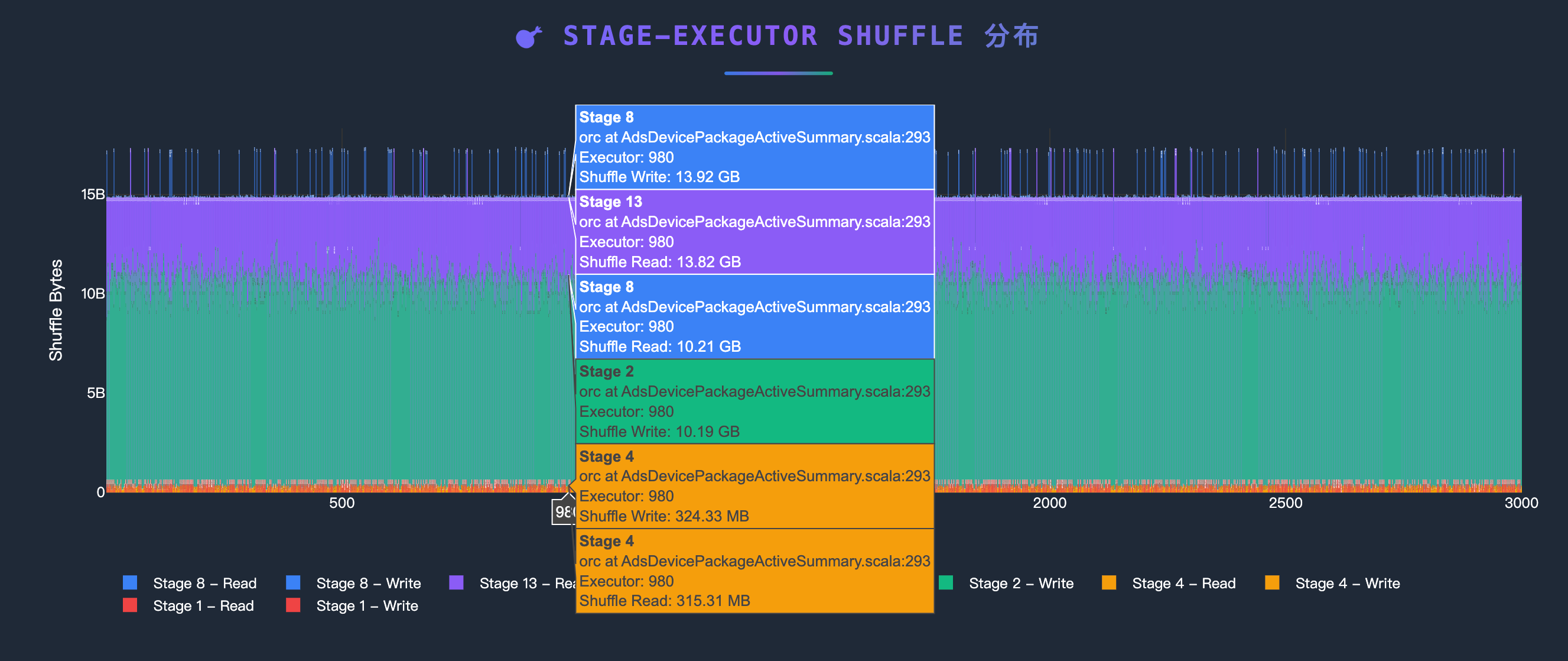
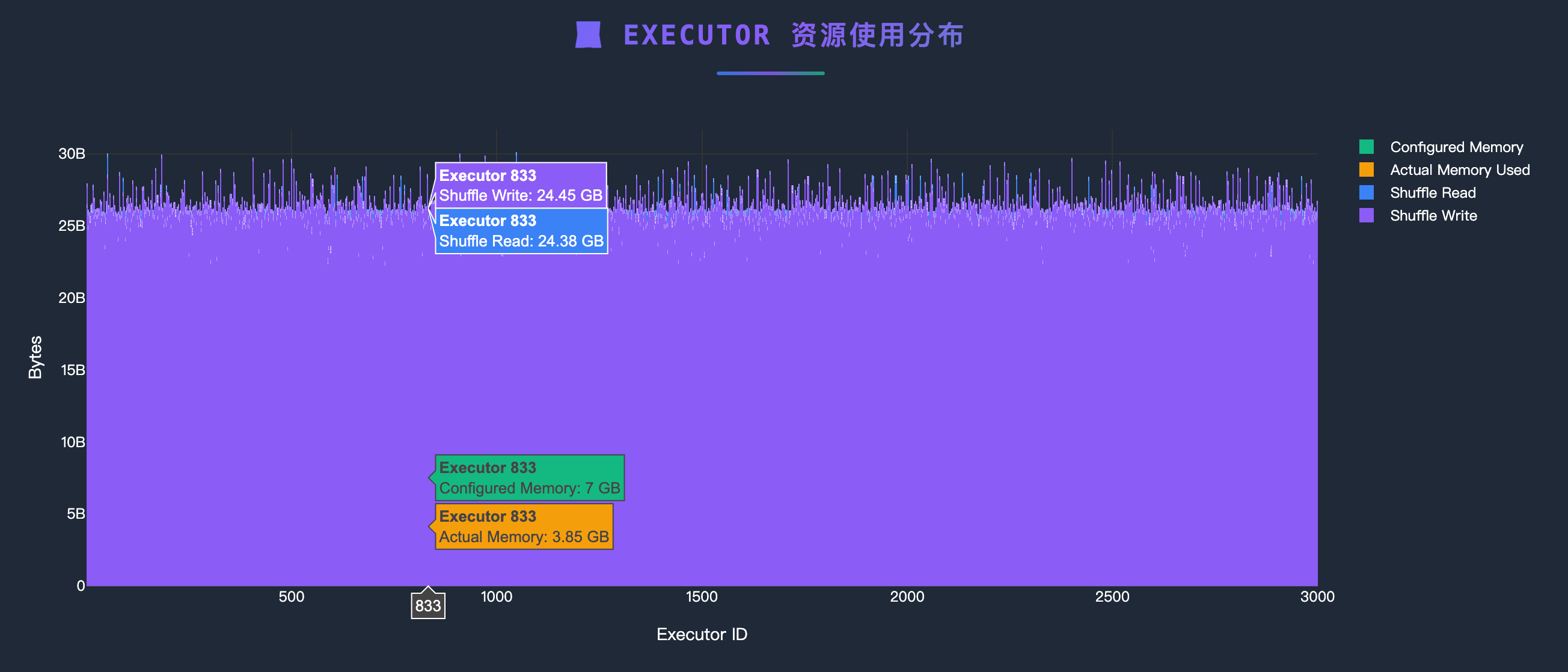
- 📈 Visual Reports: Auto-generated interactive HTML reports with direct browser access
- ☁️ Multiple Data Sources: Support for S3, HTTP URLs, and local files
- 💡 Intelligent Optimization: Automated optimization recommendations based on analysis results
Quick Start
MCP Client Integration
stdio Mode (Recommended for Local Development)
{
  "mcpServers": {
    "spark-eventlog": {
      "command": "uv run python",
      "args": ["/path/to/spark-eventlog-mcp/start.py"],
      "env": {
        "MCP_TRANSPORT": "stdio"
      }
    }
  }
}
HTTP Mode
1. Start HTTP Server:
export MCP_TRANSPORT=streamable-http
export MCP_HOST=localhost
export MCP_PORT=7799

uv run python start.py
2. Configure Remote MCP:
{
  "mcpServers": {
    "spark-eventlog": {
      "url": "http://localhost:7799/mcp",
      "type": "http"
    }
  }
}
3. Access Services:
- API Documentation: http://localhost:7799/docs
- Health Check: http://localhost:7799/health
- Reports List: http://localhost:7799/api/reports
- MCP Endpoint: http://localhost:7799/mcp
Analysis Examples

Project Structure
spark-eventlog-mcp/
├── src/spark_eventlog_mcp/
│   ├── server.py              # FastAPI + MCP integrated server
│   ├── core/
│   │   └── mature_data_loader.py    # Data loader (S3/URL/Local)
│   ├── tools/
│   │   ├── mature_analyzer.py       # Event log analyzer
│   │   └── mature_report_generator.py  # HTML report generator
│   ├── models/
│   │   ├── schemas.py        # Pydantic data models
│   │   └── mature_models.py  # Analysis result models
│   └── utils/
│       └── helpers.py         # Utility functions and logging config
├── report_data/               # Generated reports storage
├── start.py                   # Launch script
├── README.md                 # This file (English)
└── README_zh.md              # Chinese version
MCP Tools
| Tool Name | Description |
|---|---|
parse_eventlog |
Parse event logs (S3/URL/Local) |
analyze_performance |
Execute performance analysis |
generate_report |
Generate visual reports |
get_optimization_suggestions |
Get optimization recommendations |
get_analysis_status |
Query current analysis status |
clear_session |
Clear session cache |
RESTful API Endpoints
Basic Endpoints
GET /- Service informationGET /health- Health checkGET /docs- API documentation (Swagger UI)
Report Management
GET /api/reports- List all reportsGET /api/reports/{filename}- View HTML reportGET /reports/{filename}- Direct access to report filesDELETE /api/reports/{filename}- Delete report
MCP Tool Calls
POST /mcp- MCP protocol endpoint
Configuration
Environment Variables
# Server Configuration
MCP_TRANSPORT=http          # stdio or streamable-http
MCP_HOST=0.0.0.0           # HTTP mode listen address
MCP_PORT=7799              # HTTP mode port
LOG_LEVEL=INFO             # Log level

# AWS S3 Configuration (Optional)
# Not needed if AWS CLI is configured or running on EC2 with appropriate IAM role
AWS_ACCESS_KEY_ID=xxx
AWS_SECRET_ACCESS_KEY=xxx
AWS_DEFAULT_REGION=us-east-1

# Cache Configuration
CACHE_ENABLED=true
CACHE_TTL=300

# Default Data Source
DEFAULT_SOURCE_TYPE=s3  # s3, url, or local
Log Format
Logs contain detailed debugging information:
2025-12-05 10:30:45 - INFO - [server.py:243:generate_report] - spark-eventlog-mcp - Generating html report
Format: Timestamp - Level - [Filename:Line:Function] - Logger Name - Message
Data Source Support
S3
{
    "source_type": "s3",
    "path": "s3://bucket-name/path/to/eventlogs/"
}
HTTP URL
{
    "source_type": "url",
    "path": "https://example.com/eventlog.zip"
}
Local File
{
    "source_type": "local",
    "path": "/path/to/local/eventlog.zip"
}
Report Features
Generated HTML reports include:
- 📊 Application Overview (task counts, success rate, duration)
- 💻 Executor Resource Usage Distribution
- 🔄 Shuffle Performance Analysis
- ⚖️ Data Skew Detection
- 💡 Intelligent Optimization Recommendations
- 📈 Interactive Visualizations
Troubleshooting
Port Already in Use
# Change port
MCP_PORT=9090 python start.py
Missing Dependencies
# Reinstall dependencies
uv pip install -e .
AWS Credentials Issues
# Check AWS configuration
aws configure list

# Or configure in .env
AWS_ACCESS_KEY_ID=xxx
AWS_SECRET_ACCESS_KEY=xxx
Debug Logging
# Enable DEBUG logs
LOG_LEVEL=DEBUG uv run python start.py
Tech Stack
- FastMCP 2.0: MCP protocol support
- FastAPI: RESTful API framework
- Pydantic: Data validation and serialization
- Plotly: Interactive charts
- boto3: AWS S3 integration
- aiofiles: Async file operations
Development
# Clone repository
git clone <repository-url>
cd spark-eventlog-mcp

# Install development dependencies
uv pip install -e .

# MCP Inspector - stdio mode
MCP_TRANSPORT="stdio" npx @modelcontextprotocol/inspector uv run python start.py

# MCP Inspector - HTTP mode
MCP_TRANSPORT="streamable-http" uv run python start.py
npx @modelcontextprotocol/inspector --cli http://localhost:7799 --transport http --method tools/list
Support
- Documentation: Check
/docsAPI documentation - Issues: Submit GitHub Issues
- Reference: FastMCP Documentation
1 maintainer

Metadata
1 maintainer
Release files for spark-eventlog-mcp 0.1.0
For a detailed explanation of source distributions (sdists) and built distributions (wheels), please see the package formats documentation.
Source distribution (sdist)
| File | Size | Uploaded | |
|---|---|---|---|
| spark_eventlog_mcp-0.1.0.tar.gz | 54.8 kB | Details |
Built distribution (wheel)
| File | Interpreter | ABI | Platform | Reset |
|---|---|---|---|---|
| spark_eventlog_mcp-0.1.0-py3-none-any.whl | Python 3 | none | any | Details |
Total release size: 108.5 kB
Release files / spark_eventlog_mcp-0.1.0.tar.gz
| Download URL | spark_eventlog_mcp-0.1.0.tar.gz |
|---|---|
| Size | 54.8 kB |
| Tags | Source |
|
SHA-256 checksum How to use checksums |
0db1877f17772d94f6e2579f27d8600e9a264dd0ec1562fa320fa86c39d38b18
|
|
BLAKE2b-256 checksum How to use checksums |
a1aeafdf2b67e557eaf295973d07029d80fb44e4436c2129816ca85cdfc05abc
|
| Upload date | |
|
Uploaded using Trusted Publishing? What is trusted publishing? |
Yes |
| Uploaded via |
twine/6.1.0 CPython/3.13.7
|
Provenance
Provenance describes where a file came from. On PyPI, provenance is shared via attestations, which provide a verifiable record of the build or publishing details. View details, limitations and caveats.


PyPI Publish Attestation
PyPI verified that this artifact, at this checksum, originated from the publisher listed below.
Signed by GitHub Actions, verified by PyPI on Dec 6, 2025.
Transparency logRelease files / spark_eventlog_mcp-0.1.0-py3-none-any.whl
| Download URL | spark_eventlog_mcp-0.1.0-py3-none-any.whl |
|---|---|
| Size | 53.6 kB |
| Tags | Python 3 |
|
SHA-256 checksum How to use checksums |
87e0250b9e8b84ecb62068b5d1c99d7a6686d6ef02e538b0819897d6f385c399
|
|
BLAKE2b-256 checksum How to use checksums |
c5fb59799c35e7857093d84205247aa8aaa8dc7ec3b69984c3173c8c714af254
|
| Upload date | |
|
Uploaded using Trusted Publishing? What is trusted publishing? |
Yes |
| Uploaded via |
twine/6.1.0 CPython/3.13.7
|
Provenance
Provenance describes where a file came from. On PyPI, provenance is shared via attestations, which provide a verifiable record of the build or publishing details. View details, limitations and caveats.
PyPI Publish Attestation
PyPI verified that this artifact, at this checksum, originated from the publisher listed below.
Signed by GitHub Actions, verified by PyPI on Dec 6, 2025.
Transparency log












