
This project helps us to run Data Quality Rules in flight while spark job is being run

Project description
Spark-Expectations









Spark Expectations is a specialized tool designed with the primary goal of maintaining data integrity within your processing pipeline. By identifying and preventing malformed or incorrect data from reaching the target destination, it ensues that only quality data is passed through. Any erroneous records are not simply ignored but are filtered into a separate error table, allowing for detailed analysis and reporting. Additionally, Spark Expectations provides valuable statistical data on the filtered content, empowering you with insights into your data quality.

The documentation for spark-expectations can be found here
Contributors
Thanks to all the contributors who have helped ideate, develop and bring it to its current state
Contributing
We're delighted that you're interested in contributing to our project! To get started, please carefully read and follow the guidelines provided in our contributing document
Change Log
Most recent updates will be listed in the Change log
What is Spark Expectations?
Spark Expectations is a Data quality framework built in PySpark as a solution for the following problem statements:
- The existing data quality tools validates the data in a table at rest and provides the success and error metrics. Users need to manually check the metrics to identify the error records
- The error data is not quarantined to an error table or there are no corrective actions taken to send only the valid data to downstream
- Users further downstream must consume the same data incorrectly, or they must perform additional calculations to eliminate records that don't comply with the data quality rules.
- Another process is required as a corrective action to rectify the errors in the data and lot of planning is usually required for this activity
Spark Expectations solves these issues using the following principles:
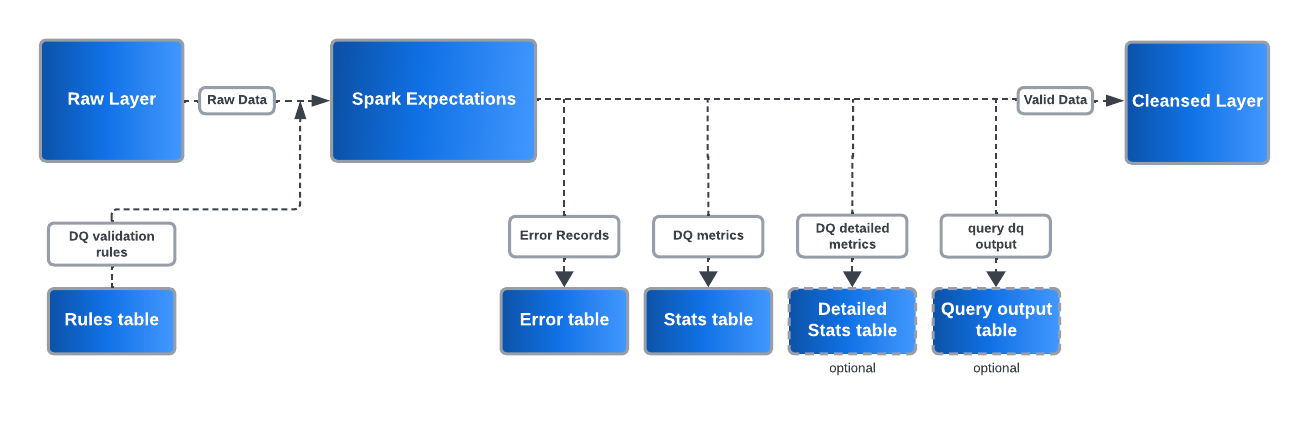
- All the records which fail one or more data quality rules, are by default quarantined in an _error table along with the metadata on rules that failed, job information etc. This makes it easier for analysts or product teams to view the incorrect data and collaborate with the teams responsible for correcting and reprocessing it.
- Aggregated metrics are provided for the raw data and the cleansed data for each run along with the required metadata to prevent recalculation or computation.
- The data that doesn't meet the data quality contract or the standards is not moved to the next level or iterations unless or otherwise specified.
Features Of Spark Expectations
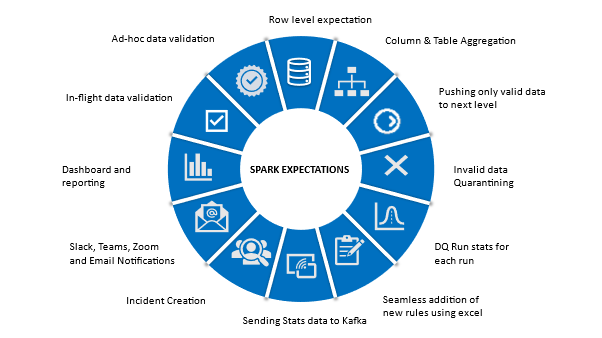
Please find the spark-expectations flow and feature diagrams below
Data Quality Rule Types
Spark-Expectations supports three distinct types of data quality rules:
- Row-Level Data Quality (
row_dq): Checks conditions on individual rows, such ascol1 > 10orcol2 is not null. - Aggregate Data Quality (
agg_dq): Checks conditions on aggregated values, such assum(col3) > 20oravg(col1) < 25. - Query-Based Data Quality (
query_dq): Checks conditions using full SQL queries, such as(select sum(col1) from test_table) > 10.
Each rule type has its own expectation format and validation logic.
👉 For detailed documentation and examples, see the Data Quality Rule Types section.
Spark Expectation Observability Feature
This feature enhances data observability by leveraging the stats detailed table and custom query table to generate a report table with key metrics.
Workflow:
- *Automatic Trigger: The observability feature is initiated upon the completion of *Spark Expectation, based on configurable user-defined settings.
- Extracts relevant data from the stats detailed table and custom query table, processes it, and creates a report table with key insights.
- Compiles and summarizes essential observability metrics.
- Delivers an alert notification via email using a Jinja template.
Template Customization:
- Users can specify a custom Jinja template for formatting the report.
- If no custom template is provided, a default Jinja template is used to generate and send the alert.
This feature enables proactive monitoring, providing timely insights to enhance data quality and system reliability. For more details see the observability documentation, the email alerts documentation, and the Slack notifications documentation.
Sample Alert Notification
Below is an example of the alert email generated by the observability feature:

Spark - Expectations Setup
Prerequisites
You can find the developer setup instructions in the Setup section of the documentation. This guide will help you set up your development environment and get you started with Spark Expectations.
Configurations
In order to establish the global configuration parameter for DQ Spark Expectations, you must define and complete the required fields within a variable. This involves creating a variable and ensuring that all the necessary information is provided in the appropriate fields.
from spark_expectations.config.user_config import Constants as user_config

se_user_conf = {
    user_config.se_notifications_enable_email: False,
    user_config.se_notifications_email_smtp_host: "mailhost.nike.com",
    user_config.se_notifications_email_smtp_port: 25,
    user_config.se_enable_obs_dq_report_result: True,
    user_config.se_dq_obs_alert_flag: True,
    user_config.se_dq_obs_default_email_template: "",
    user_config.se_notifications_email_from: "<sender_email_id>",
    user_config.se_notifications_email_to_other_nike_mail_id: "<receiver_email_id's>",
    user_config.se_notifications_email_subject: "spark expectations - data quality - notifications",
    user_config.se_notifications_enable_slack: True,
    user_config.se_notifications_slack_webhook_url: "<slack-webhook-url>",
    user_config.se_notifications_on_start: True,
    user_config.se_notifications_on_completion: True,
    user_config.se_notifications_on_fail: True,
    user_config.se_notifications_on_error_drop_exceeds_threshold_breach: True,
    user_config.se_notifications_on_rules_action_if_failed_set_ignore: True,
    user_config.se_notifications_on_error_drop_threshold: 15,
    #Optional
    #Below two params are optional and need to be enabled to capture the detailed stats in the <stats_table_name>_detailed.
    #user_config.enable_query_dq_detailed_result: True,
    #user_config.enable_agg_dq_detailed_result: True,
    #Below two params are optional and need to be enabled to pass the custom email body
    #user_config.se_notifications_enable_custom_email_body: True,
    #user_config.se_notifications_email_custom_body: "'product_id': {}",
    #Below two parameters are optional and are for enabling html templates for the custom email body
    #user_config.se_notifications_enable_templated_custom_email: True,
    #user_config.se_notifications_email_custom_template: "",
    #Below parameter is optional and needs to be enabled in case authorization is required to access smtp server.
    #user_config.se_notifications_email_smtp_auth: True,
    #Below parameter is optional and used to specify environment value.
    #user_config.se_dq_rules_params: {"env": "prod/dev/local" }
    #Below two parameters are optional and used to enable and specify the default template for basic email notifications.
    #user_config.se_notifications_enable_templated_basic_email_body: True
    #user_config.se_notifications_default_basic_email_template: ""
}
Spark Expectations Initialization
For all the below examples the below import and SparkExpectations class instantiation is mandatory
- Instantiate
SparkExpectationsclass which has all the required functions for running data quality rules
from spark_expectations.core.expectations import SparkExpectations, WrappedDataFrameWriter
from pyspark.sql import SparkSession

spark: SparkSession = SparkSession.builder.getOrCreate()
writer = WrappedDataFrameWriter().mode("append").format("delta")
# writer = WrappedDataFrameWriter().mode("append").format("iceberg")
# product_id should match with the "product_id" in the rules table
se: SparkExpectations = SparkExpectations(
    product_id="your_product",
    rules_df=spark.table("dq_spark_local.dq_rules"),
    stats_table="dq_spark_local.dq_stats",
    stats_table_writer=writer,
    target_and_error_table_writer=writer,
    debugger=False,
    # stats_streaming_options={user_config.se_enable_streaming: False},
)
- Decorate the function with
@se.with_expectationsdecorator
from spark_expectations.config.user_config import *
from pyspark.sql import DataFrame
import os


@se.with_expectations(
    target_table="dq_spark_local.customer_order",
    write_to_table=True,
    user_conf=se_user_conf,
    target_table_view="order",
)
def build_new() -> DataFrame:
    # Return the dataframe on which Spark-Expectations needs to be run
    _df_order: DataFrame = (
        spark.read.option("header", "true")
        .option("inferSchema", "true")
        .csv(os.path.join(os.path.dirname(__file__), "resources/order.csv"))
    )
    _df_order.createOrReplaceTempView("order")

    return _df_order
- Spark_expectation observability enablement
   user_config.se_enable_obs_dq_report_result: True,
   user_config.se_dq_obs_alert_flag: True,
   user_config.se_dq_obs_default_email_template: "",
   #for alert make sure to provide all the details related to SMTP for sending mail, else it will throw an error.
   user_config.se_notifications_email_smtp_host: "mailhost.nike.com",
   user_config.se_notifications_email_smtp_port: 25,
   user_config.se_notifications_smtp_password: "************"
   user_config.se_notifications_email_smtp_host: "smtp.se.com"
Adding Certificates
To enable trusted SSL/TLS communication during Spark-Expectations testing, you may need to provide custom Certificate Authority (CA) certificates. Place any required .crt files in the containers/certs directory. During test container startup, all certificates in this folder will be automatically imported into the container's trusted certificate store, ensuring that your Spark jobs and dependencies can establish secure connections as needed.
Release history Release notifications | RSS feed


Download files
Download the file for your platform. If you're not sure which to choose, learn more about installing packages.
Source Distribution
Built Distribution
Filter files by name, interpreter, ABI, and platform.
If you're not sure about the file name format, learn more about wheel file names.
Copy a direct link to the current filters
File details
Details for the file spark_expectations-2.7.0.tar.gz.
File metadata
- Download URL: spark_expectations-2.7.0.tar.gz
- Upload date:
- Size: 524.6 kB
- Tags: Source
- Uploaded using Trusted Publishing? No
- Uploaded via: twine/6.2.0 CPython/3.12.12
File hashes
| Algorithm | Hash digest | |
|---|---|---|
| SHA256 |
2e66354b6ad9917bee6a4563ccf1b1dc68dfd934b8a5c866edcf4d068fdb070f
|
|
| MD5 |
6c9b6711ef30aa4df4379e112c557a9a
|
|
| BLAKE2b-256 |
c180d60b3caa4fd8ff8cf0002c11213d095530a281d5f888a0e4db9395f939fd
|
File details
Details for the file spark_expectations-2.7.0-py3-none-any.whl.
File metadata
- Download URL: spark_expectations-2.7.0-py3-none-any.whl
- Upload date:
- Size: 79.2 kB
- Tags: Python 3
- Uploaded using Trusted Publishing? No
- Uploaded via: twine/6.2.0 CPython/3.12.12
File hashes
| Algorithm | Hash digest | |
|---|---|---|
| SHA256 |
7ad97e31428cff1f3f11757c254e3e44c1cb3cc375793c26aed9c0d96138eb62
|
|
| MD5 |
a69e2daf32d05d0d5fb16c3ef84be2e8
|
|
| BLAKE2b-256 |
72e668b54e5d3f42f7e7c038c95c4f311fe448c0e12dd3f010ca16f7752968bb
|






