
Export emails from Spark Mail's local cache on macOS — works even when accounts are disabled.

Project description
✉️ Spark Mac Mail Export
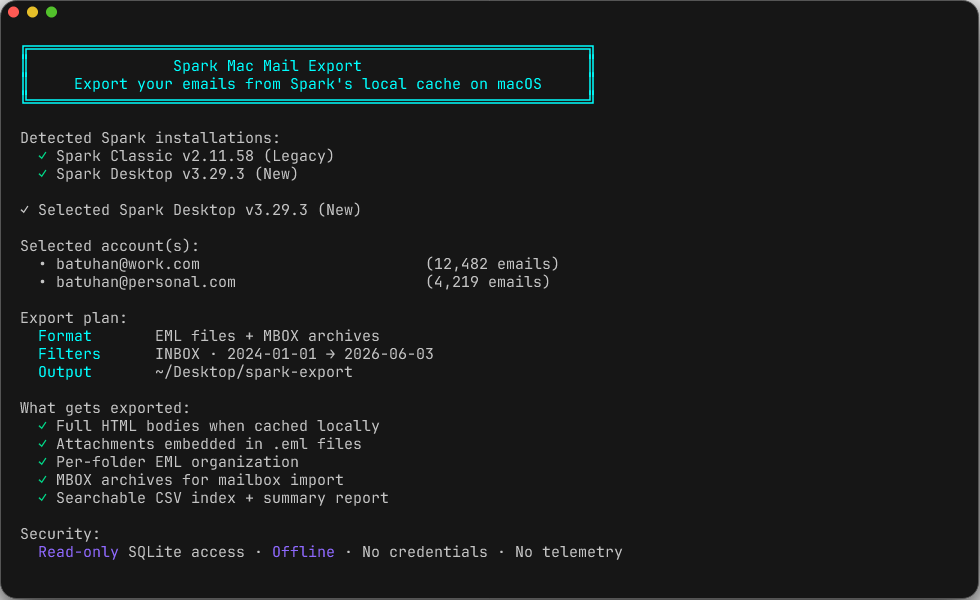
Export your emails from Spark Mail's local cache on macOS.
Works even when email accounts are disabled or deleted — as long as Spark still has the data cached locally on your Mac.
⚙️ Compatibility
| Spark Version | Status |
|---|---|
| Spark Classic (v2) | ✅ Tested |
| Spark Desktop (v3, +AI) | ✅ Tested |
Spark Classic stores mail data in the shared Group Container (3L68KQB4HG.group.com.readdle.smartemail/databases). Spark Desktop stores mail data under its own Spark Desktop/core-data directory. The schemas are compatible for the export fields this tool reads, and the tool detects both installed apps so you can choose the source with --app or the interactive selector.
✨ Features
- Zero setup — single Python script, no external dependencies
- Auto-detects Spark Classic (Legacy) and Spark Desktop (New)
- Interactive UI — persistent header, Spark app selection, arrow-key navigation with checkboxes, or use CLI flags for automation
- Multiple formats — export to
.emlfiles,.mboxarchives, or both - Organized output — emails sorted by folder with a searchable CSV index
- Read-only — opens databases in read-only mode, cannot modify Spark's data
- Fully offline — no network access, no telemetry, no cloud
- Attachments included — locally cached attachments are embedded in
.emlfiles
⚡ Quick Start
# Clone or download
git clone https://github.com/batuhangobekli/spark-mac-mail-export.git
cd spark-mac-mail-export

# Run (Python 3.8+ required — included with macOS)
python3 spark_mail_export.py
That's it. The script will auto-detect installed Spark apps, ask which source to export from, show your accounts, and guide you through the export.
📖 Usage
Interactive Mode
Run the script with no arguments to get the full interactive experience:
python3 spark_mail_export.py
You'll get:
- Auto-detection of Spark Classic (Legacy) and Spark Desktop (New)
- A Spark app/source selector when both apps are available
- A list of email accounts from the selected source, sorted by email count
- Arrow-key navigation (↑/↓) with Space to toggle and Enter to confirm
- Selected-account context on folder/date/output prompts
- Step-by-step prompts for format and output directory
Note: The interactive UI uses Python's built-in
cursesmodule. If your terminal doesn't support it, the tool falls back to plain text input automatically.
Command-Line Mode
Pass any argument and the tool runs directly — no interactive UI:
# Export a specific account
python3 spark_mail_export.py --account user@example.com

# Export using Spark Desktop's local cache
python3 spark_mail_export.py --app desktop --account user@example.com

# Export using Spark Classic's local cache
python3 spark_mail_export.py --app classic --account user@example.com

# Export all accounts
python3 spark_mail_export.py --all

# Export to MBOX format with custom output directory
python3 spark_mail_export.py --account user@example.com --format mbox -o ~/Documents/backup

# Export only Inbox emails from a date range
python3 spark_mail_export.py --account user@example.com --folder INBOX --date-from 2024-01-01

# Export everything in both formats
python3 spark_mail_export.py --all --format both

# Preview what would be exported (no files written)
python3 spark_mail_export.py --all --dry-run

# List all accounts
python3 spark_mail_export.py --list-accounts

# List Spark Desktop accounts
python3 spark_mail_export.py --app desktop --list-accounts

# List folders for a specific account
python3 spark_mail_export.py --list-folders user@example.com
All Options
--account EMAIL        Export specific account (by email address or display name)
--all                  Export all accounts without prompting
--app APP              Source app: auto, classic, or desktop (default: auto)
--output, -o DIR       Output directory (default: ~/Desktop/spark-export)
--format, -f FMT       eml, mbox, or both (default: eml)
--folder NAME          Filter by folder name (e.g., INBOX, 'Sent Mail')
--date-from DATE       Start date filter (YYYY-MM-DD)
--date-to DATE         End date filter (YYYY-MM-DD)
--dry-run              Show what would be exported without writing files
--list-accounts        List all accounts and exit
--list-folders EMAIL   List all folders for an account and exit
--include-no-body      Include emails even if no body is cached (default: all included)
--quiet, -q            Suppress progress output
--version              Show version
--help                 Show help message
Tip: Any argument triggers non-interactive mode. Use
--accountor--allto specify what to export. If you forget, the tool will show an error with the correct usage.
📁 Output Structure
~/Desktop/spark-export/
└── user@example.com/
    ├── eml/
    │   ├── INBOX/
    │   │   ├── 2025-10-15_143021_JohnDoe_Project-Update.eml
    │   │   └── ...
    │   ├── Sent Mail/
    │   │   └── ...
    │   └── ...
    ├── mbox/                    # Only if --format mbox or both
    │   ├── INBOX.mbox
    │   └── Sent Mail.mbox
    ├── email_index.csv          # Searchable index of all emails
    └── export_summary.txt       # Human-readable summary
Accounts are sorted by email count (highest first). Emails are organized into per-folder subdirectories with date-prefixed filenames for easy sorting.
📬 How to View .eml Files
| Method | Instructions |
|---|---|
| macOS Quick Look | Select .eml file → press Space |
| Apple Mail | Drag .eml files into a mailbox |
| Thunderbird | Install "ImportExportTools NG" add-on → Import directory |
| Outlook | Double-click any .eml file |
| Gmail | Import via Thunderbird + IMAP sync |
| Web browser | Open .eml file directly for HTML emails |
For detailed instructions, see docs/viewing_eml_files.md.
Requirements
- macOS (any recent version)
- Python 3.8+ (included with macOS)
- Spark Mail must have been used at least once (to create local data)
⚠️ Limitations
- macOS only — Spark's local storage is macOS-specific
- Only locally cached data — If Spark never synced/opened an email's body, only metadata + a short preview will be available
- Attachments — Only locally downloaded attachments are exported; cloud-only attachments will have metadata but no file content
- Database lock — Spark should be quit before running the export (the tool will warn you if the database is locked)
- Account must exist in Spark — The account entry must still be in Spark's database (not fully removed from the app)
⚖️ Legal Notice
This tool reads your own email data from standard SQLite database files stored on your own filesystem by the Spark Mail application.
This tool does not reverse engineer, decompile, or disassemble any application binary. It does not bypass any encryption or security measures. It does not access any remote servers. It does not modify Spark's data in any way (read-only access).
This project is not affiliated with Readdle Inc. or Spark Mail Limited.
You are solely responsible for ensuring your use of this tool complies with applicable laws and Terms of Service.
For the full disclaimer, see DISCLAIMER.md.
🔒 Security
- Read-only database access (
?mode=ro) - Zero network requests
- Zero external dependencies
- No passwords or credentials are accessed
- No telemetry or data collection
You can audit the entire tool — it's a single Python file. See SECURITY.md for details.
📦 Installation (Optional)
Direct Download (Simplest)
curl -sLO https://raw.githubusercontent.com/batuhangobekli/spark-mac-mail-export/master/spark_mail_export.py
python3 spark_mail_export.py
pip / pipx
pip install spark-mac-mail-export
spark-mac-mail-export
Or with pipx (recommended for CLI tools):
pipx install spark-mac-mail-export
spark-mac-mail-export
🤝 Contributing
Contributions are welcome! Please:
- Fork the repository
- Create a feature branch (
git checkout -b feature/amazing-feature) - Commit your changes (
git commit -m 'Add amazing feature') - Push to the branch (
git push origin feature/amazing-feature) - Open a Pull Request
Running Tests
python3 tests/test_sanitize.py
python3 tests/test_address_parser.py
python3 tests/test_utils.py
python3 tests/test_db_reader.py
python3 tests/test_detector.py
Technical Documentation
- Database Schema — How Spark stores emails locally
- Viewing EML Files — Guide to opening exported emails
📄 License
MIT — Copyright (c) 2026 Batuhan Göbekli
Release history Release notifications | RSS feed


Download files
Download the file for your platform. If you're not sure which to choose, learn more about installing packages.
Source Distribution
Built Distribution
Filter files by name, interpreter, ABI, and platform.
If you're not sure about the file name format, learn more about wheel file names.
Copy a direct link to the current filters
File details
Details for the file spark_mail_export-0.0.1.tar.gz.
File metadata
- Download URL: spark_mail_export-0.0.1.tar.gz
- Upload date:
- Size: 25.2 kB
- Tags: Source
- Uploaded using Trusted Publishing? Yes
- Uploaded via: twine/6.1.0 CPython/3.13.12
File hashes
| Algorithm | Hash digest | |
|---|---|---|
| SHA256 |
fd0c03d6e4dab198aab1f5c68c7ffef4519f049495287ee713456db8f2d9d1f7
|
|
| MD5 |
678cceb4e6a036a29de5cf9ed5ce318b
|
|
| BLAKE2b-256 |
b89e71c4de8b0af162814165339f7a09fef2f005ef9a6f4fd10333f99ce49400
|
Provenance
The following attestation bundles were made for spark_mail_export-0.0.1.tar.gz:
Publisher:
python-publish.yml on batuhangobekli/spark-mail-export
-
Statement:
-
Statement type:
https://in-toto.io/Statement/v1 -
Predicate type:
https://docs.pypi.org/attestations/publish/v1 -
Subject name:
spark_mail_export-0.0.1.tar.gz -
Subject digest:
fd0c03d6e4dab198aab1f5c68c7ffef4519f049495287ee713456db8f2d9d1f7 - Sigstore transparency entry: 1706377787
- Sigstore integration time:
-
Permalink:
batuhangobekli/spark-mail-export@45690c0d55a23c4d6fca2018cd9a46d7531d7f02 -
Branch / Tag:
refs/tags/v0.0.1 - Owner: https://github.com/batuhangobekli
-
Access:
public
-
Token Issuer:
https://token.actions.githubusercontent.com -
Runner Environment:
github-hosted -
Publication workflow:
python-publish.yml@45690c0d55a23c4d6fca2018cd9a46d7531d7f02 -
Trigger Event:
workflow_dispatch
-
Statement type:
File details
Details for the file spark_mail_export-0.0.1-py3-none-any.whl.
File metadata
- Download URL: spark_mail_export-0.0.1-py3-none-any.whl
- Upload date:
- Size: 21.2 kB
- Tags: Python 3
- Uploaded using Trusted Publishing? Yes
- Uploaded via: twine/6.1.0 CPython/3.13.12
File hashes
| Algorithm | Hash digest | |
|---|---|---|
| SHA256 |
033b9e21fcdf061a5a016b0d3d6845f86a391a2a695154dbf8ff2fc80133a6b7
|
|
| MD5 |
1b7f38afc01c891ef00cfa2034d7c4ff
|
|
| BLAKE2b-256 |
78e5d643edb1a5b8aacbd1d3cd407d2e5b47d05a1f08dbe53ab6152d56984aa1
|
Provenance
The following attestation bundles were made for spark_mail_export-0.0.1-py3-none-any.whl:
Publisher:
python-publish.yml on batuhangobekli/spark-mail-export
-
Statement:
-
Statement type:
https://in-toto.io/Statement/v1 -
Predicate type:
https://docs.pypi.org/attestations/publish/v1 -
Subject name:
spark_mail_export-0.0.1-py3-none-any.whl -
Subject digest:
033b9e21fcdf061a5a016b0d3d6845f86a391a2a695154dbf8ff2fc80133a6b7 - Sigstore transparency entry: 1706377830
- Sigstore integration time:
-
Permalink:
batuhangobekli/spark-mail-export@45690c0d55a23c4d6fca2018cd9a46d7531d7f02 -
Branch / Tag:
refs/tags/v0.0.1 - Owner: https://github.com/batuhangobekli
-
Access:
public
-
Token Issuer:
https://token.actions.githubusercontent.com -
Runner Environment:
github-hosted -
Publication workflow:
python-publish.yml@45690c0d55a23c4d6fca2018cd9a46d7531d7f02 -
Trigger Event:
workflow_dispatch
-
Statement type:






