
Web UI for spark-vllm-docker — recipe management, deployment, and monitoring for DGX Spark
Verified details
These details have been verified by PyPIProject links
GitHub Statistics
Maintainers

Project description
Spark Pulse
Spark Pulse is a web control plane for spark-vllm-docker. It brings recipe discovery, deployment management, live monitoring, cache cleanup, and configuration into one interface for NVIDIA DGX Spark hardware.
License: MIT — Copyright © 2026 Kharkevich Engineering Lab
Disclaimer: This project is not sponsored by, endorsed by, or affiliated with NVIDIA Corporation or any of its subsidiaries. NVIDIA, DGX, and related trademarks are property of their respective owners.
Features
- Recipe browsing - Explore deployment recipes, model variants, and mod combinations in a clean catalog view.
- Deployment jobs - Launch deployments, watch live logs, inspect status, and stop running jobs from the UI.
- Real-time monitoring - Track GPU, CPU, RAM, and disk usage with streaming updates.
- Cache management - Review and clean Hugging Face, wheel, ccache, Triton, and related caches.
- Settings and auth - Configure the backend path, defaults, and OIDC authentication.
- MCP server - Expose the same operations to Model Context Protocol clients and automation.
Screenshots
Recipes
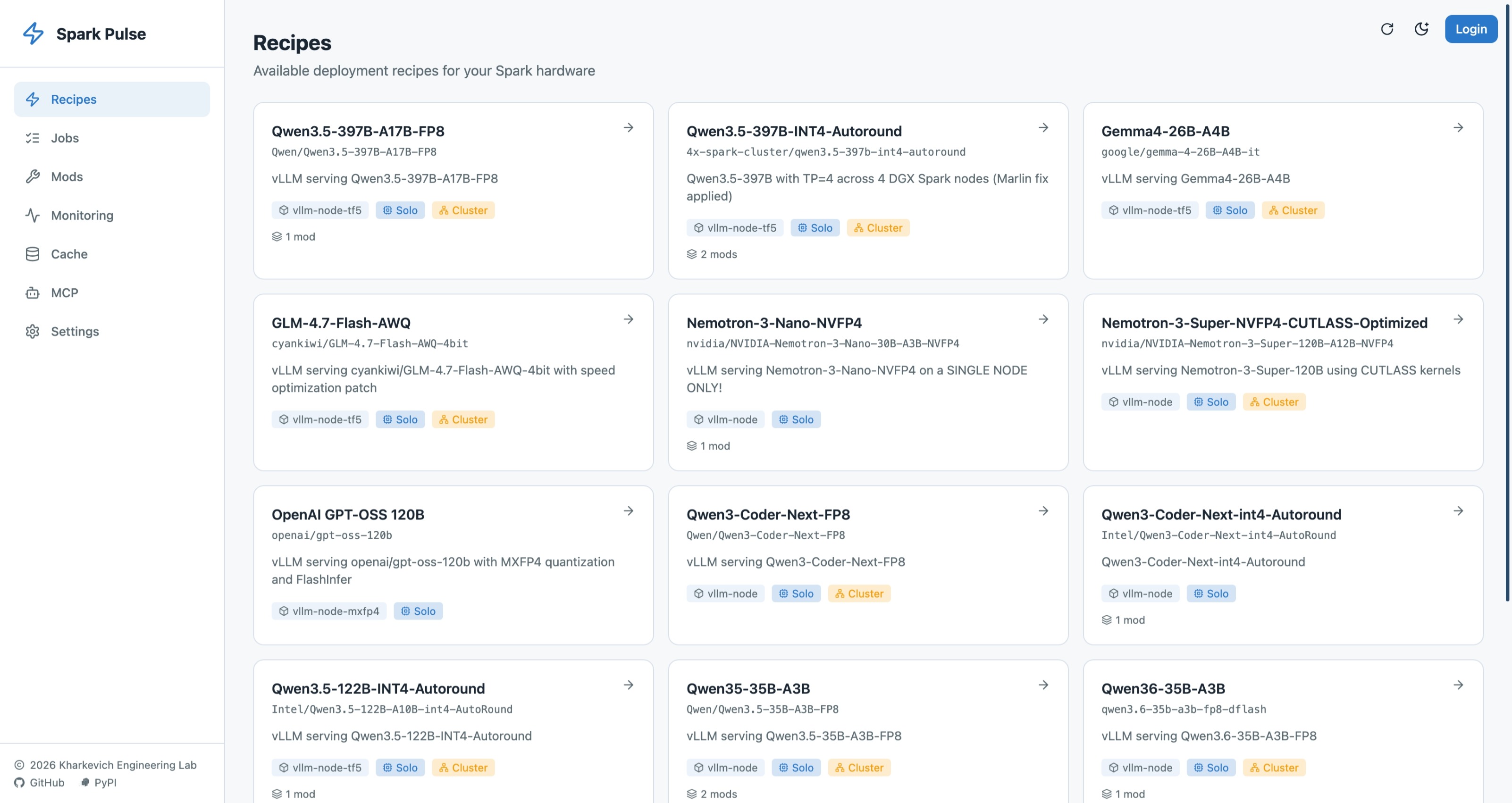
Browse available deployment recipes, inspect model details, and compare supported variants at a glance.
Jobs
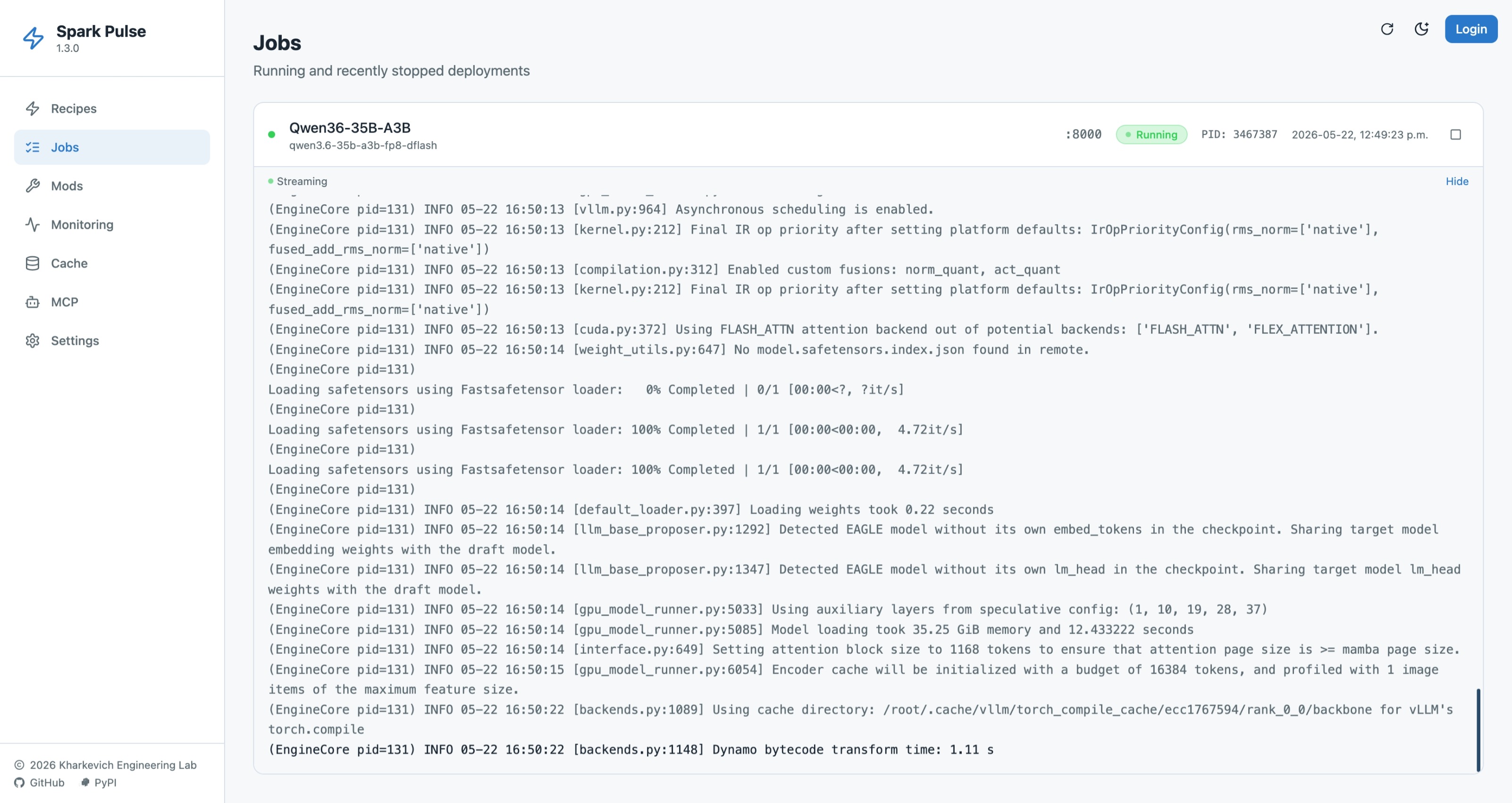
Monitor deployments, stream logs, and manage running jobs without leaving the dashboard.
Monitoring
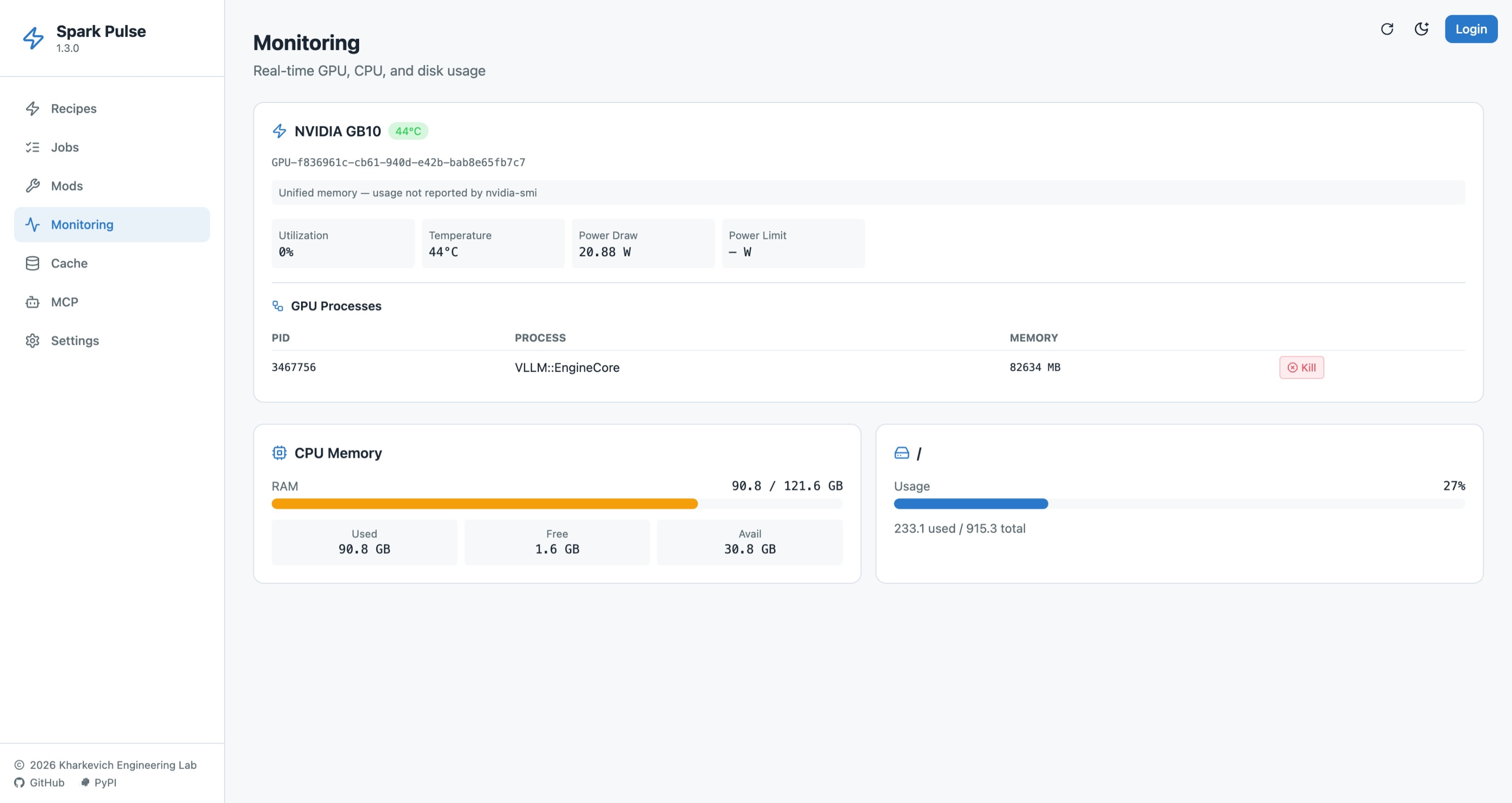
Watch GPU, CPU, and disk usage in real time alongside active GPU processes.
Installation
Install the published package from PyPI:
python3 -m pip install spark-pulse
This installs the spark-pulse command-line interface.
Usage
Start the web app after installation:
spark-pulse start
Then open the UI in your browser. The default port is 8100 unless you changed it in configuration.
Common runtime commands:
# Start the MCP server for assistants and automation
spark-pulse mcp

# Install and manage the app as a systemd service
spark-pulse install
spark-pulse status
spark-pulse start-service
spark-pulse stop-service
spark-pulse uninstall
Add --user to any of the service commands if you want a user-scoped systemd unit.
Authentication is optional. When enabled, Spark Pulse redirects users through your configured OIDC provider and protects the UI and API routes.
Configuration
Spark Pulse reads settings from config.yaml (bundled with the package) and merges user overrides from ~/.config/spark-pulse/settings.json. Environment variables take highest priority.
config.yaml Reference
| Key | Type | Default | Description |
|---|---|---|---|
spark_vllm_path |
string | /tmp/spark-vllm-docker |
Absolute path to the spark-vllm-docker installation directory. |
webui_port |
int | 8100 |
TCP port the web UI listens on. |
default_container |
string | vllm-node |
Default Docker container name for deployments. |
default_gpu_mem_util |
float | 0.8 |
Default GPU memory utilization fraction (0.0–1.0). |
default_port_range_start |
int | 9000 |
Start of the ephemeral port range for deployments. |
default_port_range_end |
int | 9100 |
End of the ephemeral port range for deployments. |
job_retention_days |
int | 7 |
Number of days to retain completed job records. |
cluster_enabled |
bool | false |
Enable multi-node cluster mode. |
mcp_enabled |
bool | true |
Enable the MCP server endpoint. |
mcp_path |
string | /mcp |
HTTP path for the MCP server. |
mcp_api_token |
string | (empty) | Optional API token to protect MCP requests. |
auth_enabled |
bool | false |
Enable OIDC authentication. |
oidc_provider_url |
string | (empty) | OIDC provider URL (e.g. https://keycloak.example.com/realms/myrealm). |
oidc_client_id |
string | (empty) | OIDC client ID. |
oidc_client_secret |
string | (empty) | OIDC client secret — stored securely in ~/.config/spark-pulse/secrets.json. |
Environment Variable Overrides
The following environment variables override their corresponding config keys:
| Environment Variable | Config Key | Description |
|---|---|---|
SPARK_VLLM_PATH |
spark_vllm_path |
Override the spark-vllm-docker path. |
WEBUI_PORT |
webui_port |
Override the web UI port. |
File Locations
| File | Purpose |
|---|---|
config.yaml |
Bundled defaults (read-only, overwritten on package update). |
~/.config/spark-pulse/settings.json |
Persistent user overrides (survives package updates). |
~/.config/spark-pulse/secrets.json |
Securely stored secrets (mode 0600). |
Example: Enabling OIDC Authentication
# config.yaml or settings.json
auth_enabled: true
oidc_provider_url: https://keycloak.example.com/realms/myrealm
oidc_client_id: spark-pulse
Then set the client secret via the UI Settings page or directly in secrets.json:
{
  "oidc_client_secret": "your-secret-here"
}
Development Mode with Mock OIDC Provider
For local development, Spark Pulse ships with convenience scripts that start a mock OIDC provider alongside the dev server. This lets you test the full SSO login flow without a real identity provider.
Full stack (backend + frontend with hot-reload):
./scripts/run-dev-oidc-full.sh
This script:
- Starts the mock OIDC provider on
http://localhost:9400 - Creates
~/.config/spark-pulse/settings.jsonandsecrets.jsonwith dev credentials - Launches the backend with
--reload(serves both API and built frontend)
Backend only (for API testing):
./scripts/run-dev-oidc.sh
Dev credentials (both scripts):
- Provider URL:
http://localhost:9400 - Client ID:
spark-pulse-dev - Client Secret:
dev-secret
To stop, press Ctrl+C — the scripts clean up all background processes.
Development
Clone the repository and install local development dependencies:
python3 -m pip install -e ".[dev]"
Build the frontend and run the app locally:
cd web && npm install && npm run build && cd ..
./scripts/run-dev-server.sh
Useful development commands:
./scripts/run-backend.sh
./scripts/run-production.sh
./scripts/build-ui.sh
pytest
python -m build
API
The app exposes REST endpoints under /api/* for recipes, deployments, memory, cache, and settings, plus /auth/* routes for OIDC login and session handling.
License
MIT. See LICENSE.
Project details
Verified details
These details have been verified by PyPIProject links
GitHub Statistics
Maintainers
Release history Release notifications | RSS feed


Download files
Download the file for your platform. If you're not sure which to choose, learn more about installing packages.
Source Distribution
Built Distribution
Filter files by name, interpreter, ABI, and platform.
If you're not sure about the file name format, learn more about wheel file names.
Copy a direct link to the current filters
File details
Details for the file spark_pulse-1.9.0.tar.gz.
File metadata
- Download URL: spark_pulse-1.9.0.tar.gz
- Upload date:
- Size: 513.1 kB
- Tags: Source
- Uploaded using Trusted Publishing? Yes
- Uploaded via: twine/6.1.0 CPython/3.13.12
File hashes
| Algorithm | Hash digest | |
|---|---|---|
| SHA256 |
0988c8beba1723b8996356042552f63694945e889a93786bed0297a88ccb048d
|
|
| MD5 |
fca5bcf8e87195457ffd27933aa0328d
|
|
| BLAKE2b-256 |
7d97d2320349ed6ee93f813139034c7f570212fbffd74fbf42c4c555df733a1f
|
Provenance
The following attestation bundles were made for spark_pulse-1.9.0.tar.gz:
Publisher:
release.yml on kharkevich-engineering-lab/spark-pulse
-
Statement:
-
Statement type:
https://in-toto.io/Statement/v1 -
Predicate type:
https://docs.pypi.org/attestations/publish/v1 -
Subject name:
spark_pulse-1.9.0.tar.gz -
Subject digest:
0988c8beba1723b8996356042552f63694945e889a93786bed0297a88ccb048d - Sigstore transparency entry: 1832811505
- Sigstore integration time:
-
Permalink:
kharkevich-engineering-lab/spark-pulse@4c7ce8a12ddde23fde001aa31dd7d558cc9283de -
Branch / Tag:
refs/heads/main - Owner: https://github.com/kharkevich-engineering-lab
-
Access:
public
-
Token Issuer:
https://token.actions.githubusercontent.com -
Runner Environment:
github-hosted -
Publication workflow:
release.yml@4c7ce8a12ddde23fde001aa31dd7d558cc9283de -
Trigger Event:
push
-
Statement type:
File details
Details for the file spark_pulse-1.9.0-py3-none-any.whl.
File metadata
- Download URL: spark_pulse-1.9.0-py3-none-any.whl
- Upload date:
- Size: 492.8 kB
- Tags: Python 3
- Uploaded using Trusted Publishing? Yes
- Uploaded via: twine/6.1.0 CPython/3.13.12
File hashes
| Algorithm | Hash digest | |
|---|---|---|
| SHA256 |
739f675f5d581ec3d9dedc9efb1635c6b4f02d6650a795c68947213ee9a87c06
|
|
| MD5 |
c7ef3cfe97c77dbf639b2be40c5d574c
|
|
| BLAKE2b-256 |
06b2e85373b8cb43e0710c62db90e7305c6d4985c473249c533fc777f05e8898
|
Provenance
The following attestation bundles were made for spark_pulse-1.9.0-py3-none-any.whl:
Publisher:
release.yml on kharkevich-engineering-lab/spark-pulse
-
Statement:
-
Statement type:
https://in-toto.io/Statement/v1 -
Predicate type:
https://docs.pypi.org/attestations/publish/v1 -
Subject name:
spark_pulse-1.9.0-py3-none-any.whl -
Subject digest:
739f675f5d581ec3d9dedc9efb1635c6b4f02d6650a795c68947213ee9a87c06 - Sigstore transparency entry: 1832811683
- Sigstore integration time:
-
Permalink:
kharkevich-engineering-lab/spark-pulse@4c7ce8a12ddde23fde001aa31dd7d558cc9283de -
Branch / Tag:
refs/heads/main - Owner: https://github.com/kharkevich-engineering-lab
-
Access:
public
-
Token Issuer:
https://token.actions.githubusercontent.com -
Runner Environment:
github-hosted -
Publication workflow:
release.yml@4c7ce8a12ddde23fde001aa31dd7d558cc9283de -
Trigger Event:
push
-
Statement type:






