
sparks
Training runs on your DGX Spark, with the curves next to the hardware they ran on.
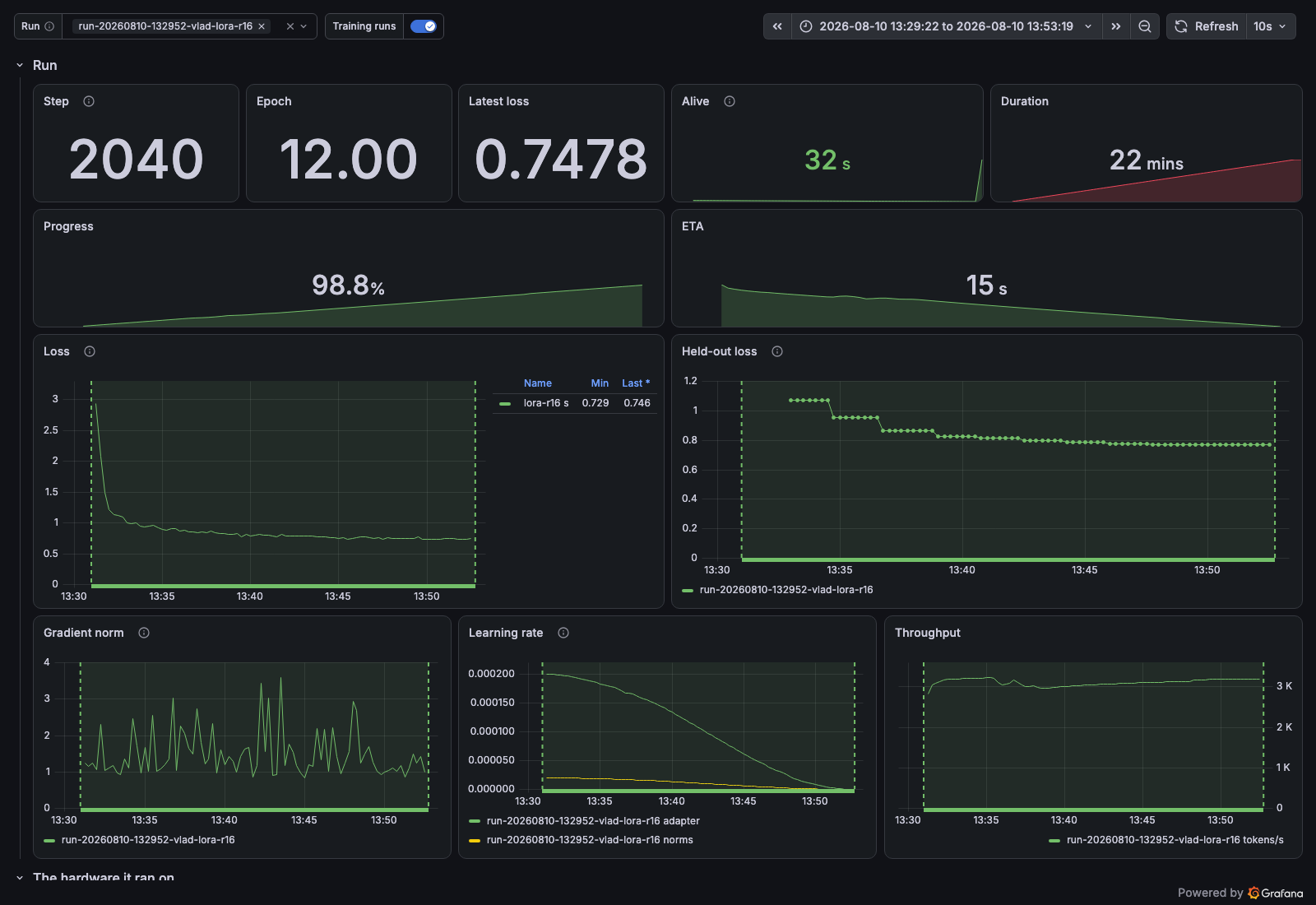
Submit a training job from your laptop with one command. sparks builds your image, ships it to the box, queues the run and supervises it. Your loop reports its own loss and learning rate, and they land in Grafana beside the GPU power and temperature from the same minutes.
Before you run it
sparks provisions nothing. It needs a box already set up by sparkup: Prometheus with the remote-write receiver, Grafana, an image registry and the queue runner. On your own machine you need Docker and SSH to the box.
The distribution is sparks-dgx; the command and the import are both sparks.
Install
uv tool install sparks-dgx
sparks setup you@your-box
setup remembers the box, lets your Docker push to its registry, restarts Docker, and says when
it is ready. The restart stops whatever containers you have running.
Submit a job
sparks submit --context ./examples --data ./examples/data \
  --name lora-r16 -- python /app/lora_finetune.py --epochs 12
--data arrives read-only at /data, also $SPARKS_DATA; read that path and never a laptop one.
Name the script by absolute path, because the container's working directory is the box's shared
directory rather than your image's.
Instrument the loop
from sparks.emit import track

with track(total=epochs * len(loader), tokens_per_step=batch_size * BLOCK) as run:
    for batch in loader:
        loss = train_one(batch)
        run.step(loss=float(loss))
run.step derives step, progress, eta_seconds and the rates. Off the box track reports
nothing, so the same script runs on your laptop unguarded.
Watch it
sparks queue            # what is running and waiting
sparks logs <job>       # what it printed
sparks status <job>     # state, exit code, duration, energy
sparks wait <job>       # block until it ends
The README has the rest, and INSTALL_CLAUDE.md has the configuration and the traps.
MIT.
1 maintainer

Metadata
1 maintainer
Release files for sparks-dgx 0.1.1
For a detailed explanation of source distributions (sdists) and built distributions (wheels), please see the package formats documentation.
Source distribution (sdist)
| File | Size | Uploaded | |
|---|---|---|---|
| sparks_dgx-0.1.1.tar.gz | 489.8 kB | Details |
Built distribution (wheel)
| File | Interpreter | ABI | Platform | Reset |
|---|---|---|---|---|
| sparks_dgx-0.1.1-py3-none-any.whl | Python 3 | none | any | Details |
Total release size: 547.4 kB
Release files / sparks_dgx-0.1.1.tar.gz
| Download URL | sparks_dgx-0.1.1.tar.gz |
|---|---|
| Size | 489.8 kB |
| Tags | Source |
|
SHA-256 checksum How to use checksums |
de98e9194086a8e1a2aa186d39a73daa1db730eb5bf00b51a274acbb9e013aa0
|
|
BLAKE2b-256 checksum How to use checksums |
5ba5e36daa958cff037a2bacca7a3a56f37c77ad8c41ca74b6b5dde7e159363f
|
| Upload date | |
|
Uploaded using Trusted Publishing? What is trusted publishing? |
Yes |
| Uploaded via |
twine/7.0.0 CPython/3.13.14
|
Provenance
Provenance describes where a file came from. On PyPI, provenance is shared via attestations, which provide a verifiable record of the build or publishing details. View details, limitations and caveats.


PyPI Publish Attestation
PyPI verified that this artifact, at this checksum, originated from the publisher listed below.
Signed by GitHub Actions, verified by PyPI on Aug 12, 2026.
Transparency logRelease files / sparks_dgx-0.1.1-py3-none-any.whl
| Download URL | sparks_dgx-0.1.1-py3-none-any.whl |
|---|---|
| Size | 57.7 kB |
| Tags | Python 3 |
|
SHA-256 checksum How to use checksums |
eeb2607eed3099c6ffb0bffd2601e4ca4c2c9e7d242b6b68764ed1b12777c413
|
|
BLAKE2b-256 checksum How to use checksums |
fcb5dd4c628792e032e0afae395b2ff05c35705befd5a2940f69f36296eff681
|
| Upload date | |
|
Uploaded using Trusted Publishing? What is trusted publishing? |
Yes |
| Uploaded via |
twine/7.0.0 CPython/3.13.14
|
Provenance
Provenance describes where a file came from. On PyPI, provenance is shared via attestations, which provide a verifiable record of the build or publishing details. View details, limitations and caveats.
PyPI Publish Attestation
PyPI verified that this artifact, at this checksum, originated from the publisher listed below.
Signed by GitHub Actions, verified by PyPI on Aug 12, 2026.
Transparency log












