
Spatial-VTK





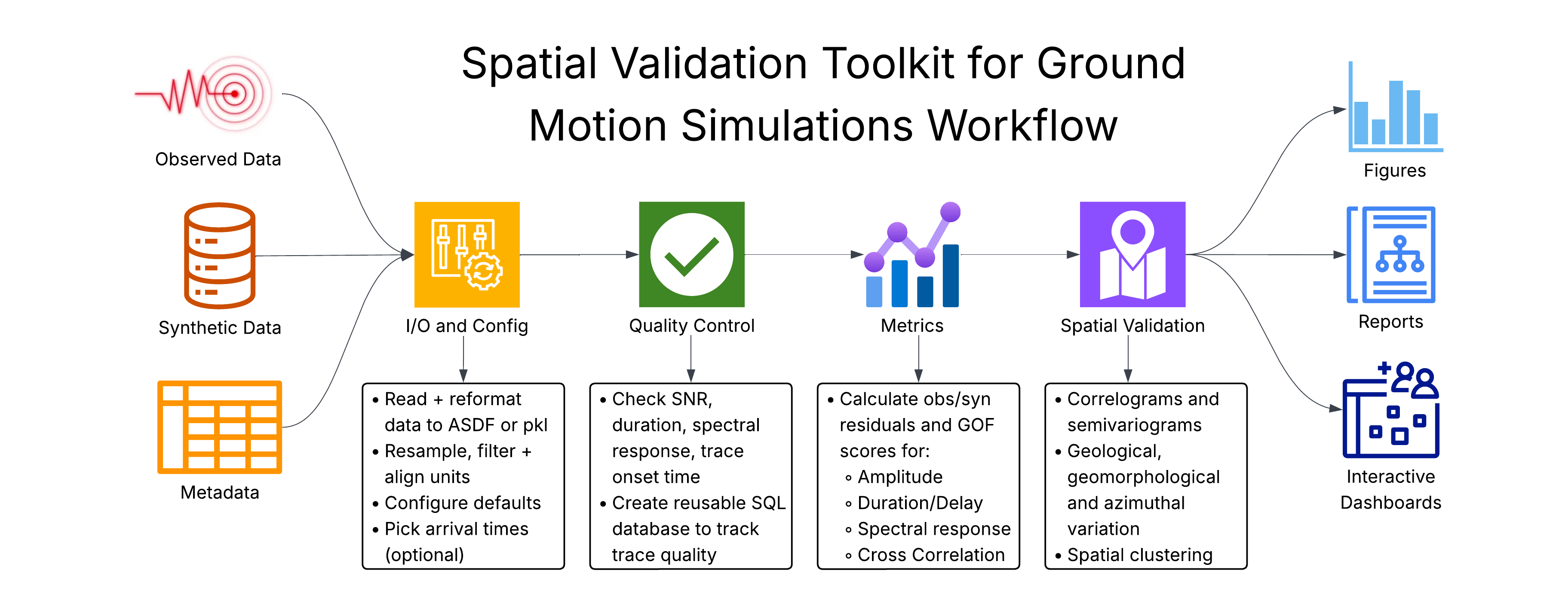
spatial-vtk provides spatial validation tools for ground-motion simulations,
with data QC, residual and metric calculations, geologic metadata integration,
spatial statistics, mapping, and dashboard preparation for understanding model
performance patterns.
Install
Install from PyPI:
python -m pip install spatial-vtk
Or create the conda environment and install from a source checkout:
conda env create -f svtk_environment.yaml
conda activate spatial-vtk
python -m pip install -e .
The package imports as spatial_vtk and installs the svtk command:
python -c "import spatial_vtk; print(spatial_vtk.__version__)"
svtk --help
Structure
spatial_vtk.io: metadata preparation, input inventories, waveform preprocessing, manifests, and waveform format helpers.spatial_vtk.config: repository paths, bounds, and runtime settings.spatial_vtk.qc: quality-control build, review, and summary workflows.spatial_vtk.metrics: ground-motion metric and residual calculations.spatial_vtk.spatial: metric-field preparation, spatial correlation, PCA spatial modes, REDCAP and residual-feature clustering, geology joins, pattern tests, plots, and map helpers.spatial_vtk.visualize: context figures, QC views, and dashboard data.spatial_vtk.cli: command-line entry points.
See the public documentation for installation, package overview, examples, API reference, support, and changelog pages.
Reproducible source tutorials (unreleased 0.1.4rc1)
This research/alpha package is under active validation. The existing PyPI 0.1.3 release does not contain these repairs. From this repaired source checkout:
python3.12 -m venv .venv
source .venv/bin/activate
python -m pip install ".[notebooks,waveforms]"
export SVTK_NO_BASEMAP=1
python tools/execute_tutorial_notebooks.py
The source example bundle includes ten original MiniSEED inputs, five events,
and 30 selected stations, with checksums in data/examples/. Examples are not
included in the wheel. Step 1 generates processed waveforms; Step 2 performs QC;
Step 3 calculates metrics and native ln(observed / synthetic) residuals.
Steps 4–7 use those generated results; run Steps 1–3 first.
See the tutorial index and CLI workflow for launch commands.
Notebooks find the checkout from its root or docs/examples. For downloaded
notebooks set SVTK_PROJECT_ROOT to the complete example checkout. Unset
SVTK_NO_BASEMAP to request Esri World Imagery backgrounds.
Base metric/statistics workflows do not require an arrival picker. PhaseNet is
an optional external TensorFlow installation with an explicit command and model;
see the integration contract. The PyPI package named
phasenet has a different interface and is not installed by Spatial-VTK.
CI runs unit tests on Python 3.10–3.12 and executes the complete waveform-to-QC- to-metrics tutorial on Python 3.12. Sphinx builds documentation without executing notebooks; the notebook runner retains execution evidence separately.
1 maintainer

Release files for spatial-vtk 0.1.4
For a detailed explanation of source distributions (sdists) and built distributions (wheels), please see the package formats documentation.
Source distribution (sdist)
| File | Size | Uploaded | |
|---|---|---|---|
| spatial_vtk-0.1.4.tar.gz | 726.1 kB | Details |
Built distribution (wheel)
| File | Interpreter | ABI | Platform | Reset |
|---|---|---|---|---|
| spatial_vtk-0.1.4-py3-none-any.whl | Python 3 | none | any | Details |
Total release size: 1.2 MB
Release files / spatial_vtk-0.1.4.tar.gz
| Download URL | spatial_vtk-0.1.4.tar.gz |
|---|---|
| Size | 726.1 kB |
| Tags | Source |
|
SHA-256 checksum How to use checksums |
4d62c197d982ab01f83439563e160f6d3376663b34890c131e81ea415e7493ac
|
|
BLAKE2b-256 checksum How to use checksums |
5ebd7fc4538c32a0d5cca46e1f04c89ea89e540d5f8c0c83fbd8f1ce735f6d6b
|
| Upload date | |
|
Uploaded using Trusted Publishing? What is trusted publishing? |
Yes |
| Uploaded via |
twine/7.0.0 CPython/3.13.14
|
Release files / spatial_vtk-0.1.4-py3-none-any.whl
| Download URL | spatial_vtk-0.1.4-py3-none-any.whl |
|---|---|
| Size | 448.7 kB |
| Tags | Python 3 |
|
SHA-256 checksum How to use checksums |
7f7a4cba259785a94d327913c873f024a4e865d8a141394061551938c726311f
|
|
BLAKE2b-256 checksum How to use checksums |
85c90e9bde773a82fa092d28b880b832405cd0b9201684df386e3750b32ae5e5
|
| Upload date | |
|
Uploaded using Trusted Publishing? What is trusted publishing? |
Yes |
| Uploaded via |
twine/7.0.0 CPython/3.13.14
|














