
SpatialDM: Spatial Direct Messaging Detected by bivariate Moran
About
SpatialDM (Spatial Direct Messaging, or Spatial co-expressed ligand and receptor Detected by Moran’s bivariant extension), a statistical model and toolbox to identify the spatial co-expression (i.e., spatial association) between a pair of ligand and receptor.
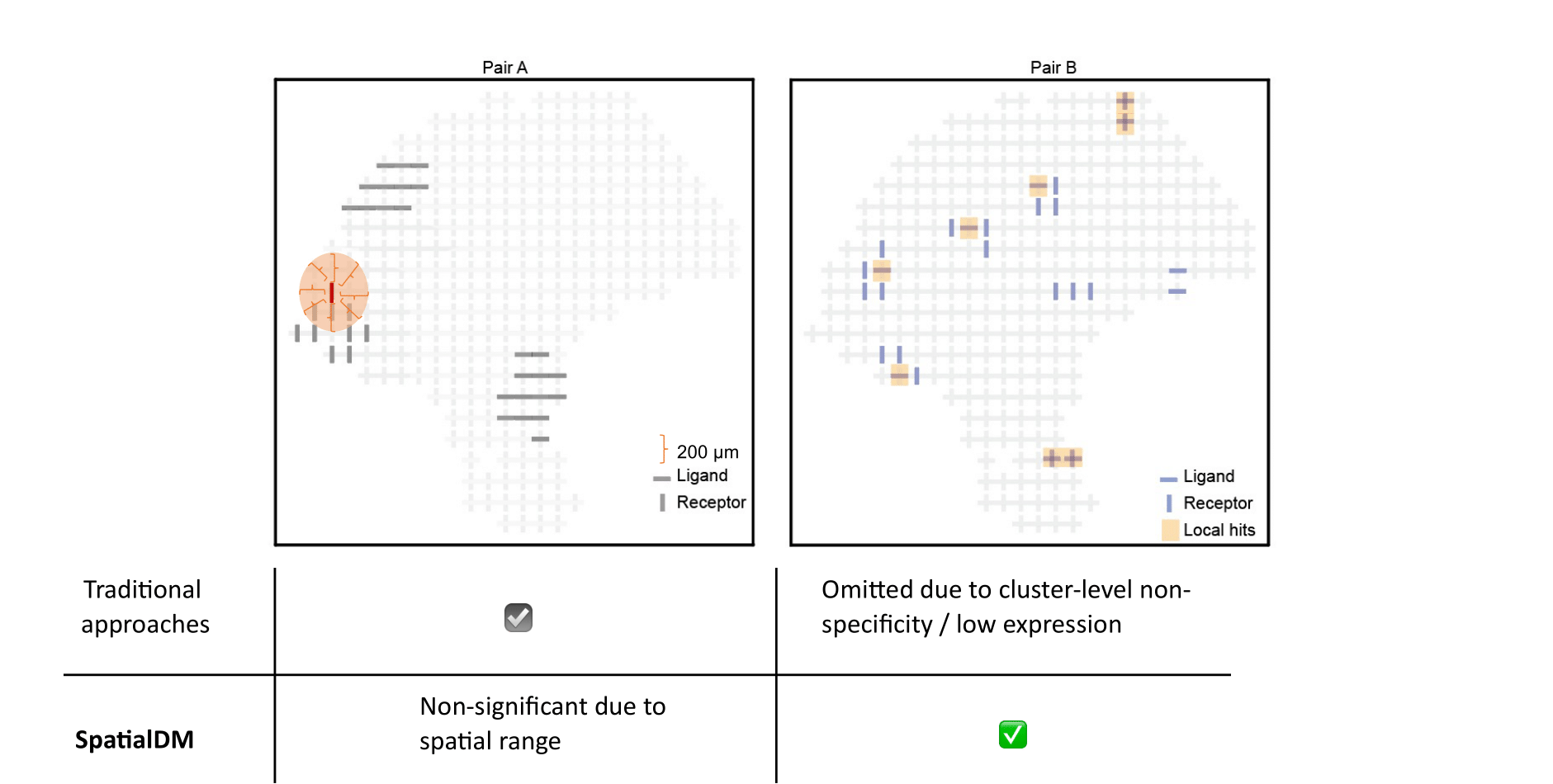
Uniquely, SpatialDM can distinguish co-expressed ligand and receptor pairs from spatially separating pairs, and identify the spots of interaction.
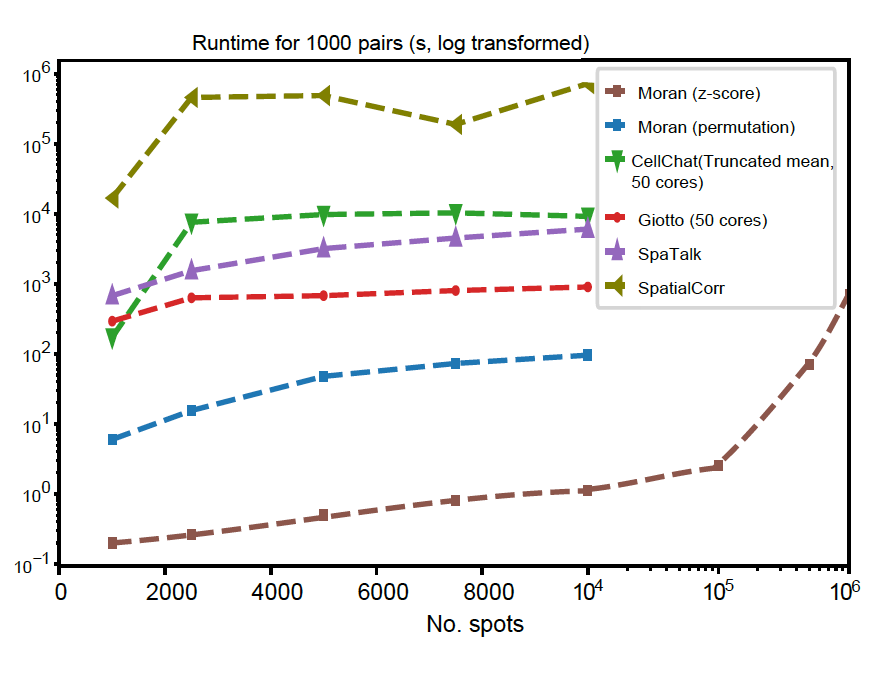
With the analytical testing method, SpatialDM is scalable to 1 million spots within 12 min with only one core.
It comprises two main steps: 1) global selection spatialdm_global to identify significantly interacting LR pairs; 2) local selection spatialdm_local to identify local spots for each interaction.
Installation
SpatialDM is available through PyPI. To install, type the following command line and add -U for updates:
pip install -U SpatialDMAlternatively, you can install from this GitHub repository for latest (often development) version by the following command line:
pip install -U git+https://github.com/StatBiomed/SpatialDMInstallation time: < 1 min
Quick example
Using the build-in melanoma dataset as an example, the following Python script will compute the p-value indicating whether a certain Ligand-Receptor is spatially co-expressed.
import spatialdm as sdm
adata = sdm.datasets.dataset.melanoma()
sdm.weight_matrix(adata, l=1.2, cutoff=0.2, single_cell=False) # weight_matrix by rbf kernel
sdm.extract_lr(adata, 'human', min_cell=3)      # find overlapping LRs from CellChatDB
sdm.spatialdm_global(adata, 1000, specified_ind=None, method='both', nproc=1)     # global Moran selection
sdm.sig_pairs(adata, method='permutation', fdr=True, threshold=0.1)     # select significant pairs
sdm.spatialdm_local(adata, n_perm=1000, method='both', specified_ind=None, nproc=1)     # local spot selection
sdm.sig_spots(adata, method='permutation', fdr=False, threshold=0.1)     # significant local spots

# visualize global and local pairs
import spatialdm.plottings as pl
pl.global_plot(adata, pairs=['SPP1_CD44'])
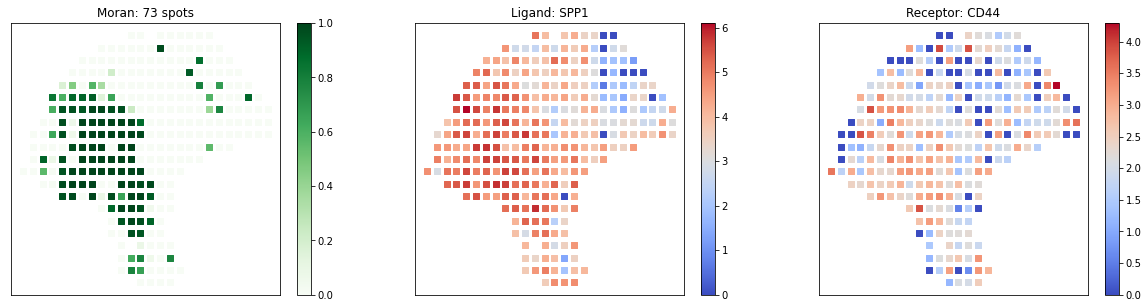
pl.plot_pairs(adata, ['SPP1_CD44'], marker='s')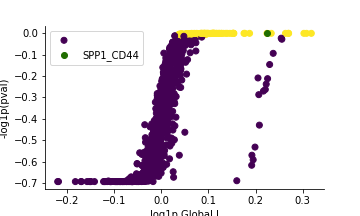
Detailed Manual
The full manual is at https://spatialdm.readthedocs.io, including:
References
2 maintainers


Metadata
2 maintainers
Release files for SpatialDM 0.3.1
For a detailed explanation of source distributions (sdists) and built distributions (wheels), please see the package formats documentation.
Source distribution (sdist)
| File | Size | Uploaded | Provenance | Actions |
|---|---|---|---|---|
| spatialdm-0.3.1.tar.gz | 5.7 MB | Without provenance | Details for spatialdm-0.3.1.tar.gz |
Release files / spatialdm-0.3.1.tar.gz
| Download URL | spatialdm-0.3.1.tar.gz |
|---|---|
| Size | 5.7 MB |
| Tags | Source |
|
SHA-256 checksum How to use checksums |
2445eeec8fca557cf9b86d0af03a6658287796a37dc3e7e9117461176cc0892f
|
|
BLAKE2b-256 checksum How to use checksums |
9f10792b87e5f9a6cbf8bbc04486231a54ca200b48744bd1cfaa2af531af38c9
|
| Upload date | |
|
Uploaded using Trusted Publishing? What is trusted publishing? |
No |
| Uploaded via |
twine/5.0.0 CPython/3.11.3
|
Security for SpatialDM 0.3.1
Provenance
Provenance describes where a file came from. On PyPI, provenance is shared via attestations, which provide a verifiable record of the build or publishing details. View details, limitations and caveats.
No provenance found
None of the files in this release were uploaded with provenance metadata.
A note on package security
PyPI is a repository for distributing packages, not a service for auditing them. While third-party security researchers and our staff do their best to detect and remove malicious packages, PyPI cannot guarantee the quality, security or suitability of any given package.
To learn more about protecting yourself from malicious actors, visit our package security documentation.














