
Spawn Point
Describe a 2D game in one sentence — get a playable, juicy Godot 4 game in seconds.





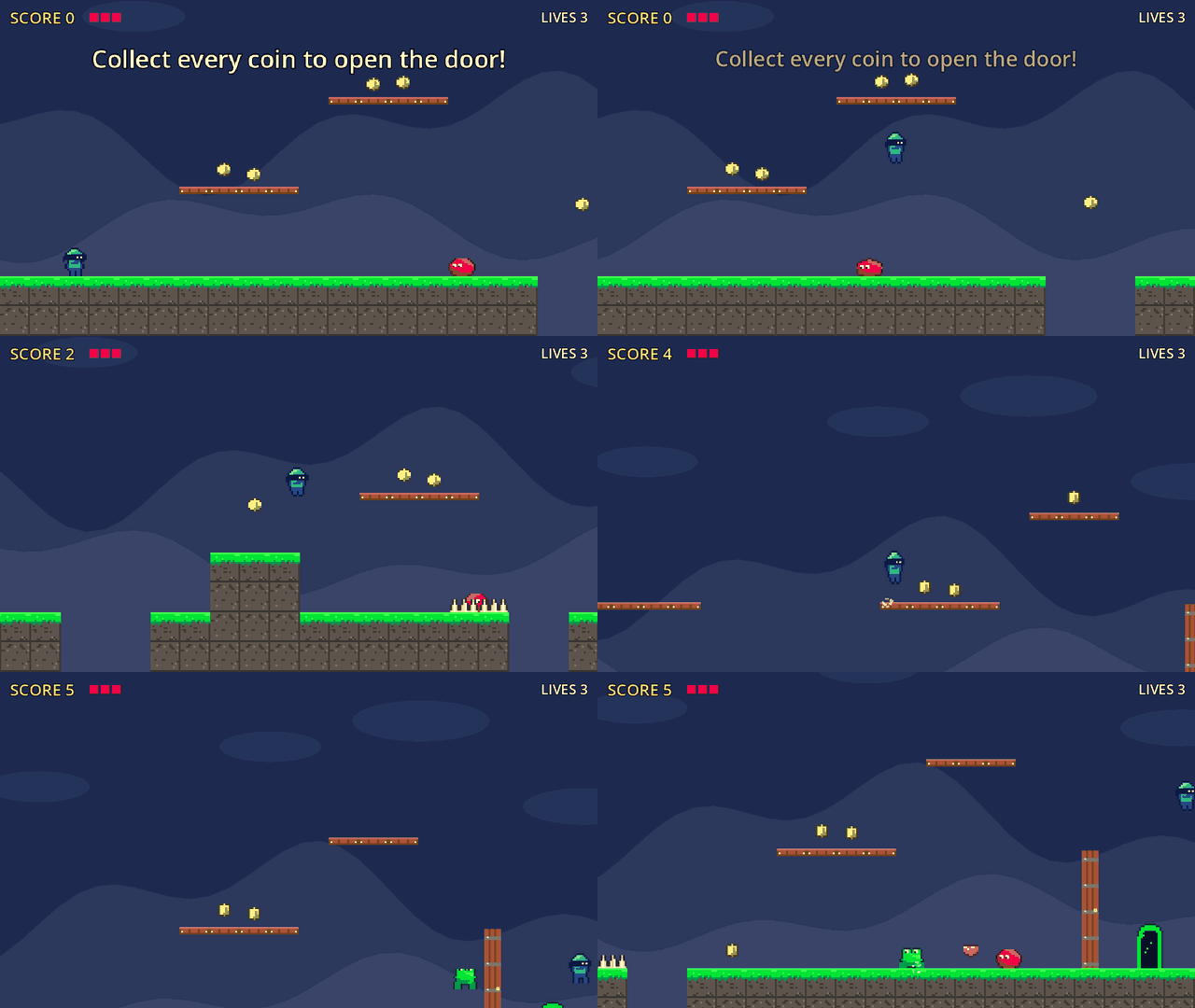
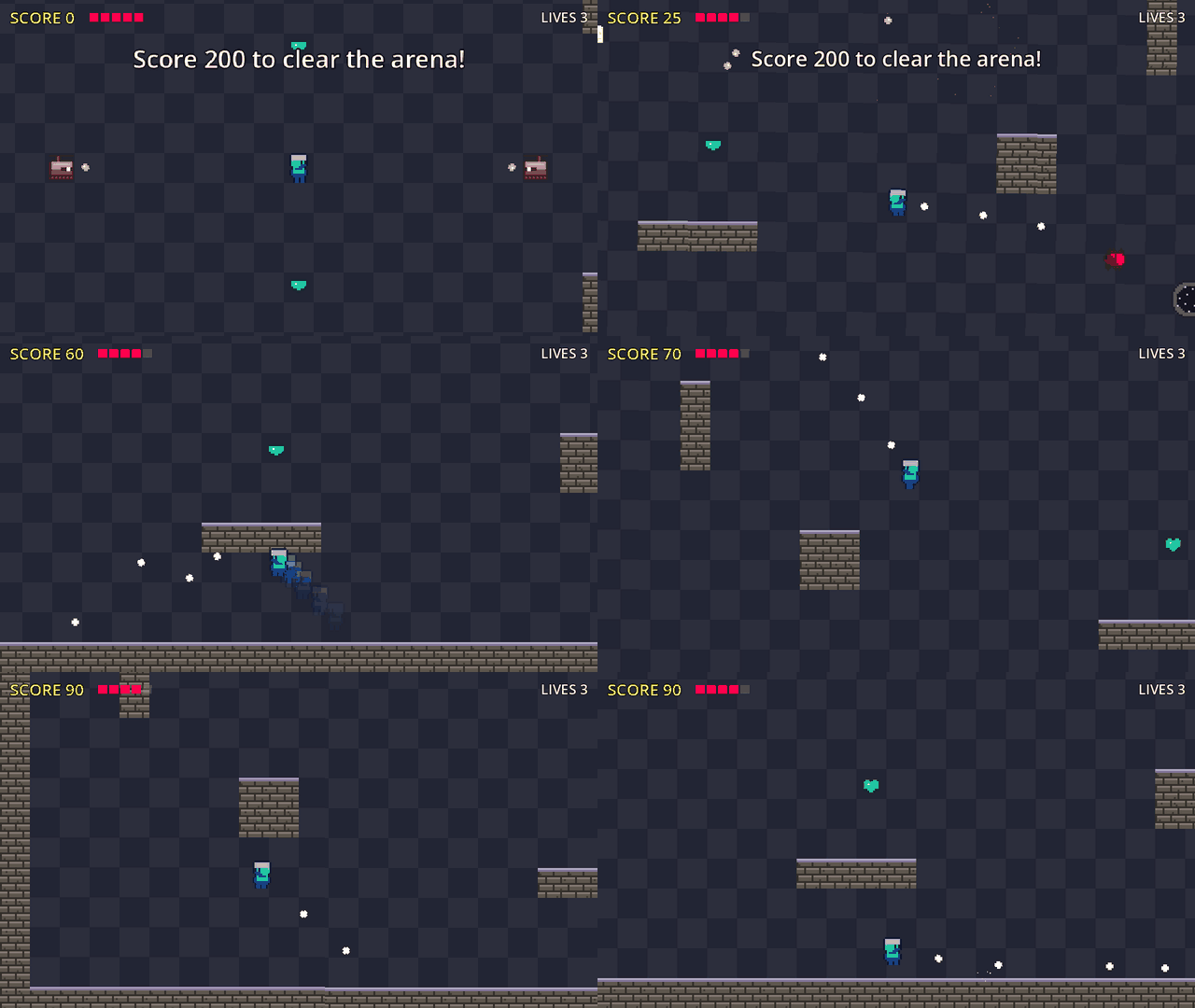
Both games are built from examples/pixel_hopper.json and
examples/pixel_arena.json: generated sprites, collision traced from pixels, juice on by
default. Recorded with spawnpoint gif (autopilot).
▶ Play the demos in your browser: a Mario-style platformer, a ninja rescue, a dinosaur-egg bubble shooter, a survivor with level-ups and an arena shooter. No install needed.
Spawn Point is an open-source, autonomous game studio that runs on your own machine. Instead of asking an LLM to type hundreds of lines of GDScript (slow, expensive, and easy to break with Godot 3/4 mix-ups), the LLM assembles pre-tested components like LEGO, places them on an ASCII map, and wires gameplay with declarative rules. A deterministic compiler validates everything and lets Godot itself write the scenes.
graph.json ──► validate (Python) ──► build scenes (Godot headless) ──► smoke-run ──► playable project
               ~1 ms, LLM-friendly       ~2 s                            ~0.3 s
               error messages
| Typical LLM-writes-code agents | Spawn Point | |
|---|---|---|
| How code is produced | GDScript generated from scratch | Components + JSON graph |
| Time to a playable build | minutes to hours | ~3 seconds |
| Game feel | none by default | coyote time, jump buffer, squash & stretch, hit-stop, screen shake, particles, SFX — on by default |
| Hitboxes | drift from visuals | derived from the same shape as the visual |
| Failure mode | crashes, syntax errors | structured diagnostics before Godot runs |
Install
Requirements: Python ≥ 3.10, Godot 4.6 on your PATH (godot4 or
godot, or set GODOT_BIN), and for the LLM features one of: a 12 GB NVIDIA GPU with Docker (vLLM, fastest),
Ollama on any machine (Mac, AMD, or CPU), or any OpenAI-compatible API.
pip install spawnpoint-studio
spawnpoint llm up                      # SpawnPoint-Coder-7B: vLLM on NVIDIA, otherwise Ollama (or set SPAWNPOINT_LLM_*)
spawnpoint create "a ninja platformer where you collect stars"
No GPU? Play the demos in your browser, or build the hand-written examples locally, no LLM needed:
spawnpoint examples copy pixel_hopper && spawnpoint build pixel_hopper.json --run
Spawn Point Studio (web cockpit)
spawnpoint studio # opens http://localhost:8070 — games live in ./out
A local "studio floor" around the running game — no terminal needed:
- Projects: every game in the workspace; New game from a prompt (optionally with the playtester and the creative pass). Progress streams live while the layers land.
- Arcade: the web build in the middle, reloading by itself after every change. Right-click an enemy or item in the game to select it, then just say what to change: "double its health and make it shoot fireballs" — the LLM returns a patch scoped to that entity, the compiler checks it (with repair rounds), missing projectiles are created, and the game reloads.
- Designer: the brief, rules, tweak history, studio edits and tuning. Artist: every sprite sheet. Developer: every entity → component → parameter as a typed input with the manifest's ranges; editing one rebuilds the game (no LLM needed). QA: run the playtester or run + tune, with the stats table and the death heatmap.
Edits are stored as overrides in studio.json and survive later tweaks; they win over the tuner.
Standard library only on the server, one HTML/JS page on the client, Server-Sent Events for progress.
Make a game from a sentence
spawnpoint llm up                     # SpawnPoint-Coder-7B: vLLM (~11 GB VRAM) or Ollama — or any OpenAI-compatible API
spawnpoint create "a ninja platformer where you collect stars"
Design:
  “Ninja Star Dash” — platformer, palette candy, goal collect_all, short, difficulty 2
  player: double_jump, stomp; jump 4.0 tiles; speed fast; feel floaty; juice subtle
  enemies: 4x Goblin (walker), 2x Spider (hopper); pickups: 10x Star; hazards: spikes
  [L0 core loop] ok in 5.5s (build 3.1s, web 2.4s)
  ▶ playing at http://localhost:8060/  (the page reloads as layers land)
  [L1 goals & enemies] ok in 5.1s
  [L2 feel & polish] ok in 5.1s
Done in 25.7s (design 10.0s; LLM 2 call(s), 977 prompt + 256 completion tokens).
The browser opens on the first playable layer and reloads as the next ones land. Then iterate:
spawnpoint tweak out/ninja-star-dash "jump 20% higher and add a dash, night colors"
#   palette: "candy" -> "night"
#   player.abilities: ["double_jump", "stomp"] -> ["double_jump", "stomp", "dash"]
#   player.jump_tiles: 4.0 -> 4.8
Only what you asked for changes, and the level layout is kept. Prompts can be in any language (non-English prompts are translated first). How it works:
- Design — the LLM fills a small, enumerated GameBrief (genre, palette, abilities, enemy archetypes, pickups, goal, feel…) using guided JSON decoding, so even a 7B model cannot produce malformed output. A normalizer repairs typical small-model mistakes (plural names, archetypes that don't exist in the genre, impossible goals).
- Assemble — deterministic: archetypes become tuned component bundles, goals become rules, levels are generated (platformer chunks tagged with the jump they need; top-down arenas whose floor is always connected) and re-seeded until the compiler finds everything reachable.
- Layers — L0 core movement → L1 enemies, pickups, goal → L2 feel & juice; each one is compiled, exported to the web and live-reloaded.
- Creative pass (
--creative) — the LLM proposes a small graph patch (parameters, rules); the compiler's diagnostics drive up to two repair rounds; if it still fails, it is dropped.
The model. SpawnPoint-Coder-7B is a 7B model
fine-tuned to generate Godot 4 games through this pipeline: it writes the game design, tweaks and entity
edits as strict JSON, and the compiler turns that into Godot scenes and GDScript. It runs on a single 12 GB
GPU (AWQ 4-bit). v2 on 30 human-written game ideas (English and Vietnamese): 87% fully right (v1: 73%),
97% of checks passed; on held-out tasks: briefs 88% exact (v1: 36%), Vietnamese → English 97% (v1: 52%),
tweaks 98%, entity edits 91%. It is tuned for 2D platformers and 2D top-down games only; other genres
are no better than a general 7B coder. spawnpoint llm up downloads and serves it: the AWQ build on vLLM when
Docker and an NVIDIA GPU are present, otherwise the GGUF build
(Q4_K_M, ~4.7 GB) in Ollama. Force one with --backend vllm|ollama.
LLM settings: SPAWNPOINT_LLM_BASE_URL (default: vLLM at http://localhost:8000/v1, or Ollama at
http://localhost:11434/v1 when only Ollama answers), SPAWNPOINT_LLM_MODEL (default: SpawnPoint-Coder if the
server has it, else its first model), SPAWNPOINT_LLM_API_KEY.
Web builds need the Godot web export templates (Editor → Manage Export Templates, or unpack
web_*.zip from the official .tpz into ~/.local/share/godot/export_templates/<version>/);
use --no-web to skip and play natively with spawnpoint run.
Sprites: generated or your own
Layer 2 replaces placeholder shapes with procedural pixel-art sprites — no assets, no GPU. The
kind follows the entity (Goblin → humanoid, FireBat → flyer, LaserBot → robot, Crystal → gem…)
and details follow the name (Ninja → mask, Fox → ears and tail, Spider → legs). Every sprite has
idle / run / jump / fall / hurt animations driven automatically by an Animator component.
Collision comes from the pixels. Hitboxes, hurtboxes, pickups, hazards and static bodies use the
sprite's traced outline (CollisionPolygon2D); moving bodies keep a smooth capsule/circle fitted to
the sprite's opaque bounds, so characters never snag on tile seams.
spawnpoint sprites kinds                                          # hero, slime, hopper, flyer, robot, ...
spawnpoint sprites generate hero --name Knight --color "#c2c3c7"  # assets/sprites/Knight.sprite.json
spawnpoint sprites import hero.png --grid 32x32 --anim idle=0-3 --anim run=4-9
spawnpoint sprites import sheet.png --rows idle,run,jump           # auto-sliced by transparent gutters
spawnpoint sprites import kenney_frames/                           # idle_0.png, walk_1.png, ...
spawnpoint sprites preview assets/sprites/Knight.sprite.json       # contact sheet + collision outline
Record a clip of any built game to share it (a window opens for a few seconds; autopilot plays):
spawnpoint gif out/pixel-hopper -o demo.gif --seconds 8 --fps 20 --width 640
AI art (optional plug-in). Point Spawn Point at an image model and layer 2 asks it for the look of each entity, then makes it game-ready: flat background removed, cropped and fitted to the kind's pixel size, a 16-color palette, animations synthesized from the single frame, collision traced from the pixels. Results are cached by prompt; if the provider is down, a generated sprite is used instead.
export SPAWNPOINT_IMAGE_PROVIDER=a1111  SPAWNPOINT_IMAGE_URL=http://localhost:7860   # Stable Diffusion WebUI
# or: SPAWNPOINT_IMAGE_PROVIDER=openai SPAWNPOINT_IMAGE_URL=https://api.openai.com/v1 SPAWNPOINT_IMAGE_API_KEY=...
spawnpoint create "a knight platformer in a haunted castle" --ai-art
In a graph: "sprite": {"ai": {"prompt": "a tiny knight in silver armor", "kind": "hero"}}.
Use one in a graph with "sprite": "assets/sprites/Knight.sprite.json" (relative to the graph file)
or "sprite": {"generate": {"kind": "slime", "color": "#ff004d"}} — see examples/pixel_hopper.json.
When an entity has a sprite and no explicit shape, its collision size comes from the drawing.
Playtesting: bots find what's unfair, then fix it
spawnpoint playtest out/pixel-hopper --tune
  before:
    novice   won 1/3  deaths 5   (Spikes 4, Frog 1)  missed jumps 3/100  pickups 69%
    average  won 1/3  deaths 2   (Spikes 2)          missed jumps 3/92   pickups 92%
    expert   won 3/3  deaths 3   (fall 3)            missed jumps 0/43   pickups 100%
  round 1 (kept, score 0.8083 -> 0.475):
    Player.Hurtbox.size_scale = 0.75 — Spikes caused 6/7 deaths
    Player.Health.max_health = 4 — novice bots won only 1/3
  after:
    average  won 2/3  deaths 2   (Spikes 1, Slime 1)
Three bot skill levels (novice: slow reactions and late jumps; average; expert) press the same keys a person would, so coyote time, jump buffering and knockback are tested for real. They navigate with a jump-aware path planner over the tile map, so a failure means the level is hard — not that the bot is lost. Runs are headless and seeded: 9 runs of up to a minute each take a few seconds.
- Telemetry: deaths with cause (
fall,Spikes,Slime,EnemyBullet…) and position, missed jumps (pressed after coyote time ran out), stuck spots, pickups, targets the bots gave up on. - Report:
playtest/report.md,report.jsonandheatmap.png(deaths colored by cause). - Tuning (
--tune): bounded rules (late jumps → more coyote time; one enemy dominates → it slows down; spikes dominate → a more forgiving hurtbox; still too hard → more health…), targets set by the game's difficulty. Each round is rebuilt and re-tested and kept only if it gets closer to the targets. Studio games store the result instudio.json, so later tweaks keep it;spawnpoint create "..." --playtestdoes all of this automatically after layer 2.
Collecting fine-tuning data (opt-in, local only)
spawnpoint create "..." --record        # or export SPAWNPOINT_RECORD=1 for every create/tweak
spawnpoint dataset stats                # records per task, accepted, corrected by the pipeline
Each LLM call is appended to ~/.local/share/spawnpoint/dataset/<date>.jsonl (override with
SPAWNPOINT_DATASET_DIR) with the exact messages, the model's raw answer, and the target the
pipeline actually used — the normalized brief, or the patch the compiler accepted — plus notes,
compiler errors, accepted and corrected. Training on messages → target teaches the model to
stop making the mistakes the normalizer and compiler had to fix (roadmap item 7). Nothing is uploaded.
Quick start (hand-written graphs)
spawnpoint examples list
spawnpoint examples copy coin_hopper && spawnpoint build coin_hopper.json --run   # platformer
spawnpoint examples copy neon_arena && spawnpoint build neon_arena.json --run     # top-down shooter
Controls: move WASD / arrows, jump Space / Z / W, dash Shift / C, shoot X / J / left mouse, restart R.
The output in out/<game>/ is a normal Godot project. Open project.godot in the editor and keep
developing; the component library is copied into addons/spawn_point/.
A game graph
{
  "name": "Coin Hopper",
  "genre": "platformer",
  "entities": {
    "Player": {
      "shape": { "type": "capsule", "size": [22, 34] },
      "components": { "PlatformerMovement": { "air_jumps": 1 }, "PlayerInput": {},
                      "Health": { "max_health": 3 }, "Hurtbox": {}, "Stomp": {} }
    },
    "Slime": {
      "components": { "PlatformerMovement": { "max_speed": 60 }, "PatrolAI": {},
                      "Health": { "max_health": 1 }, "Hurtbox": {}, "Hitbox": {} }
    },
    "Coin": { "body": "area", "shape": { "type": "circle", "size": [14, 14] },
              "components": { "Collectible": { "score": 1 } } },
    "Exit": { "body": "area", "components": { "TriggerZone": {} } }
  },
  "level": {
    "map": ["...........C......",
            "......=====.......",
            ".P.......C....S..E",
            "##################"],
    "legend": { "#": "solid", "=": "oneway", "P": "Player", "S": "Slime", "C": "Coin", "E": "Exit" }
  },
  "rules": [
    { "on": "Exit.triggered", "if": "count('Coin') == 0", "do": ["win()"] },
    { "on": "Slime.died", "do": ["add_score(5)"] }
  ]
}
- Entities are a body (
character/static/area), a placeholdershape(rect,circle,capsule,triangle,spikes,none) and components with parameters. Colors default from the entity's role; collision shapes always match the visual. - Level is an ASCII map.
solidandonewayare tiles; any other legend value is an entity. - Rules:
onan event (Entity.signal,Entity.Component.signal,GameState.score_changed,Game.ready…), optionalifexpression,doactions (win(),add_score(n),Door.open(),spawn("Slime"),shake(0.5),message("Hi")…). They compile to a readablerules.gd.
List every component with its parameters, signals and methods:
spawnpoint components          # human-readable
spawnpoint components --json   # the manifest an LLM can consume
Diagnostics built for self-correction
$ spawnpoint validate broken.json
  ✗ error[E_UNKNOWN_PARAM] entities.Player.components.Health.max_hp: Health has no parameter 'max_hp' (hint: Did you mean 'max_health'?)
  ✗ error[E_RULE_DO] rules[0].do[1]: Door has no method 'opne' (hint: Did you mean 'open'?)
  ! warning[W_UNREACHABLE] level.map: Coin at (44,2) looks unreachable (jump ≈ 3 tiles up, 4 across)
--json prints the same as {severity, code, path, message, hint} objects. Builds also run a
headless smoke test (spawn, scripted input, crash detection) and report E_RUNTIME errors.
Components
| Category | Components |
|---|---|
| Movement | PlatformerMovement (coyote time, jump buffer, variable jump, apex hang, dash, double jump), TopDownMovement (accel/friction, dash) |
| Controllers | PlayerInput, PatrolAI, ChaseAI, Aim |
| Combat | Health, Hitbox, Hurtbox, Stomp, Weapon, Projectile |
| World | Collectible, TriggerZone, Spawner (ramping waves, spawns around the player), Gate |
| Progression | Experience (XP and levels), XpOrb (gems that fly to the player), LevelUpMenu (pause and pick one of three upgrades) |
| Game modes | BubbleBoard (a complete bubble shooter: bank shots, colour pops, falling clusters, a descending ceiling) |
| Feel | Juice — attached to every entity unless "juice": "none" |
Runtime autoloads: GameState (score, lives, variables, win/lose), World (spawning, rule
bindings), FX (hit-stop, shake, particles, floating text), Sfx (pooled sounds with pitch
variation). Sounds are synthesized at build time by a built-in sfxr port — no assets needed.
Repository layout
godot/                     Godot project hosting the component library and its tests
  addons/spawn_point/      components/, runtime/, tools/ (build, smoke, capture), manifest.json
  tests/                   headless GDScript tests
compiler/spawnpoint/       Python compiler: graph schema, analysis, rules codegen, sfx, CLI
compiler/spawnpoint/studio LLM orchestrator: brief, assembler, level generators, web export, browser check
compiler/spawnpoint/sprites SpriteSet format, pixel-art generator and tiles, importer, contour → collision, AI-art providers
compiler/spawnpoint/playtest bots, jump-aware planner, telemetry, heatmaps, tuner
compiler/spawnpoint/cockpit web studio: HTTP + SSE server and the single-page UI
compiler/tests/            pytest (includes end-to-end builds and the GDScript suite)
examples/                  example graphs
scripts/                   helper scripts (local LLM)
docs/media/                README GIFs
Development
git clone https://github.com/leluong141996-dev/Spawn-Point && cd Spawn-Point
pip install -e ".[dev]"
pytest                      # everything: compiler, studio, end-to-end builds, web + browser, GDScript suite
pytest -m "not llm"         # without the live-LLM tests
spawnpoint manifest         # regenerate manifest.json after changing a component
godot4 --headless --path godot --fixed-fps 60 res://tests/run_tests.tscn   # GDScript suite only
spawnpoint demo -o site builds the browser demo site: the showcase graphs in examples/, one shared Godot
engine, each game checked in headless Chrome. The Pages workflow publishes it on every push.
Adding a component: create godot/addons/spawn_point/components/<name>_component.gd following the
contract (typed @exports with ranges, SP_NAME / SP_HOSTS / SP_REQUIRES / SP_CATEGORY
constants, ## docs on everything public), add tests in godot/tests/, then run spawnpoint manifest.
Contributions are welcome: open an issue to discuss a bigger change first, keep pytest -m "not llm"
green, and add a test with every fix. CI runs the full suite (with Godot) on every push and pull request.
Roadmap
- ✅ Component library with juice
- ✅ Graph compiler (validation, rules, levels, SFX, smoke test)
- ✅ Studio orchestrator — prompt → brief → layered builds, web export with live reload, tweaks, creative pass
- ✅ Asset pipeline — procedural pixel-art sprites and tiles, sheet/folder import with auto-slicing, outline →
CollisionPolygon2D, automatic animation, AI-art provider plug-in - ✅ Playtester — skill-profiled bots with a jump-aware planner, telemetry, death heatmaps, bounded auto-tuning
- ✅ Web cockpit —
spawnpoint studio: live arcade, right-click-to-edit with the LLM, parameter desk, sprite gallery, playtest desk - ✅ SpawnPoint-Coder-7B — a fine-tuned 7B model (QLoRA, trainable and servable on a
single 12 GB consumer GPU such as an RTX 3060) specialised in briefs, tweaks and graph patches, so
the whole studio runs well offline for free. The compiler acts as the data filter and the judge:
every training example must compile, and evaluation measures first-try validity, how often the
normalizer has to repair output, and whether tweaks change only what was asked.
Hosted providers (Claude, OpenAI, any OpenAI-compatible API) stay supported via
SPAWNPOINT_LLM_*.
License
MIT
1 maintainer

Metadata
1 maintainer
Release files for spawnpoint-studio 0.2.0
For a detailed explanation of source distributions (sdists) and built distributions (wheels), please see the package formats documentation.
Source distribution (sdist)
| File | Size | Uploaded | |
|---|---|---|---|
| spawnpoint_studio-0.2.0.tar.gz | 222.6 kB | Details |
Built distribution (wheel)
| File | Interpreter | ABI | Platform | Reset |
|---|---|---|---|---|
| spawnpoint_studio-0.2.0-py3-none-any.whl | Python 3 | none | any | Details |
Total release size: 489.7 kB
Release files / spawnpoint_studio-0.2.0.tar.gz
| Download URL | spawnpoint_studio-0.2.0.tar.gz |
|---|---|
| Size | 222.6 kB |
| Tags | Source |
|
SHA-256 checksum How to use checksums |
fc9236a7ba60fa36238891fdbdd277e55430935ebfbc59624b4e394355aab5ce
|
|
BLAKE2b-256 checksum How to use checksums |
012f192dd26c3a746f67704b05c7f2839b332f606217588feeccf9451a277f3e
|
| Upload date | |
|
Uploaded using Trusted Publishing? What is trusted publishing? |
Yes |
| Uploaded via |
twine/7.0.0 CPython/3.13.14
|
Provenance
Provenance describes where a file came from. On PyPI, provenance is shared via attestations, which provide a verifiable record of the build or publishing details. View details, limitations and caveats.


PyPI Publish Attestation
PyPI verified that this artifact, at this checksum, originated from the publisher listed below.
Signed by GitHub Actions, verified by PyPI on Oct 11, 2026.
Transparency logRelease files / spawnpoint_studio-0.2.0-py3-none-any.whl
| Download URL | spawnpoint_studio-0.2.0-py3-none-any.whl |
|---|---|
| Size | 267.1 kB |
| Tags | Python 3 |
|
SHA-256 checksum How to use checksums |
14c5e0aa1bc4a1b385ad89898f38a83f03413a80417472eb688ee0a501de0a37
|
|
BLAKE2b-256 checksum How to use checksums |
82cbbeef1cd44961f76f7d9d0790fb2759e9b541be4f2d436ba5baaa0bc9f1b9
|
| Upload date | |
|
Uploaded using Trusted Publishing? What is trusted publishing? |
Yes |
| Uploaded via |
twine/7.0.0 CPython/3.13.14
|
Provenance
Provenance describes where a file came from. On PyPI, provenance is shared via attestations, which provide a verifiable record of the build or publishing details. View details, limitations and caveats.
PyPI Publish Attestation
PyPI verified that this artifact, at this checksum, originated from the publisher listed below.
Signed by GitHub Actions, verified by PyPI on Oct 11, 2026.
Transparency log













