
speakerjoin
English | 한국어


Join a speech-to-text result and a separate speaker diarization result into speaker-labelled transcripts and subtitles (SRT, WebVTT, JSON, Markdown, text), and measure how trustworthy the alignment is. Pure Python standard library, no runtime dependencies, and it works on files, so you need no audio, model or API key.
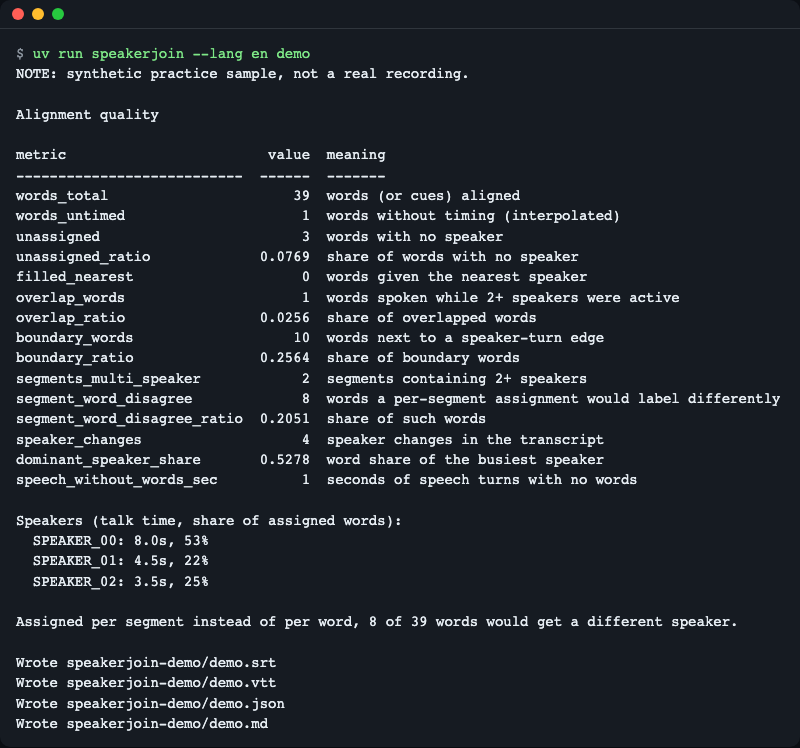
The built-in demo merges a synthetic meeting and prints the quality numbers: 3 of 39 words got no speaker, and 8 words would have a different speaker if you assigned speakers per segment instead of per word.
Install
uv add git+https://github.com/LeeGyeongPil/speakerjoin
Or use it from a clone without installing it into a project:
git clone https://github.com/LeeGyeongPil/speakerjoin
cd speakerjoin
uv run speakerjoin demo
Needs Python 3.10 or newer. Runtime dependencies: none. To install uv: curl -LsSf https://astral.sh/uv/install.sh | sh.
Quick start
Merge the bundled synthetic sample (a faster-whisper style transcript and an RTTM speaker file) and print who said what:
from importlib.resources import files

import speakerjoin as sj

samples = files("speakerjoin").joinpath("samples")
transcript = sj.load_transcript(
    samples.joinpath("meeting.whisper.json").read_text(encoding="utf-8")
)
diarization = sj.load_diarization(samples.joinpath("meeting.rttm").read_text(encoding="utf-8"))

result = sj.merge(transcript, diarization)
print(result.report.words_total, result.report.unassigned, result.report.segment_word_disagree)
print(sj.to_text(result), end="")
39 3 8
SPEAKER_00: Welcome everyone to the weekly sync Next is Bob
SPEAKER_01: Thanks Alice I have two updates Budget is
SPEAKER_02: fine wait
UNKNOWN: no
SPEAKER_00: okay go Let us start with the roadmap review now
SPEAKER_02: Quick question about the 2027 deadline please
UNKNOWN: Thanks all
The first line reads: 39 words, 3 without a speaker, 8 whose speaker would change under per-segment assignment. UNKNOWN marks words that fall outside every speaker turn.
The same thing from the command line, writing a subtitle file with renamed speakers:
uv run speakerjoin merge src/speakerjoin/samples/meeting.whisper.json \
  --diar src/speakerjoin/samples/meeting.rttm -o out.vtt \
  --speaker-map SPEAKER_00=Alice --speaker-map SPEAKER_01=Bob
39 words, 7 utterances, unassigned 3.
The summary line goes to stderr; out.vtt starts like this:
WEBVTT

00:00:00.000 --> 00:00:02.900
<v Alice>Welcome everyone to the weekly sync Next

00:00:02.900 --> 00:00:03.600
<v Alice>is Bob

00:00:03.800 --> 00:00:07.250
<v Bob>Thanks Alice I have two updates Budget is
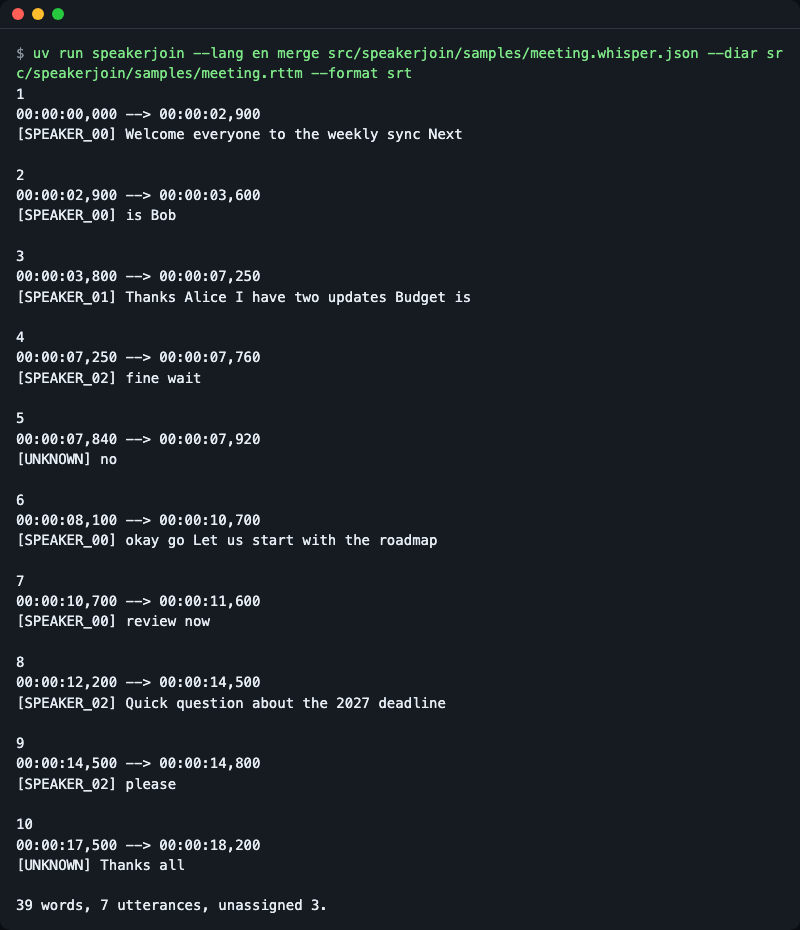
Speaker-labelled SRT. A new cue starts at every speaker change, even in the middle of one transcript segment ("Next" / "is Bob" stay with Alice, "Thanks Alice" starts Bob).
For meeting notes, --format md groups the words by speaker with a start time (uv run speakerjoin merge ... --format md):
# Transcript

**SPEAKER_00** [0:00:00]

Welcome everyone to the weekly sync Next is Bob

**SPEAKER_01** [0:00:03]

Thanks Alice I have two updates Budget is

**SPEAKER_02** [0:00:07]

fine wait
(The first lines of the output; the full text continues with the remaining speaker turns.)
Supported formats
Times are converted to seconds everywhere. Use --stt-format / --diar-format (or format= in Python) to force a format; otherwise it is detected from the shape of the data. speakerjoin formats lists the names.
Speech-to-text input (load_transcript)
| Format | Produced by | Required shape | Word times |
|---|---|---|---|
faster_whisper |
your own JSON dump of faster-whisper segments (it has no native JSON output) | {"segments": [{"start", "end", "text", "words": [{"word", "start", "end", "probability"}]}]} |
yes, if run with word_timestamps=True |
whisperx |
WhisperX result after alignment | same segments[].words[], with score instead of probability; unaligned words (e.g. numbers) may lack start and are interpolated |
yes |
openai_verbose |
OpenAI transcription with response_format="verbose_json" |
{"segments": [...], "words": [{"word", "start", "end"}]}; the words are a top-level list |
only if you request word timestamps |
openai_diarized |
OpenAI diarized transcription | {"segments": [{"start", "end", "text", "speaker"}]} |
no, segment level |
deepgram |
Deepgram response | results.channels[0].alternatives[0].words[] |
yes |
assemblyai |
AssemblyAI transcript JSON | utterances[] or top-level words[]; times in milliseconds |
yes |
srt, vtt |
any subtitle file | cues; WebVTT <v Name> voice tags are read as speakers |
no, one cue is one unit |
Diarization input (load_diarization)
| Format | Produced by | Required shape | Notes |
|---|---|---|---|
rttm |
pyannote (write_rttm), most diarization tools |
lines SPEAKER file 1 START DURATION <NA> <NA> speaker <NA> <NA> |
column 5 is the duration, not the end; pass --file-id when one file holds several recordings |
pyannoteai |
pyannoteAI job result | output.diarization[] and optionally output.exclusiveDiarization[], items {start, end, speaker} |
the exclusive list (no overlapping speakers) is preferred; --no-prefer-exclusive uses the plain one |
json |
anything you write yourself | a list, or {"turns": [...]}, of {"start": 0.0, "end": 2.2, "speaker": "alice"} |
seconds |
| Python objects | in code only | (start, end, speaker) tuples, or a pyannote Annotation |
Pitfall: if the speech-to-text file has no word times (an OpenAI verbose_json request without word timestamps, subtitles), unit="auto" silently assigns one speaker per segment. Mixed or fallback runs are recorded as effective_unit (word, segment or mixed) in the report JSON, and the CLI prints one line on stderr:
Note: no word timing found, so speakers were assigned per segment. Request word timestamps from your speech-to-text tool for word-level results.
(Output of speakerjoin merge on a verbose_json file without a words list and a plain json turn file.)
Producing inputs
Sketches for making the input files. They are not run by this repository's tests, need their own packages (and, for pyannote, a model download that can take minutes on a CPU), and may need adjusting to the versions you install.
faster-whisper, written to the JSON shape above (docs, checked 2026-11-14):
import json

from faster_whisper import WhisperModel

model = WhisperModel("small")
segments, _info = model.transcribe("meeting.wav", word_timestamps=True)
data = {
    "segments": [
        {
            "start": s.start,
            "end": s.end,
            "text": s.text,
            "words": [
                {"word": w.word, "start": w.start, "end": w.end, "probability": w.probability}
                for w in s.words
            ],
        }
        for s in segments
    ]
}
with open("meeting.whisper.json", "w", encoding="utf-8") as f:
    json.dump(data, f, ensure_ascii=False)
pyannote.audio, written as RTTM (docs, checked 2026-11-14). Version 4 returns an object whose exclusive_speaker_diarization has no overlaps and is the recommended input for joining; older versions return the Annotation directly, and load_diarization also accepts an Annotation:
from pyannote.audio import Pipeline

pipeline = Pipeline.from_pretrained("pyannote/speaker-diarization-community-1")
output = pipeline("meeting.wav")
with open("meeting.rttm", "w", encoding="utf-8") as f:
    output.exclusive_speaker_diarization.write_rttm(f)
OpenAI, with word timestamps requested so the result stays word level (API reference, checked 2026-11-14):
import json

from openai import OpenAI

client = OpenAI()
with open("meeting.wav", "rb") as audio:
    result = client.audio.transcriptions.create(
        model="whisper-1",
        file=audio,
        response_format="verbose_json",
        timestamp_granularities=["word", "segment"],
    )
with open("meeting.openai.json", "w", encoding="utf-8") as f:
    json.dump(result.model_dump(), f, ensure_ascii=False)
Then: uv run speakerjoin merge meeting.openai.json --diar meeting.rttm -o meeting.srt.
Core concepts
flowchart LR
    A[STT result<br/>words + times] --> C{merge}
    B[Diarization<br/>speaker turns] --> C
    C --> D[Speaker per word]
    D --> E[SRT / VTT / JSON / MD / TXT]
    D --> F[Quality report]
    F --> G[--fail-on thresholds]
- Transcript: what was said, with times. Segments hold words; some formats (SRT, VTT, OpenAI diarized JSON) have no word times, so the segment is the smallest unit.
- Diarization: who spoke when, as speaker turns. Turns of different speakers may overlap.
- Assignment: each word gets the speaker whose turns overlap it the most (
strategy="overlap"), or the speaker active at its midpoint ("midpoint"). Without word times it falls back to the whole segment (unit="auto"). - Quality report: numbers that tell you whether to trust the result. See the table below.
| Metric | Meaning |
|---|---|
unassigned_ratio |
share of words that no speaker turn covers |
overlap_ratio |
share of words spoken while two or more speakers were active |
boundary_ratio |
share of words whose start or end lies within tolerance (0.2 s) of a turn edge, where the label is most likely wrong |
segment_word_disagree |
words that would get a different speaker if the whole segment were assigned to one speaker |
speech_without_words_sec |
seconds of speaker turns where the STT produced no words |
Other fields are in the output of speakerjoin report (see the screenshot in the next section).
How assignment works
- Speaker turns are sorted by start time; words are visited in time order and only the turns active around each word are examined, so 20,000 words against 2,000 turns stays fast.
- A word with a zero length (some tools report
start == end) is widened tomin_word_dur(0.02 s) around its centre (flagzero_length), so it can still overlap a turn. - A word with no time at all is placed evenly between its neighbours (flag
interpolated) instead of being dropped. - The speaker with the largest summed overlap wins; ties go to the speaker whose turn came first. A word that no turn covers is
UNKNOWN(nullin JSON), or the nearest speaker withfill_nearest=True. - Without word times the whole segment is the unit.
How it differs from WhisperX
WhisperX has a similar function, assign_word_speakers (largest overlap per word, optional nearest fill; source checked 2026-11-14). speakerjoin is not a drop-in replacement; the differences are on the input and reporting side: it reads RTTM, pyannoteAI JSON, subtitles and other vendors' JSON directly instead of a pandas DataFrame and WhisperX's own result; it keeps words without a start time (interpolated) rather than leaving them without a speaker; it widens zero-length words; and it returns the numbers above. Where both apply the same "largest overlap" idea, results are expected to agree, but this repository does not test against WhisperX.
API
All names are importable from speakerjoin.
| Name | What it does | Main arguments | Returns |
|---|---|---|---|
load_transcript(src, *, format="auto") |
Read a speech-to-text result from a path, text, or parsed JSON dict | format: openai_verbose, openai_diarized, faster_whisper, whisperx, deepgram, assemblyai, srt, vtt |
Transcript |
load_diarization(src, *, format="auto", file_id=None, prefer_exclusive=True) |
Read speaker turns from a path, text, parsed JSON, (start, end, speaker) tuples, or a pyannote Annotation |
format: rttm, pyannoteai, json; file_id for multi-file RTTM |
Diarization |
merge(transcript, diarization, *, strategy="overlap", unit="auto", fill_nearest=False, tolerance=0.2, min_word_dur=0.02) |
Assign a speaker to every word and compute the report | strategy: overlap or midpoint; unit: auto, word, segment; fill_nearest gives uncovered words the nearest speaker |
MergeResult (words, utterances, report, options) |
to_srt, to_vtt, to_json, to_markdown, to_text |
Render a MergeResult |
speaker_map (rename speakers), max_chars=42, max_duration=7.0 (to_markdown also takes title) |
str |
check_thresholds(report, exprs) |
Evaluate expressions such as "unassigned_ratio>0.05" |
any scalar Report metric; operators > >= < <= |
list with one message per exceeded threshold (empty means all passed); ThresholdSyntaxError for a malformed expression or unknown metric |
detect_format(data, *, label=...) |
Name the format of parsed or text input | text or parsed JSON | format name |
Report |
The numeric report; to_dict() for JSON, metrics() for scalars |
||
Word, Segment, Transcript, Turn, Diarization, AssignedWord, Utterance, MergeResult |
Immutable dataclasses | ||
SpeakerJoinError |
Base class of every deliberate error | ||
UnknownFormatError, FormatError, ThresholdSyntaxError |
Unrecognized input shape, invalid content, malformed --fail-on expression |
merge raises ValueError for an unknown strategy or unit, a non-positive min_word_dur, or a negative tolerance.
Word flags in result.words[i].flags: unassigned, filled_nearest, overlap, boundary, interpolated (no start time, placed between neighbours), zero_length (widened to min_word_dur).
CLI
speakerjoin merge  STT --diar FILE [-o FILE] [--format srt|vtt|json|md|txt] [--report FILE]
speakerjoin report STT --diar FILE [--fail-on EXPR]... [--json]
speakerjoin demo   [--out DIR]
speakerjoin formats
merge and report also accept --stt-format, --diar-format, --file-id, --no-prefer-exclusive, --strategy, --unit, --fill-nearest, --tolerance, --min-word-dur; merge also takes --speaker-map OLD=NEW, --max-chars, --max-duration. Run speakerjoin merge --help for the full list. Exit codes: 0 ok, 1 a --fail-on threshold was exceeded, 2 invalid input or arguments.
Language
Display language: --lang en|ko, then the SPEAKERJOIN_LANG environment variable, then LC_ALL, LC_MESSAGES, LANG; anything that is not Korean falls back to English. JSON report keys are always English.
Usage examples
Fail a pipeline when alignment is poor
uv run speakerjoin report src/speakerjoin/samples/meeting.whisper.json \
  --diar src/speakerjoin/samples/meeting.rttm --fail-on "unassigned_ratio>0.05"
The quality table prints as in the screenshot below, then:
Threshold exceeded: unassigned_ratio=0.0769 > 0.05
and the exit code is 1 (the screenshot appends ; echo "exit code: $?" so the code is visible). With --fail-on "unassigned_ratio>0.5" it exits 0.
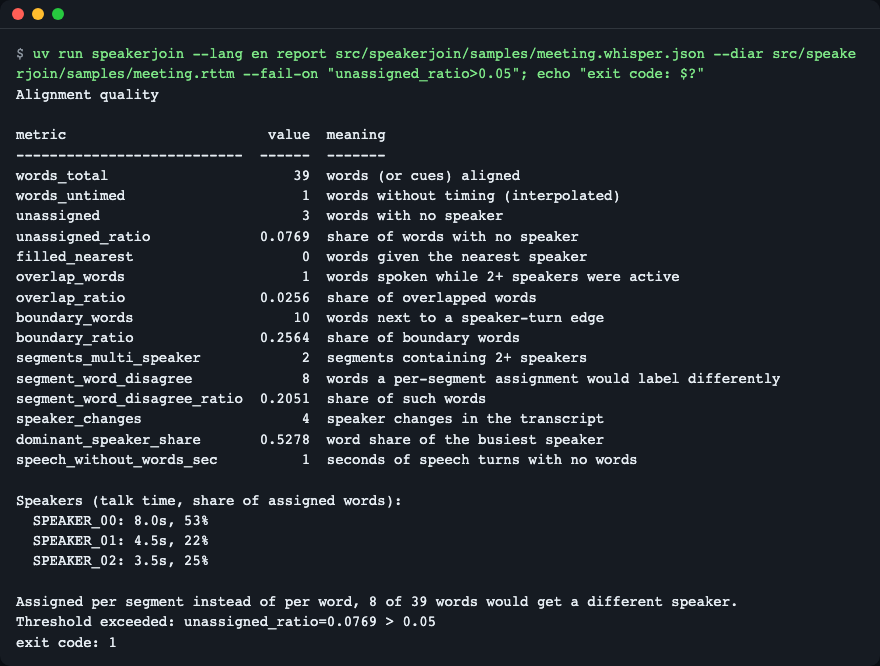
--fail-on accepts any scalar metric name and can be repeated; use it as a CI gate.
In-memory data: subtitles plus (start, end, speaker) tuples
import speakerjoin as sj

srt = """1
00:00:00,000 --> 00:00:02,000
Hello there.

2
00:00:02,500 --> 00:00:04,000
Hi, how are you?
"""
turns = [(0.0, 2.2, "alice"), (2.3, 4.2, "bob")]

result = sj.merge(sj.load_transcript(srt, format="srt"), sj.load_diarization(turns))
print(sj.to_text(result), end="")
print(sj.detect_format(srt))
alice: Hello there.
bob: Hi, how are you?
srt
A pyannote Annotation can be passed to load_diarization the same way; pyannote is never imported by this library.
Inspect words and flags
from importlib.resources import files

import speakerjoin as sj

s = files("speakerjoin").joinpath("samples")
result = sj.merge(
    sj.load_transcript(s.joinpath("meeting.whisper.json").read_text(encoding="utf-8")),
    sj.load_diarization(s.joinpath("meeting.rttm").read_text(encoding="utf-8")),
)
for w in result.words[:12]:
    print(f"{w.word.text.strip():10} {str(w.speaker):11} {sorted(w.flags)}")
print(result.report.to_dict()["word_share"])
Welcome    SPEAKER_00  ['boundary']
everyone   SPEAKER_00  []
to         SPEAKER_00  []
the        SPEAKER_00  []
weekly     SPEAKER_00  []
sync       SPEAKER_00  []
Next       SPEAKER_00  []
is         SPEAKER_00  []
Bob        SPEAKER_00  []
Thanks     SPEAKER_01  ['boundary']
Alice      SPEAKER_01  []
I          SPEAKER_01  []
{'SPEAKER_00': 0.527778, 'SPEAKER_01': 0.222222, 'SPEAKER_02': 0.25}
Unknown input
import speakerjoin as sj

try:
    sj.load_transcript({"hello": "world"})
except sj.UnknownFormatError as err:
    print(type(err).__name__, err.supported[:3])
UnknownFormatError ('openai_verbose', 'openai_diarized', 'faster_whisper')
The CLI prints a one-line error and exits 2 instead of a traceback.
When to use it
- Good fit: you already have an STT file and a diarization file and want speaker-labelled subtitles or a transcript, plus numbers that tell you where the join is shaky.
- Good fit: you want to stop copying the "assign word speakers" snippet from tutorials and writing a parser per format.
- Something else: to run the models themselves (recognition or diarization), use WhisperX, pyannote.audio or your STT vendor; speakerjoin only works on their output.
- Something else: to score diarization against reference labels (DER), use pyannote.metrics. speakerjoin's report needs no reference.
Limitations
- Deepgram and AssemblyAI word-to-segment grouping is a heuristic (punctuation, 1 s gaps, 40 words); AssemblyAI
utterancesare used when present. - Boundary and overlap decisions depend on timestamp accuracy (around 0.3 s); tune
tolerance. - For segment-level inputs (SRT, VTT, OpenAI diarized JSON) one subtitle line is one unit, so
segment_word_disagreeis 0. - The demo sample is synthetic and hand-written, not a real recording.
- The snippets under "Producing inputs" depend on third-party packages and are not tested here.
Acknowledgements
The largest-overlap idea follows WhisperX (BSD-2-Clause) and the pyannote project (MIT), and the pyannoteAI merge tutorial recommends exclusive diarization; this library contains no code from them. Sources: WhisperX, pyannote.audio, pyannoteAI tutorial (checked 2026-11-14).
Versioning
Semantic Versioning. While the version is 0.x, minor releases may change the API; changes are listed in CHANGELOG.md.
Development
uv sync
uv run pytest -q
uv run ruff check
uv build
License
MIT.
1 maintainer

Metadata
1 maintainer
Release files for speakerjoin 0.1.1
For a detailed explanation of source distributions (sdists) and built distributions (wheels), please see the package formats documentation.
Source distribution (sdist)
| File | Size | Uploaded | Provenance | Actions |
|---|---|---|---|---|
| speakerjoin-0.1.1.tar.gz | 43.3 kB | Without provenance | Details for speakerjoin-0.1.1.tar.gz |
Built distribution (wheel)
| File | Interpreter | ABI | Platform | Actions Reset |
|---|---|---|---|---|
| speakerjoin-0.1.1-py3-none-any.whl | Python 3 | none | any | Details for speakerjoin-0.1.1-py3-none-any.whl |
Total release size: 86.6 kB
Release files / speakerjoin-0.1.1.tar.gz
| Download URL | speakerjoin-0.1.1.tar.gz |
|---|---|
| Size | 43.3 kB |
| Tags | Source |
|
SHA-256 checksum How to use checksums |
b08613f359bc9f72339b18b7800b84512d93460fbb2721a698ae2fe674a8ff24
|
|
BLAKE2b-256 checksum How to use checksums |
842d2d4a9d4fabddc42dea057aeac4fe27305e198ec8965d2fa53789f523afb6
|
| Upload date | |
|
Uploaded using Trusted Publishing? What is trusted publishing? |
No |
| Uploaded via |
uv/0.13.6 {"installer":{"name":"uv","version":"0.13.6","subcommand":["publish"]},"python":null,"implementation":{"name":null,"version":null},"distro":{"name":"macOS","version":null,"id":null,"libc":null},"system":{"name":null,"release":null},"cpu":null,"openssl_version":null,"setuptools_version":null,"rustc_version":null,"ci":null}
|
Release files / speakerjoin-0.1.1-py3-none-any.whl
| Download URL | speakerjoin-0.1.1-py3-none-any.whl |
|---|---|
| Size | 43.3 kB |
| Tags | Python 3 |
|
SHA-256 checksum How to use checksums |
21837956502a55a0ce1546693c5f1173fe1a1b8b75926f80fb67548d6b78bbe4
|
|
BLAKE2b-256 checksum How to use checksums |
e52326cc1a6ec6b7ef045e394cb3aa3cc6cf75891ab7a6104cb722d765865fcd
|
| Upload date | |
|
Uploaded using Trusted Publishing? What is trusted publishing? |
No |
| Uploaded via |
uv/0.13.6 {"installer":{"name":"uv","version":"0.13.6","subcommand":["publish"]},"python":null,"implementation":{"name":null,"version":null},"distro":{"name":"macOS","version":null,"id":null,"libc":null},"system":{"name":null,"release":null},"cpu":null,"openssl_version":null,"setuptools_version":null,"rustc_version":null,"ci":null}
|
Security for speakerjoin 0.1.1
Provenance
Provenance describes where a file came from. On PyPI, provenance is shared via attestations, which provide a verifiable record of the build or publishing details. View details, limitations and caveats.
No provenance found
None of the files in this release were uploaded with provenance metadata.
A note on package security
PyPI is a repository for distributing packages, not a service for auditing them. While third-party security researchers and our staff do their best to detect and remove malicious packages, PyPI cannot guarantee the quality, security or suitability of any given package.
To learn more about protecting yourself from malicious actors, visit our package security documentation.














