







SPEARHEAD SEP-PACT tool
About
SEP-PACT (Solar Energetic Particle Analysis and Calculation Tool) analyses Solar Energetic Particle (SEP) events automatically, with the data of the High Energy Telescope (HET) of Solar Orbiter's Energetic Particle Detector (EPD). For every event and energy channel group, it computes the onset time, the peak flux and its time, and the fluence of electrons and protons.
Each quantity is calculated at several time resolutions and in the four viewing directions of HET (sun, asun, north, south), and the tool chooses one result per channel group: the onset of the finest resolution with reliable data (the earliest of its viewings), the highest peak flux of the viewings at that resolution, and the largest fluence of the resolutions in the viewing of the peak.
- Inputs: an event list (CSV file with the reference time of each event, or its data range and, optionally, its background window and the background windows of its particles and sensors), or date ranges set in the notebook, and the interplanetary shocks, by default the SODA shock list of Solar Orbiter, downloaded when the tool runs, with optionally a shock list file and shocks of your own.
- Outputs: one plot per event in
plots/, and the results inoutputs/results.csv: the chosen onset, peak flux and fluence of each event and channel group. Optionally, the event list with the times set in the notebook and the onset corrections, to use them again. - Notebook:
sep-pact.ipynb, the whole analysis: a form with all the parameters, then one cell per step, with the background window and end time of each event set over its data, and an event viewer to check the plot and results of each event and correct its onsets. - Package:
spearhead.sep_pact, the code of the analysis, also usable in scripts without the notebook.
Tested in Linux with Python 3.11, 3.12, 3.13 and 3.14.
How to install
Access online (JupyterHub)
You can access SEP-PACT online on the JupyterHub server of the SPEARHEAD project. All you need is a (free) GitHub account for verification. Access the tool by opening this link!
Install locally
- Install Python 3.11 or newer, e.g. with miniforge.
- Create a new virtual environment and activate it, e.g.
python -m venv venv_sep_pactandsource venv_sep_pact/bin/activate(on Windows,venv_sep_pact\Scripts\activate). - Install SEP-PACT from PyPI with the notebook dependencies:
pip install "spearhead-sep-pact[notebook]". - Download the notebook and its example files for the installed version into a new folder:
spearhead-sep-pact-notebooks sep-pact. - Open the notebook:
cd sep-pactandjupyter-lab sep-pact.ipynb.
Without the notebook, e.g. for scripts, pip install spearhead-sep-pact is enough (see the library guide).
Install from the repository
For the latest code, or for development:
- Clone the repository:
git clone https://github.com/spearhead-he/sep-pact.git, and open a terminal in thesep-pactfolder. - In a new virtual environment, install the package and the notebook dependencies:
pip install -r requirements.txt(the same aspip install -e ".[notebook]"). - Open the notebook:
jupyter-lab sep-pact.ipynb.
How to use
Quick start
Open sep-pact.ipynb and run all its cells with the defaults. They analyse the example event of 2021-11-01 (inputs/events_example.csv): the run takes about a minute, and downloads 25 MB of data (16 files) into data/. It writes the results of the five channel groups to outputs/results.csv and their plot to plots/event_020.png, the plot shown in Example output.
Steps
Open sep-pact.ipynb and run its cells in order:
tool = SEPPACT_notebook()
tool.parameters_form()   # all the parameters, in tabs
tool.run_data()          # reads the event list and downloads the data
tool.event_times()       # the background window and end time of each event
tool.run_analysis()      # onsets, spikes, peak flux and fluence
tool.event_viewer()      # the plot and results of each event, and onset corrections
tool.save_results()      # results.csv and the plots
- In the form, set the path of the event list (by default
inputs/events_example.csv) or the date ranges of the events, the event windows, the viewings, the resolutions, the energy channel groups and the parameters of the onset, peak flux and fluence calculations. - Run the steps: check the background windows and end times in the event times step, and the events in the event viewer, where the onsets can be corrected.
- Find the results in
outputs/results.csvand the plots inplots/.
The data are downloaded into data/ the first time. For lists of many events, the flux of the channel groups can be cached in intermediate_states/ (Data tab, Advanced), so that the loaded events are kept if the data step stops and later runs load them from there.
The user guide describes the parameters, the input files, the steps of the notebook and the results.
Example output
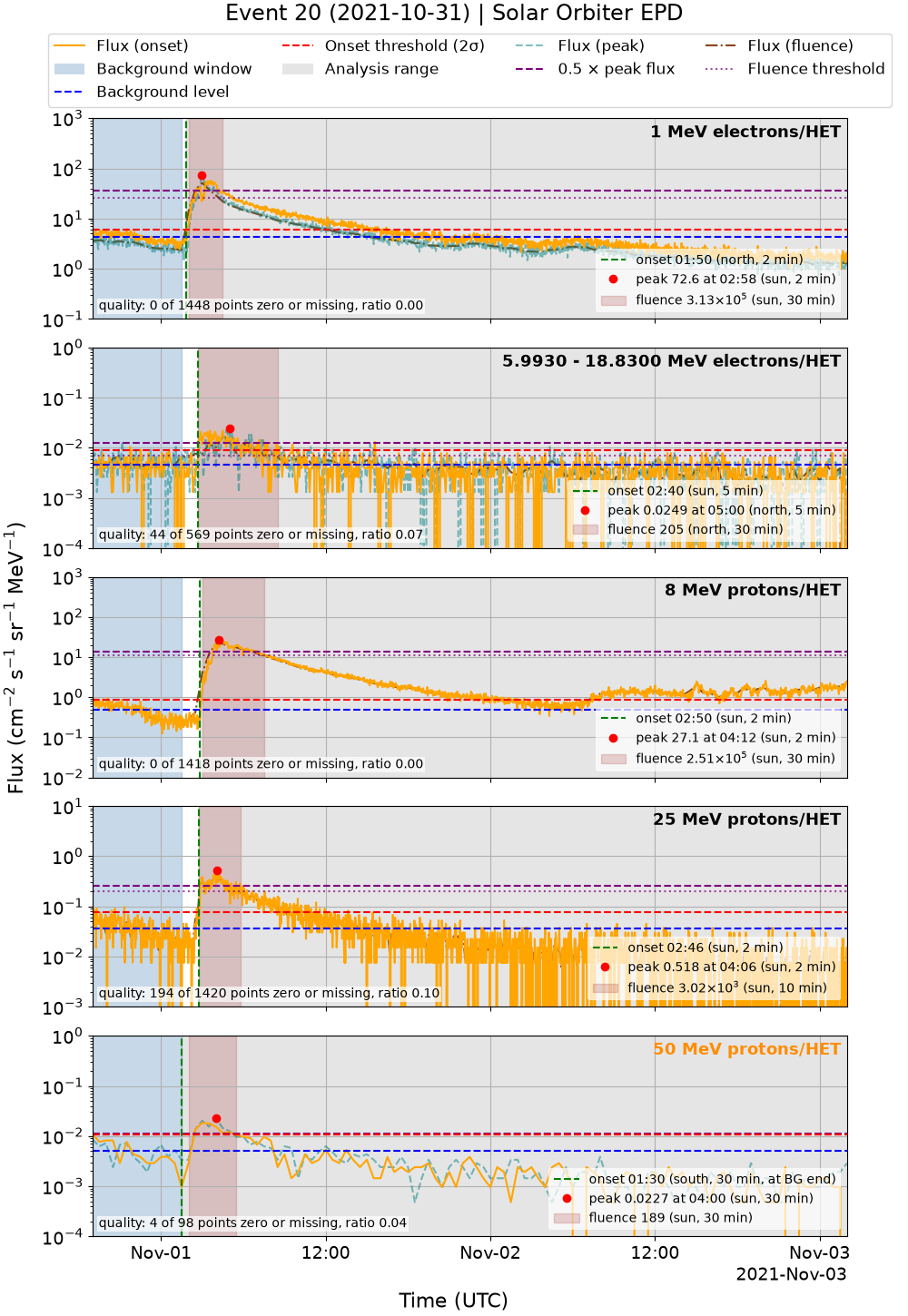
The plot of the example event (2021-11-01) has one panel per channel group: 1 MeV electrons, 5.99-18.83 MeV electrons, and 8, 25 and 50 MeV protons. Each panel shows the flux at the chosen resolution and viewing, with:
- the background window (blue-grey) and level (blue), and the onset threshold (red, dashed);
- the onset time (green line), calculated with the n-sigma method;
- the peak flux (red point);
- the fluence interval (brown), calculated following Jiggens et al. (2018);
- the interplanetary shocks of the SODA shock list (pink).
A red title marks a channel group without an onset, and an orange title one with its onset at the end of the background window. The user guide explains every element of the plot.
What's new in v1.0.0
- Install from PyPI:
pip install "spearhead-sep-pact[notebook]", thenspearhead-sep-pact-notebooksdownloads the notebook and its example files. See How to install. - Shocks: the shock list online, SODA by default or IRFU, a shock list file and shocks of your own, with the list of the shocks during the events, where shocks can be removed, and warnings for the events outside the lists. See Shocks.
- Background windows of particles and sensors: an event list or the event times step can give a particle, or a particle and sensor, its own background window. See Background windows of particles and sensors.
- Robust data step: an event whose data cannot be loaded is left out with its error instead of stopping the run, and an optional cache keeps the loaded events of long lists. Event lists separated by semicolons or tabs are read, and times in another format give a clear error.
- Plots for papers and presentations, with the results of each channel group in a legend inside its panel, and the event times plot at any resolution and viewing of the analysis. See Plots.
- Documentation: a Method section, the unit of each column of
results.csv, a quick start and How to cite.
The results change where the shocks of SODA differ from those of the former shock list: on a list of 212 Solar Orbiter events, 73 of the 1060 rows of results.csv, in 31 events. results.csv is written with 7 significant digits and with the resolutions in whole minutes. See the CHANGELOG for all the changes and how to upgrade.
Documentation
- User guide: the parameters, the input files and their formats, the steps of the notebook, and the results and plots.
- Library guide: using the package in scripts, its modules and their main functions.
- Development: the development installation, the tests and their commands, the baseline images and the continuous integration.
- Changelog: the changes of each version.
How to cite
If you use SEP-PACT in your work, please cite it with its DOI, 10.5281/zenodo.20157436, which always resolves to the latest version; the Zenodo page also gives the DOI of each version. For example:
Vasalos, G., Gieseler, J., & Papaioannou, A. SPEARHEAD SEP-PACT tool. Zenodo. https://doi.org/10.5281/zenodo.20157436
GitHub gives the same reference in other formats, e.g. BibTeX, under "Cite this repository" on the repository page, from CITATION.cff.
Contributing
Contributions to this tool are very much welcome and encouraged! Contributions can take the form of issues to report bugs and request new features or pull requests to submit new code.
If you don't have a GitHub account, you can sign-up for free here, or you can also reach out to us with feedback by sending an email to jan.gieseler@utu.fi.
Acknowledgement


This tool is developed within the SPEARHEAD (SPEcification, Analysis & Re-calibration of High Energy pArticle Data) project. SPEARHEAD has received funding from the European Union’s Horizon Europe programme under grant agreement No 101135044.
The tool reflects only the authors’ view and the European Commission is not responsible for any use that may be made of the information it contains.
1 maintainer

Metadata
1 maintainer
Release files for spearhead-sep-pact 1.0.0
For a detailed explanation of source distributions (sdists) and built distributions (wheels), please see the package formats documentation.
Source distribution (sdist)
| File | Size | Uploaded | Provenance | |
|---|---|---|---|---|
| spearhead_sep_pact-1.0.0.tar.gz | 108.2 kB | With provenance | Details |
Built distribution (wheel)
| File | Interpreter | ABI | Platform | Reset |
|---|---|---|---|---|
| spearhead_sep_pact-1.0.0-py3-none-any.whl | Python 3 | none | any | Details |
Total release size: 175.5 kB
Release files / spearhead_sep_pact-1.0.0.tar.gz
| Download URL | spearhead_sep_pact-1.0.0.tar.gz |
|---|---|
| Size | 108.2 kB |
| Tags | Source |
|
SHA-256 checksum How to use checksums |
89d6697f36d6b997f345a0408b0ffe5ae49f2dbe962e32f7462476f328397980
|
|
BLAKE2b-256 checksum How to use checksums |
80300733fa702cbd74a92aee491f562fb7b498e2d9151b54b455c710847ab936
|
| Upload date | |
|
Uploaded using Trusted Publishing? What is trusted publishing? |
Yes |
| Uploaded via |
twine/7.0.0 CPython/3.13.16
|
Provenance
Provenance describes where a file came from. On PyPI, provenance is shared via attestations, which provide a verifiable record of the build or publishing details. View details, limitations and caveats.


PyPI Publish Attestation
PyPI verified that this artifact, at this checksum, originated from the publisher listed below.
Signed by GitHub Actions, verified by PyPI on Oct 23, 2026.
Transparency logRelease files / spearhead_sep_pact-1.0.0-py3-none-any.whl
| Download URL | spearhead_sep_pact-1.0.0-py3-none-any.whl |
|---|---|
| Size | 67.3 kB |
| Tags | Python 3 |
|
SHA-256 checksum How to use checksums |
aebe25f87c4b1657f72bbcdc038c37da3437698731df3b6f810bdc9cb80a1abe
|
|
BLAKE2b-256 checksum How to use checksums |
1e7a61657cd5d2285b59aeb5d0d698e4b3ee95a7d1a0156b8a286c7a442873fb
|
| Upload date | |
|
Uploaded using Trusted Publishing? What is trusted publishing? |
Yes |
| Uploaded via |
twine/7.0.0 CPython/3.13.16
|
Provenance
Provenance describes where a file came from. On PyPI, provenance is shared via attestations, which provide a verifiable record of the build or publishing details. View details, limitations and caveats.
PyPI Publish Attestation
PyPI verified that this artifact, at this checksum, originated from the publisher listed below.
Signed by GitHub Actions, verified by PyPI on Oct 23, 2026.
Transparency logSecurity for spearhead-sep-pact 1.0.0
Provenance
Provenance describes where a file came from. On PyPI, provenance is shared via attestations, which provide a verifiable record of the build or publishing details. View details, limitations and caveats.
Full provenance
All 2 files in this release have been uploaded with provenance metadata.
Attestation for spearhead_sep_pact-1.0.0.tar.gz
PyPI Publish Attestation
PyPI verified that this artifact, at this checksum, originated from the publisher listed below.
Signed by GitHub Actions, verified by PyPI on Oct 23, 2026.
Transparency logA note on package security
PyPI is a repository for distributing packages, not a service for auditing them. While third-party security researchers and our staff do their best to detect and remove malicious packages, PyPI cannot guarantee the quality, security or suitability of any given package.
To learn more about protecting yourself from malicious actors, visit our package security documentation.














