






SPEARHEAD VDA tool
About
The VDA tool helps in the automation of Velocity Dispersion Analysis (VDA) of one or multiple Solar Energetic Particle (SEP) events. The events are provided to the tool as datetime ranges or reference times, from a file or entered in the Notebook. The user can parameterize the given Notebook and control the spacecraft whose data are used (Solar Orbiter, STEREO-A, Parker Solar Probe, SOHO, Wind or BepiColombo), which particle species are used, the sensor from which they are detected, the viewings to be considered, and the background window of each event.
The tool has three notebooks: vda_multi_event.ipynb, the VDA of one or more events from one spacecraft, vda_multi_spacecraft.ipynb, the VDA of one event from several spacecraft, with their VDA fits in one plot, and vda_custom_points.ipynb, the VDA fit of onset points given by the user, in groups such as one per spacecraft.
The tool utilizes the Pandas module and generates multiple DataFrames during its execution. The final output of the tool is the release time and apparent path length of each inputted event, with a plot of its VDA analysis.
Tested in Ubuntu with Python 3.11 to 3.14, and MacOS 15.1.1 with Python 3.12.8
How to install
Access online (JupyterHub)
You can access the complete VDA tool online on the JupyterHub server of the SPEARHEAD project. All you need is a (free) GitHub account for verification. Access the tool by opening this link!
Install locally
- This tool requires a recent Python (>=3.11) installation. Following SunPy's approach, we recommend installing Python via miniforge (click for instructions).
- Open a terminal or the miniforge prompt, create a new virtual environment (e.g.,
conda create --name vda python=3.12) and activate it (e.g.,conda activate vda). - Install the tool and its dependencies from PyPI with
pip install "spearhead-vda[notebook]" - Download the notebooks and their example files into a folder of your choice (here
vda) withspearhead-vda-notebooks vda, and move to it withcd vda - Open a Jupyter Notebook by running
jupyter-lab vda_multi_event.ipynb(orjupyter-lab vda_multi_spacecraft.ipynb,jupyter-lab vda_custom_points.ipynb)
Install from the repository
To use the latest code of the repository or change it:
- Download this file and extract to a folder of your choice (or clone the repository https://github.com/spearhead-he/VDA if you know how to use
git). - Open a terminal or the miniforge prompt and move to the directory where the code is.
- Create a new virtual environment (e.g.,
conda create --name vda python=3.12) and activate it (e.g.,conda activate vda). - Install the tool and its dependencies with
pip install -e ".[notebook]"(or, equivalently,pip install -r requirements.txt) - Open the Jupyter Notebook by running
jupyter-lab vda_multi_event.ipynb(orjupyter-lab vda_multi_spacecraft.ipynb,jupyter-lab vda_custom_points.ipynb)
How to use
Open the Notebook vda_multi_event.ipynb and run its cells in order: a setup cell, a form with all the parameters (tabs Events, Data, Energy channels, Onsets and Views/Plots), and one cell per step of the analysis:
from spearhead.vda.notebook import VDA_notebook
tool = VDA_notebook()

tool.parameters_form()       # all the parameters
tool.run_data()              # events, data download and grouping of the energy channels
tool.background_selection()  # background window of each event
tool.run_onsets()            # onsets, and their selection
tool.run_vda()               # results and plots
The events are given with a .csv file (datetime ranges or reference times, see the examples) or entered in the form. See the user guide for details.
The Notebook vda_multi_spacecraft.ipynb has the same cells, with VDA_multi_spacecraft_notebook instead of VDA_notebook, for one event and several spacecraft (see the user guide). The Notebook vda_custom_points.ipynb has a form with the onset points (or a points file, see the example) and the VDA step (see the user guide).
Example output
The VDA plots of the notebooks with their default parameters and example data.
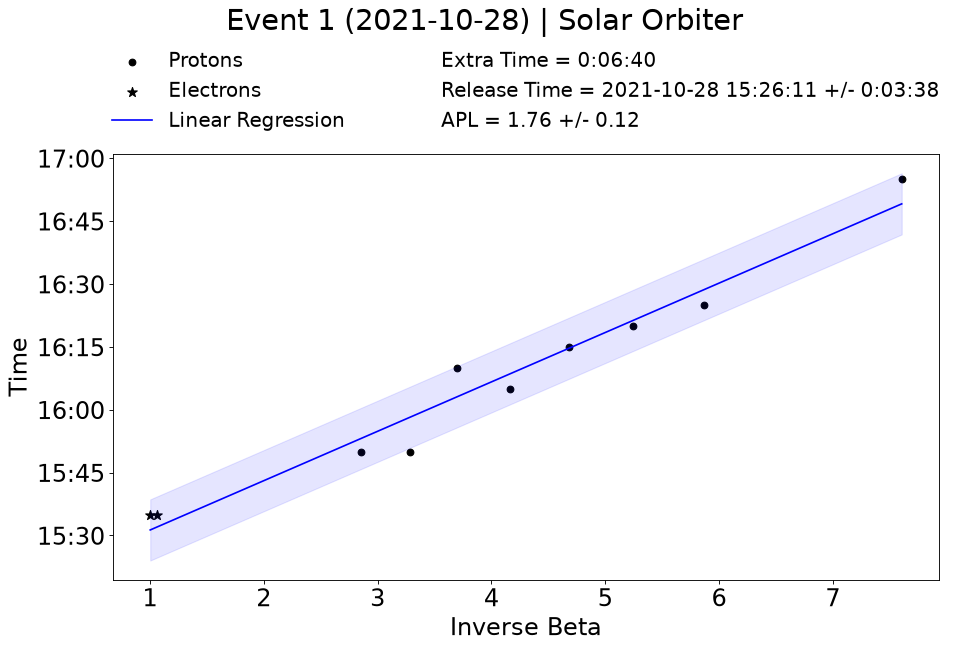
vda_multi_event.ipynb: the default event (2021-10-28) from Solar Orbiter, with the onsets of the proton channels as circles and of the electron channels as stars, and the release time and apparent path length (APL) of the VDA fit.
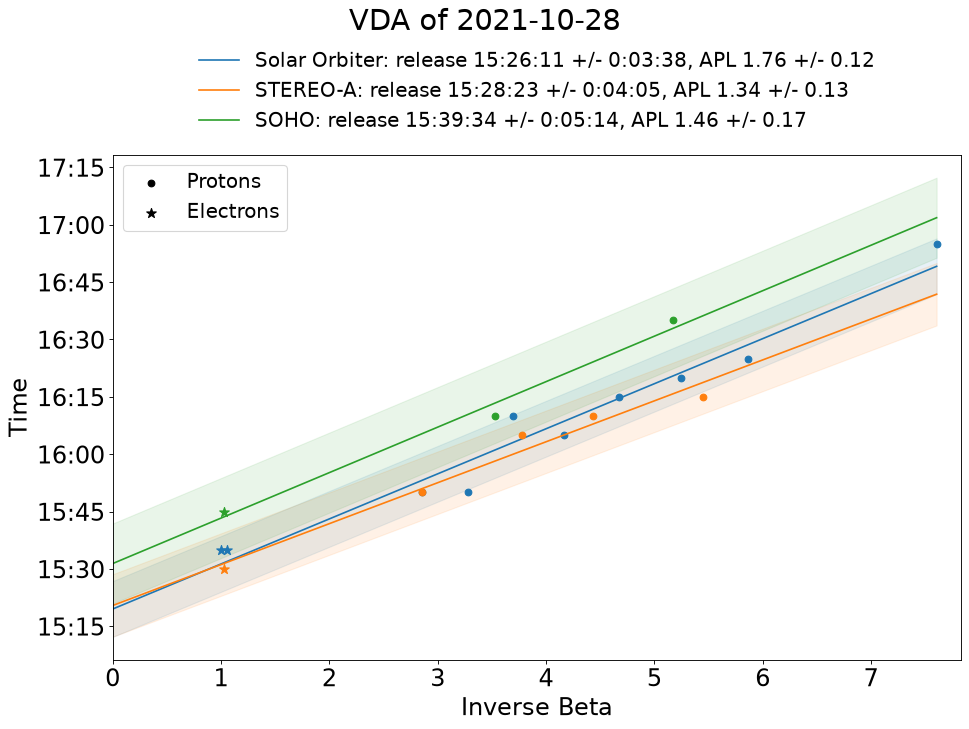
vda_multi_spacecraft.ipynb: the same event from Solar Orbiter, STEREO-A and SOHO, with the VDA fit of each spacecraft extended to inverse beta 0.
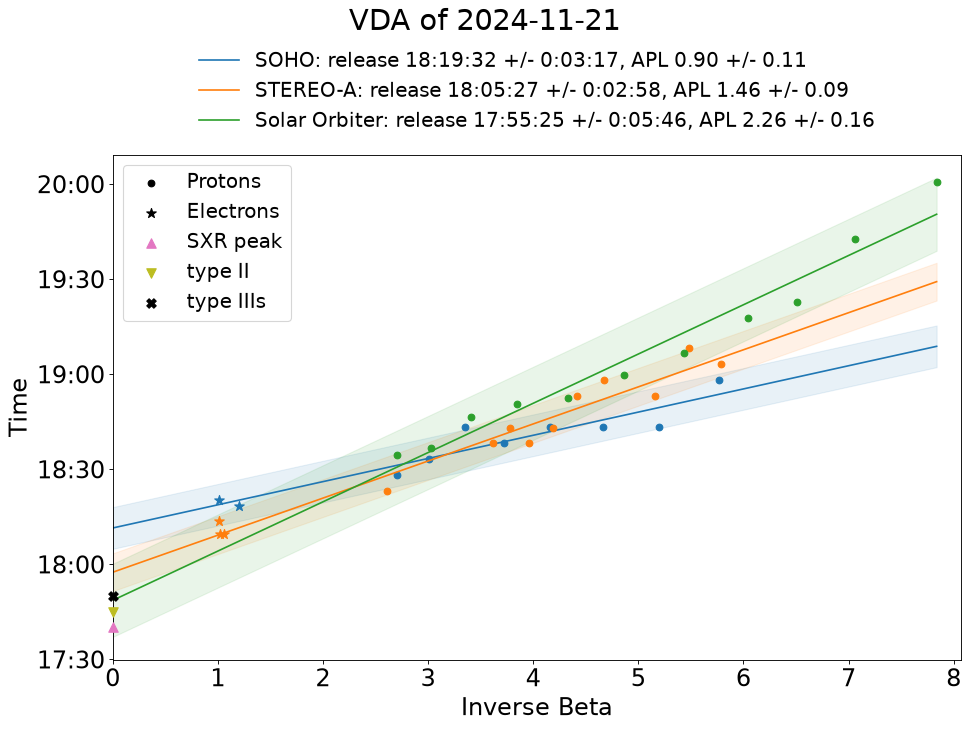
vda_custom_points.ipynb: the example points of the 2024-11-21 event (examples/custom_points_example.csv) seen by SOHO, STEREO-A and Solar Orbiter, with reference times at inverse beta 0.
What's new in v1.0.0
- The tool is on PyPI:
pip install "spearhead-vda[notebook]", and the notebooks are downloaded withspearhead-vda-notebooks(see Install locally). - Three notebooks:
vda_multi_event.ipynb(previouslyvda_tool.ipynb): the VDA of one or more events from one spacecraftvda_multi_spacecraft.ipynb(new): the VDA of one event from several spacecraft, with their VDA fits in one plotvda_custom_points.ipynb(new): the VDA fit of onset points given by the user, in groups (e.g. one per spacecraft), entered in its form or read from a points file
- Reference times (e.g. SXR peak, type II and type III radio bursts) shown at inverse beta 0 in the VDA plots.
- The spacecraft is named in the results and in the title of the VDA plot.
See the changelog for all the changes, and how to upgrade from previous versions.
Documentation
- User guide: the Notebooks, the spacecraft and their instruments, the parameters, the events files, background windows, onset selection, results, multiple spacecraft and custom points
- Using the VDA tool without the notebook: the analysis code in scripts
- Development: installation for development, the tests and the baseline image of the VDA plot
- Changelog
Contributing
Contributions to this tool are very much welcome and encouraged! Contributions can take the form of issues to report bugs and request new features or pull requests to submit new code.
If you don't have a GitHub account, you can sign-up for free here, or you can also reach out to us with feedback by sending an email to jan.gieseler@utu.fi.
Acknowledgement


This tool is developed within the SPEARHEAD (SPEcification, Analysis & Re-calibration of High Energy pArticle Data) project. SPEARHEAD has received funding from the European Union’s Horizon Europe programme under grant agreement No 101135044.
The tool reflects only the authors’ view and the European Commission is not responsible for any use that may be made of the information it contains.
1 maintainer

Metadata
1 maintainer
Release files for spearhead-vda 1.0.0
For a detailed explanation of source distributions (sdists) and built distributions (wheels), please see the package formats documentation.
Source distribution (sdist)
| File | Size | Uploaded | |
|---|---|---|---|
| spearhead_vda-1.0.0.tar.gz | 70.4 kB | Details |
Built distribution (wheel)
| File | Interpreter | ABI | Platform | Reset |
|---|---|---|---|---|
| spearhead_vda-1.0.0-py3-none-any.whl | Python 3 | none | any | Details |
Total release size: 117.3 kB
Release files / spearhead_vda-1.0.0.tar.gz
| Download URL | spearhead_vda-1.0.0.tar.gz |
|---|---|
| Size | 70.4 kB |
| Tags | Source |
|
SHA-256 checksum How to use checksums |
71c031d6c99d74318cb96c1a9b2ddfe7c764a0d6a0238b7f68fc5f6a98b8fdaa
|
|
BLAKE2b-256 checksum How to use checksums |
053832b9baa491b988aa71174ef9bb073d0bfa82a99def7f33318e26b6e1b4c5
|
| Upload date | |
|
Uploaded using Trusted Publishing? What is trusted publishing? |
Yes |
| Uploaded via |
twine/7.0.0 CPython/3.13.14
|
Provenance
Provenance describes where a file came from. On PyPI, provenance is shared via attestations, which provide a verifiable record of the build or publishing details. View details, limitations and caveats.


PyPI Publish Attestation
PyPI verified that this artifact, at this checksum, originated from the publisher listed below.
Signed by GitHub Actions, verified by PyPI on Oct 14, 2026.
Transparency logRelease files / spearhead_vda-1.0.0-py3-none-any.whl
| Download URL | spearhead_vda-1.0.0-py3-none-any.whl |
|---|---|
| Size | 46.9 kB |
| Tags | Python 3 |
|
SHA-256 checksum How to use checksums |
533473c18311498ac4c99b580c74fe0f01958b89daa7b56bb120b31aa5bdda6d
|
|
BLAKE2b-256 checksum How to use checksums |
78767b9b7cbe0add2e5e926ebdc0540dcd3043520f7fc6971e0937f921af32d1
|
| Upload date | |
|
Uploaded using Trusted Publishing? What is trusted publishing? |
Yes |
| Uploaded via |
twine/7.0.0 CPython/3.13.14
|
Provenance
Provenance describes where a file came from. On PyPI, provenance is shared via attestations, which provide a verifiable record of the build or publishing details. View details, limitations and caveats.
PyPI Publish Attestation
PyPI verified that this artifact, at this checksum, originated from the publisher listed below.
Signed by GitHub Actions, verified by PyPI on Oct 14, 2026.
Transparency log












