
Validation-first workflow for AI-assisted development.
Verified details
These details have been verified by PyPIProject links
GitHub Statistics
Maintainers

Project description

SpecGuard
SpecGuard blocks weak specs before AI coding agents turn them into defective code.
SpecGuard is a Validation-First Workflow (VFW) for AI-assisted development. It turns specs into reviewed, testable, implementation-ready packages before AI coding begins.
It is not a prompt-to-code generator. SpecGuard helps you prepare an approved spec package before an external Codex, Claude Code, or another coding agent writes application code.
Language Support
This README remains the primary package README for distribution. A Korean entry point is available at README.ko.md, and both README entry points link back to the same setup, workflow, plugin, benchmark, and policy documents.
The language split is documentation-only. It does not claim full CLI localization, expanded runtime behavior, or full Korean production support. Korean benchmark claims stay limited to the recorded deterministic low-mode evidence described in Language Support and Spec-Driven Benchmark.
Demo Video

Watch the full-resolution MP4 demo
The demo follows this flow:
- Install SpecGuard with
pip install spec-guard. - Copy the example spec with
specguard example copy your-feature-name --force. - Insert a vulnerable spec. In v0.3.0, the packaged example intentionally includes a vulnerable spec by default so users can see a blocking SpecGuard Review.
- Review the SpecGuard findings.
- Fix the weak areas directly, or ask an AI assistant to strengthen the spec by giving it the SpecGuard Review findings.
- Run SpecGuard Review again and confirm it reaches READY or READY_WITH_WARNINGS before implementation handoff.
Step 2 is for testing the example package. In real development, write your own product spec under specs/<your-feature-name>/ or a nested module's specs/<your-feature-name>/ instead of relying on the example package.
After your real spec passes, give implementation-output.md to your AI coding agent to start spec-based implementation.
Workflow At A Glance
Discovery -> Spec Package -> Technical Design -> SpecGuard Review
-> Test -> Contract -> Implementation Handoff
-> External AI Implementation -> Pull Request -> SpecGuard PR Review
SpecGuard owns the validation path through Implementation Handoff. The user or an external coding agent owns implementation after the handoff, then SpecGuard PR Review can compare the pull request back to the approved spec package.
Core Reviews
SpecGuard has two review checkpoints:
SpecGuard Reviewruns before implementation. Default low mode uses a fast heuristic review, blocks Critical findings, and reports Major or Minor findings as warnings.SpecGuard PR Reviewruns after implementation. It compares the approved spec package and implementation handoff against a pull request diff, then posts an advisory review comment.
For review levels, LLM detail review, cache behavior, and experimental Spec Revision, see Core Reviews.
Codex App Plugin
SpecGuard includes a Codex plugin scaffold under plugins/specguard/. The plugin does not replace the CLI; it helps Codex run the existing specguard command, read structured review artifacts, and summarize the next action.
To use it from the Codex app:
Supported versions: Python 3.11, 3.12, or 3.13, and a Codex CLI version that supports codex plugin marketplace. This setup has been verified with Codex CLI 0.130.0.
-
Install the SpecGuard CLI in the environment where Codex will run:
pip install spec-guard
specguard --help
-
Add the repo-scoped SpecGuard marketplace:
codex plugin marketplace add KoreaNirsa/spec-guard --ref main
-
Restart or refresh Codex if the plugin directory does not update immediately.
-
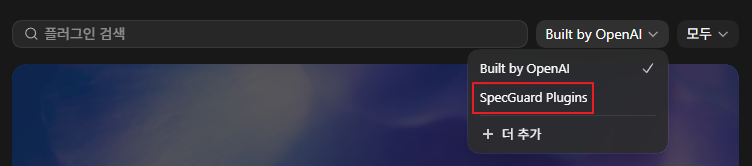
In the Codex plugin directory, select the
SpecGuard Pluginssource and installSpecGuard.
-
Prepare your target project folder. If you do not have a project yet, create one first:
mkdir your-codex-project-folder
cd your-codex-project-folder
-
Prepare a spec package. To test SpecGuard with the sample package, run:
specguard example copy specs/your-feature-name --force
-
Open
your-codex-project-folderin Codex, then ask:Run SpecGuard on specs/your-feature-name.
The default plugin path remains the heuristic CLI gate: specguard run <package> --no-llm --no-follow-up. Installing the plugin does not install the SpecGuard CLI. This is a custom repo marketplace, not the official OpenAI Plugin Directory.
For setup details, validation scenarios, and plugin boundaries, see Codex Plugin Guide.
Setup To User Flow
This is the shortest path from installation to a reviewed implementation PR:
pip install spec-guard
specguard auth setup --mode codex --model gpt-5.4
specguard init your-feature-name

# Optional: test with the packaged example spec before writing your own.
specguard example copy your-feature-name --force

specguard run specs/your-feature-name
Write or replace the draft spec under specs/your-feature-name/. If you want to test with the packaged sample first, copy the example spec with specguard example copy your-feature-name --force, then run SpecGuard.
Spec Package Resolution
SpecGuard resolves packages from directories shaped as **/specs/<feature>/spec.md. The root specs/<feature>/ layout remains supported, and nested module layouts such as services/api/specs/<feature>/ are supported for repositories with subprojects.
When a command receives an explicit package path that contains spec.md, SpecGuard uses that package. When it receives a repository tree or specs root, it searches for candidate packages. Exactly one candidate is used deterministically. Multiple candidates are reported and require rerunning with one explicit package path so SpecGuard does not choose the wrong package.
Discovery skips hidden directories and common dependency, build, and generated directories: .git, .venv, node_modules, vendor, build, dist, target, out, coverage, htmlcov, generated, __generated__, and __pycache__.
SpecGuard guards spec validation. When the spec is safe enough, specguard run exits with PASS and reports READY or READY_WITH_WARNINGS. At that point, give implementation-output.md to an external AI coding agent to start spec-based implementation.
After implementation, SpecGuard PR Review can compare GitHub PR code against the approved spec requirements and leave a comment when the PR appears to drift from the spec. To install it, run:
specguard actions install-pr-review
Then configure the GitHub Actions secret and repository variable:
SPECGUARD_OPENAI_API_KEY=sk-...
SPECGUARD_PR_REVIEW_MODEL=gpt-5.4-nano
For Codex setup, example packages, LLM review options, follow-up menus, implementation handoff, and PR review setup, see Setup To User Flow.
Benchmark Summary
The recorded v0.4.1 gate-only benchmark evaluates 99 English spec packages across practical domains such as auth, billing, document sharing, webhooks, payments, inventory, support, admin roles, privacy, API keys, SSO, cache, returns, ledger, promotions, and background jobs. It includes 99 corresponding Korean gate-only cases and reports English and Korean metrics separately. The current fixture source contains 104 English and 104 Korean cases; the 10 new or previously pending fixture results are pending the next benchmark refresh, so the table below reports only the recorded v0.4.1 artifact.
The benchmark asks one practical question: how much of the implementation handoff can SpecGuard guard before an AI coding agent starts writing code?
| Gate-Only Guard Signal | English 99 | Korean 99 |
|---|---|---|
| Weak specs blocked before implementation | 65/65 | 65/65 |
| Weak-spec block rate | 100.0% | 100.0% |
| Ready specs incorrectly blocked | 0/34 | 0/34 |
| False positive rate | 0.0% | 0.0% |
| Weak specs missed | 0/65 | 0/65 |
| False negative rate | 0.0% | 0.0% |
In the original #136 code-generation baseline, raw weak specs exposed contract defects in 11 of 12 cases. With the calibrated local gate, SpecGuard now blocks all 11 observed exposure paths before implementation handoff, increasing prevented exposure from 27.3% to 100.0%.
This means SpecGuard is acting as a strong pre-implementation guard layer: it stops most unsafe or underspecified inputs before code generation, while leaving all evaluated ready-reference specs implementation-allowed in the recorded English and Korean gate-only runs.
The refreshed v0.4.1 gate-only run has no known English or Korean false positives and no known false negatives in the recorded 198 evaluated cases. Korean support is currently a deterministic low-mode claim for explicit unsafe wording, not a full Korean production-support claim or a full CLI localization claim. Full methodology, suite breakdown, case-level results, version metadata, and limitations are available in the Spec-Driven Benchmark.
Core Value
AI coding works best when the implementation input is explicit. SpecGuard focuses on the parts that often fail before code is written:
- unclear requirements
- hidden assumptions
- missing authorization or ownership rules
- weak acceptance criteria
- undefined errors, retries, timeouts, and state transitions
- contracts that do not match the intended behavior
The user owns the spec. SpecGuard drafts, challenges, and validates the implementation basis around it.
Documentation
- Korean README: Korean practical overview for setup, workflow, plugin usage, benchmark limits, and documentation links.
- v0.4.2 Release Notes: package bump, plugin workflow updates, nested spec discovery, test layout, and known limits.
- Setup To User Flow: installation, Codex setup, example packages, validation loops, implementation handoff, and PR review setup.
- Core Reviews: SpecGuard Review, SpecGuard PR Review, LLM detail review, cache behavior, and experimental Spec Revision.
- Language Support: Korean default documentation support, English support, doc status, and Korean benchmark claim boundaries.
- Codex Plugin Guide: local Codex app plugin setup, MVP workflow, validation scenarios, and plugin boundaries.
- Plugin Examples And Contributor Fixtures: packaged example scope and contributor-only plugin scenario fixtures.
- Codex Plugin Hardening Roadmap: v0.4.x plugin backlog, priorities, missing contracts, and non-goals.
- CLI-Driven Grill Me Loop Design: planned CLI finding, Codex question, user decision, spec patch, and rerun workflow.
- Plugin Result Contract: stable
readiness-review.jsonfields and file-based states for Codex plugin consumers. - Readiness Rules: review levels, READY thresholds, contract requirements, and Strict E2E verification rules.
- Readiness Calibration Triage: false-positive, false-negative, evidence-quality, fixture-gap, and Korean counterpart triage protocol.
- CI And PR Gates: readiness gate installation, required-check guidance, and PR review separation.
- CLI Reference: common commands,
runoptions, and CI-friendly examples. - Development: local source setup, tests, and packaged-example smoke testing.
- Workflow Guide
- Discovery Guide
- Spec-Driven Benchmark
- Readiness Coverage Audit
- Contributing
License
Apache License 2.0
Project details
Verified details
These details have been verified by PyPIProject links
GitHub Statistics
Maintainers
Release history Release notifications | RSS feed


Download files
Download the file for your platform. If you're not sure which to choose, learn more about installing packages.
Source Distribution
Built Distribution
Filter files by name, interpreter, ABI, and platform.
If you're not sure about the file name format, learn more about wheel file names.
Copy a direct link to the current filters
File details
Details for the file spec_guard-0.4.2.tar.gz.
File metadata
- Download URL: spec_guard-0.4.2.tar.gz
- Upload date:
- Size: 173.6 kB
- Tags: Source
- Uploaded using Trusted Publishing? Yes
- Uploaded via: twine/6.1.0 CPython/3.13.12
File hashes
| Algorithm | Hash digest | |
|---|---|---|
| SHA256 |
e659b9ef2b2691c54992bbc2a01ee0faaa7535b14dfb808f0539770ab972a364
|
|
| MD5 |
28248abcc5a0b9c3fe2dec6ae196d360
|
|
| BLAKE2b-256 |
32ea481927f8f6c94f1cb049812920dc7d4ee99dbdcd8c59e0b1264dae780905
|
Provenance
The following attestation bundles were made for spec_guard-0.4.2.tar.gz:
Publisher:
publish-pypi.yml on KoreaNirsa/spec-guard
-
Statement:
-
Statement type:
https://in-toto.io/Statement/v1 -
Predicate type:
https://docs.pypi.org/attestations/publish/v1 -
Subject name:
spec_guard-0.4.2.tar.gz -
Subject digest:
e659b9ef2b2691c54992bbc2a01ee0faaa7535b14dfb808f0539770ab972a364 - Sigstore transparency entry: 1639974359
- Sigstore integration time:
-
Permalink:
KoreaNirsa/spec-guard@49736325be8d329ec3aa6863b38078f7d8830f0c -
Branch / Tag:
refs/tags/v0.4.2 - Owner: https://github.com/KoreaNirsa
-
Access:
public
-
Token Issuer:
https://token.actions.githubusercontent.com -
Runner Environment:
github-hosted -
Publication workflow:
publish-pypi.yml@49736325be8d329ec3aa6863b38078f7d8830f0c -
Trigger Event:
push
-
Statement type:
File details
Details for the file spec_guard-0.4.2-py3-none-any.whl.
File metadata
- Download URL: spec_guard-0.4.2-py3-none-any.whl
- Upload date:
- Size: 184.1 kB
- Tags: Python 3
- Uploaded using Trusted Publishing? Yes
- Uploaded via: twine/6.1.0 CPython/3.13.12
File hashes
| Algorithm | Hash digest | |
|---|---|---|
| SHA256 |
fc82826c35bf777556baac2eea103db3aae4af15b4696150d8f18142e8856f25
|
|
| MD5 |
4bf89ad43368fc56cad567f331e180f7
|
|
| BLAKE2b-256 |
b07272e31eacfa65401656a591680e9c2e015d4c0807d4a87c90784db90a4583
|
Provenance
The following attestation bundles were made for spec_guard-0.4.2-py3-none-any.whl:
Publisher:
publish-pypi.yml on KoreaNirsa/spec-guard
-
Statement:
-
Statement type:
https://in-toto.io/Statement/v1 -
Predicate type:
https://docs.pypi.org/attestations/publish/v1 -
Subject name:
spec_guard-0.4.2-py3-none-any.whl -
Subject digest:
fc82826c35bf777556baac2eea103db3aae4af15b4696150d8f18142e8856f25 - Sigstore transparency entry: 1639974488
- Sigstore integration time:
-
Permalink:
KoreaNirsa/spec-guard@49736325be8d329ec3aa6863b38078f7d8830f0c -
Branch / Tag:
refs/tags/v0.4.2 - Owner: https://github.com/KoreaNirsa
-
Access:
public
-
Token Issuer:
https://token.actions.githubusercontent.com -
Runner Environment:
github-hosted -
Publication workflow:
publish-pypi.yml@49736325be8d329ec3aa6863b38078f7d8830f0c -
Trigger Event:
push
-
Statement type:






