
Spec4 AI
From a rough idea to ordered, executable development phases — files a coding agent can build from.

Spec4 turns an idea into a set of structured, ordered development phases — plus an optional UI mock and a deployment plan — that you hand to whichever coding agent you use. Everything it produces is a file in a .spec4/ folder inside your project. It runs on your machine, talks only to the model provider you choose, and keeps your API key in your browser.
It is not a coding agent. It doesn't write your application; it writes the plan your coding agent builds from — with the failure modes, acceptance criteria and deployment configuration a production system needs, not just the happy path. And the plan is not written once: each pass over the project is a new round, planned against the code as it actually exists.
What you get
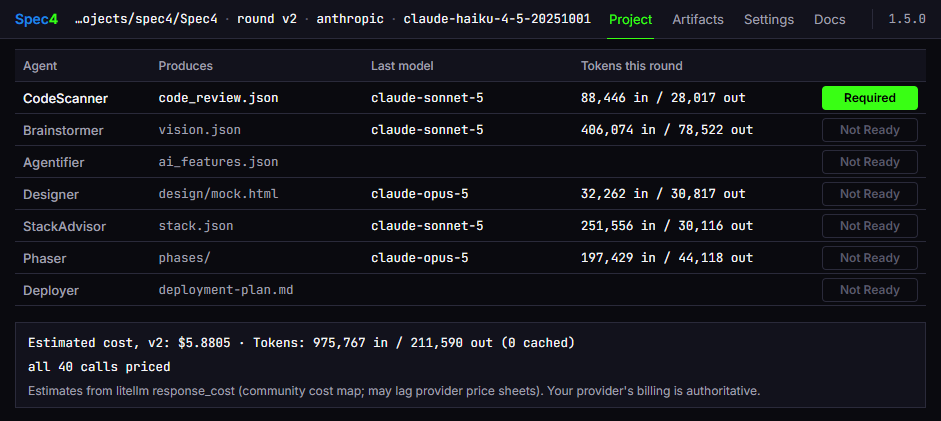
Spec4's project page on its own repository after round v2 was implemented: every artifact, the model that produced it, what it cost, and the next action — a re-scan, since the code has changed since the plan. Agentifier is blank because Spec4's AI features were added before it was mature enough to use on itself.
A round leaves this in your project directory:
.spec4/
└── v1/                        # one directory per planning round
    ├── code_review.json       # CodeScanner — the existing codebase, as facts with sources
    ├── vision.json            # Brainstormer — purpose, audiences, MVP features
    ├── feature_specs.json     # Brainstormer — a behavioral spec per MVP feature
    ├── ai_catalog.json        # Agentifier — its recommendation and your decision, per feature
    ├── ai_features.json       # Agentifier — where AI belongs, at what tier, built how
    ├── design/
    │   ├── mock.html          # Designer — a self-contained mock of the starting screen
    │   └── manifest.json      # Designer — the design decisions the mock embodies
    ├── stack.json             # StackAdvisor — the technology stack, with canonical doc links
    ├── phases/                # Phaser — ordered phase files, one per implementation step
    │   ├── phase1.md
    │   ├── phase2.md
    │   └── ...
    ├── deployment-plan.md     # Deployer — infrastructure, CI/CD, config files, Terraform
    ├── usage.json             # what each agent cost this round, per call, cache reads included
    └── IMPLEMENTED            # the coding agent's marker that the round is built
The phase files are the point. Each one is written for a coding agent, not for you. This is from Spec4's own repository — .spec4/v0/phases/phase1.md, the first phase of the round that reworked this app's UI:
# Phase 1 of 7: Integration Thread — Baseline Validation of the Existing Spec4 App

Prove the existing Dash application builds, serves at localhost:8050, and passes
its full quality gate (pytest, ruff, mypy) unchanged, and read the existing
callback co-presence contract so the coming shell rework is done against a
known-green baseline rather than a guessed one. No feature work, no layout
changes, no new files.

## Tech Stack

**Dependencies:** uv, dash, dash-mantine-components, pytest, pytest-cov, ruff, mypy, …

**Configurations:** No required env vars. Optional: DASH_DEBUG (enables Dash
hot-reload), LITELLM_LOG (must be set before litellm is first imported). App
serves HTTP on localhost:8050 only.

## Instructions

1. Run `uv build` and confirm it completes without error using the existing
   uv_build backend and pyproject.toml; do not modify pyproject.toml in this phase.
2. Run `uv run pytest` and record the exact number of passing tests and any
   pre-existing failures. This count is the baseline every later phase must meet
   or exceed.
…
7. Open src/spec4/app.py and confirm the litellm setup ordering is intact …
   Write a one-line D-XX comment above that block noting the ordering must not
   be changed by this round's work.
8. Read tests/test_callback_co_presence.py in full … This file is the existing
   component-id contract; do NOT create a parallel inventory, a new id-manifest
   file, or a duplicate test module.

## Risk Assessment
## Verification
## References
Every phase carries a JSON frontmatter with the same content as structured data, a risk assessment naming where a coding agent is likely to go wrong and what to do about it, and a Verification section with the exact command or observable that proves the phase is done. Phase 1 of a new project is a steel thread — the thinnest live end-to-end path; phase 1 of a revision round is an integration thread that wires the change into the existing code.
Requirements
- Python 3.12+
- uv
- An API key for at least one supported model provider (table below)
- Optional: a Tavily or Exa key for web search grounding
Installation
From PyPI:
uv tool install spec4 --refresh
spec4
From source (contributors):
git clone https://github.com/robertcrowe/spec4
cd spec4
make spec4        # uv sync into .venv, then launch; `make run` afterwards
Either way the app is at http://localhost:8050. Pick a project directory, connect a provider, and start with Brainstormer — or CodeScanner if the directory already has code in it.
Upgrading
uv tool upgrade spec4        # PyPI
git pull && make install     # source
Spec4 checks the running version against PyPI on launch and says so when a newer one exists. Upgrades never touch your artifacts: everything lives in .spec4/ inside your project. Saved credentials live in your browser's localStorage and carry over.
The pipeline
Seven agents, in order. Each reads what the ones before it wrote.
| Agent | Reads | Writes | |
|---|---|---|---|
| CodeScanner | your existing code | code_review.json |
optional; brownfield projects |
| Brainstormer | you, one question at a time | vision.json, feature_specs.json |
|
| Agentifier | vision, feature specs | ai_catalog.json, ai_features.json |
|
| Designer | vision, AI features, reference screenshots | design/mock.html, design/manifest.json |
optional |
| StackAdvisor | vision, AI features, code review | stack.json |
|
| Phaser | everything above | phases/*.md |
|
| Deployer | stack, phases, AI features | deployment-plan.md, optionally README.md |
CodeScanner reads an existing directory and records its architecture, stack, commands, entry points and conventions as facts with sources, so the later agents plan against what's there rather than what they'd guess.
Brainstormer develops the vision through focused questions — purpose, audiences, MVP features — and, on completion, derives a technology-agnostic behavioral spec for every MVP feature: inputs, outputs, success criteria, failure modes. It searches the web for the standards it names and embeds canonical documentation links.
Agentifier looks for places in the vision where an AI feature would serve it and recommends how much AI each one needs: a complexity tier from a nine-tier ladder (deterministic code → embeddings → single call → RAG → tool use → … → multi-agent collaboration) and the mechanisms to build it with. You choose the candidates and decide each tier; it records both and drafts a full spec for each feature you keep. The tiers are the same ones the Built With Spec4 gallery demonstrates as working apps.
Designer generates a self-contained HTML mock of the application's starting screen from the vision and AI features, with optional reference screenshots. Before you see it, the mock is checked: the extracted document is tested for truncation and unbalanced tags on the server, then run in your browser with an error reporter that catches thrown errors, failed loads and unhandled rejections. The preview reports "Rendered cleanly" or lists the errors, with a Fix errors button that sends them back to the model as a refine — nothing runs without your click. Approve the mock, refine it with a description of changes, or start over. Phaser directs the coding agent to build to it. Example mock.
StackAdvisor recommends a technology stack that serves the features and the AI tiers, with canonical documentation links for every library it names. In a revision round it re-emits the whole established stack with the changes folded in, and every established entry missing from the result is accounted for: an entry the delta or your conversation asked to remove is reported as removed, and one nothing asked for is put back where it was, with a receipt on the commit screen saying so.
Phaser turns all of it into ordered implementation phases, one file each, written for a coding agent. It treats the stack as the approved component list: a phase that needs something not in it has to ask you first, so a dependency never appears in a plan without your having said yes to it.
Deployer asks which coding agent you're using, produces a deployment plan — service, containerization, CI/CD, environment, monitoring, exact commands and complete config files, Terraform if you want it — and can author the project README. Example plan.
While any agent works, the screen says what the model is doing: reasoning is counted as it streams ("Thinking — N chars") before the first reply character arrives, and a long silence mid-draw is reported as such rather than left to look like a hang.
Rounds: why this isn't waterfall
The standard objection to spec-driven development is that it turns into waterfall: the spec is written once, the code drifts from it, and after a month the plan describes a program that doesn't exist.
Spec4 is built around the round instead of the spec. A round is one pass over the project — .spec4/v1/, v2/, v3/ — and every round after the first starts from the code, not from the previous plan:
- CodeScanner reads what was actually built — by anyone. The code review for round N is of the code as it stands, including what the coding agent did that the plan didn't say and whatever you changed yourself in between. Spec4 doesn't assume it's the only thing editing the repository; a hotfix, a refactor, or a week of work done without it is just what the next round plans against.
- The review reaches the agents in a shape they read. Brainstormer, StackAdvisor and Phaser each get a rendered view of exactly the review blocks they use — languages, toolchain, persistence, entry points — with values verbatim and their sources alongside, rather than a JSON paste the model skims, so the linter the review found is the one StackAdvisor is told to carry forward, not the one in its prompt's example.
- Brainstormer stamps a delta. In a revision round it records which features were added, modified and removed, and the downstream agents scope to that delta rather than re-deriving the whole application.
- Phaser plans only the change. Phase 1 of a revision is an integration thread that wires the new surface into the existing code, not a from-scratch steel thread, and no phases are emitted for established, unchanged features.
- Stale inputs are flagged, not ignored. Every artifact is dated against the ones upstream of it. If you re-run Brainstormer after StackAdvisor, the project page shows StackAdvisor as needing an update — and the coding agent's
IMPLEMENTEDmarker is what tells Spec4 the round is built and the next one may begin. - A round may skip the optional agents. A round implemented without the Agentifier, Designer or Deployer doesn't empty what the next round carries forward: the prior AI catalog, mock, manifest and deployment plan come from the newest implemented round that has them.
So the plan is never the source of truth for long. The code is, and each round re-reads it. This repository carries three rounds of Spec4 planning its own changes under .spec4/; the phase file quoted above is the first phase of the first of them.
Built for production, not demos
A demo needs a happy path. A production system needs the rest, and Spec4's artifacts carry it:
- Every feature has failure modes.
feature_specs.jsonrecords inputs, outputs, success criteria and failure modes per MVP feature, technology-agnostic, before any stack is chosen. - Non-functional goals are threaded, not listed. Performance, security and reliability goals from the vision are matched to the stack components that satisfy them and rendered into the Verification section of every phase that touches them, as acceptance criteria — deterministically, from the stack spec, so the model can't drop one.
- Every phase names where the coding agent will go wrong. The Risk Assessment section calls out the likely bottlenecks and the places an AI coder tends to hallucinate — auth flows, third-party API quirks — with a mitigation for each.
- Every phase is verifiable. The Verification section is the exact command or observable that proves it's done, not a description of done.
- No dependency arrives unapproved. The stack spec is the component list. A phase that needs something not on it stops and asks; the answer is recorded as a stack addition.
- The deployment plan is complete files, not pointers. Dockerfile, CI pipeline, environment and secrets management, monitoring — and for AI features, model observability, eval cadence and guardrails — as ready-to-use content with the exact commands to run.
- Canonical references, from live search. Every standard, protocol or SDK a phase names links to its documentation, found by web search at planning time rather than recalled.
What it costs
Every model call Spec4 makes is recorded in the round's usage.json: tokens as the provider reported them, cost as LiteLLM's estimate from its community cost map. Your provider's bill is authoritative.
A full greenfield round, with prompt caching. SnarkCheck — a browser checkers game with a heckling AI opponent, three deployed surfaces, CI-gated deploys — was planned in one round by six of the seven agents (no CodeScanner: there was no code yet). From its committed .spec4/v0/usage.json:
| Agent | Model | Calls | Input tokens | Output tokens | Cost |
|---|---|---|---|---|---|
| Brainstormer | claude-opus-5 |
13 | 74k | 11k | $0.38 |
| Agentifier | claude-opus-5 |
24 | 154k | 37k | $1.26 |
| Designer | claude-sonnet-5 |
1 | 8k | 15k | $0.17 |
| StackAdvisor | claude-sonnet-5 |
36 | 1.51M | 31k | $0.76 |
| Phaser | claude-sonnet-5 |
4 | 150k | 27k | $0.43 |
| Deployer | claude-sonnet-5 |
20 | 658k | 19k | $0.44 |
| Total | 98 | 2.55M | 140k | $3.44 |
Of the 2.55M input tokens, 2.31M — 90% — were cache reads. StackAdvisor is the clearest case: 1.5M input tokens across 36 calls for 76 cents, because the prompt it re-sends on every search round is served from cache after the first.
Three brownfield rounds, before caching. Spec4 planning changes to its own code, v0–v2 in this repository. All three ran before prompt caching existed (Spec4 v1.5.2 and above), so their input tokens were paid in full; they are here because they are revision rounds against a real codebase, which SnarkCheck is not. claude-sonnet-5 was the default; Phaser ran on claude-opus-5 in all three; Designer ran on claude-fable-5-1 in v0 and v1 and claude-opus-5 in v2.
| Round | What it planned | Calls | Tokens | Cost | Elapsed |
|---|---|---|---|---|---|
v0 |
the UI rework — 7 phases; excludes CodeScanner, which ran before usage was recorded | 59 | 1.69M | $7.04 | 1 h 51 m |
v1 |
the artifacts view and chat frame | 16 | 0.62M | $5.09 | 1 h 18 m |
v2 |
the rest of the UI rework — five remaining screens, per-agent effort | 40 | 1.19M | $5.88 | 4 h 17 m |
Elapsed is the first call's start to the last call's end, including the developer's time in the dialogue.
Two things the figures show. Phaser holds every upstream artifact in context while it drafts, so it is a large line in every round; on claude-opus-5 it cost $1.70–2.09 per round here, and on claude-sonnet-5 it planned SnarkCheck's seven phases for $0.43. Each agent can override the project's default model and effort from its own gate, so you can put a stronger model on Phaser — or a cheaper one — without changing anything else. And the long dialogues on the default model (Brainstormer, StackAdvisor) are where caching pays: those are the calls that re-send the whole conversation every turn.
Where caching applies. Spec4 places cache breakpoints on the system prompt and, in conversations, the latest turn, on Anthropic and AWS Bedrock. OpenAI caches long prompts on its own without a marker, and Spec4 records those reads too. On Gemini, OpenRouter and Nebius, Spec4 sends no marker; whatever caching happens is the provider's default. SPEC4_PROMPT_CACHING=0 turns the markers off, for A/B measurement. The project page shows per-agent and per-round totals with cache reads beside them, and spec4-usage prints the same from the command line.
What it isn't, and where your data goes
- Not a coding agent, and not tied to one. It doesn't assume every change goes through it either: work on the code however you like between rounds, and the next round starts from what's there. Spec4 produces the plan; Claude Code, Cursor, Codex, Copilot or whatever you use does the building. The artifacts are plain Markdown and JSON with no agent-specific format — a phase file reads the same to a person as to an agent — and Deployer writes its coding-agent setup instructions for the agent you name, not for one it assumes.
- Not for every change. A round is the unit for a feature or a rework; for a quick script, a refactor, or a small feature in a mature codebase, it is more process than the change needs.
- No commands inside your coding agent. You hand it the files.
- It stops at the spec. Building and verifying the code is your coding agent's job and yours.
- Nothing runs in the cloud. The app is a local process; the only network calls are to the model provider you chose and, if you enable it, the search provider.
- CodeScanner reads your repository locally and sends the model a bounded summary — manifests, entry points, samples — not the tree.
- API keys are held in the browser (
localStorage, opt-in) and never sent anywhere but the provider they belong to. - Web search is off unless you give it a key.
Run it on itself
Spec4 is a brownfield project like any other, and its own .spec4/ is committed:
uv tool install spec4 --refresh
spec4
# then select the spec4 directory as the project
The project page opens on the latest round with its artifacts and costs. Choose "existing project" and run CodeScanner to start a fourth.
Examples
Two projects planned with Spec4 and built by a coding agent from its phase files, each with its full .spec4/ history committed so every claim in this README can be checked against a file.
SnarkCheck
SnarkCheck is a browser checkers game whose AI opponent heckles you — a deliberately silly app built as an example of what a production-deployable application looks like when the planning is done up front. Three surfaces (a static React client, a Node commentary API, a self-hosted LiteLLM proxy on a private network), infrastructure as code, CI-gated deploys, designed-in fallbacks for every model-backed route, structured logs with alert thresholds taken from the feature specs, 130 tests under strict types. It is a repository, not a hosted app: clone it and run it.
The interesting part is .spec4/v0/: the complete output of one planning round — vision, feature and NFR specs, AI catalog with the tier decisions and what was rejected, stack spec, design mock, seven phase files, deployment plan and usage.json — committed beside the code, so a line in the server can be traced back to the spec that asked for it. A hand-written phase7-verification.md records what was actually run to verify the last phase and what wasn't. The cost table above is from this round.
Built With Spec4

Built With Spec4 is a live gallery of small apps, every one planned with Spec4 and built by a coding agent working from Spec4's phase files. Each demonstrates one tier of the complexity ladder Agentifier recommends from, so you can see what a tier looks like as software — and what the artifacts turn into when an agent executes them. BWS4 was planned in nine rounds, with hand edits between them; its full .spec4/ history, v0 through v8, every artifact and every phase file, is in the BWS4 repository.
| Example app | Pattern demonstrated |
|---|---|
| Embeddings | Semantic similarity via vector representations |
| Single Call | One prompt in, one response out — plain or schema-constrained |
| RAG | Retrieval-augmented generation with cited passages |
| Tool Use | A real function-calling loop with live web search |
| Chained Calls | Sequential calls, each building on the last |
| Planning Agent | A model that plans its own research steps, streamed live |
| ReAct Loop | Interleaved reason-act-observe under the planning-agent tier, in contrast with the plan-first Planning Agent |
| Orchestrated Subagents | A coordinator briefing parallel specialists and merging their answers |
| Multi-Agent Collaboration | Peer agents negotiating with private, mutually invisible constraints |
"You've made something really really really cool. I'm almost done with our driver app. Will be field tested by Friday. I don't think I would have built what this is going to become without it." — Wihan Booyse, Kriterion.ai
Supported model providers
| Provider | Models fetched from | Prompt caching |
|---|---|---|
| Anthropic | api.anthropic.com/v1/models |
Spec4 sets breakpoints |
| AWS Bedrock | bedrock.amazonaws.com |
Spec4 sets breakpoints |
| Cohere | api.cohere.com/v2/models |
provider default |
| Google Gemini | generativelanguage.googleapis.com |
provider default |
| Mistral | api.mistral.ai/v1/models |
provider default |
| Nebius | api.tokenfactory.nebius.com/v1/ |
provider default |
| OpenAI | api.openai.com/v1/models |
automatic; reads recorded |
| OpenRouter | openrouter.ai/api/v1/models |
provider default |
Models are fetched live from each provider when you connect, with a hardcoded fallback list if the API is unavailable.
AWS Bedrock accepts Bedrock API keys, IAM access keys, or ambient AWS credentials (environment variables, ~/.aws/credentials, or IAM roles).
Supported search providers
Web search grounds recommendations in live documentation and is available to every agent. It is optional — without a key the agents still run, just without live grounding. Both providers are reached through their hosted MCP servers, so there is nothing extra to install:
| Provider | Connected via | Get a key |
|---|---|---|
| Tavily (default) | mcp.tavily.com |
tavily.com |
| Exa | mcp.exa.ai |
exa.ai |
Development
Spec4 is a Python 3.12 Dash app using Dash Mantine Components, with LLM access through LiteLLM.
src/spec4/
├── agents/                 # The seven pipeline agents
├── agentifier/             # Agentifier's sub-agents and pattern library
├── callbacks/              # Dash server-side callbacks
├── layouts/                # Every screen the app draws
├── project_manager/        # .spec4/ artifacts, rounds, freshness, usage
└── assets/                 # Stylesheet and static assets
tests/
├── agentifier/             # Agentifier unit tests
├── integration/            # End-to-end pipeline runs (mocked LLMs) and browser tests
├── golden/, snapshots/     # Pinned renderer output and component ids
└── test_*.py               # Agent, layout, callback and utility tests
evals/                      # On-demand measurement harnesses (real LLM calls; not part of make test)
scripts/                    # E2E driver, UI screenshots, mechanical checks
Makefile                    # Common commands
make spec4       # First-time setup: create .venv, install deps, and launch
make install     # Create .venv and install all dependencies (uv sync)
make run         # Start the app (http://localhost:8050)
make dev         # Start with debug/hot-reload enabled
make test        # Run tests
make lint        # Lint check with ruff
make serve       # Production server via gunicorn (requires: uv add gunicorn)

uv add <package>        # Add a dependency — always via uv so it stays in .venv
uv add --dev <package>
Eval harnesses in evals/ make real LLM calls and are never run by make test; they measure prompt and pattern changes before and after (see evals/agentifier/README.md and evals/tier_calibration/README.md). evals/caching/ is the exception: a read-only probe over recorded usage.json files that reports per-agent cache hit rates, write totals and inter-call gaps, with a guide to reading a healthy draw.
License
Apache 2.0 — see LICENSE.
1 maintainer

Metadata
1 maintainer
Release files for spec4 1.5.3
For a detailed explanation of source distributions (sdists) and built distributions (wheels), please see the package formats documentation.
Source distribution (sdist)
| File | Size | Uploaded | |
|---|---|---|---|
| spec4-1.5.3.tar.gz | 621.6 kB | Details |
Built distribution (wheel)
| File | Interpreter | ABI | Platform | Reset |
|---|---|---|---|---|
| spec4-1.5.3-py3-none-any.whl | Python 3 | none | any | Details |
Total release size: 1.3 MB
Release files / spec4-1.5.3.tar.gz
| Download URL | spec4-1.5.3.tar.gz |
|---|---|
| Size | 621.6 kB |
| Tags | Source |
|
SHA-256 checksum How to use checksums |
3fec63f2099601fe08a9f71b79f46de6b1fa6da9436cbe8a542ff54e3fbb22fe
|
|
BLAKE2b-256 checksum How to use checksums |
7dc8113bfdfa7f980d396573532f66e9c36091f5d3ca76f43c0dea1fc7175cb1
|
| Upload date | |
|
Uploaded using Trusted Publishing? What is trusted publishing? |
No |
| Uploaded via |
uv/0.10.0 {"installer":{"name":"uv","version":"0.10.0","subcommand":["publish"]},"python":null,"implementation":{"name":null,"version":null},"distro":{"name":"Ubuntu","version":"24.04","id":"noble","libc":null},"system":{"name":null,"release":null},"cpu":null,"openssl_version":null,"setuptools_version":null,"rustc_version":null,"ci":null}
|
Release files / spec4-1.5.3-py3-none-any.whl
| Download URL | spec4-1.5.3-py3-none-any.whl |
|---|---|
| Size | 702.3 kB |
| Tags | Python 3 |
|
SHA-256 checksum How to use checksums |
862ef2f2e136d9bda9a3e27e9e5dc45e4b2d4d932838d95b0325bf7e839e2c73
|
|
BLAKE2b-256 checksum How to use checksums |
2ae4def1bb5d3687122d463124a883274e6a66993fb24a907635a5d2118e0e7d
|
| Upload date | |
|
Uploaded using Trusted Publishing? What is trusted publishing? |
No |
| Uploaded via |
uv/0.10.0 {"installer":{"name":"uv","version":"0.10.0","subcommand":["publish"]},"python":null,"implementation":{"name":null,"version":null},"distro":{"name":"Ubuntu","version":"24.04","id":"noble","libc":null},"system":{"name":null,"release":null},"cpu":null,"openssl_version":null,"setuptools_version":null,"rustc_version":null,"ci":null}
|














