
specbook-fastapi
Serves the Specbook UI for your FastAPI app's OpenAPI document. It reads the document in the browser and lets a visitor send each request: against mock responses built from the document's examples, or live against your API. It runs on your app's own origin, so there is no CORS to configure and the visitor's cookies are sent.
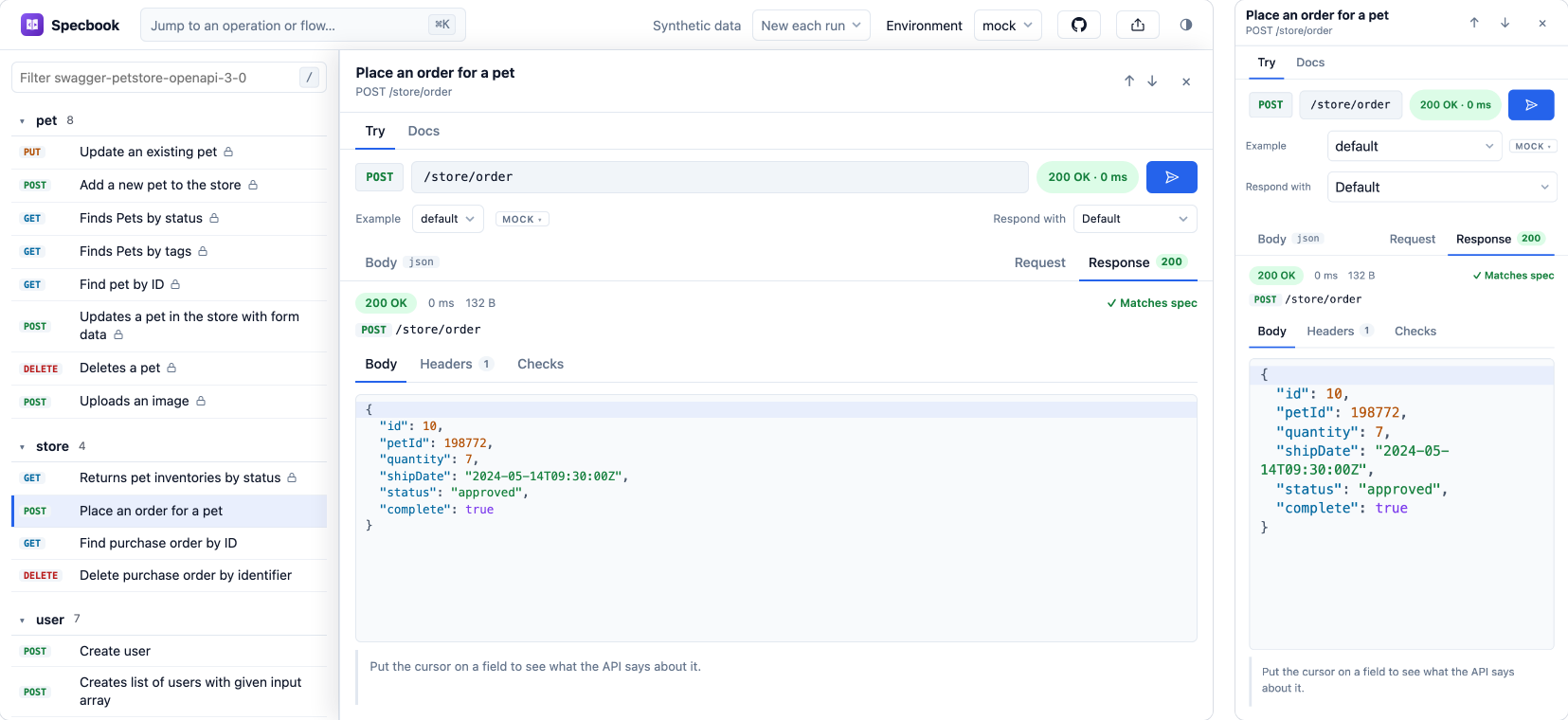
See the Specbook docs for what else it can do: requests with checks, flows, tests that run in CI, and a portal for QA.
The package only returns an HTML page that loads the viewer, so it adds nothing to your app but one route.
Installation
pip install specbook-fastapi
# or
uv add specbook-fastapi
Python 3.10 or newer, and FastAPI.
Usage
Serve the viewer at /specbook for the app's own OpenAPI document:
from fastapi import FastAPI
from specbook_fastapi import add_specbook

app = FastAPI()
add_specbook(app)  # the viewer is at /specbook
To use it instead of FastAPI's own docs page, turn that off and take its route:
app = FastAPI(docs_url=None, redoc_url=None)
add_specbook(app, route="/docs")
The document's address and the page title come from the app (app.openapi_url, with the request's root_path in front of it, so it works behind a prefix or a proxy, and app.title). The route is left out of the OpenAPI document.
Your own route
get_specbook_html returns an HTMLResponse, for when you want to set the route up yourself:
from fastapi import FastAPI
from specbook_fastapi import get_specbook_html

app = FastAPI(docs_url=None)


@app.get("/docs", include_in_schema=False)
async def docs():
    return get_specbook_html(openapi_url=app.openapi_url, title=f"{app.title} docs", default_env="live")
Options
add_specbook takes route and include_in_schema, and passes every other keyword argument on to get_specbook_html.
| Option | Type | Default | Description |
|---|---|---|---|
openapi_url |
str |
/openapi.json |
The OpenAPI document. A relative address is resolved against the page. add_specbook takes it from the app. |
title |
str |
API docs |
The page title. It is HTML-escaped. add_specbook takes it from the app. |
default_env |
str |
mock |
The environment shown first: mock, live, or the name of a server in the document. |
base_url |
str |
the page's own origin | Where live requests go when the document lists no server. |
cdn |
"specbook" | "npm" |
"specbook" |
Where the viewer is loaded from: the stable v1 channel at ui.specbook.dev, or @specbook/ui on jsDelivr. |
version |
str |
v1 / tested release |
With specbook, the channel. With npm, a version or range of @specbook/ui. The default is the release this was tested with. |
host |
str |
the host of cdn |
The host, for example https://unpkg.com or an internal mirror. |
src |
str |
The full address of specbook.js, for a copy you serve yourself. It overrides cdn, version and host. |
|
nonce |
str |
A CSP nonce for the viewer's script. |
The viewer's own settings (default_env, the page title, the Content-Security-Policy it needs) are described in the embed reference.
The specbook host is the newest deployed build of the v1 line, so fixes reach your app without a new release of this package. A breaking change to the viewer would ship as /v2/. The npm host is an immutable release of @specbook/ui; pin version to hold it still.
Content-Security-Policy
The page has no inline script. The JSON that configures the viewer is data, so it needs no nonce, and the one module script takes nonce when your policy uses nonces.
| Where the viewer comes from | The policy needs |
|---|---|
A copy you serve (src) |
script-src 'self' and worker-src 'self' |
ui.specbook.dev |
that host in script-src, style-src and worker-src, plus blob: in worker-src |
jsDelivr (cdn="npm") |
https://cdn.jsdelivr.net in the same three directives, plus blob: in worker-src |
Privacy
The viewer runs no analytics or tracking script, and your document and your API's responses stay in the visitor's browser; nothing is sent to Specbook. Loading the script from ui.specbook.dev or jsDelivr means that host sees the visitor's IP address and the file requests, as any CDN does; serve the viewer yourself to avoid that.
The overview shows a small "Powered by Specbook" link. It points to docs.specbook.dev with your site's hostname in the address, and the Specbook docs site uses Cloudflare Web Analytics.
Serving the viewer yourself
Every Specbook release carries the viewer's files as specbook-viewer-<version>.zip (MIT, with its third-party licence notices) on its GitHub release, and @specbook/ui on npm ships the same files in dist-viewer/. Unpack them into a folder, serve it from your app and point src at it, so nothing is loaded from another host:
from fastapi import FastAPI
from fastapi.staticfiles import StaticFiles
from specbook_fastapi import add_specbook

app = FastAPI(docs_url=None, redoc_url=None)
app.mount("/specbook-viewer", StaticFiles(directory="specbook-viewer"), name="specbook-viewer")
add_specbook(app, route="/docs", src="/specbook-viewer/specbook.js")
Author
Maintained by the Specbook team. Issues are welcome at specbook-dev/specbook.
License
MIT
1 maintainer

Metadata
1 maintainer
Release files for specbook-fastapi 0.1.0
For a detailed explanation of source distributions (sdists) and built distributions (wheels), please see the package formats documentation.
Source distribution (sdist)
| File | Size | Uploaded | |
|---|---|---|---|
| specbook_fastapi-0.1.0.tar.gz | 61.9 kB | Details |
Built distribution (wheel)
| File | Interpreter | ABI | Platform | Reset |
|---|---|---|---|---|
| specbook_fastapi-0.1.0-py3-none-any.whl | Python 3 | none | any | Details |
Total release size: 69.7 kB
Release files / specbook_fastapi-0.1.0.tar.gz
| Download URL | specbook_fastapi-0.1.0.tar.gz |
|---|---|
| Size | 61.9 kB |
| Tags | Source |
|
SHA-256 checksum How to use checksums |
37c3da7020001854f23d051c7c9ca10a2f580e8ca4d3b2705da7d9ff88b0920a
|
|
BLAKE2b-256 checksum How to use checksums |
e24f6209231d76b81b520bd028f42f6ce98fb7e35a6450a90225b65afd96b233
|
| Upload date | |
|
Uploaded using Trusted Publishing? What is trusted publishing? |
Yes |
| Uploaded via |
twine/7.0.0 CPython/3.13.14
|
Provenance
Provenance describes where a file came from. On PyPI, provenance is shared via attestations, which provide a verifiable record of the build or publishing details. View details, limitations and caveats.


PyPI Publish Attestation
PyPI verified that this artifact, at this checksum, originated from the publisher listed below.
Signed by GitHub Actions, verified by PyPI on Oct 18, 2026.
Transparency logRelease files / specbook_fastapi-0.1.0-py3-none-any.whl
| Download URL | specbook_fastapi-0.1.0-py3-none-any.whl |
|---|---|
| Size | 7.8 kB |
| Tags | Python 3 |
|
SHA-256 checksum How to use checksums |
a986805ee62c5fc5a33e6a63e446771704d4fd81c8b86bfaa4032e686b1b6e59
|
|
BLAKE2b-256 checksum How to use checksums |
a4e8df09653f86a08f653d4a59f8c6e804a8215807b63ee7074a6e64c8641fa1
|
| Upload date | |
|
Uploaded using Trusted Publishing? What is trusted publishing? |
Yes |
| Uploaded via |
twine/7.0.0 CPython/3.13.14
|
Provenance
Provenance describes where a file came from. On PyPI, provenance is shared via attestations, which provide a verifiable record of the build or publishing details. View details, limitations and caveats.
PyPI Publish Attestation
PyPI verified that this artifact, at this checksum, originated from the publisher listed below.
Signed by GitHub Actions, verified by PyPI on Oct 18, 2026.
Transparency log













