
SpecForge ⚡



The Interactive API Client & Automated Contract Testing Engine for Python.
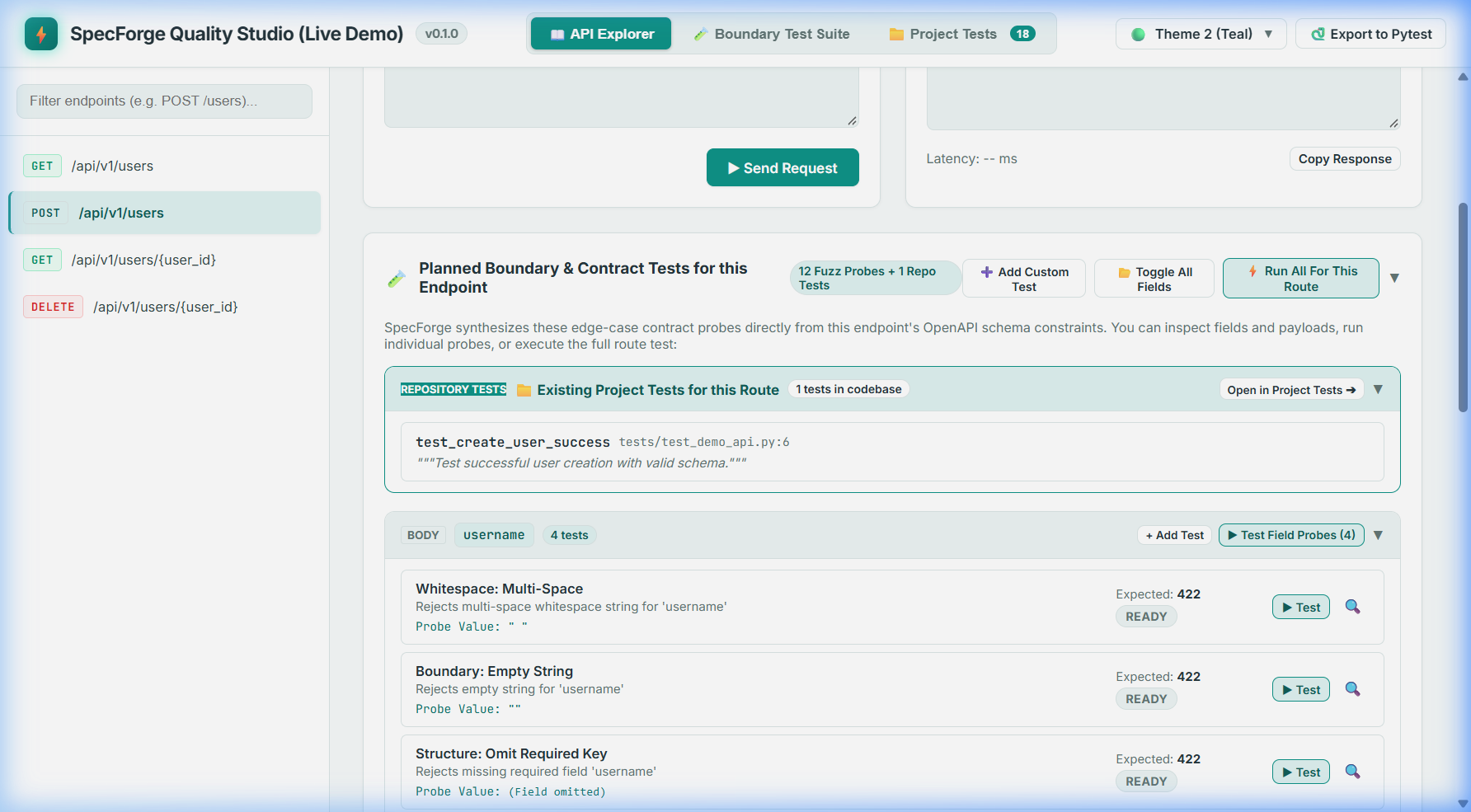
A modern, drop-in Python library that replaces Swagger UI with a beautiful, responsive API workspace and automatically discovers boundary vulnerabilities, missing whitespace stripping, and unhandled 500 server crashes directly against your endpoints.
🚀 Why SpecForge?
- Active Quality Gate, Not Just Passive Docs: Traditional tools like Swagger UI only show the "happy path". SpecForge algorithmically analyzes your schema constraints and runs targeted boundary fuzzing right in your browser.
- "Zero 500s" Invariant: Verifies that edge-case inputs (e.g.
" ", empty strings, off-by-one numbers, malformed emails) return clean client errors (422/400), never unhandled server exceptions (500). - One-Click Pytest Exporter: Discovered edge cases can be instantly exported into commit-ready
test_api_contracts.pyfiles with@pytest.mark.parametrize. - Zero Frontend Build Dependencies: The interactive workspace is fully compiled and inlined into the Python package. No Node.js or npm needed on your machine.
📦 Installation
pip install specforge-api
With framework extras:
pip install "specforge-api[fastapi]"   # FastAPI
pip install "specforge-api[flask]"     # Flask
pip install "specforge-api[all]"       # Full CLI & all framework adapters
⚡ Quickstart
FastAPI
from fastapi import FastAPI
from specforge import SpecForge

app = FastAPI(title="My API", version="1.0.0")

# Mount SpecForge (auto-detects /openapi.json)
SpecForge(app)

@app.post("/users")
def create_user(username: str, age: int):
    return {"status": "created", "username": username}
Now open http://localhost:8000/docs in your browser. You get:
- A modern, interactive dark/light mode API client (Try-It-Out, request history, multi-language code snippets).
- An integrated Boundary & Contract Testing Tab to run automated fuzzing on all endpoints with one click.
Flask
from flask import Flask
from specforge.flask import SpecForge

app = Flask(__name__)

# Register Blueprint
SpecForge(app, spec_url="/api/spec.json", path="/docs")
🧪 Schema-Aware Boundary Fuzzing
SpecForge generates targeted test cases according to field types:
| Field Type | Automated Test Coverage |
|---|---|
| String | Rejecting whitespace-only (" "), empty strings (""), min/max bounds, Unicode 4-byte emojis, null bytes (\x00), format violations (email, uuid, datetime), and injection probes. |
| Number / Integer | Boundary checks (min - 1, max + 1), negative values on unsigned fields, zero checks, float-into-integer pollution, and integer overflow. |
| Boolean | Strict type testing vs loose coercion ("true", "yes", 1, 0, null). |
| Array | Empty lists ([]), minItems / maxItems boundaries, and uniqueItems: true duplicates. |
| Object | Combinatorial required field omission, extra unexpected keys (additionalProperties: false), and empty bodies. |
📁 Integrating Existing Project Tests
If your repository already contains test suites (written in pytest or unittest), SpecForge can automatically index and display them in a dedicated Project Tests tab and link them directly to their corresponding API routes.
Quick Setup
Pass test_paths when mounting SpecForge in your application:
from fastapi import FastAPI
from specforge import SpecForge

app = FastAPI()

# Mount SpecForge with existing project tests
SpecForge(
    app,
    test_paths=["tests"],  # Can be directories or individual test files
)
Now open /docs to see:
- 📁 Project Tests Tab: Browse all repository tests, file paths, line numbers, docstrings, and parameter matrices.
- Route Coverage Linking: View your existing tests directly inside the API Explorer alongside SpecForge's automated boundary fuzzers.
Linking Tests to API Routes
SpecForge associates existing tests with OpenAPI routes using two mechanisms:
1. Automatic HTTP Client Detection (Zero Configuration)
If your test uses TestClient, httpx, or requests to call an API path, SpecForge automatically recognizes the route:
def test_user_creation_underage(client):
    """Rejects underage registrations."""
    response = client.post("/api/v1/users", json={"username": "bob", "age": 16})
    assert response.status_code == 422
2. Explicit Pytest Marker (Recommended for Complex Tests)
For tests with dynamic URLs or mocks, declare the endpoint explicitly:
import pytest

@pytest.mark.endpoint("POST", "/api/v1/users")
def test_user_signup_pipeline():
    """End-to-end user registration and event dispatch."""
    ...
🔒 Security & Zero-Execution Guarantee
SpecForge uses Python Static Abstract Syntax Tree (AST) parsing to discover tests:
- Zero Code Execution: SpecForge never imports or executes your test files. Tests are analyzed purely as static syntax trees.
- No Side Effects: Discovering tests will never trigger database operations, background tasks, or network calls.
- Path Sandboxing: Scanned paths are strictly verified to remain within the project root directory, preventing any path traversal.
🛠️ CLI & CI/CD Pipeline
Run headless contract fuzzing in your continuous integration pipeline:
specforge test http://localhost:8000/openapi.json --fail-on-500
💻 Local Development & Testing Guide
1. Run the Interactive Live Demo (Zero Dependencies)
You can launch and explore SpecForge immediately using Python's standard library:
python examples/standalone_demo.py
Open http://localhost:8000/docs in your browser to:
- Test API endpoints and inspect formatted JSON responses.
- Click "⚡ Run Boundary Test Suite" to watch automated fuzzing of whitespace strings, negative numbers, and missing fields.
- Click "🐍 Export to Pytest" to view and copy auto-generated test code.
2. Run the Automated Unit Test Suite
pytest -v
3. Install in Another Project Locally (Editable Mode)
To use this local version inside any other Python app on your machine without publishing to PyPI:
# In your other project's directory and virtualenv:
pip install -e c:\Research-projects\specforge
Any change you make in SpecForge source code will instantly reflect in your other application without reinstalling!
4. Build a Distribution Wheel (.whl)
pip install build
python -m build
# Outputs wheel file in dist/specforge-0.1.0-py3-none-any.whl
📄 License
SpecForge is licensed under the MIT License.
1 maintainer

Metadata
1 maintainer
Release files for specforge-api 0.1.1
For a detailed explanation of source distributions (sdists) and built distributions (wheels), please see the package formats documentation.
Source distribution (sdist)
| File | Size | Uploaded | Provenance | Actions |
|---|---|---|---|---|
| specforge_api-0.1.1.tar.gz | 42.8 kB | With provenance | Details for specforge_api-0.1.1.tar.gz |
Built distribution (wheel)
| File | Interpreter | ABI | Platform | Actions Reset |
|---|---|---|---|---|
| specforge_api-0.1.1-py3-none-any.whl | Python 3 | none | any | Details for specforge_api-0.1.1-py3-none-any.whl |
Total release size: 94.3 kB
Release files / specforge_api-0.1.1.tar.gz
| Download URL | specforge_api-0.1.1.tar.gz |
|---|---|
| Size | 42.8 kB |
| Tags | Source |
|
SHA-256 checksum How to use checksums |
bab5913f7ee7e498ecba614bbabbf3a8fc04c9f56c2de35ba8679a9c9dabb6cf
|
|
BLAKE2b-256 checksum How to use checksums |
d111a09338881c6c29593ef8ab4584bf2fc371ca9997066c68e1b6ddd3bfceef
|
| Upload date | |
|
Uploaded using Trusted Publishing? What is trusted publishing? |
Yes |
| Uploaded via |
twine/7.0.0 CPython/3.13.16
|
Provenance
Provenance describes where a file came from. On PyPI, provenance is shared via attestations, which provide a verifiable record of the build or publishing details. View details, limitations and caveats.


PyPI Publish Attestation
PyPI verified that this artifact, at this checksum, originated from the publisher listed below.
Signed by GitHub Actions, verified by PyPI on Oct 28, 2026.
Transparency logRelease files / specforge_api-0.1.1-py3-none-any.whl
| Download URL | specforge_api-0.1.1-py3-none-any.whl |
|---|---|
| Size | 51.5 kB |
| Tags | Python 3 |
|
SHA-256 checksum How to use checksums |
8046f8cd19fa1e3280b796dfb47e49a0b9c5a3f6d0d157dbf0c9afb87006038a
|
|
BLAKE2b-256 checksum How to use checksums |
f0cf6ad42c64acd070dc06796a3366ce052d70b7e6bd5451ad3814bc339ca56d
|
| Upload date | |
|
Uploaded using Trusted Publishing? What is trusted publishing? |
Yes |
| Uploaded via |
twine/7.0.0 CPython/3.13.16
|
Provenance
Provenance describes where a file came from. On PyPI, provenance is shared via attestations, which provide a verifiable record of the build or publishing details. View details, limitations and caveats.
PyPI Publish Attestation
PyPI verified that this artifact, at this checksum, originated from the publisher listed below.
Signed by GitHub Actions, verified by PyPI on Oct 28, 2026.
Transparency logSecurity for specforge-api 0.1.1
Provenance
Provenance describes where a file came from. On PyPI, provenance is shared via attestations, which provide a verifiable record of the build or publishing details. View details, limitations and caveats.
Full provenance
All 2 files in this release have been uploaded with provenance metadata.
Attestation for specforge_api-0.1.1.tar.gz
PyPI Publish Attestation
PyPI verified that this artifact, at this checksum, originated from the publisher listed below.
Signed by GitHub Actions, verified by PyPI on Oct 28, 2026.
Transparency logA note on package security
PyPI is a repository for distributing packages, not a service for auditing them. While third-party security researchers and our staff do their best to detect and remove malicious packages, PyPI cannot guarantee the quality, security or suitability of any given package.
To learn more about protecting yourself from malicious actors, visit our package security documentation.














