

🌱 Spec Kit
Build with a spec, fix a bug, or assess an idea — with your coding agent.


Spec Kit is an open source toolkit that gives AI coding agents structured processes, reusable templates, and documented outcomes. Start with a ready-made process, customize it, or bring your own.
Choose your process
| What you need | Process | Outcome |
|---|---|---|
| Build a feature or application | Spec-Driven Development | A specification carried through planning, implementation, and convergence |
| Diagnose and repair broken behavior | Bug fixing | An assessed cause, scoped fix, and recorded verification |
| Decide whether an idea deserves investment | Idea assessment | An evidence-backed go, clarify, or stop decision |
| Adopt or create a different process | Your own process | A process adapted or assembled from reusable primitives |
These are independent entry points, not mandatory phases. SDD ships in core; bug fixing and assessment are bundled extensions you install when needed, and the primitives below let you adopt or create other processes.
Capabilities
Spec Kit combines ready-to-use processes with composable mechanisms:
| Capability | Spec Kit mechanism |
|---|---|
| Connect to or switch between coding agents | Integration |
| Add a command, quality gate, or complete process | Extension |
| Connect a process to an external tool or service | Extension |
| React to coding-agent lifecycle events | Extension runtime event |
| Run extension commands before or after Spec Kit commands | Extension hook |
| Adapt templates, commands, terminology, or methodology | Preset |
| Enforce organizational or regulatory standards | Preset |
| Override a template for one project | Project-local override |
| Automate prompts, commands, gates, and shell tasks | Workflow |
| Modify an installed workflow without forking it | Workflow overlay |
| Add reusable executable behavior to workflows | Workflow step |
| Install a curated setup for a role or team | Bundle |
| Discover community components | Catalog |
| Host a private catalog of approved components | Catalog |
| Access private catalogs and component downloads | Authentication |
| Work offline or behind a firewall | Local sources and self-hosted catalogs |
| Inspect which layer supplies a command, template, or script | Artifact inventory |
Search the active catalogs with commands such as specify extension search,
specify preset search, specify workflow search, and specify bundle search.
Spec Kit includes community catalogs, and organizations can add their own
curated sources. Catalog listings are not audits or endorsements, so review
community source code before installing or running it.
Get started
You need Python 3.11+, uv, and a supported AI coding agent on Linux, macOS, or Windows.
Run these commands in your terminal to install Spec Kit and create a project. This example uses GitHub Copilot.
uv tool install specify-cli
specify init my-project --integration copilot
cd my-project
After installing the Specify CLI and creating your project, launch your coding agent in the project directory, then choose a process below.
For other setups:
- Installation for pinned releases, other installers, CI, and troubleshooting.
- Existing projects to start with code you already have.
- Other agents for integration keys and invocation syntax.
- Upgrade to update an existing installation.
Spec-Driven Development
Define what to build and why, then turn the specification into a plan, tasks, and working code.
The minimal flow is shown below. Create a constitution once per project and repeat the remaining steps for each feature. Run these skills in your agent's chat, not your terminal, one at a time, reviewing each result before continuing.
This example uses GitHub Copilot's default skills syntax. For another agent, use its equivalent invocation syntax.
/speckit-constitution Create principles focused on code quality, testing, and maintainability.
/speckit-specify Build a photo organizer with albums grouped by date and a tile preview of each album.
/speckit-plan Use Vite with vanilla JavaScript. Keep images local and store metadata in SQLite.
/speckit-tasks
/speckit-implement
/speckit-converge
Repeat implement and converge until convergence reports Converged.
For clarification, checklists, and consistency analysis, see the SDD walkthrough.
SDD walkthrough · Command reference
Bug fixing
Assess the cause, fix the bug, and verify the original symptom is resolved. No SDD feature workflow is required first.
Install the bug-fixing extension in your terminal, from the project directory:
specify extension add bug
Run these skills in your agent's chat, not your terminal, one at a time, reviewing each result before continuing.
This example uses GitHub Copilot's default skills syntax. For another agent, use its equivalent invocation syntax.
/speckit-bug-assess "Submitting an empty password crashes the login form." slug=login-crash
/speckit-bug-fix slug=login-crash
/speckit-bug-test slug=login-crash
Review the reports in .specify/bugs/login-crash/. The final verdict is
verified, partial, or failed; only verified confirms a successful fix.
Bug-fixing walkthrough · Command reference
Idea assessment
Gather evidence to decide whether an idea is worth pursuing. No source code or SDD feature workflow is required.
Install the assessment extension in your terminal, from the project directory:
specify extension add assess
Run these skills in your agent's chat, not your terminal, one at a time, reviewing each result before continuing.
This example uses GitHub Copilot's default skills syntax. For another agent, use its equivalent invocation syntax.
/speckit-assess-intake "Let users work offline and sync when they reconnect." slug=offline-mode
/speckit-assess-research slug=offline-mode
/speckit-assess-define slug=offline-mode
/speckit-assess-shape slug=offline-mode
/speckit-assess-decide slug=offline-mode
Review the artifacts in .specify/assessments/offline-mode/ and the final
decision: go, needs-clarification, or kill. Resolve unknowns by editing the
existing Markdown artifacts, directly or with your agent, rather than rerunning
whole stages. If you choose to build a software idea with a go decision,
establish a project constitution if needed, then pass the handoff summary from
decision.md to /speckit-specify. Stopping with a documented reason is also a
useful outcome.
Assessment walkthrough · Command reference
Customize or bring your own process
Customize Spec-Driven Development, bug fixing, or idea assessment to fit your team's standards. Or bring your own process without adopting any of them. Combine the capabilities above to match your goal:
- Adapt an existing process with a preset, such as requiring regulatory traceability in plans. Use a project-local override for a one-off template change.
- Bring your own process by adding its commands through an extension and exposing them to your coding agent through an integration.
- Automate commands and checks in a workflow. Use overlays to adapt an installed workflow without forking it, or add custom workflow steps when the built-in types are not enough.
- Share a reusable setup by packaging its extensions, presets, workflows, and workflow steps in a bundle.
Start with the smallest change that meets your needs; you do not have to replace the whole process.
Customization guide · Community components and walkthroughs
Documentation
- CLI reference and process commands
- SDD philosophy, full methodology, and evolving existing specs
- Project history
- How Spec Kit uses Spec Kit
In the news
- Open Source Friday: Spec Kit Part 2 (October 16, 2026) — Manfred Riem and Nicole Haugen discuss Spec Kit 1.0 and the expanded toolkit.
- Open Source Friday with Spec Kit (May 8, 2026) — An introduction and SDD demonstration with Manfred Riem.
Star history
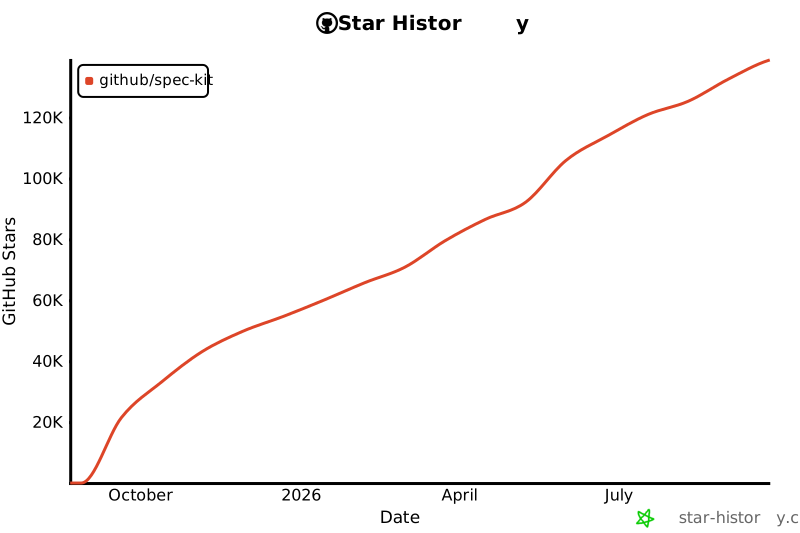
Thanks to everyone who helps Spec Kit shine.
Support and contributing
Report a bug or request a feature · Contributing guide · Code of conduct
Spec Kit is MIT licensed.
1 maintainer

Metadata
1 maintainer
Release files for specify-cli 1.3.0
For a detailed explanation of source distributions (sdists) and built distributions (wheels), please see the package formats documentation.
Source distribution (sdist)
| File | Size | Uploaded | Provenance | Actions |
|---|---|---|---|---|
| specify_cli-1.3.0.tar.gz | 5.2 MB | Without provenance | Details for specify_cli-1.3.0.tar.gz |
Built distribution (wheel)
| File | Interpreter | ABI | Platform | Actions Reset |
|---|---|---|---|---|
| specify_cli-1.3.0-py3-none-any.whl | Python 3 | none | any | Details for specify_cli-1.3.0-py3-none-any.whl |
Total release size: 6.4 MB
Release files / specify_cli-1.3.0.tar.gz
| Download URL | specify_cli-1.3.0.tar.gz |
|---|---|
| Size | 5.2 MB |
| Tags | Source |
|
SHA-256 checksum How to use checksums |
2d59601fd10b5d65c5064091a1efec67c25265569d2c12323ec444d44b6f31a8
|
|
BLAKE2b-256 checksum How to use checksums |
b776b2517ad95e33576a4b37850838c49f7fc69ca1fe3aa465ce629edd22bf8b
|
| Upload date | |
|
Uploaded using Trusted Publishing? What is trusted publishing? |
Yes |
| Uploaded via |
uv/0.13.7 {"installer":{"name":"uv","version":"0.13.7","subcommand":["publish"]},"python":null,"implementation":{"name":null,"version":null},"distro":{"name":"Ubuntu","version":"26.04","id":"resolute","libc":null},"system":{"name":null,"release":null},"cpu":null,"openssl_version":null,"setuptools_version":null,"rustc_version":null,"ci":true}
|
Release files / specify_cli-1.3.0-py3-none-any.whl
| Download URL | specify_cli-1.3.0-py3-none-any.whl |
|---|---|
| Size | 1.2 MB |
| Tags | Python 3 |
|
SHA-256 checksum How to use checksums |
1a351572e292236cb2da8329598576294c033d4c71a49dbac29840999c8b629d
|
|
BLAKE2b-256 checksum How to use checksums |
aa10492f19c59c0ba1b0595f16ff0f40ee2f34eee7c618e798d118b817e2bca3
|
| Upload date | |
|
Uploaded using Trusted Publishing? What is trusted publishing? |
Yes |
| Uploaded via |
uv/0.13.7 {"installer":{"name":"uv","version":"0.13.7","subcommand":["publish"]},"python":null,"implementation":{"name":null,"version":null},"distro":{"name":"Ubuntu","version":"26.04","id":"resolute","libc":null},"system":{"name":null,"release":null},"cpu":null,"openssl_version":null,"setuptools_version":null,"rustc_version":null,"ci":true}
|
Security for specify-cli 1.3.0
Provenance
Provenance describes where a file came from. On PyPI, provenance is shared via attestations, which provide a verifiable record of the build or publishing details. View details, limitations and caveats.
No provenance found
None of the files in this release were uploaded with provenance metadata.
A note on package security
PyPI is a repository for distributing packages, not a service for auditing them. While third-party security researchers and our staff do their best to detect and remove malicious packages, PyPI cannot guarantee the quality, security or suitability of any given package.
To learn more about protecting yourself from malicious actors, visit our package security documentation.














